Bulk Email Software

Bulk email software is software that is used to send emails in large quantities.

Bulk email software usually refers to standalone software, while there are bulk email sending web-based services as well.

Computer worms that spread themselves via email are an example of bulk email software, sometimes referred to as a mass mailer. Such worms usually (but not necessarily) send spoofed “From” headers.

Most bulk email software programs are hosted by third party companies who sell access to their system. Customers pay per send or at a fixed monthly rate to have their own user account from which they can manage their contacts and send out email campaigns. Generally the advantage of this type of program is the reliability of the third party vendor and their application. Some bulk email software programs are self-hosted. The customer buys a license or develops their own program and then hosts the program. Generally the advantage of this type of program is the lack of ongoing monthly fees to the owner/developer of the program. The disadvantage to using this option is that delivery rate is reduced as often users use one server to send bulk emails. There are various settings to tweak to avoid a server being labeled as spam.

Why is bulk email software important?

If marketers were to create and send emails to each prospect on their contact list one at a time, they would probably not have time to do anything else. Sending thousands of marketing messages to prospective customers every couple of days is a tiresome and repetitive task.

With bulk email software, you can:

  • Create marketing emails faster
  • Reach hundreds or thousands of recipients with one email
  • Reduce the cost of sending mass emails
  • Increase traffic to a website

The Fall of Bulk Email Software

Bulk email software is not a new concept for online businesses and marketers; it has been around for a while. However, it is steadily being replaced by email services. The majority of email marketers prefer these services as opposed to the software because the former offers a more holistic approach to internet marketing. With a reliable email service, you can:

  • Automate repetitive marketing tasks
  • Create personalized email campaigns
  • Send bulk emails to multiple mailing lists
  • Boost brand awareness and reputation
  • Attract and nurture quality leads
  • Monitor marketing campaign statistics on the go

Bulk Email Software vs Bulk Email Services

Bulk email services work as a standalone system that allows one to add email addresses and send email campaigns. Marketers, who use bulk email as a method for increasing brand or product awareness, may leverage using an email marketing service to save both time and money. This ultimately allows a business to get more ROI with the help of professional instruments.

For an email marketer, online business owner or internet marketer, it is easy to get confused about whether email software or an email service is the best choice. So, here is a comprehensive comparison of the two:

Features                                         Bulk Email Software Bulk Email Service
Price Costs roughly between $30-$100 depending on the vendor. However, that is not the only cost. The software requires regular updates that come at a fee. The prices are mostly fixed and non-negotiable. Price is based on the size of the mailing list. Users can, therefore, choose a package that suits their needs and thier budget best. And, one can send bulk emails for free if their list is not very big.
Reputation Bulk email software has no reputation and offers no guarantee that emails sent will be seen or opened. Remember, sender reputation is everything in email marketing as it shows how recipients and mailbox providers see a particular IP address. A negative IP reputation can hurt a brand in more ways than one.        Bulk email services manage their IP and server reputation and offer customers superior credibility. Therefore, a brand’s marketing emails have better chances of being opened and read by subscribers.
Upgrades Updates are available, but users incur additional costs to get them. Services are regularly updated and customers do not get overcharged to obtain them. Plus, most upgrades are conducted automatically.
Lead Segmentation Segmenting subscribers is not available. Consequently, users must manage their mailing lists manually. Mailing list segmentation is a common feature in most services. With the SendPulse email service, for example, it is possible to segment mailing lists based on different criteria such as age, gender, occupation, location, activities and more.
Landing Pages and Subscription forms Users don’t have the option to create landing pages or subscription forms. Therefore, users must look for additional software to perform these functions.                             Subscription forms are a key element of an email service. With the help of ready-made templates and a drag-and-drop email editor, users can create customized subscription forms easily. SendPulse allows users to design multichannel forms by adding links to messengers. Some services also help users create landing pages for their websites.
Cleaning Up the Mailing List Users must manage their contact lists themselves. Therefore, if a subscriber opts out, one must remove their address from the mailing list manually. The mailing list is constantly kept up to date. When a lead unsubscribes from your marketing emails, their address is automatically removed from the list.
Email Design Email templates are often limited which means that there is less variety to choose from. Furthermore, they can only be edited using HTML. Thus, it is difficult to modify them to one’s preference without technical knowledge about how HTML works. There is no need for HTML or any coding knowledge. Email services offer several ready-made email templates that can be edited. The user sets the parameters, and the service generates the code. Plus, you can add videos, images, buttons and more to your emails.
Ease of Use Very technical to set up. The provider might not allow for bulk email sending through an internal server. In this case, one has to find an external SMTP server. Online services are easy to use, and anyone can start creating an email campaign immediately after signing up.
Statistics and Follow Up Does not allow for the evaluation of the results of an email campaign. Instead, one has to install additional programs to monitor bulk email marketing performance. Statistics on how recipients respond to a campaign are collected and stored automatically. With a credible email service like SendPulse, a company can monitor the delivery rate, opens, click-through rates (CTR), unopened emails, emails marked as spam and much more.
Technical Support For any problems, issues or concerns, one has to contact the system administrator, and it can take some time to get the help that you need Usually, offer 24-hour customer support 7 days a week. Plus, most services provide multiple communication channels including phone, email and live chat. Therefore, it is easy to have your problems solved quickly and conveniently.

Networking Basics

A computer network is a group of two or more interconnected computer systems. You can establish a network connection using either cable or wireless media.

It is the interconnection of multiple devices, generally termed as Hosts connected using multiple paths for the purpose of sending/receiving data or media.

There are also multiple devices or mediums which helps in the communication between two different devices which are known as Network devices. Ex: Router, Switch, Hub, Bridge.

Every network involves hardware and software that connects computers and tools.

Components of Computer Network

Here are essential computer network components:

  1. Switches

Switches work as a controller which connects computers, printers, and other hardware devices to a network in a campus or a building.

It allows devices on your network to communicate with each other, as well as with other networks. It helps you to share resources and reduce the costing of any organization.

  1. Routers

Routers help you to connect with multiple networks. It enables you to share a single internet connection with multiple devices and saves money. This networking component acts as a dispatcher, which allows you to analyze data sent across a network. It automatically selects the best route for data to travel and send it on its way.

  1. Servers

Servers are computers that hold shared programs, files, and the network operating system. Servers allow access to network resources to all the users of the network.

  1. Clients

Clients are computer devices which access and uses the network as well as shares network resources. They are also users of the network, as they can send and receive requests from the server.

  1. Transmission Media

Transmission media is a carrier used to interconnect computers in a network, such as coaxial cable, twisted-pair wire, and optical fiber cable. It is also known as links, channels, or lines.

  1. Access points

Access points allow devices to connect to the wireless network without cables. A wireless network allows you to bring new devices and provides flexible support to mobile users.

  1. Shared Data

Shared data are data which is shared between the clients such as data files, printer access programs, and email.

  1. Network Interface Card

Network Interface card sends, receives data, and controls data flow between the computer and the network.

  1. Local Operating System

A local OS which helps personal computers to access files, print to a local printer and uses one or more disk and CD drives which are located on the computer.

  1. Network Operating System

The network operating system is a program which runs on computers and servers. It allows the computers to communicate via network.

  1. Protocol

A protocol is the set of defined rules that allows two entities to communicate across the network. Some standard protocols used for this purpose are IP, TCP, UDP, FTP, etc.

  1. Hub

Hub is a device that splits network connection into multiple computers. It acts a distribution center so whenever a computer requests any information from a computer or from the network it sends the request to the hub through a cable. The hub will receive the request and transmit it to the entire network.

  1. LAN Cable

Local Area Network(LAN) cable is also called as Ethernet or data cable. It is used for connecting a device to the internet.

  1. OSI

OSI stands for Open Systems Interconnection. It is a reference model which allows you to specify standards for communications.

Unique Identifiers of Network

Below given are some unique network identifiers:

  1. Hostname

Every device of the network is associated with a unique device, which is called hostname.

  1. IP Address

IP (Internet Protocol) address is as a unique identifier for each device on the Internet. Length of the IP address is 32-bits. IPv6 address is 64 bits.

  1. DNS Server

DNS stands for Domain Name System. It is a server which translates URL or web addresses into their corresponding IP addresses.

  1. MAC Address

MAC (Media Access Control Address) is known as a physical address is a unique identifier of each host and is associated with the NIC (Network Interface Card). General length of MAC address is: 12-digit/ 6 bytes/ 48 bits

  1. Port

Port is a logical channel which allows network users to send or receive data to an application. Every host can have multiple applications running. Each of these applications are identified using the port number on which they are running.

Advantages of a Computer Network

Here are the fundamental benefits/pros of using Computer Networking:

  • Helps you to connect with multiple computers together to send and receive information when accessing the network.
  • Helps you to share printers, scanners, and email.
  • Helps you to share information at very fast speed
  • Electronic communication is more efficient and less expensive than without the network.

Disadvantages of using Computer Networks

Here are drawbacks/ cons of using computer networks:

  • Investment for hardware and software can be costly for initial set-up
  • If you don’t take proper security precautions like file encryption, firewalls then your data will be at risk.
  • Some components of the network design may not last for many years, and it will become useless or malfunction and need to be replaced.
  • Requires time for constant administration
  • Frequent server failure and issues of regular cable faults

Summary:

  • A computer network is a group of two or more interconnected computer systems
  • Computer networks help you to connect with multiple computers together to send and receive information
  • Switches work as a controller which connects computers, printers, and other hardware devices
  • Routers help you to connect with multiple networks. It enables you to share a single internet connection and saves money
  • Servers are computers that hold shared programs, files, and the network operating system
  • Clients are computer device which accesses and uses the network and shares network resources
  • Hub is a device that split a network connection into multiple computers.
  • Access points allow devices to connect to the wireless network without cables
  • Network Interface card sends, receives data and controls data flow between the computer and the network
  • A protocol is the set of defined rules which that allows two entities to communicate across the network
  • Hostname, IP Address, DNS Server, and host are important unique indetenfiters of computer networks.
  • ARP stands for Address Resolution Protocol
  • RAR Reverse Address Resolution Protocol gives an IP address of the device with given a physical address as input.
  • Computer network helps you to share expensive software’s and database among network participants
  • The biggest drawback of installing computer network is that its initial investment for hardware and software can be costly for initial set-up

Different Types of Network

Used for everything from accessing the internet or printing a document to downloading an attachment from an email, networks are the backbone of business today. They can refer to a small handful of devices within a single room to millions of devices spread across the entire globe, and can be defined based on purpose and/or size.

Types of Networks in Use Today

  1. Personal Area Network (PAN)

The smallest and most basic type of network, a PAN is made up of a wireless modem, a computer or two, phones, printers, tablets, etc., and revolves around one person in one building. These types of networks are typically found in small offices or residences, and are managed by one person or organization from a single device.

There are two types of Personal Area Network:-

  • Wireless Personal Area Network: Wireless Personal Area Network is developed by simply using wireless technologies such as WiFi, Bluetooth. It is a low range network.
  • Wired Personal Area Network: Wired Personal Area Network is created by using the USB.
  1. Local Area Network (LAN)

We’re confident that you’ve heard of these types of networks before LANs are the most frequently discussed networks, one of the most common, one of the most original and one of the simplest types of networks. LANs connect groups of computers and low-voltage devices together across short distances (within a building or between a group of two or three buildings in close proximity to each other) to share information and resources. Enterprises typically manage and maintain LANs.

Using routers, LANs can connect to wide area networks (WANs, explained below) to rapidly and safely transfer data.

  1. Wireless Local Area Network (WLAN)

Functioning like a LAN, WLANs make use of wireless network technology, such as Wi-Fi. Typically seen in the same types of applications as LANs, these types of networks don’t require that devices rely on physical cables to connect to the network.

  1. Campus Area Network (CAN)

Larger than LANs, but smaller than metropolitan area networks (MANs, explained below), these types of networks are typically seen in universities, large K-12 school districts or small businesses. They can be spread across several buildings that are fairly close to each other so users can share resources.

  1. Metropolitan Area Network (MAN)

These types of networks are larger than LANs but smaller than WANs and incorporate elements from both types of networks. MANs span an entire geographic area (typically a town or city, but sometimes a campus). Ownership and maintenance is handled by either a single person or company (a local council, a large company, etc.).

Uses of Metropolitan Area Network

  • MAN is used in communication between the banks in a city.
  • It can be used in an Airline Reservation.
  • It can be used in a college within a city.
  • It can also be used for communication in the military.
  1. Wide Area Network (WAN)

Slightly more complex than a LAN, a WAN connects computers together across longer physical distances. This allows computers and low-voltage devices to be remotely connected to each other over one large network to communicate even when they’re miles apart.

The Internet is the most basic example of a WAN, connecting all computers together around the world. Because of a WAN’s vast reach, it is typically owned and maintained by multiple administrators or the public.

Advantages of Wide Area Network

Following are the advantages of the Wide Area Network:

  • Geographical area: A Wide Area Network provides a large geographical area. Suppose if the branch of our office is in a different city then we can connect with them through WAN. The internet provides a leased line through which we can connect with another branch.
  • Centralized data: In case of WAN network, data is centralized. Therefore, we do not need to buy the emails, files or back up servers.
  • Get updated files: Software companies work on the live server. Therefore, the programmers get the updated files within seconds.
  • Exchange messages: In a WAN network, messages are transmitted fast. The web application like Facebook, Whatsapp, Skype allows you to communicate with friends.
  • Sharing of software and resources: In WAN network, we can share the software and other resources like a hard drive, RAM.
  • Global business: We can do the business over the internet globally.
  • High bandwidth: If we use the leased lines for our company then this gives the high bandwidth. The high bandwidth increases the data transfer rate which in turn increases the productivity of our company.

Disadvantages of Wide Area Network

The following are the disadvantages of the Wide Area Network:

  • Security issue: A WAN network has more security issues as compared to LAN and MAN network as all the technologies are combined together that creates the security problem.
  • Needs Firewall & antivirus software: The data is transferred on the internet which can be changed or hacked by the hackers, so the firewall needs to be used. Some people can inject the virus in our system so antivirus is needed to protect from such a virus.
  • High Setup cost: An installation cost of the WAN network is high as it involves the purchasing of routers, switches.
  • Troubleshooting problems: It covers a large area so fixing the problem is difficult.
  1. Storage-Area Network (SAN)

As a dedicated high-speed network that connects shared pools of storage devices to several servers, these types of networks don’t rely on a LAN or WAN. Instead, they move storage resources away from the network and place them into their own high-performance network. SANs can be accessed in the same fashion as a drive attached to a server. Types of storage-area networks include converged, virtual and unified SANs.

  1. System-Area Network (also known as SAN)

This term is fairly new within the past two decades. It is used to explain a relatively local network that is designed to provide high-speed connection in server-to-server applications (cluster environments), storage area networks (called “SANs” as well) and processor-to-processor applications. The computers connected on a SAN operate as a single system at very high speeds.

  1. Passive Optical Local Area Network (POLAN)

As an alternative to traditional switch-based Ethernet LANs, POLAN technology can be integrated into structured cabling to overcome concerns about supporting traditional Ethernet protocols and network applications such as PoE (Power over Ethernet). A point-to-multipoint LAN architecture, POLAN uses optical splitters to split an optical signal from one strand of singlemode optical fiber into multiple signals to serve users and devices.

  1. Enterprise Private Network (EPN)

These types of networks are built and owned by businesses that want to securely connect its various locations to share computer resources.

  1. Virtual Private Network (VPN)

By extending a private network across the Internet, a VPN lets its users send and receive data as if their devices were connected to the private network even if they’re not. Through a virtual point-to-point connection, users can access a private network remotely.

Hubs

A hub, also called a network hub, is a common connection point for devices in a network. Hubs are devices commonly used to connect segments of a LAN. The hub contains multiple ports. When a packet arrives at one port, it is copied to the other ports so that all segments of the LAN can see all packets.

A hub is a network hub used for connection of devices in a network. It connects several devices in a LAN. All the devices in the network connection is connected through hub that acts as a central connection for all the devices. There are many ports in the hub and if a packet arrives only at one port, it is copied so that all the ports can see the packets. This helps if there is any trouble in one port of the hub. The three types of hub are active, passive and intelligent. Active hubs amplify the incoming electric signal whereas passive hubs do not amplify the electric signal. Intelligent hubs are kind of active hubs.

When referring to a network, a hub is the most basic networking device that connects multiple computers or other network devices together. Unlike a network switch or router, a network hub has no routing tables or intelligence on where to send information and broadcasts all network data across each connection. Most hubs can detect basic network errors such as collisions, but having all information broadcast to multiple ports can be a security risk and cause bottlenecks. In the past, network hubs were popular because they were cheaper than a switch or router. Today, switches do not cost much more than a hub and are a much better solution for any network.

What Hubs Do?

Hubs and switches serve as a central connection for all of your network equipment and handles a data type known as frames. Frames carry your data. When a frame is received, it is amplified and then transmitted on to the port of the destination PC.

In a hub, a frame is passed along or “broadcast” to every one of its ports. It doesn’t matter that the frame is only destined for one port. The hub has no way of distinguishing which port a frame should be sent to. Passing it along to every port ensures that it will reach its intended destination. This places a lot of traffic on the network and can lead to poor network response times.

Compared to a standard switch, the hub is slower as it can send or receive information just not at the same time, but typically costs more than a hub.

Types of Hub

There are three types which is deployed according to its usage. They are passive, active, and intelligent. In recent days, the modification was done to hubs that provide high performance.

  1. Passive Hub

It has quiescent creatures as the name portraits and it does not should any impact on performance but it helps in identifying the bugs and detecting the faulty hardware. They are a simple that receives the packet on a port and is then broadcast to all the port.

It has a 10base-2 port and RJ-45 connectors which is connected to each local area network device. This connecter is applied as a standard one in your network. AUI ports are placed in advanced passive hubs which are connected as the transceiver as per the network design.

  1. Active Hub

Active hubs have some additional features apart from passive hubs. It monitors the data which is sent out to the connected devices. It has a unique role in this network communication by using Store technology where it checks the data before sending out and prioritizes which packet to send first.

It has the option to fix the damaged packets and hold the direction and distribution of the rest of the packets. If a week signal is received in port but it’s still readable then the active hub amplifies it to a stronger signal before its retransmitted to other ports.

If any connecting device is not functioning in the network it can boost the signal which is viewed by other devices with passive hubs. Hence it helps in the continuation of service in the local area network.

But few of them will account for the malfunction of any device and offer related diagnostic capabilities in the local area network. They will be able to resync the packets and transmit them again. Some cables go through electromagnetic troubles and stop the packet from entering into the designated port or rarely it does not reach the port. At those times, they can make up for the packet or data loss. They are accessible to retime the port for slower delivery and error-prone connections

  1. Intelligent Hub

These give many advantages than passive and active hubs. The management who wants to expand their business in networking can assign users to share a common pool efficiently and work more quickly using intelligent hubs. The technique behind them is explored recently and now its great demand in the market.

It is proved that it delivers unparallel performance for your local area network. If any problem is detected with any physical device it is easily detected, diagnosed and solution to the problem using management data which can be rectified by the hub.

This is a standard improvement over active hubs. Detecting the centralized management tool which helps to explore the network which runs out of the device to find the low functioning devices.

Another feature is flexibility which has high transmission rates to numerous devices. They have their standard terms with transmission rate as 10, 16, in the speed of 100Mbps to desktop.

Benefits of Hubs

  • The technical information has a physical layer function which is connecting multiple hubs and has numerous benefits. They detect crucial problems and immoderate collision and interrupt jabbering occurred between ports or devices. If any fault occurs, it disconnects the signal flow and prevents the damaged device from the rest of the device.
  • If there is any misbehavior or hissing in a cable can also be detected and prevented the device from great loss. It has an inbuilt twisted based ethernet which helps to detect any malfunction. To pass the data through each segment through repeater should be the same in all partitions because the repeater cannot connect the data with different segments.
  • Many classes have varied speed range hubs. Class 1 has a signal delay of 140-bit time by setting a transaction record in a range of 100BASE-TX, and 100BASE-T4 whereas class 2 has the signal delay of 92-bit time by accessing a single collision domain.
  • Dual speed is an internal port switch that works on 10M/bits and 100M/bits segments. When any device is connected along with these segments the port becomes active and the data signal is transmitted at a higher rate, but this turns as a failure model because it fails to design the switch between traffic flow.

A switch is part of Hub which tracks all details of the MAC address of the connected devices. It knows about the system or devices and their connection port, so if any packet is received, the switch chooses and sends it to that port. The network hub is also called an active, multiport repeater, ethernet, and repeater. The hubs and switches with multiple inputs and output ports that form a network and all the connected devices act a single network segment and work efficiently preventing data loss.

Bridges

A bridge is a type of computer network device that provides interconnection with other bridge networks that use the same protocol.

Bridge devices work at the data link layer of the Open System Interconnect (OSI) model, connecting two different networks together and providing communication between them. Bridges are similar to repeaters and hubs in that they broadcast data to every node. However, bridges maintain the media access control (MAC) address table as soon as they discover new segments, so subsequent transmissions are sent to only to the desired recipient.

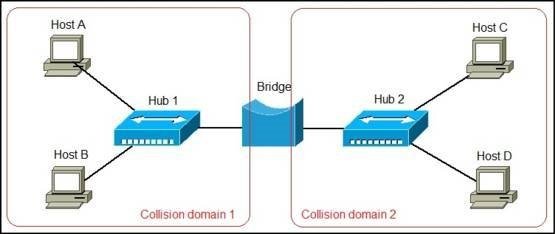
A network bridge is a device that divides a network into segments. Each segment represent a separate collision domain, so the number of collisions on the network is reduced. Each collision domain has its own separate bandwidth, so a bridge also improves the network performance.

A bridge is also called Layer 2 Switch. A network bridge is a device that is primarily used in Local Area Networks (LANs). It is because these networks can potentially flood and clog a large network.

It is one of their abilities that they broadcast data to all the nodes if they do not know the destination node’s address. The bridge uses a database.

The purpose of this database is to ascertain where to pass the data frame, where to transmit the data frame, or where to discard the data frame. Network bridges are also called Ethernet bridges. They connect two segments of a single network together. The main purpose of bridges is to divide a network into different manageable sections.

A bridge works at the Data link layer (Layer 2) of the OSI model. It inspects incoming traffic and decide whether to forward it or filter it. Each incoming Ethernet frame is inspected for destination MAC address. If the bridge determines that the destination host is on another segment of the network, it forwards the frame to that segment.

Consider the following example network:

In the picture above we have a network of four computers. The network is divided into segments by a bridge. Each segment is a separate collision domain with its own bandwidth. Let’s say that Host A wants to communicate with Host C. Host A will send the frame with the Host C’s destination MAC address to the bridge. The bridge will inspect the frame and forward it to the segment of the network Host C is on.

Network bridges offer substantial improvements over network hubs, but they are not widely used anymore in modern LANs. Switches are commonly used instead.

Types of bridges in networking

Following are some Types of bridges in networking

  1. Transparent Bridge

This is a bridge in which the stations are completely unaware of the experience of the bridge. For example, May or May not a bridge is added or deleted from the network, the station’s reconfiguration is unnecessary. This bridge makes use of two different processes like bridge forwarding and bridge learning.

  1. Source routing bridge

In this bridge, the routing operation is performed by the source station. The frame specifies which route to follow. The hot discovers the frame by sending a special frame which is called a discovery frame. This spreads through the entire network by using all possible paths to the destination.

Advantages of bridges

  • Bridges can extend a network.
  • Bridges can act as a repeater.
  • They can reduce network traffic on a segment.
  • They can subdivide the network communication.
  • They increase the available bandwidth to individual nodes.
  • Bridges reduce collisions as well.
  • Bridges can create separate collision domains.
  • They can connect different architectures.

Disadvantages of bridges

  • They are slower than repeaters.
  • Filtering makes them slower.
  • They do not filter broadcasts.
  • Bridges are more expensive.
  • They must use routable protocols.
  • They need to understand the protocols which they forward.
  • They require a lot of amount for initial configuration.
  • These are complex devices.
  • These devices are unable to read a specific IP address.
  • Its speed is slow.
  • Bridges cannot use a firewall as a device.
  • They send messages to all the nodes.
  • Sending a message to all nodes reduces speed.
  • Sending messages to all nodes causes a waste of time.

Routers

A router is a networking device that forwards data packets between computer networks. Routers perform the traffic directing functions on the Internet. Data sent through the internet, such as a web page or email, is in the form of data packets. A packet is typically forwarded from one router to another router through the networks that constitute an internetwork (e.g. the Internet) until it reaches its destination node.

A router is connected to two or more data lines from different IP networks. When a data packet comes in on one of the lines, the router reads the network address information in the packet header to determine the ultimate destination. Then, using information in its routing table or routing policy, it directs the packet to the next network on its journey.

The most familiar type of IP routers are home and small office routers that simply forward IP packets between the home computers and the Internet. An example of a router would be the owner’s cable or DSL router, which connects to the Internet through an Internet service provider (ISP). More sophisticated routers, such as enterprise routers, connect large business or ISP networks up to the powerful core routers that forward data at high speed along the optical fiber lines of the Internet backbone.

A router is the first line of security from intrusion into a network. Enabling the highest level of security on the router turns on things like the firewall, and is the best way to keep your computer system and information safe from attack.

How Routers Work?

Routers connect a modem like a fiber, cable, or DSL modem to other devices to allow communication between those devices and the internet. Most routers, including wireless routers, usually feature several network ports to connect numerous devices to the internet simultaneously.

A router typically connects physically, using a network cable, to the modem via the internet or WAN port and then physically, again through a network cable, to the network interface card in whatever wired network devices you have. A wireless router can connect using various wireless standards to devices that also support the particular standard used.

The IP address assigned to the WAN or internet connection is a public IP address. The IP address assigned to the local network connection is a private IP address. The private IP address assigned to a router is usually the default gateway for the various devices on the network.

Wireless routers, and wired routers with multiple connections, also act as simple network switches allowing the devices to communicate with each other. For example, several computers connected to a router can be configured to share files and printers among each other.

Routers are like small computers, with a CPU and memory to deal with incoming and outgoing data. Different software, such as DD-WRT, can be loaded on the router, much like an operating system on a computer.

A router operates on the Network layer (layer 3) of the OSI model and uses routing tables to understand where traffic is coming from and where it should go.

Managing a Router

There will most likely come a time where you need to make changes to how your network works. This is done by accessing the software on the router.

A few reasons you need to log in to your router is if you want to change the router’s login password, encrypt the network, set up port forwarding rules, change the Wi-Fi password, pick a different wireless network name, or update the firmware on the router.

Some other common tasks related to managing a router involve rebooting the router and completely resetting the router’s software.

Buying a Router

There are several things to consider before buying a router, such as how fast it needs to be to support your internet speed and devices, as well as its power to ensure that all your devices can receive internet access.

For example, maybe you’re buying a Wi-Fi router to serve lots of devices, like gaming consoles, computers, tablets, and phones. If your house is small, you might be able to get away with one router, whereas larger homes or businesses with several rooms might be better off with a mesh network or a Wi-Fi extender.

See these lists if you’re having trouble deciding on a new router:

  • Long-Range Routers
  • Secure Routers
  • Routers for Under $50
  • Budget Routers
  • DD-WRT Routers
  • Gaming Routers
  • Travel Routers
  • Parental Control Routers
  • VPN Routers

Mobile Wi-Fi hotspots are similar to routers because they connect multiple devices to the same internet connection.

Types of Routers

Core routers used by Internet Service Providers (ISPs) are the fastest and most powerful, sitting at the center of the internet and forwarding information along the main fiber optic backbone. Enterprise routers connect large organizations’ networks to these core routers.

An edge router, also known as an access router, is a lower-capacity device that resides at the boundary of a LAN and connects it to a the public internet or a private wide area network (WAN) and/or external  local area network (LAN). Home and small office routers are considered subscriber edge routers.

Branch routers link an organization’s remote office locations to its WAN, connecting to the primary campus network’s edge routers. Branch routers often provide additional features, like time-division multiplexing, wireless LAN management capabilities and WAN application acceleration.

A logical router is a configured partition of a traditional network hardware, or physical, router. It replicates the hardware’s functionality, creating multiple routing domains within a single router. Logical routers perform a subset of the tasks that can be handled by the physical router, and each can contain multiple routing instances and routing tables.

A wireless router works in the same way as the router in a hard-wired home or business local area network (LAN), but allows greater mobility for notebook or portable computers. Wireless routers use the 802.11g specification, a standard that offers transmission over short distances.

IP Address

An Internet Protocol address (IP address) is a numerical label assigned to each device connected to a computer network that uses the Internet Protocol for communication. An IP address serves two main functions: host or network interface identification and location addressing.

Internet Protocol version 4 (IPv4) defines an IP address as a 32-bit number. However, because of the growth of the Internet and the depletion of available IPv4 addresses, a new version of IP (IPv6), using 128 bits for the IP address, was standardized in 1998. IPv6 deployment has been ongoing since the mid-2000s.

IP addresses are written and displayed in human-readable notations, such as 172.16.254.1 in IPv4, and 2001:db8:0:1234:0:567:8:1 in IPv6. The size of the routing prefix of the address is designated in CIDR notation by suffixing the address with the number of significant bits, e.g., 192.168.1.15/24, which is equivalent to the historically used subnet mask 255.255.255.0.

The IP address space is managed globally by the Internet Assigned Numbers Authority (IANA), and by five regional Internet registries (RIRs) responsible in their designated territories for assignment to local Internet registries, such as Internet service providers, and other end users. IPv4 addresses were distributed by IANA to the RIRs in blocks of approximately 16.8 million addresses each, but have been exhausted at the IANA level since 2011. Only one of the RIRs still has a supply for local assignments in Africa. Some IPv4 addresses are reserved for private networks and are not globally unique.

Network administrators assign an IP address to each device connected to a network. Such assignments may be on a static (fixed or permanent) or dynamic basis, depending on network practices and software features.

Function

An IP address serves two principal functions. It identifies the host, or more specifically its network interface, and it provides the location of the host in the network, and thus the capability of establishing a path to that host. Its role has been characterized as follows: “A name indicates what we seek. An address indicates where it is. A route indicates how to get there.” The header of each IP packet contains the IP address of the sending host, and that of the destination host.

IP versions

Two versions of the Internet Protocol are in common use in the Internet today. The original version of the Internet Protocol that was first deployed in 1983 in the ARPANET, the predecessor of the Internet, is Internet Protocol version 4 (IPv4).

The rapid exhaustion of IPv4 address space available for assignment to Internet service providers and end user organizations by the early 1990s, prompted the Internet Engineering Task Force (IETF) to explore new technologies to expand the addressing capability in the Internet. The result was a redesign of the Internet Protocol which became eventually known as Internet Protocol Version 6 (IPv6) in 1995. IPv6 technology was in various testing stages until the mid-2000s, when commercial production deployment commenced.

Today, these two versions of the Internet Protocol are in simultaneous use. Among other technical changes, each version defines the format of addresses differently. Because of the historical prevalence of IPv4, the generic term IP address typically still refers to the addresses defined by IPv4. The gap in version sequence between IPv4 and IPv6 resulted from the assignment of version 5 to the experimental Internet Stream Protocol in 1979, which however was never referred to as IPv5.

Other versions v1 to v9 were defined, but only v4 and v6 ever gained widespread use. v1 and v2 were names for TCP protocols in 1974 and 1977, as there was to separate IP specification at the time. v3 was defined in 1978, and v3.1 is the first version where TCP is separated from IP. v6 is a synthesis of several suggested versions, v6 Simple Internet Protocol, v7 TP/IX: The Next Internet, v8 PIP — The P Internet Protocol, and v9 TUBA — Tcp & Udp with Big Addresses.

What is Your IP Address?

To view your IP address you can use the ipconfig (IPCONFIG) command line tool.  Ipconfig displays all current TCP/IP network configuration values and refreshes Dynamic Host Configuration Protocol (DHCP) and Domain Name System (DNS) settings.

To launch the command prompt from a Windows-based computer click: Start > All Programs > Accessories > Command Prompt. Type ipconfig and press the Enter key.

You can also use Google search to find your IP address. Type “what is my IP address” as a search query and Google will show the IP address of the computer from which the query was received as the top search result.

Metropolitan Area Network (MAN)

A metropolitan area network (MAN) is a computer network that interconnects users with computer resources in a geographic region of the size of a metropolitan area. The term MAN is applied to the interconnection of local area networks (LANs) in a city into a single larger network which may then also offer efficient connection to a wide area network. The term is also used to describe the interconnection of several local area networks in a metropolitan area through the use of point-to-point connections between them.

The MAN network (Metropolitan Area Network) is a high-speed network (broadband) that covers larger geographic area such as city (tens of kilometers) or districts than local area network (LAN) but smaller than wide area network (WAN) and providing the ability to integrate multiple services through the transmission of data, voice, and video, on transmission media such as copper, fiber optics, and microwaves.

The term is applied to the single network such as a cable television network, or it can be a way of connecting a certain number of LANs in a more extensive network so that resources can share from LAN to LAN and from device to device. For example, a company can use a MAN to connect the LANs of all its offices scattered around the city. Local libraries and government agencies often use a MAN to connect to citizens and private industries. It may also connect MANs within a larger area than LAN. The geographical limit of a MAN may span a city.

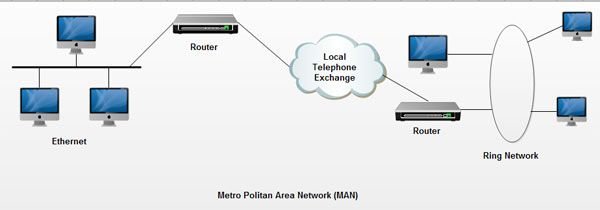
In MAN, different LANs connected through a local telephone exchange. Some of the widely used protocols for MAN are X.25, Frame Relay, Asynchronous Transfer Mode (ATM), ISDN (Integrated Services Digital Network), xDSL (Digital Subscriber Line), ADSL (Asymmetrical Digital Subscriber Line), WDM (Wavelength Division Modulation), etc. These protocols are quite different from those used for LANs.

A MAN can wholly own by a private company, which will be its operator, or it can be a service provided by a public service company, such as a local telephone company. Many telephone companies have a very popular MAN service called Multimegabit Data Switching Services (SMDS).

The copper pair technology positioned as the world’s largest network an excellent alternative for the creation of metropolitan networks, for its low latency (between 1 and 50 ms), excellent stability and the lack of radio interference, the MAN LOOP networks, offer speeds of 10 Mbit/s or 20 Mbit/s, on copper pairs and 100 Mbit/s, 1 Gbit/s and 10 Gbit/s through optical fiber.

The concept of the metropolitan area network represents an evolution of the concept of a local area network to a broader scope, covering larger areas that in some cases are not limited to an urban environment but can reach regional and even national coverage through the interconnection of different networks of the metropolitan area.

This type of networks is a larger version than the LAN and usually based on a technology similar to this one. The main reason to distinguish a MAN with a particular category is that a standard has adopted to make it work, which is equivalent to the IEEE standard.

WAN networks also applied in organizations, in groups of corporate offices near a city, these do not contain switching elements, which divert the packets by one of several potential output lines. These networks can be public or private.

The networks of the metropolitan area, comprise a specific geographical location “city, the municipality,” and its distance of coverage is greater than 4 km. They are networks with two unidirectional buses, each of which is independent of the other in terms of data transfer.

Applications of Metropolitan Area Network

The Metropolitan Area Network (MAN) has many and varied applications; the main ones are:

  • Deployment of VoIP services (Voice over Internet Protocol), in the metropolitan area, allowing eliminating the “obsolete” traditional lines of analog or ISDN telephony, eliminating the current expenditure of these lines.
  • Interconnection of local area networks (LAN).
  • Deployment of Wi-Fi zones without wireless Backhaul (Femtocell) freeing all Wi-Fi channels for access, this in practice means more than 60% improvement in the connection of Wi-Fi users.
  • Computer to computer interconnection.
  • Local video surveillance systems.
  • CAD / CAM transmission.
  • Walkways for wide area networks (WAN).

They also allow the transmission of voice, data and video traffic with high latency guarantees, which is why it is necessary to install a metropolitan area network at the corporate level, for corporations that have multiple dependencies in the same capital area.

MAN public or private

A metropolitan area network can be public or private.

An example of a private MAN would be a large department or administration with buildings distributed throughout the city, transporting all voice and data traffic between buildings through its own MAN and routing external information through public operators.

The data could transport between the different buildings, either in the form of packages or over fixed bandwidth channels.

Video applications can link buildings for meetings, simulations, or project collaboration.

An example of public MAN is the infrastructure that a telecommunications operator installs in a city to offer broadband services to its customers located in this geographical area.

  1. Network nodes

Citizen area networks allow to execute and exceed 600 access nodes to the network, which makes it very useful for public and private environments with a large number of jobs.

  1. Network extension

The networks of metropolitan area allow to reach a diameter around 50 km, depending on the scope of network training of the type of cable used, as well as the technology used. This diameter is considered sufficient to house a metropolitan area. They cover a city and can connect many, forming more networks.

  1. Distance between nodes

Metropolitan area networks allow distances between access nodes of several kilometers, depending on the type of cable. These distances are considered sufficient to connect different buildings in a metropolitan area or private camp.

  1. High reliability

Reliability referred to the error rate of the network while it is in operation the error rate defined as the number of erroneous bits that transmitted over the network. In general, the error rate for optical fiber is lower than that of copper cable with equal length. The error rate not detected by the error detection mechanisms is of the order of 10-20. This feature allows metropolitan area networks to work in environments where errors can be disastrous, such as air traffic control.

The creation of municipal metropolitan networks would allow municipalities to have a high-performance infrastructure by providing them with a network similar to that of Internet service providers. In this way, the town hall can connect new offices, remote users, or video cameras on public roads.

  1. High security

Fiber optic offers a safe means because it is not possible to read or change the optical signal without physically interrupting the link.

  1. Real-time traffic

The metropolitan area networks guarantee minimum network access times, which allows for the inclusion of synchronous services necessary for real-time applications, where it is crucial that specific messages go through the network without delay even when the network load is high.

Between node and node, you can not have, for example, more than 100 kilometers of cable. Approximately 20 km of cable can approximate, but it not known at what moment information or data sent can be lost.

Synchronous services require a reservation of bandwidth; Such is the case of voice and video traffic. For this reason, metropolitan area networks are optimal networks for multimedia traffic environments, although not all metropolitan networks support isochronous traffic (information transmission at constant intervals).

Electronic Data Interchange, Features, Components, Benefits

Electronic Data Interchange (EDI) is a standardized communication method that allows businesses to exchange documents and information electronically, bypassing the need for paper-based communication. It enables the automated transfer of data, such as purchase orders, invoices, shipping notices, and other business documents, between the computer systems of trading partners with minimal human intervention. EDI streamlines business processes, reduces errors, improves transaction speed, and enhances operational efficiency by using a set of agreed-upon standards to ensure that the information exchanged is understandable and processable across different systems and organizations. This technology is widely used in various industries, facilitating more efficient and seamless business-to-business (B2B) transactions.

Electronic Data Interchange Features:

  • Standardization

EDI relies on standardized formats for documents such as invoices, purchase orders, and shipping notices. These standards ensure that companies using different IT systems can still communicate effectively. Common standards include EDIFACT, X12, and TRADACOMS, depending on the region and industry.

  • Automation

EDI automates the process of sending and receiving business documents, reducing the need for manual data entry. This automation leads to fewer errors, faster processing times, and increased operational efficiency.

  • Speed

Transactions via EDI are completed in a matter of minutes, compared to days with traditional postal mail. This rapid exchange enables quicker decision-making, faster fulfillment, and improved business cycles.

  • Cost Savings

By automating document processing, EDI significantly reduces the costs associated with paper-based communication, including printing, postage, storage, and document retrieval expenses.

  • Accuracy

EDI reduces the likelihood of errors commonly associated with manual data entry. The use of standardized formats and automated processing ensures high levels of accuracy in business transactions.

  • Security

EDI transmissions are secure, employing encryption and secure protocols to protect sensitive information during transmission. This security is crucial for compliance with regulations and maintaining trust in business relationships.

  • Traceability and Auditability

EDI systems keep detailed logs of all transactions, providing an audit trail that can be used for troubleshooting, compliance, and analysis. This traceability is essential for managing disputes, monitoring supply chain activity, and improving business processes.

  • Integration

EDI can be integrated with internal business systems, such as Enterprise Resource Planning (ERP) systems, accounting software, and inventory management systems. This integration allows for seamless data flow within an organization, further enhancing operational efficiency.

  • Global Reach

EDI enables businesses to communicate electronically with trading partners around the world, overcoming barriers associated with international trade, such as differences in language and business practices.

  • Environmental Impact

By reducing the need for paper-based documents, EDI contributes to environmental sustainability efforts, aligning with the goals of many organizations to reduce their carbon footprint.

Electronic Data Interchange Components:

  • EDI Software or Service Provider

This is the application or service that translates business documents into EDI standard formats and vice versa. Businesses can use in-house EDI software or subscribe to an EDI service provider (also known as a VAN – Value Added Network) that handles the translation and transmission of EDI messages.

  • EDI Standards

EDI standards are agreed-upon formats for documents to ensure consistency and interoperability between different systems and organizations. Examples include ANSI X12 (widely used in North America), EDIFACT (used internationally), and TRADACOMS (used in the UK). These standards specify the exact format and sequence of data in an EDI document.

  • Transmission Protocols

These are the methods used to securely send and receive EDI documents over a network. Common protocols include AS2 (Applicability Statement 2), FTP (File Transfer Protocol), sFTP (Secure File Transfer Protocol), and HTTPS (Hypertext Transfer Protocol Secure). The choice of protocol depends on factors like security requirements, speed, and cost.

  • Integration Tools and Middleware

Integration tools and middleware enable the flow of EDI data to and from internal systems, such as ERP (Enterprise Resource Planning), WMS (Warehouse Management System), and accounting software. This integration is crucial for automating processes like order fulfillment, invoicing, and inventory management.

  • Document Management and Mapping Tools

These tools assist in converting business documents from their native format (e.g., a purchase order in an ERP system) into an EDI-compliant format and vice versa. Mapping is a critical process because it ensures that each piece of information is correctly placed in the EDI document according to the relevant standards.

  • Communication Network

The network over which EDI documents are exchanged, which can be a direct connection between trading partners or through a VAN. VANs offer additional services like message encryption, secure mailboxes, and transaction tracking, facilitating reliable and secure communication.

  • Trading Partner Agreements

These are agreements between companies that specify the technical and business requirements for EDI exchanges, including standards, protocols, document types, and security measures. These agreements ensure that all parties have a clear understanding of their roles and responsibilities in the EDI process.

Electronic Data Interchange Benefits:

  1. Improved Efficiency

EDI automates the transfer of data between organizations, reducing the need for manual processing. This automation streamlines business processes, such as order fulfillment, invoicing, and payments, leading to significant improvements in operational efficiency.

  1. Cost Savings

By eliminating paper-based processes, businesses can save on printing, postage, and document storage costs. Additionally, the automation of data exchange reduces the need for manual data entry and the associated labor costs.

  1. Enhanced Accuracy

EDI minimizes human errors such as typos or lost documents that can occur with manual processing. The use of standardized formats ensures that data is consistent and correctly formatted, reducing the likelihood of errors and the need for corrections.

  1. Faster Transaction Processing

EDI allows for the almost instantaneous transmission of business documents, significantly speeding up transaction cycles. This rapid exchange can improve cash flow, reduce inventory levels, and enable faster response to market demands.

  1. Stronger Partner Relationships

The efficiency and reliability of EDI transactions contribute to stronger relationships with trading partners. Consistent and timely exchanges of information can improve trust and collaboration between businesses.

  1. Competitive Advantage

Businesses that implement EDI can respond more quickly to customer demands and market changes, giving them a competitive edge. The ability to process transactions efficiently can also lead to better customer service and satisfaction.

  1. Better Data Quality and Management

EDI provides a structured format for data that enhances the quality and consistency of information exchanged. This structure facilitates better data management and analysis, enabling businesses to make more informed decisions.

  1. Regulatory Compliance

Many industries have regulatory requirements regarding the handling of documents and data. EDI can help ensure compliance with these regulations by providing a secure and traceable method of data exchange, complete with audit trails.

  1. Scalability

EDI systems can be scaled to handle increased volumes of transactions without a corresponding increase in costs or processing time. This scalability supports business growth and expansion into new markets.

  1. Environmental Benefits

By reducing the need for paper and physical document storage, EDI contributes to environmental sustainability efforts. Digital transactions reduce waste and the carbon footprint associated with paper production and transportation.

Rehearsal of Presentation

Rehearsal is essential to giving an effective presentation. Rehearsing increases your confidence, ensures you are familiar with your material and allows you to polish your presentation skills. It is important to not only practice delivering your talk, but to practice using your visual aids.

  • Rehearse your presentation to yourself at first (speak in front of a mirror or to the cat), then to a friend or colleague.
  • Time your rehearsal. Make sure you can complete your talk within the allotted time.
  • Rehearse with your slideshow. Practicing running it at the same time as your talk will ensure that it looks and operates as you expect.
  • Make sure that the structure of your talk matches the sequence of your visual aids.
  • Consider the timing of your slideshow. Does it fit with your words? Is there too much on-screen movement? Too many mouse clicks too close together?

Here are five steps to rehearse effectively.

  1. Start with presentation notes.

In PowerPoint, you can write notes at the bottom of each slide. Start writing notes for each slide in full sentences. Read the transcript out loud as you review each slide. Next, cut down the full sentences into bullet points and rehearse out loud again–relying on notes even less. Eventually, cut the notes down to just a few words that will prompt you to deliver the entire concept. The less you rely on notes for your final presentation, the more eye contact you’ll make and the stronger your connection will be.

  1. Practice under ‘mild stress.’

Psychologists who work with athletes have found that mirror real-world conditions as much as possible during practice sessions brings out the best performance when the pressure is on. The famous entrepreneur and author, Tim Ferriss, applied this concept to his TED talk. “Mimic game-day conditions as much as possible,” he said after his presentation. Ferriss gave the presentation in front of friends and strangers at various startups to groups of about 20 people. “I don’t want my first rehearsal in front of a large group of strangers to be when I stand up in front of 3,000 people,” he said. 

  1. Ask for specific feedback.

Once you’ve practiced your presentation in front of a small audience, most people will say “good job.” They don’t want to hurt your feelings and they’ll have limited feedback. While “good job” might help you feel good, it won’t help you get better. Ask them to be specific: Is there something you didn’t understand? Do I use jargon that you’re not familiar with? Did I make strong eye contact? What did you like–or not like–about my delivery? What can I do to make it stronger?

The musician, Amanda Palmer, invited more than two-dozen people to a watch her practice over a potluck-style dinner. She delivered the talk to students, she gave the presentation to friends over Skype, and did two or three rehearsals in front of TED organizers. She spent countless hours to get it right over a period of four months. Each time, she received feedback and tweaked the presentation–re-writing parts of the script–to condense it into 12 short, powerful minutes.

Ask friends and colleagues for open, honest, and specific feedback

  1. Record it.

Set up a smartphone or a video camera on a tripod and record your presentation. You’ll be surprised at what you see. You’ll catch vocal fillers such as ‘ums’ and ‘ahs.’ You’ll find yourself using distracting hand motions like brushing your hair back or jiggling coins in your pocket. You might catch yourself avoiding eye contact or looking at the slides more than you’re looking at the audience. It’s not always comfortable watching yourself on camera, but it’s a critical tool for successful presentations.

  1. Practice until it’s effortless.

The hardest question to answer is: How many times should I practice my presentation? Dr. Jill practiced 200 times. Author and scientist Mary Roach practiced 25 times for her TED presentation. I recommend rehearsing the entire presentation until you can deliver it effortlessly, without thinking about the first words you’re going to say about each slide. In my experience as a professional communication advisor, I put the number of rehearsals at 10. Some people might need more; others need a little less. But if you practice your presentation from start to finish at least ten times, you’ll have more confidence than ever.

error: Content is protected !!