Advantage and Disadvantage of Firewall

Advantages of Firewall

  1. Monitor Traffic

A major responsibility of a firewall is to monitor the traffic passing through it. Whatever the information traveling through a network is in the form of packets. Firewall inspects each of these packets for any hazardous threats. If any chance the firewall happens to find them it will immediately block them.

  1. Protection against Trojans

Malwares especially the type Trojans are dangerous to a user. A Trojan silently sits on your computer spying over all the works you do with it. Whatever the information they gather will be sent to a web server. Obviously you will not know their presence until the strange behaviours of your computer. A firewall in this instance will immediately block Trojans before they cause any damages to your system.

  1. Prevent Hackers

Hackers on the internet constantly look for computers in order for carrying out their illegal activities. When the hackers happen to find such computers they will start to do even malicious activities such as spreading viruses. Apart from those hackers there can be unknown people such as the neighbours looking out for an open internet connection. Hence to prevent such intrusions it is a good idea to be with a firewall security.

  1. Access Control

Firewalls comes with an access policy that can be implemented for certain hosts and services. Some hosts can be exploited with the attackers. So the best in case is to block such hosts from accessing the system. If a user feels that they need protection from these types of unwanted access, this access policy can be enforced.

  1. Better Privacy

Privacy is one of the major concerns of a user. Hackers constantly look out for privacy informations for getting clues about the user. But by using a firewall many of the services offered by a site such as the domain name service and the finger can be blocked. Hence the hackers are with no chance of getting privacy details. Additionally firewalls can block the DNS informations of the site system. Due to this the names and the IP address will not be visible to the attackers.

Disadvantages of Firewall

  1. Cost

Firewalls does have an investment depending on the types of it. In general hardware firewalls are more expensive than the software firewalls. Besides that hardware firewalls require installations and maintenance which can be costly. These types of configurations cannot be done without an expert IT employee. Comparing this to a software firewall, there is no much investment and it is easy enough for an average user to deploy them.

  1. User Restriction

It is no doubt that firewalls prevent unauthorized access to your system from the network. While this can be advantageous for an average user, this can actually be a problem for large organizations. The policies used by the firewall cab be strict enough to prevent employees from doing certain operations. As a result of this, the overall productivity of the company an be affected severely. Sometimes this can also prompt employees from using backdoor exploits. However this can lead to security problems since the data travelled through these backdoor exploits are not examined properly.

  1. Performance

Firewalls especially the software based has the capability to limit your computer’s overall performance. The processing power and the RAM resources are some of the factors which decides the computer’s overall performance. When the software firewalls constantly run on the background they consume more the processing power and the RAM resources. This can lead to a diminished system performance. However hardware firewalls does not impact the system performance since they do not rely upon the computer resources.

  1. Malware Attacks

Even though firewalls has the capability to block the basic types of trojans, it is proved to be defenseless against other types of malwares. These types of malwares can enter your system in the form of trusted data. Therefore even if you have firewall, it is still recommended to have an anti-malware software installed on your PC. Because the only way to remove them is through an anti-malware scan.

  1. Complex Operations

Even though for small businesses the firewall maintenance is made easy, it is definitely not for large organizations. Firewalls for large organizations require separate set of staffs for operating them. These people make sure that the firewall is safe enough to protect the network from intruders.

Enterprise Wide Security Framework

Traditionally, organizations have relied on policies to communicate high-level directives from the management. These documents, once issued, provide top down influence for everyone in the company from business units to departments to individual employees. Furthermore, these policies typically were developed at one time in the organization’s evolution to capture the current environment. One of the major challenges for an organization in this area is the continued growth and adaptation of the policies to mirror the transformation within the organization. The fastest area of growth and change within an organization is Information Systems. With the rapid development and push toward new technologies, organizations find themselves striving to maintain current technical environments with outdated policies. Secondly, with the emergence of new technology strategies such as Intranets and Extranets, security and the protection of informational assets has become paramount.

The first step is an enterprise-wide Information Systems Security Policy that is consistently enforced even as business needs change. Unfortunately, most companies have only bits and pieces of security scattered throughout the organization. These may make some departments or individuals feel safe, but they do little to protect the enterprise as a whole.

To address these needs, PricewaterhouseCoopers has designed a Security Knowledge Management system the Enterprise Security Architecture System (ESAS). The idea is to assist an organization in providing a key security infrastructure tool. Primarily ESAS is built on PPT methodology (People, Policy & Technology). Over the period PwC also went ahead mapping ESAS with COBIT methodology from ISACA and the guidelines given in ISO 17799.

PPT Methodology

PPT stands for People, Policy, & Technology. The security process is a mixture of these three elements. Each element depends in some manner on the other elements. Also, issues receive greater coverage when the elements are combined. The controls environment is greatly enhanced when these three elements work in concert. A simple drawing will suffice to illustrate this (see Figure 1). This drawing shows the basic elements and also the coverage areas.
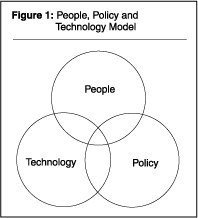
As you move toward the union of these elements, the controls environment increases there is greater coverage. Let’s understand these three elements individually.

People

This core element is the most important. The people element comprises the people and various roles and responsibilities within the organization. These are the people that are put in place to execute and support the process. A few key roles include senior management, security administrators, system and IT administrators, end users, and auditors.

Policy

This element comprises the security vision statement, security policy and standards, and the control documentation. This is basically the written security environment the bible that the security process will refer to for direction and guidance.

Technology

This element includes tools, methods, and mechanisms in place to support the process. These are core technologies the operating systems, the databases, the applications, the security tools embraced by the organization. The technology then is the enforcement, monitoring, and operational tool that will facilitate the process.

The concept is that each core element could be measured for effectiveness and coverage. Also, issues can be measured against the model to determine what controls coverage for that issue. The objective then is to move issues into the intersecting areas of the elements with the final objective of moving the issue into the middle area of greatest coverage. As risk issues are identified, each step to manage the risk will fall into one of the core elements of people, policy, or technology. If the issue is resolved with one of the elements, addressing one of the other elements can enhance this resolution. As the core elements are added to the controls environment and utilized in concert, the issue is then resolved on several fronts. The controls coverage is greater.

The PPT Model

The PPT Model can be illustrated with a few simple examples. Figure 2 shows the PPT Model with regards to Internet usage and misuse. Users are educated on the proper usage of the Internet. The controls environment relies solely on the user. An Internet usage policy is written to document proper use of the Internet and the consequences of misuse. The controls environment now is supported by two of the three core elements.

Filtering software is deployed on the firewall. Now the controls environment is covered by all three elements. Figure 3 demonstrates when an issue is covered only by two of the three elements. It also shows the consequence of a limited controls environment.

The Internet connection is protected by the deployment of a firewall. Core elements coverage = 1.

The firewall administrator receives specialized training and develops the skill set necessary to administer the firewall. Core elements coverage = 2.

The firewall administrator leaves the organization. The controls now rely back on just one element the technology.

How can the model be used to identify an alternative solution to Figure 3?

This is depicted in Figure 4.

The Internet connection is protected by the deployment of a firewall. Core elements coverage = 1.

The firewall administrator receives specialized training and develops the skill set necessary to administer the firewall. Core elements coverage = 2.

Firewall operating standards are written and controls are documented. Core elements coverage = 3.

The firewall administrator leaves the organization. The controls environment relies on two of the core elements. The controls, standards, and technology are documented so that the skill and knowledge does not completely leave the organization. Core elements coverage = 2.

From these examples, it is easy to see how the PPT model can simplify the analysis of a risk issue. If the issue is broken down into the three core elements, action items can be determined for each core element. In this manner, control coverage can be moved from one element to two, and ultimately to coverage by all of the elements.

The PPT model sounds like a very comfortable proposition but during actual implementation, CIO’s used to get lost in the framework. This is simplified by the ESAS tool.

The ESAS repository

ESAS is a Security Knowledge Management tool designed to bridge the gap between business and technology. It provides organizations with a centralized repository of security policies and technical control information. ESAS allows an organization to effectively communicate security policies and controls throughout the enterprise, and provide the key infrastructure for a successful Information Security program.

The major objectives of the ESAS are:

  • Ensure consistency of organizational security objectives throughout operating units
  • Allow business strategies and goals to drive Information Security
  • Allow an organization to deal with the changes in both business initiatives and technology and manage the risk associated with change
  • Provide a comprehensive set of security policies for the organization
  • Provide a method to look at information and technical systems from a Risk perspective
  • Provide the methods to implement security objectives effectively and efficiently at a technical level

ESAS is built on a unique security model/Framework (explained below) to provide flexibility in managing the information.

Understanding the Security Framework

PricewaterhouseCoopers’ Information Security Framework provides the overall model for developing comprehensive security programs. The framework illustrates an enterprise approach for security.

Key elements, also referred to as the “Four Pillars” to Information Security, include:

  • Solid Senior Management Commitment
  • An overall Security Vision and Strategy
  • A comprehensive Training and Awareness Program
  • A solid Information Security Management Structure including key skill sets and documented responsibilities

Within the four “pillars” of the program, several phases are included.

The first is the Decision Driver Phase, which contains factors determining the business drivers of security. These include Technology Strategy and Usage, Business Initiatives and Processes and Threats, Vulnerabi-lities and Risk. All these combine to form a unique “Security Profile” of the organization. The “profile” needs to be reflected in the Security Policies and Technical Controls.

The next facet of the Information Security Framework includes the design of the security environment also called the Design Phase. This is the stage where the organization documents its security policy, the control environment and deals with controls on the technology level. A key element in this process is not only the clear definition of security policy and technical control information, but also the “Security Model” of the enterprise. Information Classifications and Risk Assessment methods fall under this component. These processes allow the organization to manage risk appropriately and identify the risks and values of information assets.

The final facet of the Information Security Framework is the Implementation phase. This begins by documenting the Administrative and End-User guidelines and procedures. These guidelines must be succinct and flexible for the changing environment. Enforcement, Monitoring, and Recovery processes are then layered on for the operational support of the security program. These processes are “where the rubber hits the road”. All the benefits of the Security Program design and documentation is diminished if it is not put into effect on an operational day-to-day basis.

Information Security Environment in India

Information Technology Act, 2000

(i) The act regulates use of computers, computer systems, computer networks and also data and information in electronic format.

(ii) The act lists down among other things, following as offences:

  • Tampering with computer source documents.
  • Hacking with computer system
  • Act of cyber terrorism i.e. accessing a protected system with the intention of threatening the unity, integrity, sovereignty or security of country.
  • Cheating using computer resource etc.

Strategies under National Cyber Policy, 2013

  • Creating a secure cyber ecosystem.
  • Creating mechanisms for security threats and responses to the same through national systems and processes.
  • National Computer Emergency Response Team (CERT-in) functions as the nodal agency for coordination of all cyber security efforts, emergency responses, and crisis management.
  • Securing e-governance by implementing global best practices, and wider use of Public Key Infrastructure.
  • Protection and resilience of critical information infrastructure with the National Critical Information Infrastructure Protection Centre (NCIIPC) operating as the nodal agency.
  • NCIIPC has been created under Information Technology Act, 2000 to secure India’s critical information infrastructure. It is based in New Delhi.
  • Promoting cutting edge research and development of cyber security technology.
  • Human Resource Development through education and training programs to build capacity.

Challenges

  • Increased use of mobile technology and internet by people.
  • Proliferation of Internet of Things (IoT) and lack of proper security infrastructure in some devices.
  • Cyberspace has inherent vulnerabilities that cannot be removed.
  • Internet technology makes it relatively easy to misdirect attribution to other parties.
  • It is generally seen that attack technology outpaces defence technology.
  • Lack of awareness on Cyber security.
  • Lack of Cyber security specialists.
  • Increased use of cyberspace by terrorists.

Recent Steps taken by Government

  1. Cyber Surakshit Bharat Initiative

It was launched in 2018 with an aim to spread awareness about cybercrime and building capacity for safety measures for Chief Information Security Officers (CISOs) and frontline IT staff across all government departments.

  1. National Cyber security Coordination Centre (NCCC)

In 2017, the NCCC was developed. Its mandate is to scan internet traffic and communication metadata (which are little snippets of information hidden inside each communication) coming into the country to detect real-time cyber threats.

  1. Cyber Swachhta Kendra

In 2017, this platform was introduced for internet users to clean their computers and devices by wiping out viruses and malware.

  1. Security Education and Awareness Project (ISEA)

Training of 1.14 Lakh persons through 52 institutions under the Information Security Education and Awareness Project (ISEA) – a project to raise awareness and to provide research, education and training in the field of Information Security.

  1. International cooperation

Looking forward to becoming a secure cyber ecosystem, India has joined hands with several developed countries like the United States, Singapore, Japan, etc. These agreements will help India to challenge even more sophisticated cyber threats.

Way Forward

  • Real-time intelligence is required for preventing and containing cyber attacks.
  • Periodical ‘Backup of Data’ is a solution to ransomware.
  • Using Artificial Intelligence (AI) for predicting and accurately identifying attacks.
  • Using the knowledge gained from actual attacks that have already taken place in building effective and pragmatic defence.
  • Increased awareness about cyber threats for which digital literacy is required first.
  • India needs to secure its computing environment and IoT with current tools, patches, updates and best known methods in a timely manner.
  • The need of the hour for Indian government is to develop core skills in cyber security, data integrity and data security fields while also setting stringent cyber security standards to protect banks and financial institutions.

Types of Real Time System

Real time

It is the time span taken by the system to complete all its tasks and provides an output for an input. This time span should be the same for computation of all its tasks.

Real time system

Real time systems are those which must produce the correct response within the specified or defined time limit. If it exceeds these time bonds it results in performance degradation and/or malfunction of system.

For example in aircraft engine control system, the real time control system should perform its task within a specified time as the operator/pilot intended and failure of this can cause the loss of control and possibly the loss of many lives.

Real time program

A program for which the correctness of operation depends upon the logical output of the computation and the time at which the results are produced. Every real time system must be having real time clock which specifies the time of the execution of the task or interruption of the task.

Types of real time system

As per the clock and execution procedure of task the real time systems are divided as follows

  • Clock based systems
  • Event based systems
  • Interactive systems
  1. Clock based real time system

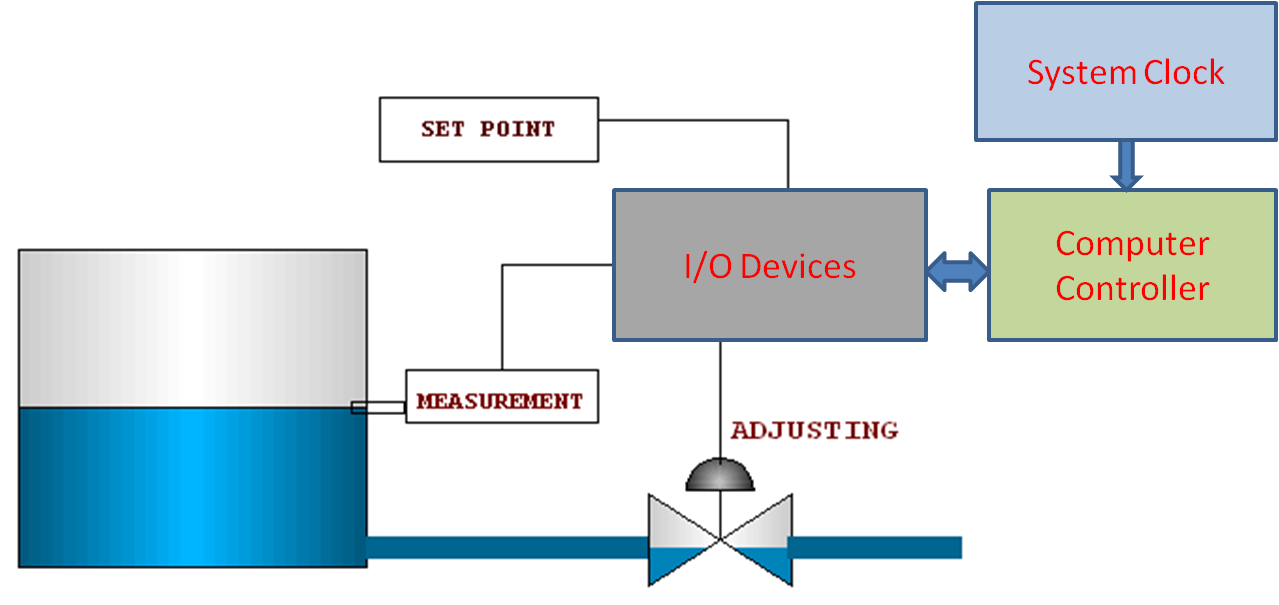
In this system the computation of its task has to be completed in the specified time interval called real time clock. Most of plant control systems are in this category. The clock can be in hours for some chemical process or it may be in milli seconds for some control systems.  For example of feedback control of tank level, the real time system should read the level of the tank, process it with control algorithm and actuate the valve accordingly to maintain the level. These three tasks should perform in the specified time interval i.e sampling of input, processing and output response.

This clock can be continuous or discrete. In continuous the system will perform the task continuously within a specified time. This is same as above tank level controller where it is a continuous control process.  In some chemical industries, The chemicals should be added with some specified intervals these are called discrete control systems.

  1. Event based real time system:

In plants there are some systems where actions have to be performed in response of some events instead of some particular time intervals. For example the control system has to close the value if the liquid level in the tank reaches its high level. Here this action is not time based, its an event based and these are used extensively to indicate the alarm conditions and initiate alarm actions, for example indicating the liquid level in the tank high or temperature of the liquid high etc. The specification of event based systems usually indicates that the system must respond within specified maximum time to a particular event. These systems uses interrupts to indicate the real time system that the action is required. Some small system uses Polling i.e the system periodically asks the various sensors to see whether the action is required. These systems are basically aperiodic tasks and may have deadlines expressed in terms of start up time or finish time. For example after sensing of level of liquid the the valve closer should start after some interval.

  1. Interactive systems:

The combination of Clock based system and Event based system which gives the importance of average execution time of the task is called interactive systems. This covers the systems like Automatic teller machine, reservation system for hotels, Airlines booking etc. This systems receive the input from the plant or operator and initiate the task and executes within the average response time. For an example if you want draw cash from ATM when u put your card then it process the task of giving the money out. In this case the response time depends on the network traffic and internal processing time and it does not bother about other atmospheric changes.

Distinguish between Real Time, Online and Batch Processing System

Real-time processing is data processing that occurs as the user enters in the data or a command. Batch processing involves the execution of jobs at the same time. The main difference is that administrators can postpone batch processes, while real-time processes must occur as soon as possible.

  1. Time Frame

The time between when the user inputs the data into the computer and when the computer performs the expected output is called the response time. Real-time systems have predictable response times. Outputs are successful if they are accurate and timely. Response times do not necessarily have to be fast. There is no speed where a process is considered real-time and all processes have some delay. A system is “real-time” when processing activities have deadlines. Batch processing does not have a specific moment at which tasks are completed, with tasks being completed when the computer is able to complete them, based on the processing demands of the tasks and the processing speed of the computer.

  1. Deadlines

A hard real-time system is one in which the failure to meet even one deadline indicates a complete system failure. With soft real-time, missing a deadline indicates that the system is not working at its peak. In batch processing, missed deadlines might mean that the computer needs more processing capacity to finish tasks.

  1. Embedded

Real-time systems are usually reactive, meaning they behave based on the conditions of the environment. Real-time processors are usually embedded, meaning they do not have an operating system interface and are used only to control hardware devices. For example, a digital thermometer might have a real-time processor embedded in the thermometer that gives a continuously correct temperature. Batch processes are usually a part of a larger computer system.

  1. Predictability Vs. Flexibility

Real-time systems have specific and predictable outputs that occur in response to an input. The number of outputs that a real-time system can have is usually fixed. For example, on the thermometer, the number of readings the thermometer has is fixed and the thermometer will not perform unique actions, such as reading “the meat is done.” Administrators can usually adjust batch processes to serve different purposes.

  1. Postponing

With batch processing, processes are saved for when the computer is not executing very many tasks, such as in the evening when a business is not very busy. For example, a company can refrain from running antivirus scans when the company is busy, since the scans use up computer processing power. Administrators often start antivirus scans at night, when most of the workers have gone home. Real-time processing usually occurs whenever the processor receives an input.

  1. Outside Computing

Batch processing also occurs outside computers. For example, instead of sending a bill to a customer every time the customer pays for a service, a company might send a bill every month so that the company doesn’t have to spend as much on postage. Real-time processing usually only refers to computers and microcontrollers.

Real Time System vs Online System

We are all used to real time systems as we deal with them in all walks of life. We also know what an online system is as surfing is a particular example of online system that is all pervasive today. There are online systems that are almost real time as RTGS which is online system of transfer of funds electronically. When there is so much similarity between online and real time systems, there is bound to be confusion among the minds of readers pertaining to their differences.

Online has just one meaning and that is when one is logged on to internet. Whether you are playing a game online, tracking movement of share prices, or talking to your friend via instant messenger, you are effectively dealing with online systems. There are systems that update automatically after a specified time and there are systems where you need to refresh the page manually. There is some time lag between the event that is happening and the time when the web page refreshes. If you are watching a live telecast of a cricket match online, it is not real time as you get to see a wicket falling or a ball being bowled after a lag of a few seconds.

A real time system changes its state as a function of physical time. Some examples of real time systems are command and control systems, defense and space systems, air traffic control systems, automated electronics. Real time systems are not dependent upon just logical results of manual computations but also on the exact instant that the events happen or take place. One example of real time system is when you are chatting with your friend online. You see the reaction of the system as soon as you type in the messenger. Because of advancements in technology and increase in the number of users, many online systems today are almost real time.

Railway reservations systems are one example where you get immediate booking as soon as you press the button ‘confirm’ and thus it is an online system that is also real time.

ATMs

An automated teller machine (ATM) is an electronic banking outlet that allows customers to complete basic transactions without the aid of a branch representative or teller. Anyone with a credit card or debit card can access cash at most ATMs.

ATMs are convenient, allowing consumers to perform quick self-service transactions such as deposits, cash withdrawals, bill payments, and transfers between accounts. Fees are commonly charged for cash withdrawals by the bank where the account is located, by the operator of the ATM, or by both. Some or all of these fees can be avoided by using an ATM operated directly by the bank that holds the account.

ATMs are known in different parts of the world as automated bank machines (ABM) or cash machines.

An automated teller machine (ATM) is an electronic telecommunications device that enables customers of financial institutions to perform financial transactions, such as cash withdrawals, deposits, funds transfers, or account information inquiries, at any time and without the need for direct interaction with bank staff.

ATMs are known by a variety of names, including automatic teller machine (ATM) in the United State (sometimes redundantly as “ATM machine”). In Canada, the term automated banking machine (ABM) is also used, although ATM is also very commonly used in Canada, with many Canadian organizations using ATM over ABM. In British English, the terms cashpoint, cash machine and hole in the wall are most widely used. Other terms include any time money, cashline, nibank, tyme machine, cash dispenser, cash corner, bankomat, or bancomat. Many ATMs have a sign above them indicating the name of the bank or organization that owns the ATM, and possibly including the networks to which it can connect. ATMs that are not operated by a financial institution are known as “white-label” ATMs.

Using an ATM, customers can access their bank deposit or credit accounts in order to make a variety of financial transactions, most notably cash withdrawals and balance checking, as well as transferring credit to and from mobile phones. ATMs can also be used to withdraw cash in a foreign country. If the currency being withdrawn from the ATM is different from that in which the bank account is denominated, the money will be converted at the financial institution’s exchange rate. Customers are typically identified by inserting a plastic ATM card (or some other acceptable payment card) into the ATM, with authentication being by the customer entering a personal identification number (PIN), which must match the PIN stored in the chip on the card (if the card is so equipped), or in the issuing financial institution’s database.

According to the ATM Industry Association (ATMIA), as of 2015, there were close to 3.5 million ATMs installed worldwide. However, the use of ATMs is gradually declining with the increase in cashless payment systems.

Types of ATMs

There are two primary types of ATMs. Basic units only allow customers to withdraw cash and receive updated account balances. The more complex machines accept deposits, facilitate line-of-credit payments and transfers, and access account information.

To access the advanced features of the complex units, a user must be an account holder at the bank that operates the machine.

Analysts anticipate ATMs will become even more popular and forecast an increase in the number of ATM withdrawals. ATMs of the future are likely to be full-service terminals instead of or in addition to traditional bank tellers.

Although the design of each ATM is different, they all contain the same basic parts:

  • Card reader: This part reads the chip on the front of the card or the magnetic stripe on the back of the card.
  • Keypad: The keypad is used by the customer to input information, including personal identification number (PIN), the type of transaction required, and the amount of the transaction.
  • Cash dispenser: Bills are dispensed through a slot in the machine, which is connected to a safe at the bottom of the machine.
  • Printer: If required, consumers can request receipts that are printed here. The receipt records the type of transaction, the amount, and the account balance.
  • Screen: The ATM issues prompts that guide the consumer through the process of executing the transaction. Information is also transmitted on the screen, such as account information and balances.

Conclusion

  • Automated teller machines are electronic banking outlets that allow people to complete transactions without going into a branch of their bank.
  • Some are simple cash dispensers while others allow a variety of transactions such as check deposits, balance transfers, and bill payments.
  • To keep ATM fees down, use an ATM branded by your own bank as often as possible.

EDI Transactions

If you work with purchasing or sales, you will inevitably come across EDI transactions. Electronic Data Interchange, commonly shortened to EDI, is a standard format for exchanging business data.

EDI transactions are a type of electronic commerce that companies use for transactions such as when one company wants to electronically send a purchase order to another. EDI transactions were designed to be independent of the communications used by companies or the software technology that generates the EDI data.

EDI Formats

EDI works based on standards which determine how each message should be formatted.

Four EDI standards exist: UN/EDIFACT, which is the only internationally-recognized standard, used mostly outside of North America; ANSI ASC X12, used within North America, TRADACOM, used by British retail companies, and ODETTE, which is used by European automakers.

The implementation of EDI is important for companies as it can significantly reduce the cost of sending documents.

EDI Costs Versus Benefits

A paper purchase order requires resources to print the document, fax it, or post it to the vendor. EDI automatically sends the electronic document to the vendor thus reducing the cost of sending the PO. Studies of the cost savings of implementing EDI have been performed, including a report from the Aberdeen group in 2008, which highlighted that in the US it cost $37.45 to produce and send a paper PO, while it only cost $23.83 to send it using EDI.

Not all companies use EDI. There is a cost to implement and maintain the technology required to perform EDI. Each trading partner that a company wants to use EDI with may require resources to set up and this can be cost-prohibitive for smaller companies or companies without technical resources.

Some companies who profess to use EDI may receive orders electronically but are unable to automatically load those orders into their sales systems. The EDI orders are printed out and manually entered into their computer systems.

This situation is common where companies have aging order systems that do not have the capability to accept or generate EDI orders.

EDI How It Works

There are a number of ways EDI messages are transmitted between trading partners. The most common method was to use a value-added network or VAN. This allowed companies to send a transmission which was then reviewed by the VAN and then sent to the correct recipient.

More recently a new method for EDI transmission is being used. This is called AS2, which stands for Applicability Statement 2, and was championed by Wal-Mart, who requires all of their vendors to use this method. Using AS2, the EDI documents are transmitted across the internet and the security of the document is achieved by encryption and the use of digital certificates.

There are dozens of EDI documents that can be implemented by a company and their trading partners. Under the ANSI ASC X12 standard, EDI documents are part of a series, for example, such as an order series, a warehousing series, or a financial series.

In addition, a number of series that relate to specific industries such as government, insurance, mortgage and automotive.

Many companies will only implement a small number of EDI documents with their trading partners, commonly in the ordering series, material handling series and the delivery series.

For example a company who is implementing EDI between themselves and a third party logistics company may only implement five EDI documents such as an EDI 940 for a warehouse shipping order, EDI 943 for a warehouse stock transfer shipment advice, EDI 944 for a warehouse stock transfer receipt advice, EDI 945 for a warehouse shipping advice, and EDI 947 for a warehouse inventory adjustment advice.

e-Cash

E-Cash was a digital-based system that facilitated the transfer of funds anonymously. A pioneer in cryptocurrency, its goal was to secure the privacy of individuals that use the Internet for micropayments. eCash was created by Dr. David Chaum under his company, DigiCash, in 1990. Though there was interest in the platform from large banks, eCash never took off and DigiCash filed for bankruptcy in 1998. DigiCash, along with its eCash patents, was eventually sold off. In 2018, Chaum launched a new startup focused on cryptography.

The idea for eCash came from Dr. David Chaum in 1983. He was ahead of his time in thinking about privacy concerns in the age of the Internet. And not only did he advocate for privacy but he took it a few steps further in creating an anonymous based payment system for the digital age. This was even before the Internet was available for public use. In 1990, Chaum created the company, DigiCash, to realize his idea for eCash.

The core concept behind eCash was blind signatures. A blind signature is a type of digital signature in which the message’s content is invisible prior to signing. In this manner, no user is able to create a link between withdrawal and spend transactions. The money used in the system was called “CyberBucks.”

E-Cash’s Rise and Fall

DigiCash gained a lot of traction in the 1990s when Internet companies were taking off. The company signed deals with many banks that intended to use the platform. These banks included Deutsche Bank (DB), Credit Suisse (CS), and other banks across the globe. Microsoft was also interested in eCash for Windows 95 but the two companies couldn’t agree to a deal.

The banks that decided to implement eCash started testing the platform but never sold it as a viable product to its customers. The only bank that actually used the platform was Mark Twain Bank in St. Louis, Missouri. The service was free to buyers, but sellers had to pay a transaction fee. Mark Twain Bank had signed up 300 businesses and 5,000 individual users but the platform never gained traction. According to Chaum, “As the Web grew, the average level of sophistication of users dropped. It was hard to explain the importance of privacy to them.”

DigiCash eventually filed for bankruptcy in 1998. It was sold off to eCash Technologies along with its patents for eCash. The trademark for the name is now with Due Inc.

E-Cash and Online Security Today

Despite the failure of DigiCash and with it eCash, online security is an ongoing issue in the digital realm to this day. Financial information, stored on a computer or electronic device, or the Internet more generally (e.g., the cloud) is vulnerable to hackers. Cryptocurrencies, such as Bitcoin, are extremely popular and owe their foundations to eCash. In fact, many consider Chaum to be the father of digital currency.

In 2018, Chaum launched a new startup called Elixxir, whose purpose is to create a cryptography network focused on communication anonymity, that is controlled by users to protect their information, as opposed to the current setup, where companies have detailed access to consumer information and use it for targeting ads to generate revenue.

The electronic cash-system is deliberate to contribute to the consecutive replacement of money in the retail sector. One among its attractive assets from the merchant’s perspective is the payment guarantee given by the issuing bank after the effectual authorization. Due to its efficiency, electronic cash is ready to grow even in competition with different POS-systems. For cardholders, electronic cash transactions are free of charge.

E-cash actually globalizes the economy, since the user will transfer cash into his cyber-wallet in any currency desired. A merchant will accept any currency and convert it to local currency once the cyber cash is uploaded to the bank account.

To the extent a user needs E-cash off-line; all that’s necessary is smart card technology. The cash is loaded onto the smartcard, and the special electronic wallets are used to offload the cash onto different smartcards or directly to an on-line system. Smartcards are used successful in different countries for such transactions as phone calls for a number of years.

Four major elements in an electronic cash system:-

  • Issuers
  • Merchants
  • Regulators
  • Customers

For E-Cash dealing, we want to go through a minimum of three stages:-

  • Account setup
  • Purchase
  • Authenticatio

We can classify E-Cash payment systems:-

  • Account -based systems
  • Token- based systems
  • Notational systems
  • Smart card-based notational systems.

Pros and cons of e-cash payment system:

Pros:

  • We can transfer funds, purchase stocks, and offer a variety of other services without having to handle physical cash or checks as long as bank is providing such services online.
  • Debit cards and online bill payments allow immediate transfer of funds from an individual’s personal account to a business’s account regardless the designated place.
  • Consumers will have greater privacy when shopping on the Internet using electronic money instead of ordinary credit cards.

Cons:

  • E-cash and E-Cash transaction security are the major concern.
  • Frauds on E-Cash are on the catch recent years.
  • Hackers with good skill able to hack into bank accounts and illegally retrieve of banking records has led to a widespread invasion of privacy and has promoted identity theft.
  • There are many other tricks including through phishing website of certain banks and emails.
  • With the continued growth of E-Cash, money flow in and out of countries at immediate speed without being traced will weaken the government’s ability to monitor and income in tax.

Properties of Electronic Cash:

  • Digital cash must have a monetary value; it must be backed by cash, bank-authorized credit, or a bank-certified cashier’s check.
  • When digital cash created by one bank is accepted by others, reconciliation must occur without any problems.
  • Digital cash must be interoperable or exchangeable as payment for other digital cash, paper cash, goods or services, lines of credit, deposits in banking accounts, bank notes or obligations, electronic benefits transfers, and the like.
  • Digital cash must be storable and retrievable.
  • Digital cash should not be easy to copy with while it is being exchanged.
  • It should be possible to prevent or detect duplication and double-spending of digital cash.

Security Requirements for Safe E-Payment Systems

The concrete security requirements of electronic payment systems vary, depending both on their features and the trust assumptions placed on their operation. In general, however, electronic payment systems must exhibit integrity, authorization, confidentiality, availability, and reliability.

  1. Integrity and authorization

A payment system with integrity allows no money to be taken from a user without explicit authorization by that user. It may also disallow the receipt of payment without explicit consent, to prevent occurrences of things like unsolicited bribery. Authorization constitutes the most important relationship in a payment system. Payment can be authorized in three ways: via out-band authorization, passwords, and signature.

  1. Out-band authorization

In this approach, the verifying party (typically a bank) notifies the authorizing party (the payer) of a transaction. The authorizing party is required to approve or deny the payment using a secure, out-band channel (such as via surface mail or the phone). This is the current approach for credit cards involving mail orders and telephone orders: Anyone  who knows a user’s credit card data can initiate transactions, and the legitimate user must check the statement and actively complain about unauthorized transactions. If the user does not complain within a certain time (usually 90 days), the transaction is considered “approved” by default.

  1. Password authorization

A transaction protected by a password requires that every message from the authorizing party include a cryptographic check value. The check value is computed using a secret known only to the authorizing and verifying parties. This secret can be a personal identification number, a password, or any form of shared secret. In addition, shared secrets that are short like a six-digit PIN are inherently susceptible to various kinds of attacks. They cannot by themselves provide a high degree of security. They should only be used to control access to a physical token like a smart card (or a wallet) that performs the actual authorization using secure cryptographic mechanisms, such as digital signatures.

  1. Signature authorization

In this type of transaction, the verifying party requires a digital signature of the authorizing party. Digital signatures provide nonrepudiation of origin: Only the owner  of the secret signing key can “sign” messages (whereas everybody who knows the corresponding public verification key can verify the authenticity of signatures.)

  1. Confidentiality

Some parties involved may wish confidentiality of transactions. Confidentiality in this context means the restriction of the knowledge about various pieces of  information related to a transaction: the identity of payer/payee, purchase content, amount, and so on. Typically, the confidentiality requirement dictates that this information be restricted only to the participants involved. Where anonymity or un-traceability are desired, the requirement may be to limit this knowledge to certain subsets of the participants only, as described later.

  1. Availability and reliability

All parties require the ability to make or receive payments whenever necessary. Payment transactions must be atomic: They occur entirely or not at all, but they never hang in an unknown or inconsistent state. No payer would accept a loss of money (not a significant amount, in any case) due to a network or system crash. Availability and reliability presume that the underlying networking services and all software and hardware components are sufficiently dependable. Recovery from crash failures requires some sort of stable storage at all parties and specific resynchronization protocols. These fault tolerance issues are not discussed here, because most payment systems do not address them explicitly.

Security Measures in International and Cross Boarder Financial Transaction

Cross Border Transaction services means services related to transaction which involve two or more countries. In India there are two Acts which primarily seems to show concern when a person (Indian Resident or foreign Resident) undertakes cross border transactions viz. Foreign Exchange Management Act, 1999 and Income Tax Act, 1961. Therefore it is imperative that a person needs to deal with both the above mentioned Acts to enter into a cross Border Transaction.

Types of Cross Border Transactions

  1. Cross-Border Financing

This term refers to any financing arrangement that crosses national boundaries. Cross border financing could include loans, letters of credit or bankers acceptances, Bank guarantees, depositary receipts etc.

  1. Buying or Selling Products & Services

This term refers to any buying or selling activities of products or services. Both may have different features with respect to infrastructure, permanent establishment, producing product or services outside the one’s jurisdictional area, trading across the borders, bridging between local resources and outside supply etc.

  1. Combined research/ shared services

In present business styles, entities are finding it fancier to have a shared service point. Entities are introducing joint research programs for entire industry as one cartel or chamber of commerce or group of commerce. This type of arrangements of shared service centers are also concern matter in international trade if those shared service centers providing services across the borders scattered in different locations. They are very useful to outsource the routine work in less expensive areas.

Furthermore, the following things may be consider before entering into a Cross-Border Transaction:

  • Advance ruling
  • Legal compliances
  • Contract with States
  • Change in Law (An exit route in case of change in ‘Laws of the Land’).
  • Choice between Liaison office set up or Branch office set up or subsidiary incorporation
  • Taxation Direct and Indirect
  • Transfer pricing
  • International taxation and applicable foreign laws
  • Corporate tax planning
  • Accounting and financial analysis
  • Currency and Repatriation Issues

The Indian Scenario

In India, Reform initiative has been taken in the field of investment, trade, financial sector, exchange control simplification of procedure. India provides liberal, attractive and investor friendly environment to investors. The world is looking at India as an attractive destination with strategic incentives and lucrative commercial advantages. As compared to other developed markets, the India is largely under penetrated with a huge potential for growth.

As more and more investments are coming in India the clarity on regulatory and taxation front also strengthened. In India taxation system is under the Department of Revenue, Ministry of Finance. Taxability of income is determined by Indian Income Tax Act, 1961. With the countries with which Indian Government have signed Double taxation avoidance agreement in that cases the taxability shall be determined by Indian Income Tax Act, 1961 read with DTAA. As per section 90(2) of the Act an assesse has an option to choose from ACT or DTAA whichever is more beneficial to him.

Foreign companies engaged in business activities in India become liable to Indian Income Tax. According to Sec. 5 (2) Indian Income Tax Act, 1961 (“ITA”) nonresident companies are taxable in respect of the income received or deemed to be received, accrued or deemed to have been accrued or arisen in India. This definition covers income accruing or arising or and also deemed to have accrued or arisen to a non-resident whether directly or indirectly, through or from any business connection in India, Sec. 9 ITA.

The term “Business Connection” involves a relationship between the business of the assessee and some activity in India which contributes directly or indirectly to the earning of profits and gains by the assessee from his business. This is a verybroad definition rendering almost any activity of a nonresident entity subject to tax in India. It is however required to be read with Double Taxation Avoidance Agreements (DTAAs) entered into by India with respective countries.

The DTAAs aim at restricting the right of a state to levy tax on income received by a nonresident entity from business activities pursued in that state. According to national Indian tax law, the provisions of a DTAA apply if they are beneficial for the foreign entity (“assessee”), Sect. 90 (2) ITA.

Any foreign entity may ask for an advance ruling with respect to any activity/ investment in India before starting such activity. Such advance rulings are precisely applicable to the parties of advance ruling and concerned tax authorities and it helps in limiting the dispute and tax liabilities.

Due Diligence before Cross Border Transactions

The Due diligence checklist before entering into a cross-border transaction is a wide list of several essential elements to be kept in mind by the transacting states/Parties:

  1. Legal and Regulatory Measures

  • Detailed schedule of all ongoing, pending and threatened action, arbitration, audit, examination, investigation, hearing, litigation, claim, suit, administrative proceeding, governmental investigation, or governmental inquiry affecting the Entity, its assets or operations.
  • Copies of all correspondence, reports to and filings with all regulators, including but not limited to the Securities & Exchange Commission, state securities authorities, foreign securities authorities, Environmental Protection and the ministry of Commerce.
  • Copies of all notices of legal or regulatory violations and
  • infringements including correspondence, reports, notices, and filings related to any dispute, alleged violation or infringement by the Entity, its agents or employees of any local, state, federal or foreign laws, regulation, order or permit relating to employment violations, unfair labor practices, equal opportunity, bribery, corruption, occupational safety and health, antitrust matters, intellectual property and environmental matters.
  • All local, state, federal and foreign approvals, authorizations, certifications, clearances, licenses, permits, registrations and waivers related to the Entity, its operations or assets.
  • A detailed schedule of all breaches or defaults that have occurred under agreements to which the Entity is a party, including all agreements which would be affected by the contemplated transaction.
  • A list of expenses by the entity under the schemes of corporate
  • Social responsibilities during last 3 years along with description of ongoing social programs by the entity.
  1. Securities & Investments

  • A detailed schedule of companies in which the Entity holds an interest of 2% or more.
  • Copies of all offering circulars, private placement memoranda, syndication documents, or other securities placement documents, prepared or used by the Entity over the last 3 years.
  • Copies of contracts, agreements or engagement letters with investment bankers, finders, business brokers or other financial advisers pursuant to any contemplated financial transaction over the last 3 years.
  1. Contracts

  • A detailed schedule of all subsidiaries, partnerships, joint ventures and strategic alliances along with copies of all related agreements.
  • Copies of all contracts between the Entity and its officers, directors, shareholders and affiliates.
  • Copies of all loan agreements, bank financing agreements, lines of credit, promissory notes, guarantees, security agreements, mortgages, indentures, collateral pledges or other contracts with creditors.
  • Copies of all contracts related to sales, agency, franchise, dealer, marketing or distribution agreements or arrangements, supplier or vendor agreements.
  • Copies of all performance assurance agreements, non-compete agreements by/ for the entity.
  • Copies of all licensing agreements, franchise agreements and conditional sales agreements.
  • Copies of the Entity’s standard quote, purchase order and invoice forms, including standard terms and conditions.
  • Copies of any understanding, letters of intent, contracts,
  • agreements, or closing documents related to any acquisition or disposition of corporate shares, companies, divisions, businesses, or other significant assets by the Entity.
  1. Financial

  • All annual and quarterly financial statements for the last 3 years for the Entity and all its subsidiaries, if any, along with latest available interim financial information.
  • A detailed description of all accounting policies, including depreciation methods. A schedule of any changes in accounting policies, principles or procedures in the last 3 years, including justifications for such changes.
  • Details and descriptions of any extraordinary or non-recurring items appearing in the financial statements along with detailed schedule of all deferred income items during last 3 years.
  • A detailed schedule of all off-balance sheet transactions including lease liabilities and credit derivatives.
  • A detailed description of the Entity’s internal controls. All available entity-wide departmental budgets for the last 3 years.
  • Details of all transactions between the entity and its subsidiaries, parents, or other related parties.
  • A detailed schedule of long term investments, including shareholding, bonds and debt instruments along with statements of terms and condition related to Investments.
  • A detailed schedule of all property, plant and equipment, including acquisition cost, accumulated depreciation and depreciable life.
  • A detailed schedule of all contingent liabilities, litigations and suits.
  • The latest financial projections and estimates for the Entity and its subsidiaries, including a discussion of assumptions made.
  • The latest available capital budget, including a discussion of essential, non-essential and strategic investments.
  • A detailed schedule of all cash holdings and short-term investments.
  • A detailed aged schedule of accounts receivable by customer and geography along with confirmatory letters from debtors acknowledging their debts as far as possible.
  • An analysis of the entity’s monthly breakeven cash flow, broken down by fixed and variable cash inflows and outflows.
  • A detailed schedule of revenues and cost of sales broken down by customer, geography, and product for the last 3 years.
  • A detailed schedule of selling, general and administrative expenses by division, subsidiary and geography for the last 3 years.
  • A detailed schedule of all capital expenditures for the last 3 years, including a description of each major expenditure and abandoned projects, if any.
  • A detailed schedule of all accounts payable by vendor. A detailed schedule of all outstanding notes payable, bonds, mortgages and other long term debts along with terms and conditions thereof.
  1. Credit Facilities

  • A detailed schedule of all long-term debt facilities, including capitalized leases, guarantees and other contingent obligations, along with copies of all related documents.
  • A detailed schedule of all short-term debt facilities, including capitalized leases, guarantees and other contingent obligations, along with copies of all related documents.
  • Copies of all correspondence with lenders including consents, notices, waivers of default, and compliance certificates.
  1. Taxes

  • All local, state, federal and foreign tax returns and filings along with all documents related to compliance with tax laws and regulations for the last 3 years.
  • All correspondence with local, state, federal and foreign tax authorities including audits, notices of proposed or final adjustments to the Entity’s tax liabilities for the last 3 years.
  • Assessment orders from the tax authority received in the past 3 years.
  • All agreements, consents, elections, requests, rulings, settlements and waivers made with any local, state, federal or foreign tax authority in the last 3 years.
  • All tax opinions received from attorneys, accountants or other specialists for the last 3 years.
  • A detailed schedule of all tax liabilities, tax basis of all assets, its accumulated depreciation and the depreciation method used.
  • Detailed schedules of all tax carry forwards and carry backs, including their source, their expiration dates and any limitations on their use.
  • A detailed schedule of all tax free transactions not listed on the Entity’s tax returns.
  • A description of transfer pricing methodologies and description of advance ruling, if any.
  • A detailed schedule of all tax liens against the Entity’s assets.
error: Content is protected !!