Threats to Computer System

A computer system threat is anything that leads to loss or corruption of data or physical damage to the hardware and/or infrastructure. Knowing how to identify computer security threats is the first step in protecting computer systems. The threats could be intentional, accidental or caused by natural disasters.

Security Threat

Security Threat is defined as a risk that which can potentially harm computer systems and organization. The cause could be physical such as someone stealing a computer that contains vital data. The cause could also be non-physical such as a virus attack. In these tutorial series, we will define a threat as a potential attack from a hacker that can allow them to gain unauthorized access to a computer system.

Physical Threats

A physical threat is a potential cause of an incident that may result in loss or physical damage to the computer systems.

The following list classifies the physical threats into three (3) main categories;

  • Internal: The threats include fire, unstable power supply, humidity in the rooms housing the hardware, etc.
  • External: These threats include Lightning, floods, earthquakes, etc.
  • Human: These threats include theft, vandalism of the infrastructure and/or hardware, disruption, accidental or intentional errors.

To protect computer systems from the above mentioned physical threats, an organization must have physical security control measures.

The following list shows some of the possible measures that can be taken:

  • Internal: Fire threats could be prevented by the use of automatic fire detectors and extinguishers that do not use water to put out a fire. The unstable power supply can be prevented by the use of voltage controllers. An air conditioner can be used to control the humidity in the computer room.
  • External: Lightning protection systems can be used to protect computer systems against such attacks. Lightning protection systems are not 100% perfect, but to a certain extent, they reduce the chances of Lightning causing damage. Housing computer systems in high lands are one of the possible ways of protecting systems against floods.
  • Humans: Threats such as theft can be prevented by use of locked doors and restricted access to computer rooms.

Non-physical threats

A non-physical threat is a potential cause of an incident that may result in;

  • Loss or corruption of system data
  • Disrupt business operations that rely on computer systems
  • Loss of sensitive information
  • Illegal monitoring of activities on computer systems
  • Cyber Security Breaches
  • Others

The non-physical threats are also known as logical threats. The following list is the common types of non-physical threats;

  • Virus
  • Trojans
  • Worms
  • Spyware
  • Key loggers
  • Adware
  • Denial of Service Attacks
  • Distributed Denial of Service Attacks
  • Unauthorized access to computer systems resources such as data
  • Phishing
  • Other Computer Security Risks

To protect computer systems from the above-mentioned threats, an organization must have logical security measures in place. The following list shows some of the possible measures that can be taken to protect cyber security threats

To protect against viruses, Trojans, worms, etc. an organization can use anti-virus software. In additional to the anti-virus software, an organization can also have control measures on the usage of external storage devices and visiting the website that is most likely to download unauthorized programs onto the user’s computer.

Unauthorized access to computer system resources can be prevented by the use of authentication methods. The authentication methods can be, in the form of user ids and strong passwords, smart cards or biometric, etc.

Intrusion-detection/prevention systems can be used to protect against denial of service attacks. There are other measures too that can be put in place to avoid denial of service attacks.

  • A threat is any activity that can lead to data loss/corruption through to disruption of normal business operations.
  • There are physical and non-physical threats
  • Physical threats cause damage to computer systems hardware and infrastructure. Examples include theft, vandalism through to natural disasters.
  • Non-physical threats target the software and data on the computer systems.

Types of Security Threads

Cyber attackers are day by day changing their attacking techniques and gaining access of a organizations system. There are different types of security threats to organizations, which can affect business continuity of an organization. So, there is no way to be completely sure that an organization is free from cyber security threats or attacks.

Types of Security Threats

In this post, we will discuss on different types of security threats to organizations, which are as follows:

  1. Computer Viruses

A virus is a software program that can spread from one computer to another computer or one network to another network without the user’s knowledge and performs malicious attacks.

It has capability to corrupt or damage organization’s sensitive data, destroy files,  and format hard drives.

How Does a Virus Attack?

There are different ways that a virus can be spread or attack, such as:

  • Clicking on an executable file
  • Installing free software and apps
  • Visiting an infected and unsecured website
  • Clicking on advertisement
  • Using of infected removable storage devices, such USB drives
  • Opening spam email or clicking on URL link
  • Downloading free games, toolbars, media players and other software.
  1. Trojans Horse

Trojan horse is a malicious code or program that developed by hackers to disguise as legitimate software to gain access to organization’s systems. It has designed to delete, modify, damage, block, or some other harmful action on your data or network.

 How Does Trojans Horse Attack?

The victim receives an email with an attachment file which is looking as an original official email. The attachment file can contain malicious code that is executed as soon as when the victim clicks on the attachment file.

In that case, the victim does not suspect or understand that the attachment is actually a Trojan horse.

  1. Adware

Adware is a software program that contains commercial and marketing related advertisements such as display advertisements through pop-up windows or bars, banner ads, video on your computer screen.

Its main purpose is to generate revenue for its developer (Adware) by serving different types advertisements to an internet user.

How Does Adware Attack?

  • When you click on that type of advertisements then it redirect you to an advertising websites and collect information from to you.
  • It can be also used to steal all your sensitive information and login credentials by monitoring your online activities and selling that information to the third party.
  1. Spyware

Spyware is unwanted types of security threats to organizations which installed in user’s computer and collects sensitive information such as personal or organization’s business information, login credentials and credit card details without user knowledge.

This type of threats monitor your internet activity, tracking your login credentials, and spying on your sensitive information.

So, every organization or individual should take an action to prevent from spyware by using anti-virus, firewall and download software from trusted sources.

How Does Spyware Install?

It can be automatically installs itself on your computer or hidden component of software packages or can be install as traditional malware such as deceptive ads, email and instant messages.

  1. Worm

Computer worm is a type of malicious software or program that spreads within its connected network and copies itself from one computer to another computer of an organization.

How Does Worm Spreads?

It can spread without any human assistance and exploit the security holes of the software and trying to access in order to stealing sensitive information, corrupting files and installing a back door for remote access to the system.

  1. Denial-of-Service (Dos) Attacks

Denial-of-Service is an attack that shut down a machine or network or making it inaccessible to the users. It typically flooding a targeted system with requests until normal traffic is unable to be processed, resulting in denial-of-service to users.

How Does Dos Attack?

  • It occurs when an attacker prevents legitimate users from accessing specific computer systems, devices or other resources.
  • The attacker sends too much traffic to the target server
  • Overloading it with traffic and the server is overwhelmed, which causes to down websites, email servers and other services which connect to the Internet.
  1. Phishing

Phishing is a type of social engineering attack that attempt to gain confidential information such as usernames, passwords, credit card information, login credentials, and so more.

How Does Phishing Attack?

  • In a phishing email attack, an attacker sends phishing emails to victim’s email that looks like it came from your bank and they are asked to provide your personal information.
  • The message contains a link, which redirects you to another vulnerable website to steal your information.
  • So, it is better to avoid or don’t click or don’t open such type of email and don’t provide your sensitive information.
  1. SQL Injection

SQL injection is type of an injection attack and one of the most common web hacking techniques that allows attacker to control the back end database to change or delete data.

How Does SQL Injection Attack?

It is an application security weakness and when an application fails to properly sanitize the SQL statements then attacker can include their own malicious SQL commands to access the organization database. Attacker includes the malicious code in SQL statements, via web page input.

  1. Rootkit

Rootkit is a malicious program that installs and executes malicious code on a system without user consent in order gain administrator-level access to a computer or network system.

There are different types of Rootkit virus such as Bootkits, Firmware Rootkits, Kernel-Level Rootkits and application Rootkits.

How Does Rootkit Install?

It can be infected in a computer either by sharing infected disks or drives. It is typically installed through a stolen password or installed through by exploiting system vulnerabilities, social engineering tactics, and phishing techniques without the victim’s knowledge.

  1. MALWARE

Malware is software that typically consists of program or code and which is developed by cyber attackers. It is types of cyber security threats to organizations which are designed to extensive damage to systems or to gain unauthorized access to a computer.

How Does Malware Attack?

  • There are different ways that a malware can infect a device such as it can be delivered in the form of a link or file over email and it requires the user to click on that link or open the file to execute the malware.
  • This type of attack includes computer viruses, worms, Trojan horses and spyware.
  1. Ransomware

Ransomware is type of security threats that blocks to access computer system and demands for bitcoin in order to access the system. The most dangerous ransomware attacks are  WannaCry, Petya, Cerber, Locky and CryptoLocker etc.

How Does Ransomware Install?

All types of threats typically installed in a computer system through the following ways:

  • When download and open a malicious email attachment
  • Install an infected software or apps
  • When user visit a malicious or vulnerable website
  • Click on untrusted web link or images
  1. Data Breach

A data breach is a security threat that exposes confidential or protected information and the information is accessed from a system without authorization of the system’s owner.

The information may involve sensitive, proprietary, or confidential such as credit card numbers, customer data, trade secrets etc.

  1. Zero Day Attack

Zero day attack is the application based cyber security threats which is unknown security vulnerability in a computer software or application. When an organization going to launch an application, they don’t what types of vulnerability is there?

How Does Zero Day Attack?

When the patch has not been released or the software developers were unaware of or did not have sufficient time to fix the vulnerability of the application.

If the vulnerability is not solved by the developer then it can affect on computer programs, data, or a network.

  1. Careless Employees of Organization

Employees are the greatest security risk for any organization, because they know everything of the organizations such as where the sensitive information is stored and how to access it. In addition to malicious attacks, careless employees are other types of cyber security threats to organizations.

How Does Attack?

They use very simple password to remember their mind and also share passwords. Another common problem is that employees opening suspicious email attachments, clicking on the link or visit malicious websites, which can introduce malware into the system.

Information Technology Risk

Information technology risk, IT risk, IT-related risk, or cyber risk is any risk related to information technology. While information has long been appreciated as a valuable and important asset, the rise of the knowledge economy and the Digital Revolution has led to organizations becoming increasingly dependent on information, information processing and especially IT. Various events or incidents that compromise IT in some way can therefore cause adverse impacts on the organization’s business processes or mission, ranging from inconsequential to catastrophic in scale.

Assessing the probability or likelihood of various types of event/incident with their predicted impacts or consequences, should they occur, is a common way to assess and measure IT risks. Alternative methods of measuring IT risk typically involve assessing other contributory factors such as the threats, vulnerabilities, exposures, and asset values.

Your IT systems and the information that you hold on them face a wide range of risks. If your business relies on technology for key operations and activities, you need to be aware of the range and nature of those threats.

Types of risks in IT systems

Threats to your IT systems can be external, internal, deliberate and unintentional. Most IT risks affect one or more of the following:

  • Business Or Project Goals
  • Service Continuity
  • Bottom Line Results
  • Business Reputation
  • Security
  • Infrastructure

Examples of IT risks

Looking at the nature of risks, it is possible to differentiate between:

  • Physical threats: Resulting from physical access or damage to IT resources such as the servers. These could include theft, damage from fire or flood, or unauthorised access to confidential data by an employee or outsider.
  • Electronic threats: Aiming to compromise your business information – eg a hacker could get access to your website, your IT system could become infected by a computer virus, or you could fall victim to a fraudulent email or website. These are commonly of a criminal nature.
  • Technical failures: Such as software bugs, a computer crash or the complete failure of a computer component. A technical failure can be catastrophic if, for example, you cannot retrieve data on a failed hard drive and no backup copy is available.
  • Infrastructure failures: Such as the loss of your internet connection can interrupt your business – eg you could miss an important purchase order.
  • Human error: Is a major threat – eg someone might accidentally delete important data, or fail to follow security procedures properly.

Managing various types of IT risks begins with identifying exactly:

  • The type of threats affecting your business
  • The assets that may be at risks
  • The ways of securing your IT systems

Criminal IT threats

Specific or targeted criminal threats to IT systems and data include:

  • Hackers: People who illegally break into computer systems
  • Fraud: Using a computer to alter data for illegal benefit
  • Passwords theft: Often a target for malicious hackers
  • Denial-of-service: Online attacks that prevent website access for authorised users
  • Security breaches: Includes physical break-ins as well as online intrusion
  • Staff dishonesty: Theft of data or sensitive information, such as customer details.

Natural disasters and IT systems

Natural disasters such as fire, cyclone and floods also present risks to IT systems, data and infrastructure. Damage to buildings and computer hardware can result in loss or corruption of customer records/transactions.

Risk Mitigation in IT

Risk mitigation is a strategy to prepare for and lessen the effects of threats faced by a data center. Comparable to risk reduction, risk mitigation takes steps to reduce the negative effects of threats and disasters on business continuity (BC). Threats that might put a business at risk include cyberattacks, weather events and other causes of physical or virtual damage to a data center.

Risk mitigation planning is the process of developing options and actions to enhance opportunities and reduce threats to project objectives. Risk mitigation implementation is the process of executing risk mitigation actions. Risk mitigation progress monitoring includes tracking identified risks, identifying new risks, and evaluating risk process effectiveness throughout the project.

Risk Mitigation Strategies

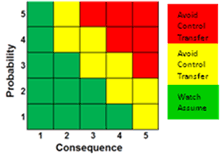
General guidelines for applying risk mitigation handling options are shown in Figure 2. These options are based on the assessed combination of the probability of occurrence and severity of the consequence for an identified risk. These guidelines are appropriate for many, but not all, projects and programs.

Figure 2. Risk Mitigation Handling Options

Risk mitigation handling options include:

  • Assume/Accept: Acknowledge the existence of a particular risk, and make a deliberate decision to accept it without engaging in special efforts to control it. Approval of project or program leaders is required.
  • Avoid: Adjust program requirements or constraints to eliminate or reduce the risk. This adjustment could be accommodated by a change in funding, schedule, or technical requirements.
  • Control: Implement actions to minimize the impact or likelihood of the risk.
  • Transfer: Reassign organizational accountability, responsibility, and authority to another stakeholder willing to accept the risk.
  • Watch/Monitor: Monitor the environment for changes that affect the nature and/or the impact of the risk.

Each of these options requires developing a plan that is implemented and monitored for effectiveness. More information on handling options is discussed under best practices and lessons learned below.

From a systems engineering perspective, common methods of risk reduction or mitigation with identified program risks include the following, listed in order of increasing seriousness of the risk:

  • Intensified technical and management reviews of the engineering process
  • Special oversight of designated component engineering
  • Special analysis and testing of critical design items
  • Rapid prototyping and test feedback
  • Consideration of relieving critical design requirements
  • Initiation of fallback parallel developments

When determining the method for risk mitigation, the MITRE SE can help the customer assess the performance, schedule, and cost impacts of one mitigation strategy over another. For something like “parallel” development mitigation, MITRE SEs could help the government determine whether the cost could more than double, while time might not be extended by much (e.g., double the cost for parallel effort, but also added cost for additional program office and user engagement). For conducting rapid prototyping or changing operational requirements, MITRE SEs can use knowledge in creating prototypes and using prototyping and experimenting for projecting the cost and time to conduct a prototype to help mitigate particular risks (e.g., requirements). Implementing more engineering reviews and special oversight and testing may require changes to contractual agreements. MITRE systems engineers can help the government assess these (schedule and cost) by helping determine the basis of estimates for additional contractor efforts and providing a reality check for these estimates. MITRE’s CASA [Center for Acquisition and Systems Analysis] and the CCG [Center for Connected Government] Investment Management practice department have experience and a knowledge base in many development activities across a wide spectrum of methods and can help with realistic assessments of mitigation alternatives.

Types of Risk Mitigation

  1. Risk Acceptance

Risk acceptance does not reduce any effects however it is still considered a strategy. This strategy is a common option when the cost of other risk management options such as avoidance or limitation may outweigh the cost of the risk itself. A company that doesn’t want to spend a lot of money on avoiding risks that do not have a high possibility of occurring will use the risk acceptance strategy.

  1. Risk Avoidance

Risk avoidance is the opposite of risk acceptance. It is the action that avoids any exposure to the risk whatsoever. It’s important to note that risk avoidance is usually the most expensive of all risk mitigation options.

  1. Risk Limitation

Risk limitation is the most common risk management strategy used by businesses. This strategy limits a company’s exposure by taking some action. It is a strategy employing a bit of risk acceptance along with a bit of risk avoidance or an average of both. An example of risk limitation would be a company accepting that a disk drive may fail and avoiding a long period of failure by having backups.

  1. Risk Transference

Risk transference is the involvement of handing risk off to a willing third party. For example, numerous companies outsource certain operations such as customer service, payroll services, etc. This can be beneficial for a company if a transferred risk is not a core competency of that company. It can also be used so a company can focus more on their core competencies.

So how can I be a leader in Business Continuity Management (BCM) Governance, Risk and Compliance (GRC) and balance my risks and opportunities?

All of these four risk mitgiation strategies require montioring. Vigilence is needed so that you can recognize and interrperet changes to the impact of that risk.

Risk Management in IT

IT Risk Management is the application of risk management methods to information technology in order to manage IT risk, i.e.: The business risk associated with the use, ownership, operation, involvement, influence and adoption of IT within an enterprise or organization

IT risk management can be considered a component of a wider enterprise risk management system.

The establishment, maintenance and continuous update of an Information Security Management System (ISMS) provide a strong indication that a company is using a systematic approach for the identification, assessment and management of information security risks.

Different methodologies have been proposed to manage IT risks, each of them divided into processes and steps.

According to the Risk IT framework, this encompasses not only the negative impact of operations and service delivery which can bring destruction or reduction of the value of the organization, but also the benefit enabling risk associated to missing opportunities to use technology to enable or enhance business or the IT project management for aspects like overspending or late delivery with adverse business impact.

Because risk is strictly tied to uncertainty, decision theory should be applied to manage risk as a science, i.e. rationally making choices under uncertainty.

Steps to IT Risk Management

IT risk management is the application of risk management methods to information technology to manage the risks inherent in that space. To do that means assessing the business risks associated with the use, ownership, operation and adoption of IT in an organization. Follow these steps to manage risk with confidence.

  1. Identify the Risk

You can’t prepare for risk without first figuring out, to the best of your ability, where and when it might arise. Therefore, both manager and team must be alert to uncovering and recognizing any risks, then detailing them by explaining how they might impact the project and outcomes. One method is using an IT risk assessment template.

  1. Analyze the Risk

Once you’ve identified risk, you then must analyze it and discern if it’s big, small or minimal in its impact. Also, what would be the impact for each of the risks. Study the risk and how it might influence the project in various ways. You’ll add these findings to your risk assessment.

  1. Evaluate and Rank the Risk

Once you evaluate the impact of risks and prioritize them, you can begin to develop strategies to control them. This is done by understanding what the risk can do to the project, which is determining the likelihood of it occurring and the magnitude of its impact. Then you can say that the risk must be addressed or can be ignored without faulting the overall project. Again, these rankings would be added to your risk assessment.

  1. Respond to the Risk

After all this, if the risk becomes an actual issue, then you’re no longer in the theoretical realm. It’s time for action. This is what’s called risk response planning in which you take your high-priority risks and decide how to treat them or modify them, so they place as lower priority. Risk mitigation strategies apply here, as well as preventive and contingency plans. Add these approaches to your risk assessment.

  1. Monitor & Review the Risk

Once you act, you must track and review the progress on mitigating the risk. Use your risk assessment to track and monitor how your team is dealing with the risk to make sure that nothing is left out or forgotten.

IT Risk Management Strategies

Strategies are a way to provide a structured approach to identify, access and manage risks. They provide a process to regularly update and review the assessment based on changes.

  1. Apply Safeguards

This is an avoidance strategy, where the company decides to avoid risk at all costs and focuses a great deal of resources to that end. If you can avoid the risk, then it is no longer a threat to the project. However, there is a downside to this. If you avoid the risk, you also avoid the associated potential of its return and opportunity. So, it’s a decision not to take lightly.

  1. Transfer the Risk

This is a transference strategy, when the company transfers the risk to another entity. This redistribution can be onto the company members, some outsource entity or an insurance policy.

  1. Reduce the Impact

This is a mitigation strategy, where the company works to reduce the impact of the risk through methodology, teams or whatever resources are at its disposal. It can involve small changes, but always must come by process and a plan.

  1. Accept the Risk

This is an acceptance strategy, where you know there is risk and accept that, so when and if it occurs you can deal with it then and there. This is sometimes unavoidable, but manageable if you have followed the steps in your project risk assessment template.

Best Practices for IT Risk Management

Here are six best practices when managing risk in IT.

  • Evaluate Early & Often: There’s no better time to start on the risk management process than now, so begin early. Remember it is a process and so it will continue throughout the project. Then continue monitoring all the time. Risk never sleeps.
  • Lead from the Top: Good leadership is many things. One aspect is developing a risk culture at the organization. That means valuing input from everyone, believing in the importance of acknowledging risk and keeping a positive attitude about responding.
  • Communications: Having a clear channel to communicate risk throughout the organization is paramount to identifying and responding quickly and effectively to risk.
  • Strong Policies: If there is not already a process and plan to deal with risk, you’re always going to be one step behind. This is again why a project risk assessment is key, but so is understanding roles and responsibilities for everyone on the project team, having a continuity plan, etc.
  • Involve Stakeholders: A great resource that is often overlooked are the project stakeholders, who have a unique perspective and can provide insight into areas where risk might arise. So, involve them throughout the process, from asking for their participation with the risk assessment template and over the whole course of the project.
  • Get Signoffs: At every stage of your risk management, get people to sign-off on the strategy, which includes the stakeholders.

Information System Security

Information systems security, more commonly referred to as INFOSEC, refers to the processes and methodologies involved with keeping information confidential, available, and assuring its integrity.

It also refers to:

  • Access controls, which prevent unauthorized personnel from entering or accessing a system.
  • Protecting information no matter where that information is, i.e. in transit (such as in an email) or in a storage area.
  • The detection and remediation of security breaches, as well as documenting those events.

Information systems security does not just deal with computer information, but also protecting data and information in all of its forms, such as telephone conversations.

Risk assessments must be performed to determine what information poses the biggest risk. For example, one system may have the most important information on it and therefore will need more security measures to maintain security. Business continuity planning and disaster recovery planning are other facets of an information systems security professional. This professional will plan for what could happen if a major business disruption occurs, but still allow business to continue as usual.

MIS security refers to measures put in place to protect information system resources from unauthorized access or being compromised. Security vulnerabilities are weaknesses in a computer system, software, or hardware that can be exploited by the attacker to gain unauthorized access or compromise a system.

People as part of the information system components can also be exploited using social engineering techniques. The goal of social engineering is to gain the trust of the users of the system.

  1. Computer viruses

These are malicious programs as described in the above section. The threats posed by viruses can be eliminated or the impact minimized by using Anti-Virus software and following laid down security best practices of an organization.

  1. Unauthorized access

The standard convention is to use a combination of a username and a password. Hackers have learnt how to circumvent these controls if the user does not follow security best practices. Most organizations have added the use of mobile devices such as phones to provide an extra layer of security.

Let’s take Gmail as an example, if Google is suspicious of the login on an account, they will ask the person about to login to confirm their identity using their android powered mobile devices or send an SMS with a PIN number which should supplement the username and password.

If the company does not have enough resources to implement extra security like Google, they can use other techniques. These techniques can include asking questions to users during signup such as what town they grew up in, the name of their first pet, etc. If the person provides accurate answers to these question, access is granted into the system.

  1. Data loss

If the data center caught fire or was flooded, the hardware with the data can be damaged, and the data on it will be lost. As a standard security best practice, most organizations keep backups of the data at remote places. The backups are made periodically and are usually put in more than one remote area.

Biometric Identification – this is now becoming very common especially with mobile devices such as smartphones. The phone can record the user fingerprint and use it for authentication purposes. This makes it harder for attackers to gain unauthorized access to the mobile device. Such technology can also be used to stop unauthorized people from getting access to your devices.

Ethical & Security Issues in Information Security System

Information systems have made many businesses successful today. Some companies such as Google, Facebook, EBay, etc. would not exist without information technology. However, improper use of information technology can create problems for the organization and employees.

Criminals gaining access to credit card information can lead to financial loss to the owners of the cards or financial institute. Using organization information systems i.e. posting inappropriate content on Facebook or Twitter using a company account can lead to lawsuits and loss of business.

  • Cyber-crime
  • Information system Security
  • Information system Ethics
  • Information Communication Technology (ICT) policy

Internet Security

Internet security is a branch of computer security specifically related to not only Internet, often involving browser security and the World Wide Web[citation needed], but also network security as it applies to other applications or operating systems as a whole. Its objective is to establish rules and measures to use against attacks over the Internet. The Internet represents an insecure channel for exchanging information, which leads to a high risk of intrusion or fraud, such as phishing, online viruses, trojans, worms and more.

Many methods are used to protect the transfer of data, including encryption and from-the-ground-up engineering. The current focus is on prevention as much as on real time protection against well known and new threats.

Internet security is a catch-all term for a very broad issue covering security for transactions made over the Internet. Generally, Internet security encompasses browser security, the security of data entered through a Web form, and overall authentication and protection of data sent via Internet Protocol.

Internet security relies on specific resources and standards for protecting data that gets sent through the Internet. This includes various kinds of encryption such as Pretty Good Privacy (PGP). Other aspects of a secure Web setup includes firewalls, which block unwanted traffic, and anti-malware, anti-spyware and anti-virus programs that work from specific networks or devices to monitor Internet traffic for dangerous attachments.

Internet security is generally becoming a top priority for both businesses and governments. Good Internet security protects financial details and much more of what is handled by a business or agency’s servers and network hardware. Insufficient Internet security can threaten to collapse an e-commerce business or any other operation where data gets routed over the Web.

Internet security refers to securing communication over the internet. It includes specific security protocols such as:

  • Internet Security Protocol (IPSec)
  • Secure Socket Layer (SSL)

Internet security is a branch of computer security that deals specifically with internet-based threats. These include hacking, where unauthorized users gain access to computer systems, email accounts or websites; viruses and other malicious software (malware), which can damage data or make systems vulnerable to other threats; and identity theft, where hackers steal personal details such as credit card numbers and bank account information.

You can protect yourself from these threats with strong internet security.

Malware and Anti-Malware

Malware, meaning malicious software, includes viruses, worms and Trojans. Although “virus” is used colloquially to refer to various malware types, its meaning is quite specific.

A virus is a program that replicates itself throughout a system. It can spread to other computers, but needs user involvement since it requires a host file to spread. An individual must download the virus from the internet or connect infected storage media, such as a USB drive, to his computer. A worm replicates itself and spreads more actively.

A Trojan (from Trojan horse) can appear useful, but is actually dangerous. Trojans can steal data such as passwords or financial details or allow “back-door” access into computers. Networks of compromised computer systems, called botnets, are used to send spam or disseminate further malware. Install and use anti-malware internet protection applications to protect your computer.

Internet Security: Firewalls

Think of a firewall as a filter consisting of a device or array of devices that allow or deny access to a network. Firewalls, which can be hardware or software devices, prevent sensitive information from being uncovered and stolen from networks and also prevent dangerous information — such as malicious code — from being planted on networks. Firewalls apply a specific set of rules to all information coming in or going out of networks to determine whether it’s dangerous or benign.

Browser Choice

Browsers can have security flaws, which allow hackers and cyber-criminals to attack computers and networks. You must choose a secure browser and keep it updated with new security patches the developer releases. One example of a dangerously insecure browser is Microsoft’s Internet Explorer 6 (IE6). Although it’s now largely out of use, IE6 has so many security flaws that even Microsoft wants to stop people from using it.

Email Security

Electronic mail (email) offers many potential vulnerabilities. It’s often used to send sensitive information, which then becomes vulnerable to theft, and is also used to distribute malware. A solid email security strategy includes both anti-malware applications and good practice by users, such as not sending sensitive information via unsecured email and not opening suspicious messages.

Denial-of-Service Attack

Denial of service (DoS) attacks are performed against computer resources such as websites. The aim of a DoS attack is to make a resource unavailable to users. One example is when a website is so overwhelmed by repeated communications requests that it cannot keep up with the demand. When multiple systems are involved, it becomes a distributed denial of service attack (DDoS). Methods for protecting against such attacks include firewalls and systems such as “clean pipes,” in which website traffic is routed through a proxy server that drops bad traffic, allowing only genuine requests.

Social Engineering

The strongest firewall and high security anti-virus suite won’t protect your system if you give away sensitive information such as passwords or security questions. Social engineering uses tricks to make you hand over information to criminals.

An example is phishing, in which an email appears to come from a reputable organization such as a bank, tricking the recipient into entering their personal details. The phisher can then collect and use them to log in to the victim’s account. If you want excellent internet security, it’s important to remain aware of social engineering.

Network and Website Security Risks

Most businesses view their website as one of their biggest assets, and while it certainly can be, it can also be the biggest vulnerability.

All the hard work your company does to generate traffic and promote itself online can go up in flames if you’re not protected from network security threats.

Network security risks are so troublesome because you may not be aware of an issue until the damage has been done.

If you haven’t already, you need to start protecting your company’s network now. Below, we’re discussing some of the most common network security risks and the problems they can cause.

The most common network and Website Security threats-

  1. Computer virus

We’ve all heard about them, and we all have our fears. For everyday Internet users, computer viruses are one of the most common threats to cybersecurity. Statistics show that approximately 33% of household computers are affected with some type of malware, more than half of which are viruses.

Computer viruses are pieces of software that are designed to be spread from one computer to another. They’re often sent as email attachments or downloaded from specific websites with the intent to infect your computer and other computers on your contact list by using systems on your network. Viruses are known to send spam, disable your security settings, corrupt and steal data from your computer including personal information such as passwords, even going as far as to delete everything on your hard drive.

  1. Rogue security software

Leveraging the fear of computer viruses, scammers have a found a new way to commit Internet fraud.

Rogue security software is malicious software that mislead users to believe there is a computer virus installed on their computer or that their security measures are not up to date. Then they offer to install or update users’ security settings. They’ll either ask you to download their program to remove the alleged viruses, or to pay for a tool. Both cases lead to actual malware being installed on your computer.

  1. Trojan horse

Metaphorically, a “Trojan horse” refers to tricking someone into inviting an attacker into a securely protected area. In computing, it holds a very similar meaning — a Trojan horse, or “Trojan,” is a malicious bit of attacking code or software that tricks users into running it willingly, by hiding behind a legitimate program.

They spread often by email; it may appear as an email from someone you know, and when you click on the email and its included attachment, you’ve immediately downloaded malware to your computer. Trojans also spread when you click on a false advertisement.

Once inside your computer, a Trojan horse can record your passwords by logging keystrokes, hijacking your webcam, and stealing any sensitive data you may have on your computer.

  1. Adware and spyware

By “adware” we consider any software that is designed to track data of your browsing habits and, based on that, show you advertisements and pop-ups. Adware collects data with your consent and is even a legitimate source of income for companies that allow users to try their software for free, but with advertisements showing while using the software. The adware clause is often hidden in related User Agreement docs, but it can be checked by carefully reading anything you accept while installing software. The presence of adware on your computer is noticeable only in those pop-ups, and sometimes it can slow down your computer’s processor and internet connection speed.

When adware is downloaded without consent, it is considered malicious.

Spyware works similarly to adware, but is installed on your computer without your knowledge. It can contain keyloggers that record personal information including email addresses, passwords, even credit card numbers, making it dangerous because of the high risk of identity theft.

  1. Computer worm

Computer worms are pieces of malware programs that replicate quickly and spread from one computer to another. A worm spreads from an infected computer by sending itself to all of the computer’s contacts, then immediately to the contacts of the other computers.

A worm spreads from an infected computer by sending itself to all of the computer’s contacts,, then immediately to the contacts of the other computers

  1. DOS and DDOS attack

Have you ever found yourself waiting impatiently for the online release of a product, one that you’re eagerly waiting to purchase? You keep refreshing the page, waiting for that moment when the product will go live. Then, as you press F5 for the last time, the page shows an error: “Service Unavailable.” The server must be overloaded!

There are indeed cases like these where a website’s server gets overloaded with traffic and simply crashes, sometimes when a news story breaks. But more commonly, this is what happens to a website during a DoS attack, or denial-of-service, a malicious traffic overload that occurs when attackers overflood a website with traffic. When a website has too much traffic, it’s unable to serve its content to visitors.

A DoS attack is performed by one machine and its internet connection, by flooding a website with packets and making it impossible for legitimate users to access the content of flooded website. Fortunately, you can’t really overload a server with a single other server or a PC anymore. In the past years it hasn’t been that common if anything, then by flaws in the protocol.

A DDoS attack, or distributed denial-of-service attack, is similar to DoS, but is more forceful. It’s harder to overcome a DDoS attack. It’s launched from several computers, and the number of computers involved can range from just a couple of them to thousands or even more.

Since it’s likely that not all of those machines belong to the attacker, they are compromised and added to the attacker’s network by malware. These computers can be distributed around the entire globe, and that network of compromised computers is called botnet.

Since the attack comes from so many different IP addresses simultaneously, a DDoS attack is much more difficult for the victim to locate and defend against.

  1. Phishing

Phishing is a method of a social engineering with the goal of obtaining sensitive data such as passwords, usernames, credit card numbers.

The attacks often come in the form of instant messages or phishing emails designed to appear legitimate. The recipient of the email is then tricked into opening a malicious link, which leads to the installation of malware on the recipient’s computer. It can also obtain personal information by sending an email that appears to be sent from a bank, asking to verify your identity by giving away your private information.

  1. Rootkit

Rootkit is a collection of software tools that enables remote control and administration-level access over a computer or computer networks. Once remote access is obtained, the rootkit can perform a number of malicious actions; they come equipped with keyloggers, password stealers and antivirus disablers.

Rootkits are installed by hiding in legitimate software: when you give permission to that software to make changes to your OS, the rootkit installs itself in your computer and waits for the hacker to activate it. Other ways of rootkit distribution include phishing emails, malicious links, files, and downloading software from suspicious websites.

  1. SQL Injection attack

We know today that many servers storing data for websites use SQL. As technology has progressed, network security threats have advanced, leading us to the threat of SQL injection attacks.

SQL injection attacks are designed to target data-driven applications by exploiting security vulnerabilities in the application’s software. They use malicious code to obtain private data, change and even destroy that data, and can go as far as to void transactions on websites. It has quickly become one of the most dangerous privacy issues for data confidentiality. You can read more on the history of SQL injection attacks to better understand the threat it poses to cybersecurity.

  1. Man-in-the-middle attacks

Man-in-the-middle attacks are cybersecurity attacks that allow the attacker to eavesdrop on communication between two targets. It can listen to a communication which should, in normal settings, be private.

As an example, a man-in-the-middle attack happens when the attacker wants to intercept a communication between person A and person B. Person A sends their public key to person B, but the attacker intercepts it and sends a forged message to person B, representing themselves as A, but instead it has the attackers public key. B believes that the message comes from person A and encrypts the message with the attackers public key, sends it back to A, but attacker again intercepts this message, opens the message with private key, possibly alters it, and re-encrypts it using the public key that was firstly provided by person A. Again, when the message is transferred back to person A, they believe it comes from person B, and this way, we have an attacker in the middle that eavesdrops the communication between two targets.

Here are just some of the types of MITM attacks:

  • DNS spoofing
  • HTTPS spoofing
  • IP spoofing
  • ARP spoofing
  • SSL hijacking
  • Wi-Fi hacking

Summary

It can seem a difficult task to keep track of all the network security threats that are out there, and the new ones that just keep emerging. Whether the media is creating a culture of fear out of being online and placing trust in leaving our information out for all to see, or whether the threats that wait in the dark corners of the Internet are truly serious and can happen to anyone, the best thing we can all do is to be prepared. There is no way to be completely sure that a system is impenetrable by cybersecurity threat. We need to ensure that our systems are as secure as possible.

Prevention of future attacks has never been easier than now with our up-to-date cyber intelligence data. Contact us for custom data enrichment solutions so you can always be prepared.

Website Hacking and Issues Therein

Getting your website hacked is not a new thing. The websites are usually prone to get hacked, and there are various steps that you must take to get rid of such issues. The website is a property of a single person, company or multiple individuals. The famous websites are at a risk always that they might get hack by someone. It is a common issue that people and companies are discussing recently. The cyber-crime of hacking the websites is not increasing with the passage of time.

In 2014, the total number of websites on the internet reached 1 billion. Today it’s hovering somewhere in the neighborhood of 944 million due to websites going inactive, and it is expected to normalize again at 1 billion sometime in 2015. Let’s take a minute to absorb that number for a moment 1 billion.

Another surprising statistic is that Google, one of the most popular search engines in the world, quarantines approximately 10,000 websites a day via its Safe Browsing technology. From our own research, out of the millions of websites that push through our scanning technology, roughly 2 – 5% of them have some Indicator of Compromise (IoC) that signifies a website attack. Granted, this might be a bit high, as the websites being scanned are often suspected of having an issue, so to be conservative we would extrapolate that to suggest about 1% of the total websites online are hacked or infected. To put that into perspective, we are talking somewhere in the neighborhood of 9 million websites that are currently hacked or infected.

With this sort of impact, it’s only natural that people are curious how websites keep getting hacked. The challenge is that the answer has been the same for quite some time.

What to do if your Website has Been Hacked?

First Steps You Should Take

It is also necessary to analyze the hacking of your website to find out soft spots in the code and eliminate them as soon as possible. You should also remember that very often hackers after having got access to your website prefer to reserve ways for further hacking of your web resource. Only a specialist is able to uncover such ways.

So, here follows step-by-step guidelines what to do in case your website has been hacked:

  1. Check your home PC for viruses. It is not necessary to run to the shop and buy a commercial antivirus. We would recommend using Antivira and Comodo.
  2. Install FireWall to your local PC. Use of FireWall significantly reduces the risk of penetration of malware to your PC. We would recommend to use Comodo, free and one of the best FireWalls, or Zone Alarm, also a very good but commercial alternative.
  3. Contact your hosting provider. Not only your website may have been hacked, especially if you do not rent your own server but use usual hosting. Notify the administrators and ask them to analyze the hacking.
  4. Change all the passwords, from passwords to mail boxes to FTP passwords.
  5. Warn your users that your website has been hacked and recommend them to change their passwords to your website.
  6. Back up all the files at your server without delay.
  7. Check the code of the file .htaccess. A hacker can use this file to forward your visitors from your web resource to a website with a malicious code installed.
  8. Be prepared that it might be necessary to delete all the files from your server. The installed code may be hidden so well that it may be necessary to delete all the files and the data base from your server.
  9. Update your CMS to the newest version.

To sum up, it is easier to prevent hacking the website than to restore the website from scratch. Your website protection is a big responsibility only experts can deal with. One should not entrust a website to the first comer but it is not advisable to neglect security either.

Hacking

There are two types of the companies; one type of companies was subject to the hacking issue, but the other ones are safe. The safe companies must have some measures taken to secure themselves and get rid of the hacking issues. There are various people, viruses, and malware threats that can hack the websites and do some damage to the content and the users. Hacking is a common problem, but the webmasters must be skilled enough to get rid of such problems and prevent them from the damage or any harm.

Get to Know

Have you ever thought that how will you find out if your website is not yours now? How will you get to know that someone has hacked your website or blog? It is a common question that is raised when people become webmasters, and their website is prone to get hacked. There are different types of indications that tell the webmasters that a hacker has hacked you. The first indication is that when you see your website and your interface has been changed. Your website does not look like the one you created, and you have no control over it. Some of the hackers deface the website and give a message to the webmasters to know that a particular hacker is hacking them. These are the ways that the hacker enjoys and tells the world proudly I hacked it. Sometimes the webmasters do not get to know that they are being chased, and someone is using their website as well. They do not get any signal about the hacking when the hacker has hacked the site.

Indications

Here are some of the indications and signs that will help the owner of the website know that someone has hacked them, and he has got no control over his property.

  • You got to see a defaced website.
  • The redirection of the website will lead you to a porn site or some other unsavory website.
  • The search engine like Google and Bing will let you know about the hacking.
  • The search browsers and engines will give you the indications about website hacking.
  • You will find more traffic on your website from other countries that you have not focused yet.
  • You will feel strange activities on your website.

How the websites get hacked?

Without the use of some safety measures, hackers hack the websites usually. The webmasters are unaware of the reasons that how someone hacked their property when they have put safety measures as well. The hackers have many ways in which they can get the control of the website, and some of the ways are:

  • The hacker easily guesses the password of your website.
  • The malware will be introduced in your PC to get the login details.
  • Using outdated software other than siteguarding.com
  • Hacking some other website that has shared-server with you.

What to do?

When the hacker controls your website, you have the responsibility to take some serious steps. Your website is your property; you cannot lose control over it. The hacker can use your business and information for negative purposes creating problems for you. Follow some of the steps given here when your website is subject to hacking:

  1. Tell the World

When the hacker hacks your website, you must tell the world. Other platforms must spread the awareness about the incident. It will help the users to understand the conditions and situations you are facing. It will help the users from facing any problems in the meantime.

  1. Contacting the Host

The webmaster must eventually contact the host that can restore website. The server hosts the ability to regain the control over the website you have owned.

  • It will come back to normal.
  • Remove the redirection to some unsavory website.
  1. Damage must be Reverted

Asking for help to regain the website will undo the damage done by the hacker. The people who were aware of your problems can help you get your website back. This step is very important as getting help from someone is essential at particular times.

  1. Changing the Passwords

When you get to know that someone hacked the website, change the passwords. Sometimes changing the passwords let you regain the control. Do not ever set easy passwords. Setting the passwords is a technique. So the webmasters must keep changing the passwords or rotate them.

  1. Create a Backup

The webmaster must keep the backup of his website. Sometimes, the websites have chances to get hacked because of the popularity or some growing issues. So the backup must be there in case if something happens, you must have your data to upload it again.

  1. Website Security

The websites must always be secured. Some of the companies offer their services to set a safe and secure solution for the websites. The websites like siteguarding.com are helpful in such cases when the webmasters want to set security on their websites. The website will offer;

  • Antivirus
  • Monitoring the Change
  • Firewall
  1. Find Solutions

The webmasters must look for better solutions to secure their website. They must look for services that guarantee them the proper security. Siteguarding.com is the website that has solutions to your problems.

5 Easy Steps to Secure Your Website from Hackers

You may have worried when starting this post that it would be full of technical jargon that your average website owner would find baffling. Some of our tips further down do get technical, and you may want to bring in your developer for those.

But there are a few things you can do on your own first that don’t involve that much technical know-how.

Step #1: Install security plugins.

If you built your website with a content management system (CMS), you can enhance your website with security plugins that actively prevent website hacking attempts. Each of the main CMS options have security plugins available, many of them for free.

Security plugins for WordPress:

  • iThemes Security
  • Bulletproof Security
  • Sucuri
  • Wordfence
  • fail2Ban

Security options for Magento:

  • Amasty
  • Watchlog Pro
  • MageFence

Security extensions for Joomla:

  • JHackGuard
  • jomDefender
  • RSFirewall
  • Antivirus Website Protection

These options address the security vulnerabilities that are inherent in each platform, foiling additional types of hacking attempts that could threaten your website.

In addition, all websites – whether you’re running a CMS-managed site or HTML pages – can benefit from considering SiteLock.  SiteLock goes above and beyond simply closing site security loopholes by providing daily monitoring for everything from malware detection to vulnerability identification to active virus scanning and more. If your business relies on its website, SiteLock is definitely an investment worth considering.

Step #2: Use HTTPS

As a consumer, you may already know to always look for the green lock image and https in your browser bar any time you provide sensitive information to a website. Those five little letters are an important shorthand for hacker security: they signal that it’s safe to provide financial information on that particular webpage.

An SSL certificate is important because it secures the transfer of information – such as credit cards, personal data, and contact information – between your website and the server.

While an SSL certificate has always been essential for eCommerce websites, having one has recently become important for all websites. Google released a Chrome update in 2018. The security update happened in July and alerts website visitors if your website doesn’t have an SSL certificate installed. That makes visitors more likely to bounce, even if your website doesn’t collect sensitive information.

Search engines are taking website security more seriously than ever because they want users to have a positive and safe experience browsing the web. Taking the commitment to security further, a search engine may rank your website lower in search results if you don’t have an SSL certificate.

What does that mean for you? If you want people to trust your brand, you need to invest in an SSL certificate. The cost of an SSL certificate is minimal, but the extra level of encryption it offers to your customers goes a long way to making your website more secure and trustworthy.

At HostGator, we also take website security seriously, but most importantly, we want to make it easy for you to be secure. All HostGator web hosting packages come with a free SSL certificate. The SSL certificate will be automatically applied to your account, but you do need to take a few steps to install the free SSL certificate on your website.

Step #3: Keep your website platform and software up-to-date

Using a CMS with various useful plugins and extensions offers a lot of benefits, but it also brings risk. The leading cause of website infections is vulnerabilities in a content management system’s extensible components.

Because many of these tools are created as open-source software programs, their code is easily accessible – to both good-intentioned developers as well as malicious hackers. Hackers can pore over this code, looking for security vulnerabilities that allow them to take control of your website by exploiting any platform or script weaknesses.

To protect your website from being hacked, always make sure your content management system, plugins, apps, and any scripts you’ve installed are up-to-date.

If you’re running a website built on WordPress, you can check whether you’re up to date quickly when logging into your WordPress dashboard. Look for the update icon in the top left corner next to your site name. Click the number to access your WordPress Updates.

Step #4: Make sure your passwords are secure

This one seems simple, but it’s so important.

It’s tempting to go with a password you know will always be easy for you to remember. That’s why the #1 most common password is still 123456. You have to do better than that – a lot better than that to prevent login attempts from hackers and other outsiders.

Make the effort to figure out a truly secure password (or use HostGator’s password generator).  Make it long. Use a mix of special characters, numbers, and letters. And steer clear of potentially easy-to-guess keywords like your birthday or kid’s name. If a hacker somehow gains access to other information about you, they’ll know to guess those first.

Holding yourself to a high standard for password security is step one. You also need to make sure everyone who has access to your website has similarly strong passwords. One weak password within your team can make your website susceptible to a data leak, so set expectations with everyone who has access.

Institute requirements for all website users in terms of length and types of characters. If your employees want to use easy passwords for their less secure accounts, that’s their business. But when it comes to your website, it’s your business (literally) and you can hold them to a higher standard.

Step #5: Invest in automatic backups.

Even if you do everything else on this list, you still face some risk. The worst-case scenario of a website hack is to lose everything because you forgot to back your website up. The best way to protect yourself is to make sure you always have a recent backup.

While a data breach will be stressful no matter what, when you have a current backup, recovering is much easier. You can make a habit out of manually backing your website up daily or weekly. But if there’s even the slightest chance you’ll forget, invest in automatic backups. It’s a cheap way to buy peace of mind.

Security and Email

Email security describes different techniques for keeping sensitive information in email communication and accounts secure against unauthorized access, loss or compromise. Email is often used to spread malware, spam and phishing attacks. Attackers use deceptive messages to entice recipients to part with sensitive information, open attachments or click on hyperlinks that install malware on the victim’s device. Email is also a common entry point for attackers looking to gain a foothold in an enterprise network and obtain valuable company data.

Email encryption involves encrypting, or disguising, the content of email messages to protect potentially sensitive information from being read by anyone other than intended recipients. Email encryption often includes authentication.

How Secure Is Email?

Email was designed to be as open and accessible as possible. It allows people in organizations to communicate with each other and with people in other organizations. The problem is that email is not secure. This allows attackers to use email as a way to cause problems in attempt to profit. Whether through spam campaigns, malware and phishing attacks, sophisticated targeted attacks, or business email compromise (BEC), attackers try to take advantage of the lack of security of email to carry out their actions. Since most organizations rely on email to do business, attackers exploit email in an attempt to steal sensitive information.

Because email is an open format, it can be viewed by anyone who can intercept it. This became an issue as organizations began sending confidential or sensitive information through email. An attacker could easily read the contents of an email by intercepting it. Over the years, organizations have been increasing email security measures to make it harder for attackers to get their hands on sensitive or confidential information.

Email Security Policies

Because email is so critical in today’s business world, organizations have established polices around how to handle this information flow. One of the first policies most organizations establish is around viewing the contents of emails flowing through their email servers. It’s important to understand what is in the entire email in order to act appropriately. After these baseline policies are put into effect, an organization can enact various security policies on those emails.

These email security policies can be as simple as removing all executable content from emails to more in-depth actions, like sending suspicious content to a sandboxing tool for detailed analysis. If security incidents are detected by these policies, the organization needs to have actionable intelligence about the scope of the attack. This will help determine what damage the attack may have caused. Once an organization has visibility into all the emails being sent, they can enforce email encryption policies to prevent sensitive email information from falling into the wrong hands.

Email Security Best Practices

One of the first best practices that organizations should put into effect is implementing a secure email gateway. An email gateway scans and processes all incoming and outgoing email and makes sure that threats are not allowed in. Because attacks are increasingly sophisticated, standard security measures, such as blocking known bad file attachments, are no longer effective. A better solution is to deploy a secure email gateway that uses a multi-layered approach.

It’s also important to deploy an automated email encryption solution as a best practice. This solution should be able to analyze all outbound email traffic to determine whether the material is sensitive. If the content is sensitive, it needs to be encrypted before it is emailed to the intended recipient. This will prevent attackers from viewing emails, even if they were to intercept them.

Training employees on appropriate email usage and knowing what is a good and bad email is also an important best practice. Users may receive a malicious email that slips through the secure email gateway, so it’s critical that they understand what to look for. Most often they are exposed to phishing attacks, which have telltale signs. Training helps employees spot and report on these types of emails.

Email Security Tools

A secure email gateway, deployed either on-premises or in the cloud, should offer multi-layered protection from unwanted, malicious and BEC email; granular visibility; and business continuity for organizations of all sizes. These controls enable security teams to have confidence that they can secure users from email threats and maintain email communications in the event of an outage.

An email encryption solution reduces the risks associated with regulatory violations, data loss and corporate policy violations while enabling essential business communications. The solution should work for any organization that needs to protect sensitive data, while still making it readily available to affiliates, business partners and users—on both desktops and mobile devices. An email encryption solution is especially important for organizations required to follow compliance regulations, like GDPR, HIPAA or SOX, or abide by security standards like PCI-DSS.

error: Content is protected !!