Computer Based Information System

A CBIS is an organized integration of hardware and software technologies and human elements designed to produce timely, integrated, accurate and useful information for decision making purposes.

Computer Based Information System is essentially an IS using computer technology to carry out some or all of its planned tasks. The basic components of computer based information system are:

  • Hardware: These are the devices like the monitor, processor, printer and keyboard, all of which work together to accept, process, show data and information, hardware and software
  • Software: The programs that allow the hardware to process the data.
  • Databases: The gathering of associated files or tables containing related data.
  • Networks: A connecting system that allows diverse computers to distribute resources.
  • Procedures: The commands for combining the components above to process information and produce the preferred output.

Advantages of Computer-Based Information Systems

Compute-based information systems have been in widespread use since the 1990s in industry, non-profit organizations and government agencies. These systems provide fast, centralized access to databases of personnel information, reference reading, best practices and on-the-job training, and are easily customizable to meet an organization’s needs. With the Internet and technology boom of the early 21st century, use of computer-based information networks is growing faster each year.

  1. Data Centrality

Access to data via a computer network information system is central, providing a “one-stop” location to find and access pertinent computer data. Most large-scale businesses and organizations use some sort of central database to manage user information, manage advertisement lists, store product information and keep track of orders. Examples of central database solutions are MySQL, PostgreSQL or Microsoft SQL database solutions, coupled with custom software which provides user interfaces.

  1. Information Coverage

Central information systems provide organizations with the advantages of having large amounts of data, covering many different fields, all accessible via a central source. Information coverage is a huge advantage for any organization, because having vast amounts of useful data from every different department streamlines access and increases productivity. For users, having access to a networked information system is analogous to having a digital library of shared knowledge. Recent developments in database information systems link company information access with larger databases of academic and professional research, such as Google Scholar, to provide even more information capability to personnel.

  1. Access Efficiency

Efficiency of access is a crucial advantage to networked information systems over more traditional information management systems, such as paper cataloging and filing. Computer-based information systems catalog and file documents in a set logical way, making data access very efficient and fast. Data can be manually categorized, and filters created to automatically file documents that match certain patterns. This increases employee productivity time by allowing workers to focus more on the task at hand rather than filing paperwork.

  1. Extensibility

Computer-based information systems are completely extensible and customizable to an organization’s needs. Upon installation, customized computer information systems use configuration files that are tailor-made to an organization’s needs to file and categorize data. Computer software engineers frequently design custom database interfaces and information storage/recovery systems for enterprise clients. As a company grows, modifications and additions to this filing configuration allow easy extensibility. Computer information systems are not limited in scale or possibility. They are uniquely designed for maximum organizational benefit for each customer.

Main Types of Information Technology Support System

A typical organization has six of information systems with each supporting a specific organizational level. These systems include transaction processing systems (TPS) at the operational level, office automation systems (OAS) and knowledge work systems (KWS) at the knowledge level, management information systems (MIS) and decision support Systems (DSS) at the management level, and the executive support systems (ESS) at the strategic level.

  1. Transaction Processing Systems

Every firm needs to process transactions in order to perform their daily business operations. A transaction refers to any event or activity that affects the organization. Depending on the organization’s business, transactions may differ from one organization to another. In a manufacturing unit, for example, transactions include order entry, receipt of goods, shipping, etc., while in a bank, transactions include deposits and withdrawals, cashing of cheques etc.

However, some transactions, including placing orders, billing customers, hiring employees, employee record keeping, etc., are common to all organizations. To support the processing of business transactions, the transaction processing systems (TPS) are used in the organizations.

  1. Office Automation Systems

An office automation system (OAS) is a collection of communication technology, computers and persons to perform official tasks. It executes office transactions and supports official activities at every organizational level. These activities can be divided into clerical and managerial activities.

Clerical activities performed with the help of office automation system include preparing written communication, typesetting, printing, mailing, scheduling meetings, calendar keeping etc. Under managerial activities, office automation system helps in conferencing, creating reports and messages, and controlling performance of organization. Many applications like word processing, electronic filing and e-mail are integrated in office automation system.

  • Word Processing: Word processing is used for the preparation of documents like letters, reports, memos, or any type of printable material by electronic means. The text is entered by keyboard and displayed on the computer’s display unit. This text can be edited, stored, and reproduced with the help of commands present in the word processor. Word processors have facilities for spell checking, grammar checking, counting (character, lines, pages, etc.), automatic page numbering, index creation, header and footer, etc.
  • Email: E-mail or electronic mail facilitates the transfer of messages or documents with the help of computer and communication lines. This helps in speedy delivery of mails and also reduces time and cost of sending a paper mail. E-mail supports not only the transfer of text messages but it also has options for sending images, audio, video, and many other types of data.
  • Voice Mail: Voice mail, an important call service, allows recording and storing of telephone messages into the computer’s memory. The intended person can retrieve these messages any time.
  1. Knowledge Work Systems

A knowledge work system (KWS) is a specialized system built to promote the creation of knowledge and to make sure that knowledge and technical skills are proper integrated into business. It helps the knowledge workers in creating and propagating new information and knowledge by providing them the graphics, analytical, communications, and document management tools.

The knowledge workers also need to search for knowledge outside the organization. Thus, knowledge work system must give easy access to external databases. In addition, knowledge work systems should have user-friendly interface to help users to get the required information quickly and easily.

Some examples of knowledge work systems are computer-aided design (CAD) systems, virtual reality systems, and financial workstations.

  • Computer-aided design (CAD) systems: These systems are used for automating the creation and revision of designs using computers and graphics software. The CAD software has the capability to provide design specifications for tooling and manufacturing process. This saves much time and money while making a manufacturing process.
  • Virtual Reality System: These systems have more capabilities than CAD systems for visualization, rendering and simulation. They make use of interactive graphics software to build computer-generated simulations which almost look like real. They can be used in educational, scientific and business work.
  • Financial Workstations: They are used to combine a wide range of data from internal as well as external sources. This data includes contact management data, market data and research reports. Financial workstations help in analyzing trading situations and large amount of financial data within no time. It is also used for portfolio management.
  1. Management Information Systems

Management information systems are especially developed to support planning, controlling, and decision-making functions of middle managers. A management information system (MIS) extracts transaction data from underlying TPSs, compiles them, and produces information products in the form of reports, displays or responses.

These information products provide information that conforms to decision-making needs of managers and supervisors. Management information systems use simple routines like summaries and comparisons which enable managers to take decisions for which the procedure of reaching at a solution has been specified in advance.

Generally, the format of reports produced by MIS is pre-specified. A typical MIS report is a summary report, such as a report on the quarterly sales made by each sales representative of the organization. Another type of management information system report is an; for example, exception report that specifies the exception conditions the sales made by some sales representative is far below than expected.

Usually, management information systems are used to produce reports on monthly, quarterly, or yearly basis. However, if managers want to view the daily or hourly data, MIS enables them to do so. In addition, they provide managers online access to the current performance as well as past records of the organization.

  1. Decision Support Systems

A decision support system (DSS) is an interactive computer-based information system that, like MIS, also serves at the management level of an organization. However, in contrast to MIS, it processes information to support the decision making process of managers. It provides middle managers with the information that enables them to make intelligent decisions. A decision support system in a bank, for example, enable a manager to analyze the changing trends in deposits and loans in order to ascertain the yearly targets.

Decision support systems are designed for every manager to execute a specific managerial task or problem. Generally, they help managers to make semi-structured decisions, the solution to which can be arrived at logically. However, sometimes, they can also help in taking complex decisions. To support such decisions, they use information generated by OASs and TPSs.

Decision support systems have more analytical power as compared to other information systems. They employ a wide variety of decision models to analyze data or summarize vast amount of data into a form (usually form of tables or charts) that make the comparison and analysis of data easier for managers. They provide interactive environment so that the users could work with them directly, add or change data as per their requirements, and ask new questions.

  1. Executive Support Systems

An executive support system (ESS) an extension of MIS is a computer based information system that helps ind decision making at the top-level of an organization. The decisions taken with the help of executive support system are non-routine decisions that effect the entire organization and, thus, require judgement and sight.

As compared to DSSs, ESSs offer more general computing capabilities, better telecommunications and efficient display options. They use the advanced graphics software to display the critical information in the form of charts or graphs that help senior executives to solve a wide range of problems. To make effective decisions, they use summarized internal data from MIS and DSS as well as data from external sources about events like new tax laws, new competitors, etc. They filter, compress, and track data of high importance and make it available to the strategic-level managers.

Types and Levels of Information System

Information systems (IS) are vital components of modern organizations, helping them manage, store, process, and disseminate data to support decision-making and operational efficiency. They are broadly classified based on their purpose, functionality, and level within the organization. Here are the main types and levels of information systems:

Types of Information Systems:

Transaction Processing Systems (TPS):

TPS is the foundational level of information systems. They are designed to process and record day-to-day transactions, such as sales, purchases, inventory management, and payroll. TPS ensures that basic operational data is captured accurately and in real-time, forming the basis for other levels of information systems.

Management Information Systems (MIS):

MIS is a system that collects, processes, and presents summarized and aggregated data from various TPS. It provides middle-level managers with reports and dashboards to monitor the organization’s performance, analyze trends, and make informed decisions. MIS helps managers focus on strategic planning and tactical decision-making.

Decision Support Systems (DSS):

DSS is designed to assist managers at all levels in making semi-structured and unstructured decisions. They use data analysis tools, modeling techniques, and “what-if” scenarios to help managers assess various options and potential outcomes. DSS aids in solving problems that may not have clear-cut solutions and supports strategic decision-making.

Executive Information Systems (EIS):

EIS is a specialized information system designed for top-level executives. It provides strategic information and high-level performance indicators to support executive decision-making. EIS typically offers visually rich dashboards and customizable displays to help executives quickly grasp the organization’s overall health and performance.

Enterprise Resource Planning (ERP) Systems:

ERP systems integrate various business processes and functions across an organization into a single, unified system. They facilitate the flow of information and enable real-time data sharing between different departments, such as finance, human resources, sales, and supply chain management. ERP promotes efficiency, reduces redundancies, and enhances collaboration.

Knowledge Management Systems (KMS):

KMS focuses on capturing, organizing, and sharing an organization’s knowledge and expertise. It includes tools for document management, collaboration, and knowledge sharing, enabling employees to access critical information, best practices, and lessons learned.

Levels of Information Systems:

Operational Level:

This level deals with day-to-day, routine tasks and transactions. It primarily involves Transaction Processing Systems (TPS) that process data from operational activities. The primary users are operational staff and supervisors who need detailed and real-time information to carry out their duties efficiently.

Tactical Level:

The tactical level supports middle-level managers and their decision-making processes. Management Information Systems (MIS) play a vital role at this level, providing summarized and aggregated data from various TPS to help managers monitor performance, analyze trends, and plan for the short to medium term.

Strategic Level:

At the strategic level, decision-makers are concerned with the long-term direction and overall success of the organization. Decision Support Systems (DSS) and Executive Information Systems (EIS) are used at this level to assist top-level executives in making strategic decisions that have a significant impact on the organization’s future.

Knowledge Level:

The knowledge level spans across all three organizational levels. Knowledge Management Systems (KMS) are used to capture, store, and disseminate organizational knowledge, ensuring that valuable information and expertise are available to support decision-making and problem-solving at all levels.

Information systems have become critical components in organizations of all sizes and industries. Their effective implementation and utilization can enhance efficiency, streamline processes, improve decision-making, and give businesses a competitive edge in today’s rapidly evolving digital landscape.

Transaction Processing Systems (TPS):

TPS is essential for the day-to-day operations of an organization. Its primary function is to capture, process, and store transactional data resulting from routine business activities, such as sales, purchases, inventory movements, and employee timekeeping. TPS ensures data accuracy, timeliness, and reliability. Key characteristics of TPS include:

  • Real-time processing: TPS records and updates data immediately as transactions occur, ensuring that the information is up-to-date at all times.
  • Large transaction volumes: TPS must handle a high volume of transactions efficiently and without delays.
  • High reliability: Since TPS deals with critical operational data, it requires robust backup and recovery mechanisms to prevent data loss.
  • Limited decision support: TPS mainly supports operational decisions, providing data for day-to-day tasks rather than strategic or managerial decision-making.

Management Information Systems (MIS):

MIS aggregates and summarizes data from TPS to provide middle-level managers with the information needed to monitor and control operations effectively. It helps managers understand the organization’s performance, identify trends, and make informed decisions. Key features of MIS include:

  • Reports and dashboards: MIS generates regular reports and dashboards with key performance indicators (KPIs) to provide an overview of the organization’s performance.
  • Data integration: MIS pulls data from various TPS and departments to create a comprehensive view of business activities.
  • Periodic reporting: MIS reports are typically produced on a regular schedule, such as daily, weekly, or monthly, to aid in monitoring ongoing operations.
  • Drill-down capability: Managers can drill down into reports to access more detailed data and identify the root causes of issues.

Decision Support Systems (DSS):

DSS assists managers in making semi-structured and unstructured decisions that often involve complex and uncertain situations. DSS uses data analysis, modeling tools, and simulations to support decision-making. Key characteristics of DSS include:

  • “What-if” analysis: DSS allows users to model different scenarios and assess the potential outcomes of each scenario before making a decision.
  • Data mining: DSS can analyze large datasets to discover patterns, trends, and relationships that may not be apparent through standard reporting.
  • Ad hoc support: DSS is designed to respond to ad hoc queries and provide on-the-spot analysis to help managers with unique and unplanned decision-making needs.
  • Collaboration features: DSS often includes collaboration tools to facilitate group decision-making and consensus building.

Executive Information Systems (EIS):

EIS serves the top-level executives of an organization, such as the CEO, CFO, and other C-suite members. Its primary purpose is to provide executives with an easy-to-understand overview of the organization’s performance and its key success factors. Key features of EIS include:

  • Dashboards and scorecards: EIS presents critical performance metrics in graphical form, allowing executives to quickly grasp the organization’s status.
  • External data integration: EIS may include external data sources, such as economic indicators and market trends, to provide a broader context for decision-making.
  • Drill-down and drill-up: Executives can delve into more detailed information or zoom out for a higher-level view, depending on their needs.
  • Strategic planning support: EIS helps executives identify opportunities, assess risks, and align decisions with long-term goals.

Enterprise Resource Planning (ERP) Systems:

ERP integrates various business processes and data across an organization into a unified system. It enables seamless information flow and enhances efficiency by eliminating data silos. Key features of ERP systems include:

  • Centralized database: ERP uses a shared database, ensuring that all departments access the same accurate and up-to-date information.
  • Process automation: ERP automates workflows, streamlining business processes and reducing manual tasks and errors.
  • Cross-functional integration: ERP connects different functional areas like finance, human resources, inventory, sales, and more, fostering collaboration and better decision-making.
  • Scalability: ERP systems can handle the growth of an organization, supporting increased data volumes and user demands.

Knowledge Management Systems (KMS):

KMS aims to capture, store, organize, and share an organization’s knowledge and expertise. It helps ensure that knowledge is accessible to employees and can be utilized to solve problems and improve decision-making. Key components of KMS include:

  • Knowledge repositories: KMS stores knowledge in various formats, such as documents, manuals, best practices, lessons learned, and employee expertise profiles.
  • Collaboration tools: KMS often includes communication and collaboration tools to facilitate knowledge sharing among employees.
  • Search and retrieval capabilities: KMS allows users to search for specific information and retrieve relevant knowledge efficiently.
  • Expert identification: KMS helps identify subject matter experts within the organization, promoting knowledge sharing and mentoring.

Information System and its Major Components

An information system (IS) is a formal, sociotechnical, organizational system designed to collect, process, store, and distribute information. In a sociotechnical perspective, information systems are composed by four components: task, people, structure (or roles), and technology.

A computer information system is a system composed of people and computers that processes or interprets information. The term is also sometimes used in more restricted senses to refer to only the software used to run a computerized database or to refer to only a computer system.

Information Systems is an academic study of systems with a specific reference to information and the complementary networks of hardware and software that people and organizations use to collect, filter, process, create and also distribute data. An emphasis is placed on an information system having a definitive boundary, users, processors, storage, inputs, outputs and the aforementioned communication networks.

Any specific information system aims to support operations, management and decision-making. An information system is the information and communication technology (ICT) that an organization uses, and also the way in which people interact with this technology in support of business processes.

Some authors make a clear distinction between information systems, computer systems, and business processes. Information systems typically include an ICT component but are not purely concerned with ICT, focusing instead on the end use of information technology. Information systems are also different from business processes. Information systems help to control the performance of business processes.

Alter argues for advantages of viewing an information system as a special type of work system. A work system is a system in which humans or machines perform processes and activities using resources to produce specific products or services for customers. An information system is a work system whose activities are devoted to capturing, transmitting, storing, retrieving, manipulating and displaying information.

As such, information systems inter-relate with data systems on the one hand and activity systems on the other. An information system is a form of communication system in which data represent and are processed as a form of social memory. An information system can also be considered a semi-formal language which supports human decision making and action.

Components of Information Systems

The computer age introduced a new element to businesses, universities, and a multitude of other organizations: a set of components called the information system, which deals with collecting and organizing data and information. An information system is described as having five components.

  1. Computer hardware

This is the physical technology that works with information. Hardware can be as small as a smartphone that fits in a pocket or as large as a supercomputer that fills a building. Hardware also includes the peripheral devices that work with computers, such as keyboards, external disk drives, and routers. With the rise of the Internet of things, in which anything from home appliances to cars to clothes will be able to receive and transmit data, sensors that interact with computers are permeating the human environment.

  1. Computer software

The hardware needs to know what to do, and that is the role of software. Software can be divided into two types: system software and application software. The primary piece of system software is the operating system, such as Windows or iOS, which manages the hardware’s operation. Application software is designed for specific tasks, such as handling a spreadsheet, creating a document, or designing a Web page.

  1. Telecommunications

This component connects the hardware together to form a network. Connections can be through wires, such as Ethernet cables or fibre optics, or wireless, such as through Wi-Fi. A network can be designed to tie together computers in a specific area, such as an office or a school, through a local area network (LAN). If computers are more dispersed, the network is called a wide area network (WAN). The Internet itself can be considered a network of networks.

  1. Databases and Data Warehouses

This component is where the “material” that the other components work with resides. A database is a place where data is collected and from which it can be retrieved by querying it using one or more specific criteria. A data warehouse contains all of the data in whatever form that an organization needs. Databases and data warehouses have assumed even greater importance in information systems with the emergence of “big data,” a term for the truly massive amounts of data that can be collected and analyzed.

  1. Human Resources and Procedures

The final, and possibly most important, component of information systems is the human element: the people that are needed to run the system and the procedures they follow so that the knowledge in the huge databases and data warehouses can be turned into learning that can interpret what has happened in the past and guide future action.

Technologies within Information Systems:

  • Data Management:

This involves techniques for collecting, organizing, and storing data efficiently. It includes database management systems (DBMS), data modeling, data normalization, and data governance.

  • Information Retrieval:

Techniques for retrieving relevant information from large datasets or databases. This includes search algorithms, indexing methods, and information retrieval models.

  • Networking and Telecommunications:

Technologies that facilitate the transmission of data between computers and devices. This includes network protocols, wireless communication, and internet technologies.

  • Systems Analysis and Design:

Methodologies for analyzing organizational processes and designing information systems to support them. This involves requirements gathering, system modeling, and the use of tools such as Unified Modeling Language (UML).

  • Software Development:

Techniques for building software applications to automate business processes or provide decision support. This includes programming languages, software development methodologies (e.g., Agile, Waterfall), and software testing techniques.

  • Cybersecurity:

Measures to protect information systems from unauthorized access, data breaches, and other security threats. This includes encryption, firewalls, intrusion detection systems, and security policies.

  • Cloud Computing:

Delivery of computing services over the internet, allowing organizations to access resources such as storage, processing power, and software on-demand. This includes Infrastructure as a Service (IaaS), Platform as a Service (PaaS), and Software as a Service (SaaS) models.

  • Business Intelligence and Analytics:

Techniques for analyzing and interpreting data to gain insights and support decision-making. This includes data mining, predictive analytics, business intelligence tools, and visualization techniques.

  • Enterprise Resource Planning (ERP):

Integrated software systems that facilitate the management of core business processes, such as accounting, human resources, and supply chain management.

  • Emerging Technologies:

Constantly evolving technologies that have the potential to disrupt traditional Information Systems, such as artificial intelligence (AI), machine learning, blockchain, and the Internet of Things (IoT).

Database

The database is an organized collection of structured data to make it easily accessible, manageable and update. In simple words, you can say, a database in a place where the data is stored. The best analogy is the library. The library contains a huge collection of books of different genres, here the library is database and books are the data.

In layman terms, consider your school registry. All the details of the students are entered in a single file. You get the details regarding the students in this file. This is called a Database where you can access the information of any student.

Facts about Database:

  • Databases have evolved dramatically since their inception in the early 1960s.
  • Some Navigational databases such as the Hierarchical database and the Network database were the original systems used to store and manipulate data. Although these early systems were actually inflexible
  • In the early 1980s, Relational databases became very popular, which was followed by object-oriented databases later on.
  • More recently, NoSQL databases came up as a response to the growth of the internet and the need for faster speed and processing of unstructured data.
  • Today, we have cloud databases and self-driving databases that are creating a new ground when it comes to how data is collected, stored, managed, and utilized.

Database Components

The major components of the Database are:

  1. Hardware

This consists of a set of physical electronic devices such as I/O devices, storage devices and many more. It also provides an interface between computers and real-world systems.

  1. Software

This is the set of programs that are used to control and manage the overall Database. It also includes the DBMS software itself. The Operating System, the network software being used to share the data among the users, the application programs used to access data in the DBMS.

  1. Data

Database Management System collects, stores, processes, and accesses data. The Database holds both the actual or operational data and the metadata.

  1. Procedure

These are the rules and instructions on how to use the Database in order to design and run the DBMS, to guide the users that operate and manage it.

  1. Database Access Language

It is used to access the data to and from the database. In order to enter new data, updating, or retrieving requires data from databases. You can write a set of appropriate commands in the database access language, submit these to the DBMS, which then processes the data and generates it, displays a set of results into a user-readable form.

Advantage of database

  • Reduced data redundancy.
  • Also, there is reduced updating errors and increased consistency.
  • Easier data integrity from application programs.
  • Improved data access to users through the use of host and query languages.
  • Data security is also improved.
  • Reduced data entry, storage, and retrieval costs.

Disadvantage of database

  • Complexity: Databases are complex hardware and software systems.
  • Cost: It requires significant upfront and ongoing financial resources.
  • Security: Most leading companies need to know that their Database systems can securely store data, including sensitive employee and customer information.
  • Compatibility: There is a risk that a DBMS might not be compatible with a company’s operational requirements.

Types of Database

There are a few types that are very important and popular.

  • Relational Database
  • Object-Oriented Database
  • Distributed Database
  • NoSQL Database
  • Graph Database
  • Cloud Database
  • Centralization Database
  • Operational Database

Concept of Data, Information and Knowledge

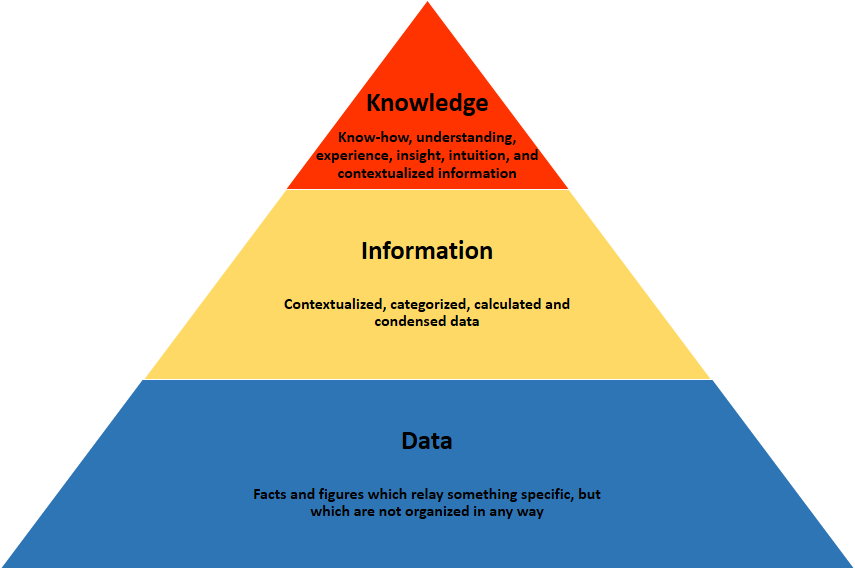
Data management is a very lexically challenged discipline. A major part of that lexical challenge is the terms data, information, and knowledge. These three terms are often misused, abused, and used interchangeably to the point that their real meaning is often unclear. These three terms must be formally defined and consistently used to begin resolving the lexical challenge and creating a formal data management profession.

Data

Data are the individual facts that are out of context, have no meaning, and are difficult to understand. They are often referred to as raw data. The term data is plural, equivalent to facts, while datum is singular, equivalent to a fact. Although some people continue to use the term data as singular, a comprehensive, denotative definition of data in the singular form, beginning with Data is not available. Most definitions of data in the singular are really definitions of a data resource.

Data could be considered an irregular noun, like deer or sheep, where the meaning is in the context. Data could be used to represent an individual fact the same as datum, and data could be used to represent a set of facts. However, the data management discipline has enough lexical challenge without treating data as an irregular noun. Therefore, datum is singular and data is plural.

Data in context are individual facts that have meaning and can be readily understood. They are the raw facts wrapped with meaning, but they are not yet information. Datum in context is a single fact wrapped with meaning.

Information

Information is a set of data in context with relevance to one or more people at a point in time or for a period of time. Information is more than data in context it must have relevance and a time frame. Information is considered to be singular.

Knowledge

Knowledge is cognizance, cognition, the fact or condition of knowing something with familiarity gained through experience or association. It’s the acquaintance with or the understanding of something, the fact or condition of being aware of something, or apprehending truth or fact. Knowledge is information that has been retained with an understanding about the significance of that information. Knowledge includes something gained by experience, study, familiarity, association, awareness, and/or comprehension.

Knowledge can be either tacit or explicit. Tacit knowledge, also known as implicit knowledge, is the knowledge that a person retains in their mind. It’s relatively hard to transfer to others and to disseminate widely.  Explicit knowledge, also known as formal knowledge, is knowledge that has been codified and stored in various media, such as books, magazines, tapes, presentations, and so on, and is held for mankind, such as in a reference library or on the web. It is readily transferable to other media and capable of being readily disseminated.

Organizational knowledge is information that is of significance to the organization, is combined with experience and understanding, and is retained by the organization. It’s information in context with respect to understanding what is relevant and significant to a business issue or business topic what is meaningful to the business. It’s analysis, reflection, and synthesis about what information means to the business and how that information can be used. It’s a rational interpretation of information that leads to business intelligence.

Knowledge management is the management of an environment where people generate tacit knowledge, render it into explicit knowledge, and feed it back to the organization. The cycle forms a base for more tacit knowledge, which keeps the cycle going in an intelligent learning organization. It’s an emerging set of policies, organizational structures, procedures, applications, and technology aimed toward increased innovation and improved decisions. It’s an integrated approach to identifying, sharing, and evaluating the organization’s information. It’s a culture for learning where people are encouraged to share information and best practices to solve business problems.

Some people have misperceptions of information. One misperception is that information is the same as data in context. Whenever raw data are wrapped with meaning, those data become information. However, if information is considered to be data in context, then the question becomes what are the terms for information that is relevant and timely and information that is not relevant and timely?

The answer might lead to relevant information and non-relevant information. However, only relevant information leads to knowledge and non-relevant information does not lead to knowledge.  Therefore, raw data are wrapped with meaning to become data in context, which can become either relevant or non-relevant information. Only relevant information can become knowledge.

Another misperception is that information is any summary data or derived data. That misperception is not valid because whether data are primitive or derived, they are still data.  They have not yet become relevant or timely and, therefore, are not yet information.

If data in context are not relevant or timely, then they are not information. However, data may not be relevant or timely to one person, but could be relevant and timely to another person. Therefore, the definition of information can be expanded.  Specific information is a set of data in context that is relevant and timely to one or more people at a point in time or for a period of time. General information is a set of data in context that could be relevant to one or more people at a point in time or for a period of time.

Now that these terms are defined, the data-information-knowledge cycle can be defined. The data-information-knowledge cycle is the cycle from data, to data in context, to relevant information (specific or general), to knowledge, and back to data when that information or knowledge is stored, as shown in the diagram below.

Many people want to belabor the issue, but when information and knowledge are stored, they become part of the organization’s data resource and are managed according to formal data resource management concepts, principles, and techniques. Whether those data were once raw data, specific or general information, or knowledge makes no difference. Everything stored is part of the organization’s data resource, is considered data, and is formally managed as data.

When specific information and general information are stored, they become part of the data resource, they are treated as data, and are managed like any other data. Those data will only become information again when they become relevant and timely. The same is true for knowledge.  Stored knowledge becomes data and is managed like any other data. Those data will only become knowledge again when they are extracted as information, combined with experience, and retained.

A book on the shelf, a document on a server, raw data, a stored form or document, a stored report, and so on, are all considered data and managed as part of the organization’s data resource.  The storage of information or knowledge is still data to other people, and may or may not become information or knowledge to those people.

Looking at the situation the other way around, all information and knowledge were data at one time, whether or not they were stored in the organization’s data resource. By becoming relevant and timely, those data became information. By being combined with business experience and retained, that information becomes knowledge.

Based on these definitions, there is no information resource, because timeliness and relevancy cannot be managed or stored. There can be information resources (plural) which is the set of resources used to produce information from data and present that information to the business.  Knowledge resource is the tacit and implicit knowledge within an organization or available to the organization, and most of that knowledge is stored in the human resource.

Information overload is a misused term that is part of the lexical challenge because it is unclear. Information assimilation overload occurs when information is coming too fast for a person to absorb and understand. A certain amount of time is needed for information to be assimilated, and the delivery needs to match that assimilation rate.

Disparate information is any information that is disparate with respect to the recipient. It could result from information acquired from different sources that are organized differently, or it could result from information created from disparate data that provide conflicting information, or it could be conflicting information.

Information paranoia is the fear of not knowing everything that is relevant or could be relevant at some point in time. It’s a situation where a person is obsessed with gaining information for information’s sake.

Non-information is a set of data in context that is not relevant or timely to the recipient. Data overload is a deluge of data or data in context coming at a recipient, but is not relevant and timely. It’s a deluge of non-information that is not wanted by the recipient.

Data management professionals must establish proper terms that are comprehensively and denotatively defined, and must use them properly. The development and proper use of basic terms is one step toward resolving the lexical challenge in data resource management and creating a formal data management profession.

Information Technology

Information Technology (IT) refers to the use of computers, software, networks, communication systems, and digital tools to store, process, transmit, and manage information. It encompasses all technologies involved in handling data electronically and plays a central role in modern business environments. IT includes components such as computer hardware, software applications, databases, cloud systems, telecommunications, the internet, and cybersecurity mechanisms. It enables organizations to process large amounts of information efficiently and make data-driven decisions.

In the context of international business, Information Technology has transformed how companies operate across borders. It facilitates global communication, real-time data sharing, online transactions, digital marketing, supply chain coordination, and remote collaboration. IT also supports e-commerce, international finance, outsourcing, and virtual business operations, making global integration faster and more efficient.

The adoption of IT reduces costs, increases productivity, and improves decision-making through automation and analytics. With tools like ERP systems, CRM platforms, artificial intelligence, and cloud computing, companies can manage complex international operations more effectively. Overall, IT acts as the backbone of global business connectivity, enabling companies to operate in a digitally-driven, competitive, and interconnected world economy.

Features of Information Technology (IT)

  • Speed and Efficiency

Information Technology enables rapid processing, storage, and transmission of data. Tasks that once required hours or days can now be completed in seconds. High-speed networks, advanced processors, and automation tools allow businesses to improve productivity, make faster decisions, and enhance customer service. Speed is one of the most transformative features of IT, enabling global operations and real-time communication across borders.

  • Accuracy and Reliability

IT systems minimize human errors by automating processes and standardizing data handling. Computer-based operations are highly accurate and dependable, especially in calculations, data analysis, and record management. Reliable systems ensure consistency in operations, support better planning, and reduce the risk of costly mistakes in business transactions or decision-making.

  • Automation of Processes

IT enables the automation of repetitive and routine tasks, reducing manual effort and increasing efficiency. Automation tools like ERP, CRM, robotics, and AI-driven systems streamline workflows, minimize operational costs, and free employees to focus on strategic work. Automation improves scalability and helps organizations operate with greater precision and control.

  • Connectivity and Communication

One of IT’s strongest features is seamless connectivity through the internet, wireless networks, and digital platforms. It allows businesses to interact with customers, suppliers, and employees across the world instantly. Tools like email, video conferencing, cloud platforms, and social media support collaborative work environments and improve international communication.

  • Storage and Retrieval of Data

Modern IT systems offer vast storage capacity and easy retrieval of data. Cloud computing, databases, and data warehouses enable organizations to store large volumes of information securely. Quick access to data aids decision-making, improves customer service, and enhances operational efficiency. Backup and recovery systems also ensure data safety and continuity.

  • Integration of Business Functions

IT integrates various business functions—finance, marketing, operations, HR—into a single unified system. Tools like ERP and MIS allow smooth information flow across departments, reducing duplication of work and improving coordination. Integration leads to better resource management, transparency, and overall organizational efficiency.

  • Innovation and Flexibility

Information Technology fosters innovation by providing tools for research, creativity, and new product development. It also makes business operations flexible, enabling remote work, cloud-based operations, online platforms, and quick adaptation to changing market conditions. IT-driven flexibility improves competitiveness and allows businesses to respond effectively to global challenges.

  • Security and Data Protection

Modern IT systems include advanced security features like encryption, firewalls, authentication, and intrusion detection. These protect sensitive information from cyber threats, fraud, and unauthorized access. Strong IT security is essential for maintaining trust, compliance, and reliability in international business operations.

Types of Information Technology

1. Hardware Technology

This includes physical components such as computers, servers, routers, storage devices, and peripherals. Hardware forms the foundation for all IT systems and supports data processing and communication.

2. Software Technology

Software consists of programs and applications that run on hardware. It includes operating systems, productivity tools, enterprise software (ERP, CRM), and specialized applications used in industries for management and automation.

3. Networking Technology

Networking refers to systems that enable connectivity between devices. It includes LAN, WAN, internet technologies, routers, switches, and communication protocols. Networking is essential for information sharing and collaboration.

4. Database Technology

Databases store, manage, and retrieve structured information. Technologies like SQL, NoSQL, and data warehouses help organizations maintain customer data, financial records, inventory, and operational information efficiently.

5. Internet and Web Technology

This includes web browsers, websites, cloud platforms, e-commerce systems, search engines, and online communication tools. Web technology enables global reach and drives digital business activities.

6. Cloud Computing

Cloud technology allows storage, processing, and software delivery over the internet. It provides flexibility, scalability, and cost-efficiency, enabling businesses to operate without owning physical infrastructure.

7. Artificial Intelligence and Automation

AI technologies include machine learning, neural networks, robotics, and expert systems. They enable intelligent decision-making, predictive analytics, and automation of complex tasks.

8. Cybersecurity Technology

Cybersecurity tools protect data and systems from unauthorized access, cyberattacks, and malware. These technologies include firewalls, encryption, antivirus software, and intrusion detection systems.

9. Communication Technology

This includes mobile technology, VoIP, video conferencing, social media platforms, and messaging systems. These tools support global communication and collaboration.

Importance of Information Technology

  • Enhances Business Efficiency

Information Technology improves the efficiency of business operations by automating routine tasks, streamlining workflows, and reducing manual intervention. IT systems allow faster processing of transactions, accurate record-keeping, and seamless communication between departments. This leads to increased productivity, optimized resource utilization, and reduced operational costs. By enhancing efficiency, IT enables businesses to respond quickly to market demands and maintain competitiveness in a rapidly evolving global environment.

  • Facilitates Communication

IT enables fast and reliable communication within and across organizations. Tools like emails, video conferencing, messaging apps, and collaboration platforms allow instant information exchange, bridging geographical distances. Efficient communication enhances coordination among employees, management, and stakeholders, enabling real-time decision-making. In international business, IT ensures smooth interaction with global partners, suppliers, and customers, supporting operational consistency, strategic planning, and relationship management.

  • Supports Decision-Making

Information Technology provides access to real-time data, analytics, and reporting tools that assist in informed decision-making. Business Intelligence (BI) systems, dashboards, and data visualization enable managers to evaluate trends, forecast outcomes, and identify opportunities or risks. Timely and accurate information improves strategic planning, reduces uncertainty, and allows businesses to make data-driven decisions that enhance efficiency, profitability, and long-term sustainability in competitive markets.

  • Promotes Innovation

IT fosters innovation by providing tools for research, product development, and process improvement. Cloud computing, AI, IoT, and data analytics enable businesses to develop new products, optimize services, and explore innovative business models. IT allows experimentation with minimal risk, accelerates innovation cycles, and enhances creativity. By integrating advanced technology, companies can differentiate themselves in the global marketplace and respond effectively to evolving consumer demands.

  • Expands Market Reach

Through IT, businesses can access global markets efficiently. E-commerce platforms, digital marketing, and online customer support systems enable companies to reach customers beyond geographic limitations. IT facilitates international trade, online sales, and marketing campaigns targeting diverse demographics. Expanding market reach increases sales opportunities, brand visibility, and competitiveness, enabling small and large organizations to participate effectively in the global economy.

  • Enhances Customer Service

IT improves customer service by enabling quick response, personalized interactions, and efficient complaint resolution. Customer Relationship Management (CRM) systems collect and analyze customer data to offer tailored solutions, loyalty programs, and timely communication. Enhanced service quality strengthens customer satisfaction, retention, and trust. In a global business environment, IT-driven customer service ensures competitive advantage and helps companies build long-term relationships with clients across different regions.

  • Facilitates Cost Reduction

IT contributes to cost reduction by optimizing resource allocation, automating processes, and minimizing errors. Cloud computing reduces infrastructure expenses, while digital platforms lower marketing and communication costs. Efficient inventory management, supply chain automation, and data-driven operations prevent wastage and reduce overheads. By lowering operational expenses, IT allows businesses to increase profitability while maintaining quality and competitiveness in both domestic and international markets.

  • Supports Knowledge Management and Learning

Information Technology enables effective knowledge management by storing, organizing, and sharing organizational information. Employees can access learning resources, training modules, and best practices through IT systems, improving skills and decision-making capabilities. Knowledge management ensures that critical information is available for future use, fosters innovation, and enhances organizational learning. By leveraging IT for knowledge sharing, businesses maintain agility, competitiveness, and continuous improvement in a dynamic global environment.

Challenges of Information Technology

  • High Implementation Costs

One major challenge of IT is the high cost of implementation. Purchasing hardware, software, and network infrastructure requires significant financial investment. Additionally, training employees and maintaining IT systems adds to the expenses. Small and medium enterprises (SMEs) may struggle to afford advanced technology solutions, limiting their ability to compete. High costs can act as a barrier to adopting modern IT systems, reducing overall operational efficiency and competitiveness in the market.

  • Rapid Technological Changes

The fast pace of technological advancement poses a challenge for organizations. IT systems can become outdated quickly, requiring frequent upgrades and replacements. Businesses must constantly adapt to new software, tools, and platforms to remain competitive. Failure to keep up with evolving technology can result in inefficiency, security vulnerabilities, and loss of market relevance. Managing rapid change requires continuous learning, investment, and strategic planning.

  • Cybersecurity Risks

IT systems are vulnerable to cyber threats, including hacking, malware, phishing, and data breaches. Cybersecurity risks can compromise sensitive business and customer information, leading to financial losses, reputational damage, and legal penalties. Protecting IT infrastructure requires advanced security measures, regular monitoring, and employee training. Organizations must prioritize cybersecurity to maintain trust, ensure compliance with data protection laws, and safeguard operations in the digital age.

  • Dependency on Technology

Heavy reliance on IT can create dependency risks. System failures, network outages, or software glitches can disrupt business operations, halt production, and affect customer service. Over-dependence may reduce human decision-making capabilities and problem-solving skills. Organizations must develop contingency plans, backup systems, and disaster recovery strategies to minimize operational risks and ensure business continuity in case of IT failures.

  • Privacy Concerns

The extensive use of IT raises concerns about data privacy. Collecting, storing, and analyzing large amounts of personal and corporate data can expose sensitive information to misuse or unauthorized access. Organizations must comply with privacy regulations such as GDPR and implement secure data handling practices. Failure to address privacy issues can lead to legal consequences, customer distrust, and reputational damage, impacting business sustainability.

  • Skill and Training Requirements

Effective utilization of IT requires skilled personnel. Employees need training to operate complex software, manage databases, and maintain networks. A lack of technical expertise can hinder IT adoption and reduce operational efficiency. Continuous employee development programs are necessary to keep up with technological advancements. Recruiting and retaining skilled IT professionals also presents challenges, especially in highly competitive labor markets.

  • Integration Challenges

Integrating new IT systems with existing infrastructure can be complex. Compatibility issues, data migration difficulties, and software conflicts may arise during implementation. Poor integration can lead to operational inefficiencies, data inconsistencies, and increased costs. Organizations must carefully plan IT integration, conduct testing, and coordinate across departments to ensure seamless adoption and maximum system efficiency.

  • Resistance to Change

Introducing IT in organizations often faces resistance from employees accustomed to traditional methods. Fear of job loss, unfamiliarity with technology, and reluctance to adopt new systems can hinder IT adoption. Overcoming resistance requires effective change management, training programs, and communication strategies. Engaging employees and demonstrating the benefits of IT are essential to achieve smooth implementation and maximize productivity gains.

Capital Gearing Ratio

Capital gearing ratio is a useful tool to analyze the capital structure of a company and is computed by dividing the common stockholders’ equity by fixed interest or dividend bearing funds.

Analyzing capital structure means measuring the relationship between the funds provided by common stockholders and the funds provided by those who receive a periodic interest or dividend at a fixed rate.

A company is said to be low geared if the larger portion of the capital is composed of common stockholders’ equity. On the other hand, the company is said to be highly geared if the larger portion of the capital is composed of fixed interest/dividend bearing funds.

formula:

Capital gearing ratio = (Common Stockholder^’ s equity)/(Fixed cost cost bearing funds)

In the above formula, the numerator consists of common stockholders’ equity that is equal to total stockholders’ equity less preferred stock and the denominator consists of fixed interest or dividend bearing funds that usually include long term loans, bonds, debentures and preferred stock etc.

Gearing (%) = (longterm Liabilities)/(Capital employed)

Notes:

Long-term liabilities include loans due more than one year + preference shares + mortgages

Capital employed = Share capital + retained earnings + long-term liabilities

How can the gearing ratio be evaluated?

  • A business with a gearing ratio of more than 50% is traditionally said to be “highly geared”.
  • A business with gearing of less than 25% is traditionally described as having “low gearing”
  • Something between 25% – 50% would be considered normal for a well-established business which is happy to finance its activities using debt.

It is important to remember that financing a business through long-term debt is not necessarily a bad thing! Long-term debt is normally cheap, and it reduces the amount that shareholders have to invest in the business.

What is a sensible level of gearing? Much depends on the ability of the business to grow profits and generate positive cash flow to service the debt. A mature business which produces strong and reliable cash flows can handle a much higher level of gearing than a business where the cash flows are unpredictable and uncertain.

Another important point to remember is that the long-term capital structure of the business is very much in the control of the shareholders and management. Steps can be taken to change or manage the level of gearing for example:

Reduce Gearing

Increase Gearing

Focus on Profit improvement Focus on growth
Repay long-term loans Convert short term debt into long term loans
Retain profits rather than pay Dividends Buy-back ordinary shares
Issue more Shares Pay increased dividends out of retained earning
Convert loans into equity Issue preference shares or debentures

Creditors turnover Ratio

Accounts payable turnover ratio (also known as creditors turnover ratio or creditors’ velocity) is computed by dividing the net credit purchases by average accounts payable. It measures the number of times, on average, the accounts payable are paid during a period.  Like receivables turnover ratio, it is expressed in times.

Formula:

Accounts payable turnover Ratio = Net credit purchases / Average accounts payable

In above formula, numerator includes only credit purchases. But if credit purchases are not known, the total net purchases should be used.

Average accounts payable are computed by adding opening and closing balances of accounts payable (including notes payable) and dividing by two. If opening balance of accounts payable is not given, the closing balance (including notes payable) should be used.

Analysis

Since the accounts payable turnover ratio indicates how quickly a company pays off its vendors, it is used by supplies and creditors to help decide whether or not to grant credit to a business. As with most liquidity ratios, a higher ratio is almost always more favorable than a lower ratio.

A higher ratio shows suppliers and creditors that the company pays its bills frequently and regularly. It also implies that new vendors will get paid back quickly. A high turnover ratio can be used to negotiate favorable credit terms in the future.

Interpretation of Accounts Payable Turnover Ratio

The accounts payable turnover ratio indicates to creditors the short-term liquidity and, to that extent, the creditworthiness of the company. A high ratio indicates prompt payment is being made to suppliers for purchases on credit. A high number may be due to suppliers demanding quick payments, or it may indicate that the company is seeking to take advantage of early payment discounts or actively working to improve its credit rating.

A low ratio indicates slow payment to suppliers for purchases on credit. This may be due to favorable credit terms, or it may signal cash flow problems and hence, a worsening financial condition. While a decreasing ratio could indicate a company in financial distress, that may not necessarily be the case. It might be that the company has successfully managed to negotiate better payment terms which allow it to make payments less frequently, without any penalty.

The accounts payable turnover ratio depends on the credit terms set by suppliers. For example, companies that enjoy favorable credit terms usually report a relatively lower ratio. Large companies with bargaining power are able to secure better credit terms, resulting in a lower accounts payable turnover ratio (source).

Although a high accounts payable turnover ratio is generally desirable to creditors as signaling creditworthiness, companies should usually take advantage of the credit terms extended by suppliers, as doing so will help the company maintain a comfortable cash flow position.

As with most financial metrics, a company’s turnover ratio is best examined relative to similar companies in its industry. For example, a company’s payables turnover ratio of two will be more concerning if virtually all of its competitors have a ratio of at least four.

Current Ratio

The current ratio, also known as the working capital ratio, measures the capability of a business to meet its short-term obligations that are due within a year. The ratio considers the weight of total current assets versus total current liabilities. It indicates the financial health of a company and how it can maximize the liquidity of its current assets to settle debt and payables.  The Current Ratio formula (below) can be used to easily measure a company’s liquidity.

Current Ratio = Current Assets / Current Liabilities

What are Current Assets?

Current assets are resources that can quickly be converted into cash within a year’s time or less. They include the following:

  • Cash: Legal tender bills, coins, undeposited checks from customers, checking and savings accounts, petty cash
  • Cash equivalents: Corporate or government securities with 90 days or less maturity
  • Marketable securities: Common stock, preferred stock, government and corporate bonds with a maturity date of 1 year or less
  • Accounts receivable: Money owed to the company by customers and that is due within a year. This net value should be after deducting an allowance for doubtful accounts (bad credit)
  • Notes receivable: Debt that is maturing within a year
  • Other receivables: Insurance claims, employee cash advances, income tax refunds
  • Inventory: Raw materials, work-in-process, finished goods, manufacturing/packaging supplies
  • Office supplies: Office resources such as paper, pens, and equipment expected to be consumed within a year
  • Prepaid expenses: Unexpired insurance premiums, advance payments on future purchases

 What are Current Liabilities?

Current liabilities are business obligations owed to suppliers and creditors, and other payments that are due within a year’s time. This includes:

  • Notes payable: Interest and the principal portion of loans that will become due within one year
  • Accounts payable or Trade payable: Credit resulting from the purchase of merchandise, raw materials, supplies, or usage of services and utilities
  • Accrued expenses: Payroll taxes payable, income taxes payable, interest payable, and anything else that has been accrued for but an invoice is not received
  • Deferred revenue: Revenue that the company has been paid for that will be earned in the future when the company satisfies revenue recognition requirements

 Why Use the Current Ratio Formula?

This current ratio is classed with several other financial metrics known as liquidity ratios. These ratios all assess the operations of a company in terms of how financially solid the company is in relation to its outstanding debt. Knowing the current ratio is vital in decision-making for investors, creditors, and suppliers of a company. The current ratio is an important tool in assessing the viability of their business interest.

error: Content is protected !!