Public, Private, Co-operative Sectors Meaning, Role and Importance

Public Sectors

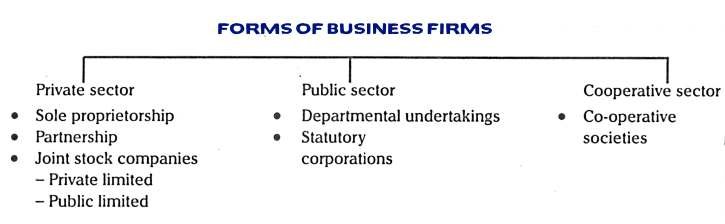
Public sector refers to government-owned or government-controlled organizations and entities that provide goods and services to the general public. These include government agencies, departments, and enterprises responsible for delivering essential services such as healthcare, education, transportation, and public safety. The public sector operates with the goal of serving the public interest and promoting the welfare of society.

Role of Public Sectors:

  • Service Provision:

Public sectors provide essential services such as healthcare, education, transportation, and utilities to ensure universal access and meet societal needs.

  • Infrastructure Development:

Public sectors invest in and maintain infrastructure such as roads, bridges, airports, and utilities to support economic growth and social development.

  • Regulation and Oversight:

Public sectors regulate industries and enforce laws to ensure fair competition, consumer protection, and environmental sustainability.

  • Employment Opportunities:

Public sectors create jobs and offer stable employment opportunities, contributing to economic stability and reducing unemployment rates.

  • Social Welfare:

Public sectors implement welfare programs, social security systems, and poverty alleviation initiatives to support vulnerable populations and promote social equity.

  • Investment in Research and Innovation:

Public sectors fund research and development initiatives, support innovation, and promote technological advancement to drive economic growth and improve quality of life.

  • Strategic Investments:

Public sectors make strategic investments in key sectors such as healthcare, education, and technology to foster long-term economic competitiveness and prosperity.

  • Public Goods Provision:

Public sectors supply public goods such as national defense, law enforcement, and disaster relief that benefit society as a whole and are not provided adequately by the private sector.

Importance of Public Sectors:

  • Service Provision:

Public sectors ensure the delivery of essential services such as healthcare, education, transportation, and utilities to all members of society, regardless of their ability to pay.

  • Social Equity:

Public sectors promote social equity by providing access to basic services and support to disadvantaged and marginalized populations, reducing inequalities and improving social welfare.

  • Economic Stability:

Public sectors play a vital role in stabilizing the economy through strategic investments, employment generation, and regulation of key industries, contributing to economic growth and resilience.

  • Infrastructure Development:

Public sectors invest in and maintain infrastructure that forms the backbone of economic activity, including roads, bridges, airports, and utilities, supporting productivity and connectivity.

  • Regulation and Oversight:

Public sectors regulate industries, enforce laws, and provide oversight to ensure fair competition, consumer protection, environmental sustainability, and public safety.

  • Innovation and Research:

Public sectors fund research and innovation initiatives, support scientific advancements, and promote technological progress, driving economic development and improving quality of life.

  • National Security:

Public sectors are responsible for ensuring national security through defense, law enforcement, and emergency response services, safeguarding the well-being and sovereignty of the nation.

  • Public Goods Provision:

Public sectors supply public goods such as defense, public safety, and environmental protection that benefit society as a whole and are not adequately provided by the private sector.

Private Sectors

Private Sector comprises privately-owned businesses and enterprises that operate for profit and are not under direct government control. It encompasses a wide range of industries and sectors, including manufacturing, retail, finance, technology, and services. Private sector businesses are driven by market forces and aim to maximize profits and shareholder value. They play a significant role in driving economic growth, creating employment opportunities, and fostering innovation and competition within the economy.

Role of Private Sectors:

  • Economic Growth:

Private sectors drive economic growth by investing capital, creating jobs, and fostering innovation, entrepreneurship, and productivity enhancements.

  • Employment Generation:

Private sectors are major sources of employment, offering job opportunities across various industries and sectors, contributing to poverty reduction and economic stability.

  • Innovation and Technology:

Private sectors spur innovation and technological advancement through research and development, leading to the creation of new products, processes, and services that drive progress and competitiveness.

  • Efficiency and Competition:

Private sectors promote efficiency and competition by operating in a market-driven environment, incentivizing businesses to improve quality, reduce costs, and innovate to meet consumer demands.

  • Wealth Creation:

Private sectors generate wealth by generating profits and returns on investments, stimulating economic activity, and contributing to the accumulation of capital for future growth and development.

  • Corporate Social Responsibility (CSR):

Private sectors engage in CSR initiatives, including philanthropy, environmental sustainability, and community development projects, demonstrating their commitment to social responsibility and contributing to the well-being of society.

Importance of Private Sectors:

  • Economic Growth:

Private sectors are primary drivers of economic growth through investments, entrepreneurship, and productivity improvements, leading to increased GDP and overall prosperity.

  • Job Creation:

Private sectors generate employment opportunities across various industries and sectors, reducing unemployment rates and providing livelihoods for millions of people worldwide.

  • Innovation and Technology:

Private sectors spur innovation and technological advancement by investing in research and development, leading to the creation of new products, services, and processes that drive progress and competitiveness.

  • Efficiency and Competition:

Private sectors operate in a competitive market environment, driving efficiency, quality improvement, and cost reduction to meet consumer demands and stay competitive.

  • Wealth Creation:

Private sectors generate wealth through profit generation, investment returns, and capital accumulation, fueling economic activity and creating opportunities for wealth creation and distribution.

  • Diversification and Specialization:

Private sectors promote diversification and specialization within the economy, leading to the development of niche markets, specialized skills, and competitive advantages that enhance overall economic resilience and competitiveness.

  • Global Trade and Investment:

Private sectors facilitate global trade and investment by expanding market access, fostering international business relationships, and driving cross-border economic integration, contributing to global economic interconnectedness and prosperity.

  • Inclusive Growth:

Private sectors play a vital role in promoting inclusive growth by providing opportunities for entrepreneurship, skills development, and social mobility, contributing to poverty reduction, social cohesion, and shared prosperity.

Co-operative Sector

Co-operative sector consists of enterprises owned and operated by their members, who pool resources and share ownership to meet common needs and objectives. These organizations operate on democratic principles, with members having equal voting rights regardless of their financial contributions. Cooperatives exist in various sectors, including agriculture, finance, retail, housing, and healthcare, and aim to promote economic participation, social cohesion, and community development through collective action and mutual support.

Role of Co-operative Sector:

  • Community Development:

Cooperatives empower communities by providing collective ownership and democratic control over essential services such as agriculture, finance, housing, and healthcare, leading to local economic development and social cohesion.

  • Economic Participation:

Cooperatives promote economic participation by allowing members to pool resources, share risks, and benefit collectively from their cooperative endeavors, fostering financial inclusion and self-reliance.

  • Job Creation:

Cooperatives generate employment opportunities by creating cooperative enterprises and supporting cooperative businesses, particularly in rural and marginalized areas where traditional employment opportunities may be limited.

  • Access to Services:

Cooperatives provide access to essential services such as banking, credit, insurance, healthcare, education, and utilities to underserved populations, improving their quality of life and enhancing social welfare.

  • Empowerment and Capacity Building:

Cooperatives empower members by promoting democratic decision-making, leadership development, and skills training, enabling individuals to actively participate in their economic and social development.

  • Sustainable Development:

Cooperatives promote sustainable development by adopting environmentally friendly practices, promoting resource conservation, and supporting sustainable agriculture, energy, and production methods.

  • Market Access and Fair Trade:

Cooperatives enable small-scale producers and marginalized groups to access markets, negotiate fair prices, and participate in fair trade practices, ensuring equitable distribution of benefits and reducing market vulnerabilities.

  • Social Responsibility:

Cooperatives embody principles of social responsibility and solidarity by prioritizing the well-being of their members, supporting community development initiatives, and contributing to social and environmental sustainability.

Importance of Co-operative Sector:

  • Community Empowerment:

Cooperatives empower communities by providing collective ownership, democratic control, and equitable distribution of benefits, fostering social cohesion, and promoting inclusive development.

  • Economic Participation:

Cooperatives enable members to actively participate in economic activities, pooling resources, sharing risks, and benefiting collectively from their cooperative endeavors, leading to financial inclusion and self-reliance.

  • Job Creation:

Cooperatives create employment opportunities, particularly in rural and marginalized areas, by establishing cooperative enterprises and supporting cooperative businesses, contributing to poverty reduction and economic stability.

  • Access to Essential Services:

Cooperatives provide access to essential services such as banking, credit, insurance, healthcare, education, and utilities to underserved populations, improving their quality of life and enhancing social welfare.

  • Promotion of Sustainable Development:

Cooperatives promote sustainable development by adopting environmentally friendly practices, supporting sustainable agriculture, energy, and production methods, and prioritizing social and environmental responsibility.

  • Market Access for Small Producers:

Cooperatives enable small-scale producers and marginalized groups to access markets, negotiate fair prices, and participate in fair trade practices, ensuring equitable distribution of benefits and reducing market vulnerabilities.

  • Social Responsibility:

Cooperatives embody principles of social responsibility and solidarity by prioritizing the well-being of their members, supporting community development initiatives, and contributing to social and environmental sustainability.

  • Resilience and Stability:

Cooperatives provide a resilient and stable economic model that is less prone to economic shocks and market fluctuations, fostering long-term sustainability and resilience in communities and economies.

Application of computer

Computers play a role in every field of life. They are used in homes, business, educational institutions, research organizations, medical field, government offices, entertainment, etc.

Home

Computers are used at homes for several purposes like online bill payment, watching movies or shows at home, home tutoring, social media access, playing games, internet access, etc. They provide communication through electronic mail. They help to avail work from home facility for corporate employees. Computers help the student community to avail online educational support.

Medical Field

Computers are used in hospitals to maintain a database of patients’ history, diagnosis, X-rays, live monitoring of patients, etc. Surgeons nowadays use robotic surgical devices to perform delicate operations, and conduct surgeries remotely. Virtual reality technologies are also used for training purposes. It also helps to monitor the fetus inside the mother’s womb.

Entertainment

Computers help to watch movies online, play games online; act as a virtual entertainer in playing games, listening to music, etc. MIDI instruments greatly help people in the entertainment industry in recording music with artificial instruments. Videos can be fed from computers to full screen televisions. Photo editors are available with fabulous features.

Industry

Computers are used to perform several tasks in industries like managing inventory, designing purpose, creating virtual sample products, interior designing, video conferencing, etc. Online marketing has seen a great revolution in its ability to sell various products to inaccessible corners like interior or rural areas. Stock markets have seen phenomenal participation from different levels of people through the use of computers.

Education

Computers are used in education sector through online classes, online examinations, referring e-books, online tutoring, etc. They help in increased use of audio-visual aids in the education field.

Government

In government sectors, computers are used in data processing, maintaining a database of citizens and supporting a paperless environment. The country’s defense organizations have greatly benefitted from computers in their use for missile development, satellites, rocket launches, etc.

Banking

In the banking sector, computers are used to store details of customers and conduct transactions, such as withdrawal and deposit of money through ATMs. Banks have reduced manual errors and expenses to a great extent through extensive use of computers.

Business

Nowadays, computers are totally integrated into business. The main objective of business is transaction processing, which involves transactions with suppliers, employees or customers. Computers can make these transactions easy and accurate. People can analyze investments, sales, expenses, markets and other aspects of business using computers.

Training

Many organizations use computer-based training to train their employees, to save money and improve performance. Video conferencing through computers allows saving of time and travelling costs by being able to connect people in various locations.

Arts

Computers are extensively used in dance, photography, arts and culture. The fluid movement of dance can be shown live via animation. Photos can be digitized using computers.

Science and Engineering

Computers with high performance are used to stimulate dynamic process in Science and Engineering. Supercomputers have numerous applications in area of Research and Development (R&D). Topographic images can be created through computers. Scientists use computers to plot and analyze data to have a better understanding of earthquakes.

Basis of Computer and their evaluation

Computer is an electronic device designed to process data and perform tasks according to instructions provided by a user or a program. It operates using hardware (physical components) and software (programs and instructions). Computers have revolutionized how we work, communicate, and perform daily tasks by enabling fast and accurate data processing.

Components of a Computer:

  1. Hardware: Includes input devices (keyboard, mouse), output devices (monitor, printer), storage devices (hard drive, SSD), and central processing unit (CPU), which is the brain of the computer.
  2. Software: Divided into system software (e.g., operating systems like Windows, macOS) and application software (e.g., Microsoft Office, web browsers).

Types of Computers: Computers range from personal computers (PCs) to supercomputers, serving diverse needs like personal use, business operations, and scientific research.

Functions of a Computer:

  1. Input: Accepting data via input devices.
  2. Processing: CPU processes data based on instructions.
  3. Storage: Data is stored in memory for future use.
  4. Output: Results are displayed via output devices.

Evaluation of Computer:

The evaluation of computers refers to their development and progression over time, transforming from basic calculating devices into highly sophisticated systems that have revolutionized modern life. This evolution can be broadly categorized into five generations:

First Generation (1940-1956): Vacuum Tubes

  • Used vacuum tubes for circuitry and magnetic drums for memory.
  • These computers were large, consumed a lot of power, and generated significant heat.
  • Examples: ENIAC, UNIVAC.

Second Generation (1956-1963): Transistors

  • Replaced vacuum tubes with transistors, making computers smaller, faster, and more reliable.
  • Emergence of high-level programming languages like COBOL and FORTRAN.
  • Example: IBM 7094.

Third Generation (1964-1971): Integrated Circuits (ICs)

  • Used ICs, which combined multiple transistors on a single chip, significantly improving processing power and efficiency.
  • Introduction of operating systems and user-friendly interfaces.
  • Example: IBM System/360.

Fourth Generation (1971-Present): Microprocessors

  • Development of microprocessors (entire CPU on a single chip) led to the advent of personal computers (PCs).
  • Introduction of graphical user interfaces (GUIs), networking, and internet connectivity.
  • Examples: Apple Macintosh, IBM PC.

Fifth Generation (Present and Beyond): Artificial Intelligence

  • Focused on artificial intelligence (AI) and machine learning (ML) to create intelligent systems capable of decision-making and natural language processing.
  • Examples include supercomputers like IBM Watson and AI-based technologies like self-driving cars.

Significance of Computers

Computers have evolved from simple calculators to advanced systems that influence nearly every aspect of human life. They are indispensable in fields like healthcare, education, research, and business. This evolution has been driven by the need for greater speed, efficiency, and user-friendliness.

Characteristics of Computer

Computers are essential tools in modern life due to their remarkable characteristics that enable them to perform complex tasks with speed, precision, and reliability.

1. Speed

Computers can process data and execute instructions at incredible speeds, measured in microseconds, nanoseconds, or even picoseconds. Tasks that would take hours or days for humans can be completed by computers in seconds. For instance, supercomputers perform trillions of calculations per second.

2. Accuracy

One of the most significant advantages of computers is their accuracy. They perform tasks without errors as long as the input data and instructions are correct. This precision is invaluable in critical applications such as scientific research, financial analysis, and medical diagnostics.

3. Automation

Computers can automatically perform tasks without requiring manual intervention once programmed. Automation reduces human effort and increases efficiency. For example, computers automate repetitive tasks like payroll processing or data entry.

4. Versatility

Computers are versatile and can perform a wide range of tasks. From word processing to complex simulations, they are used in diverse fields like healthcare, education, entertainment, and engineering. A single device can be used for multiple purposes, such as browsing, gaming, and data analysis.

5. Storage

Computers have immense storage capacity, enabling them to store vast amounts of data in a small physical space. With advancements in technology, storage devices like hard drives, SSDs, and cloud storage offer secure, scalable, and reliable solutions for data management.

6. Connectivity

Modern computers enable seamless connectivity through networks, including the internet. This characteristic facilitates communication, collaboration, and access to information globally. Applications like email, video conferencing, and file sharing depend on this connectivity.

7. Diligence

Unlike humans, computers do not suffer from fatigue, boredom, or distractions. They can perform tasks continuously without a drop in performance or accuracy. This makes them ideal for repetitive and time-consuming tasks.

8. Multitasking

Computers can perform multiple tasks simultaneously without compromising performance. For instance, users can run multiple applications, such as browsing the web, editing documents, and listening to music, all at the same time.

9. Scalability

Computers are highly scalable, both in terms of hardware and software. Users can upgrade components like memory, storage, and processing power or enhance functionality by installing new software to meet growing demands.

10. Communication

Computers enable communication through various technologies like emails, social media, and instant messaging. They facilitate real-time interaction and sharing of information, making them indispensable in personal and professional settings.

Classification of Computer

Computers are classified based on various parameters such as size, functionality, purpose, and performance. Understanding the classification of computers helps in selecting the right type of computer for specific tasks.

1. Supercomputers

Supercomputers are the most powerful and fastest computers designed for complex computations. They are used in tasks that require immense processing power, such as climate modeling, nuclear simulations, and space research. These machines can perform trillions of calculations per second and are equipped with thousands of processors working in parallel. Due to their high cost and complexity, supercomputers are primarily used by government agencies, research institutions, and large corporations.

Examples: IBM Summit, Cray XC50.

2. Mainframe Computers

Mainframe computers are large systems designed for bulk data processing. They are used by organizations like banks, insurance companies, and airlines to handle massive amounts of transactions simultaneously. Known for their reliability, scalability, and security, mainframes can support thousands of users and applications at the same time. They are often used in industries where uninterrupted performance and high processing speeds are critical.

Examples: IBM Z Series, Unisys ClearPath.

3. Minicomputers

Minicomputers, also known as mid-range computers, are smaller and less powerful than mainframes but still capable of supporting multiple users simultaneously. They are used in medium-sized businesses for tasks like database management, accounting, and inventory control. Minicomputers offer a balance between cost and performance, making them ideal for organizations that do not require the capabilities of a mainframe but need more power than a personal computer.

Examples: PDP-11, VAX.

4. Microcomputers (Personal Computers)

Microcomputers are designed for individual use and are the most common type of computer. They include desktops, laptops, tablets, and smartphones. These computers are versatile, affordable, and used for a wide range of tasks such as word processing, gaming, internet browsing, and multimedia editing. The microcomputer’s popularity stems from its adaptability and ease of use, making it suitable for both personal and professional applications.

Examples: Apple MacBook, Dell Inspiron.

5. Workstations

Workstations are high-performance computers designed for technical and scientific applications. They are equipped with advanced processors, larger memory, and enhanced graphics capabilities. Workstations are used by engineers, architects, and graphic designers for tasks like 3D modeling, video editing, and simulation. Unlike standard personal computers, workstations are built to handle resource-intensive applications and provide greater reliability and performance.

Examples: HP Z Series, Dell Precision.

6. Embedded Computers

Embedded computers are specialized systems integrated into other devices to perform specific tasks. They are not standalone devices and are designed to operate within a larger system, such as appliances, automobiles, and medical devices. Embedded computers are highly efficient and tailored for real-time operations, offering limited functionalities optimized for their specific applications.

Examples: Microcontrollers in washing machines, processors in cars.

7. Hybrid Computers

Hybrid computers combine the features of both analog and digital computers. They are used in applications that require real-time data processing and precise calculations, such as in hospitals for monitoring patient vitals or in scientific research for data modeling. Hybrid computers are less common but are highly specialized for tasks that demand both qualitative and quantitative data handling.

Examples: CAT scan machines, industrial automation systems.

8. Analog Computers

Analog computers process data represented in continuous physical forms such as electrical signals, temperature, or speed. They are used in applications requiring measurement and comparison, such as scientific experiments, engineering designs, and control systems. Analog computers are highly specialized and are often used in conjunction with digital systems for more complex operations.

Examples: Slide rules, oscilloscopes.

9. Digital Computers

Digital computers process data in binary format (0s and 1s). They are the most widely used type of computer due to their accuracy, versatility, and ability to store large amounts of data. Digital computers are used in various fields, including business, education, and healthcare, for tasks ranging from simple calculations to advanced simulations.

Examples: Personal computers, servers.

Compiler and Interpreter

Compiler

Compiler is a software program that translates high-level programming language code into machine code, which can be directly executed by a computer’s processor. It performs this task in several stages: lexical analysis, syntax analysis, semantic analysis, optimization, and code generation. The input (source code) is thoroughly checked for errors during the process, ensuring correctness and efficiency. Compilers produce executable programs, unlike interpreters, which execute code line by line. Popular examples of compilers include GCC for C/C++ and the Java Compiler for Java. They are essential for software development, as they bridge the gap between human-readable code and machine execution.

Functions of Compiler:

1. Lexical Analysis

The compiler begins by performing lexical analysis, which involves scanning the source code and breaking it down into smaller units known as tokens. These tokens can be keywords, operators, identifiers, constants, or symbols. Lexical analysis helps the compiler understand the structure and elements of the source code, converting it into a form suitable for further processing.

Example: In the statement int x = 10;, the tokens would be int, x, =, 10, and ;.

2. Syntax Analysis

After lexical analysis, the compiler performs syntax analysis (or parsing), where it checks the code’s syntax according to the language’s grammar rules. It builds a syntax tree (or abstract syntax tree, AST) that represents the hierarchical structure of the source code. If there are syntax errors, the compiler reports them, making it clear which parts of the code are not structured correctly.

Example: If a programmer writes int x = + 5;, the compiler will flag this as a syntax error.

3. Semantic Analysis

Semantic analysis checks the source code for logical consistency and ensures that the statements in the code make sense. It verifies that operations are valid (e.g., ensuring that a variable is used before it is declared, or checking type compatibility between operands). This step ensures the program has meaningful operations and complies with the language’s semantic rules.

Example: In the expression int x = "string";, the compiler will identify a type mismatch and flag it as an error.

4. Intermediate Code Generation

After syntax and semantic checks, the compiler generates intermediate code. This is a low-level code representation, which is not machine-specific but is closer to the final machine code than the original source code. The intermediate code is easier to optimize and can be translated to different machine architectures.

Example: A compiler might translate int x = 10 + 20; into an intermediate representation like ADD 10, 20, x.

5. Optimization

The optimization phase enhances the efficiency of the intermediate code without changing its functionality. The goal is to improve performance by reducing execution time and memory usage. This can involve eliminating redundant calculations, reordering instructions, or minimizing memory access.

Example: If a variable is calculated multiple times with the same value, the compiler might optimize it by storing the result in a temporary variable.

6. Code Generation

During code generation, the compiler translates the optimized intermediate code into machine code or assembly code specific to the target architecture. This machine code can be directly executed by the CPU. The code generation phase ensures that the program’s instructions correspond accurately to the processor’s instruction set.

Example: A simple instruction like x = y + z might be translated into assembly language instructions such as MOV R1, y; ADD R1, z; MOV x, R1.

7. Code Linking

In this phase, the compiler links the program’s components, such as functions, libraries, and external modules, into a single executable. The linker resolves addresses and ensures that all referenced functions or variables are correctly located in the final program. If there are missing dependencies or external references, the linker will flag an error.

Example: If the program calls an external function like printf(), the linker ensures that the correct library or object file is included in the executable.

8. Code Optimization (Final Optimization)

Final optimization focuses on improving the machine code produced in the previous stage. This can include loop unrolling, instruction reordering, and reducing the number of instructions. The aim is to make the code as efficient as possible in terms of speed and memory usage while maintaining its correctness.

Example: The compiler might optimize memory access patterns to avoid cache misses or reduce the number of instructions in a loop.

Interpreter

An interpreter is a program that directly executes instructions written in a high-level programming language without translating them into machine code beforehand. It processes the source code line-by-line, analyzing and executing each statement in real-time. Unlike compilers, which generate a separate executable file, an interpreter executes the code directly, which makes it slower for large programs. However, interpreters are useful for debugging and running scripts quickly. They are commonly used for languages like Python, JavaScript, and Ruby. Interpreters offer flexibility and ease of use, as they allow immediate execution without needing an intermediate compiled file.

Functions of  Interpreter:

1. Lexical Analysis

The interpreter starts with lexical analysis, which involves scanning the source code to break it into smaller components called tokens. Tokens are the fundamental building blocks of the language, such as keywords, identifiers, operators, and punctuation. This process enables the interpreter to understand the structure of the code and prepare it for further processing.

Example: In the expression int x = 10;, the tokens are int, x, =, 10, and ;.

2. Syntax Analysis

After lexical analysis, the interpreter performs syntax analysis (or parsing). In this stage, the interpreter checks if the code follows the correct grammatical structure according to the language’s syntax rules. The interpreter constructs a parse tree or abstract syntax tree (AST) that reflects the hierarchical relationships of expressions and statements in the code. Any syntax errors are reported at this point.

Example: If the code is int x = 10 + ;, the interpreter will flag the missing operand as a syntax error.

3. Semantic Analysis

Semantic analysis ensures that the source code makes logical sense. This phase involves checking the meaning and context of the code. The interpreter checks for issues like variable declaration before use, type mismatches, and valid operations on variables. It ensures that the logic of the program is sound and complies with the programming language’s semantic rules.

Example: In the statement int x = "hello";, the interpreter will detect a type mismatch error as it tries to assign a string to an integer.

4. Memory Management

The interpreter handles memory management, which involves allocating memory for variables, functions, and objects during execution. It dynamically manages memory at runtime, making sure that memory is allocated when variables are declared and deallocated when they are no longer needed. This enables the interpreter to execute code without the need for a separate memory management step.

Example: When a variable x is assigned a value, the interpreter allocates memory space for storing x’s value and frees it once it’s out of scope.

5. Execution of Instructions

The primary function of an interpreter is to execute instructions. It reads the code line-by-line, interprets it, and directly executes each command. The interpreter translates high-level code into machine-level instructions on the fly, meaning no intermediate file is created. This real-time execution makes it slower than compiled languages but useful for quick debugging and development.

Example: The interpreter will execute the line x = 10; by assigning the value 10 to the variable x.

6. Error Detection and Reporting

An interpreter performs real-time error detection while executing the code. As it encounters each line, the interpreter checks for syntax, semantic, or runtime errors. Unlike a compiler, which might only report errors after parsing the entire code, an interpreter identifies issues immediately during execution. It provides immediate feedback on errors, which is beneficial for debugging.

Example: If the code attempts to access an undefined variable, the interpreter will flag it and stop execution at the error point.

7. Interactive Execution

One of the key features of an interpreter is interactive execution, allowing users to run code interactively, especially in environments like REPL (Read-Eval-Print Loop). This function is particularly useful for scripting, testing, and debugging small code snippets. Users can modify and immediately test the code in real time, enhancing the development process.

Example: In an interactive Python shell, a user can type a line like x = 5, and the interpreter will immediately execute and return the result.

Generation of Computer Language

The generation of computer languages refers to the evolution of programming languages over time, with each generation introducing more powerful and user-friendly features. These generations are typically categorized from the earliest machine languages to the high-level languages used today. Each generation has marked a significant milestone in terms of abstraction, usability, and performance.

1st Generation: Machine Language (1940s1950s)

The first generation of computer languages is machine language, which is the lowest-level language directly understood by the computer’s central processing unit (CPU). Machine language consists entirely of binary code (0s and 1s) and represents raw instructions that the hardware can execute. Each instruction corresponds to a specific operation, such as loading data, performing arithmetic, or manipulating memory.

Characteristics:

  • Binary Code: Machine language is written in binary, making it very difficult for humans to write or understand.
  • Hardware-Specific: It is directly tied to the architecture of the computer, meaning that a program written for one machine cannot run on another without modification.
  • No Abstraction: There is no concept of variables, loops, or high-level constructs in machine language.

Example: A machine instruction for adding two numbers could look like 10110100 00010011 in binary code, representing an addition operation to the CPU.

2nd Generation: Assembly Language (1950s–1960s)

The second generation of computer languages is assembly language, which was developed to overcome the limitations of machine language. Assembly language uses symbolic representations of machine instructions, known as mnemonics. While still closely tied to the hardware, assembly language is more human-readable than machine language.

Characteristics:

  • Mnemonics: Instead of binary code, assembly uses symbols (e.g., MOV for move, ADD for addition) to represent operations.
  • Assembler: An assembler is used to translate assembly code into machine language so that it can be executed by the computer.
  • Low-Level: Assembly language is still hardware-specific, meaning that programs written in assembly language are not portable across different systems.

Example: In assembly language, the instruction to add two numbers could be written as ADD R1, R2, where R1 and R2 are registers.

3rd Generation: High-Level Languages (1960s–1970s)

Third generation of computer languages consists of high-level programming languages, such as Fortran, COBOL, Lisp, and Algol. These languages abstract away the complexities of machine code and assembly, allowing developers to write code using human-readable syntax that is independent of the computer hardware.

Characteristics:

  • Abstraction: High-level languages allow programmers to focus on logic and functionality rather than hardware-specific details.
  • Portability: Programs written in high-level languages can run on different hardware platforms, provided there is an appropriate compiler or interpreter.
  • More Complex Constructs: High-level languages support complex constructs such as variables, loops, conditionals, functions, and data structures.

Example: A simple addition operation in Fortran might look like this:

A = 10
B = 20
C = A + B

4th Generation: Fourth-Generation Languages (1980s–1990s)

Fourth-generation languages (4GLs) were developed to further simplify the programming process. These languages are closer to human language and are often used for database management, report generation, and business applications. They focus on automation and declarative programming, where the programmer specifies what should be done rather than how it should be done.

Characteristics:

  • Higher Abstraction: 4GLs allow developers to write even less code compared to 3GLs, with a focus on user-friendly syntax and more natural expressions.
  • Database-Driven: Many 4GLs are designed for building database applications (e.g., SQL).
  • Minimal Code: These languages often allow for writing complex tasks with fewer lines of code.

Example: SQL, a popular 4GL, is used to query and manage databases. A query to retrieve all records from a table might look like:

SELECT * FROM Employees;

5th Generation: Fifth-Generation Languages (1990s–Present)

Fifth generation of computer languages is focused on problem-solving and artificial intelligence (AI). These languages aim to make use of natural language processing (NLP) and advanced problem-solving techniques such as logic programming and machine learning. They are not primarily aimed at general-purpose programming but are designed to solve specific complex problems.

Characteristics:

  • Natural Language Processing: Fifth-generation languages often rely on the ability to understand and process human language.
  • Artificial Intelligence: These languages support advanced AI techniques like reasoning, learning, and inference.
  • Declarative Programming: These languages use a declarative approach, where the programmer specifies what the program should achieve, and the language decides how to achieve it.

Example: Prolog is a popular 5GL used in AI applications. It uses logical statements to represent facts and rules, such as:

father(john, mary).
father(mary, susan).

6th Generation: Evolution of AI-Based Languages (Future Vision)

The sixth generation of computer languages is largely speculative at this stage but is expected to evolve alongside quantum computing and more advanced artificial intelligence systems. These languages may incorporate elements like self-learning algorithms, augmented reality (AR), and genetic algorithms.

Characteristics (Speculative):

  • Quantum Computing: Integration with quantum computing for parallel processing and complex problem-solving.
  • Self-Adapting Systems: Software may evolve and adapt to new requirements automatically.
  • Human-Computer Collaboration: Future languages might enable closer collaboration between humans and computers in problem-solving.

Generation of Computer

The evolution of computers is categorized into five generations, each marked by significant technological advancements that revolutionized computing capabilities. From vacuum tubes to artificial intelligence, the journey of computers showcases continuous innovation and improvement.

1. First Generation (1940–1956): Vacuum Tube Technology

The first generation of computers relied on vacuum tubes for circuitry and magnetic drums for memory. These machines were enormous, consumed a lot of power, and generated significant heat. Programming was done using machine language, which made these computers difficult to operate and maintain.

Features:

  • Used vacuum tubes as the main component.
  • Consumed a large amount of electricity and required air conditioning.
  • Input was through punched cards, and output was printed.
  • Slow processing speeds and limited storage.

Examples:

  • ENIAC (Electronic Numerical Integrator and Computer)
  • UNIVAC (Universal Automatic Computer)

Limitations:

  • Bulky and expensive.
  • High failure rate due to the heat generated by vacuum tubes.

2. Second Generation (1956–1963): Transistor Technology

The second generation saw the replacement of vacuum tubes with transistors, which were smaller, faster, and more reliable. This innovation drastically reduced the size of computers and improved their efficiency. Assembly language replaced machine language, simplifying programming.

Features:

  • Transistors were used as the main component.
  • Smaller, more energy-efficient, and less heat-generating than the first generation.
  • Magnetic core memory for storage.
  • Batch processing and multiprogramming introduced.

Examples:

  • IBM 7094
  • UNIVAC II

Advantages:

  • More reliable and cost-effective.
  • Increased computational speed and reduced downtime.

3. Third Generation (1964–1971): Integrated Circuits (ICs)

The introduction of integrated circuits marked the third generation of computers. ICs allowed multiple transistors to be embedded on a single chip, which further reduced the size of computers and increased their processing power.

Features:

  • Use of ICs for faster and more efficient performance.
  • Smaller in size, consuming less power compared to previous generations.
  • Introduction of keyboards and monitors for input and output.
  • Operating systems for better management of hardware and software.

Examples:

  • IBM 360 Series
  • PDP-8

Impact:

  • Lowered the cost of computers, making them more accessible to businesses.
  • Paved the way for multiprogramming and time-sharing systems.

4. Fourth Generation (1971–Present): Microprocessors

The fourth generation introduced microprocessors, where thousands of ICs were integrated onto a single silicon chip. This innovation led to the development of personal computers (PCs), making computers accessible to individuals and small businesses.

Features:

  • Use of microprocessors as the core component.
  • Introduction of graphical user interfaces (GUIs).
  • Development of networking and the Internet.
  • Portable computers like laptops and handheld devices became common.

Examples:

  • Intel 4004 (first microprocessor)
  • IBM PC

Impact:

  • Revolutionized industries by making computers affordable and user-friendly.
  • Enabled the development of software for diverse applications like word processing, gaming, and spreadsheets.

5. Fifth Generation (Present and Beyond): Artificial Intelligence (AI)

The fifth generation focuses on the development of intelligent systems capable of learning, reasoning, and self-correction. These computers are based on AI technologies such as natural language processing, machine learning, and robotics.

Features:

  • Use of advanced technologies like quantum computing, AI, and nanotechnology.
  • Development of parallel processing and supercomputers.
  • Voice recognition and virtual assistants like Siri and Alexa.
  • Cloud computing and IoT (Internet of Things) integration.

Applications:

  • AI-driven tools in healthcare, finance, and education.
  • Real-time data analysis and decision-making.
  • Advanced robotics for automation and exploration.

Examples:

  • IBM Watson
  • Google DeepMind

Future Trends in Computing

As the fifth generation continues to evolve, emerging technologies like quantum computing and bio-computing are expected to shape the future. Quantum computers promise unparalleled processing power, while bio-computing explores the integration of biological and digital systems.

Inter conversion between number systems

As you know decimal, binary, octal and hexadecimal number systems are positional value number systems. To convert binary, octal and hexadecimal to decimal number, we just need to add the product of each digit with its positional value. Here we are going to learn other conversion among these number systems.

Decimal to Binary

Decimal numbers can be converted to binary by repeated division of the number by 2 while recording the remainder. Let’s take an example to see how this happens.

The remainders are to be read from bottom to top to obtain the binary equivalent.

4310 = 1010112

Decimal to Octal

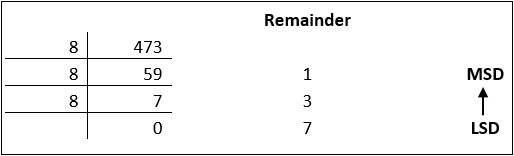
Decimal numbers can be converted to octal by repeated division of the number by 8 while recording the remainder. Let’s take an example to see how this happens.

Reading the remainders from bottom to top,

47310 = 7318

Decimal to Hexadecimal

Decimal numbers can be converted to octal by repeated division of the number by 16 while recording the remainder. Let’s take an example to see how this happens.

Reading the remainders from bottom to top we get,

42310 = 1A716

Binary to Octal and Vice Versa

To convert a binary number to octal number, these steps are followed:

  • Starting from the least significant bit, make groups of three bits.
  • If there are one or two bits less in making the groups, 0s can be added after the most significant bit
  • Convert each group into its equivalent octal number

Let’s take an example to understand this.

101100101012 = 26258

To convert an octal number to binary, each octal digit is converted to its 3-bit binary equivalent according to this table.

Octal Digit 0 1 2 3 4 5 6 7
Binary Equivalent 000 001 010 011 100 101 110 111

546738 = 1011001101110112

Binary to Hexadecimal

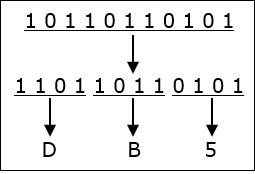
To convert a binary number to hexadecimal number, these steps are followed:

  • Starting from the least significant bit, make groups of four bits.
  • If there are one or two bits less in making the groups, 0s can be added after the most significant bit.
  • Convert each group into its equivalent octal number.

Let’s take an example to understand this.

101101101012 = DB516

To convert an octal number to binary, each octal digit is converted to its 3-bit binary equivalent.

Various fields of Computer

Computers have become indispensable in modern life, touching nearly every aspect of society. The vast capabilities of computers have led to their application in numerous fields, transforming industries and enhancing productivity.

1. Information Technology (IT)

IT encompasses the use of computers to manage, process, and store information. This field includes networking, database management, software development, and cybersecurity. IT professionals design and maintain the infrastructure that supports businesses, governments, and other organizations.

Applications:

  • Cloud computing platforms like AWS and Azure
  • IT support and helpdesk operations
  • Data management and business intelligence

2. Education

Computers have transformed education by enabling e-learning, online courses, and digital classrooms. Tools like learning management systems (LMS), virtual reality (VR), and simulations make learning interactive and accessible.

Applications:

  • Online learning platforms (e.g., Coursera, Khan Academy)
  • Virtual labs and simulations for practical training
  • Educational software and apps for students and teachers

3. Healthcare

In healthcare, computers play a crucial role in diagnosis, treatment, and patient management. From maintaining electronic health records (EHRs) to advanced imaging techniques, computers enhance the efficiency and accuracy of medical services.

Applications:

  • Diagnostic tools and medical imaging systems
  • Telemedicine for remote consultations
  • Robotic-assisted surgeries

4. Business and Finance

Computers streamline business operations, improve decision-making, and enhance customer experiences. In finance, they are essential for managing transactions, risk analysis, and fraud detection.

Applications:

  • Customer relationship management (CRM) systems
  • Online banking and mobile payment systems
  • Stock market analysis and trading algorithms

5. Entertainment and Media

The entertainment industry relies heavily on computers for content creation, distribution, and streaming. Media production tools and video editing software enable the development of high-quality content.

Applications:

  • Special effects and animation in movies
  • Video games and virtual reality experiences
  • Streaming platforms like Netflix and YouTube

6. Science and Research

In scientific research, computers are used for data analysis, simulations, and modeling. They assist researchers in solving complex problems and exploring new frontiers.

Applications:

  • Genome sequencing and bioinformatics
  • Climate modeling and weather forecasting
  • Space exploration and astronomical simulations

7. Transportation

Computers are critical in managing modern transportation systems, ensuring safety and efficiency. They are used in navigation, traffic control, and vehicle automation.

Applications:

  • GPS navigation and route planning
  • Autonomous vehicles and drones
  • Airline reservation and scheduling systems

8. Defense and Security

In defense, computers support surveillance, communication, and strategic operations. Advanced systems are used for cybersecurity and to protect sensitive information from cyber threats.

Applications:

  • Missile guidance and radar systems
  • Military simulations and training
  • Cybersecurity solutions to prevent data breaches

9. Artificial Intelligence and Machine Learning (AI/ML)

AI and ML represent the forefront of computer technology. These fields focus on developing intelligent systems that can learn, reason, and adapt.

Applications:

  • Natural language processing (e.g., chatbots like ChatGPT)
  • Image recognition and facial recognition systems
  • Predictive analytics for business and healthcare

10. Engineering and Manufacturing

Computers revolutionize engineering and manufacturing by automating processes and enabling precision. CAD (Computer-Aided Design) and CAM (Computer-Aided Manufacturing) are widely used.

Applications:

  • 3D modeling and printing
  • Robotics and automation in production lines
  • Quality control and testing

11. Gaming and Virtual Reality

The gaming industry leverages high-performance computers to create immersive experiences. Virtual reality (VR) and augmented reality (AR) are becoming popular for gaming and training.

Applications:

  • Multiplayer online games and simulations
  • VR-based training programs for industries
  • AR apps for retail and education

12. Social Media and Communication

Computers enable global communication through social media platforms, email, and messaging apps. These tools have transformed how people connect and share information.

Applications:

  • Platforms like Facebook, Instagram, and LinkedIn
  • Video conferencing tools like Zoom and Google Meet
  • Blogging and content-sharing websites
error: Content is protected !!