Category: Bangalore University B.com Notes
 by
by HR6.5 Labour Welfare and Social security
| Unit 1 Social & Labour Welfare [Book] | ||
| Social Welfare Concept, Scope | VIEW | |
| Labour Welfare Concept, Scope | VIEW | VIEW |
| Philosophy of Labour Welfare | VIEW | |
| Principles of Labour Welfare | VIEW | |
| Indian Constitution and Labour Welfare | VIEW | |
| Labour Welfare Policy and Five Year Plans | VIEW | |
| Historical Development of Labour Welfare in India | VIEW | VIEW |
| Unit 2 Managing Quality and Productivity [Book] | ||
| Alternative work arrangements | VIEW | |
| Using quality circle programs | VIEW | |
| Attitude surveys | VIEW | VIEW |
| Total Quality Management programs | VIEW | |
| Creating self-directed teams | VIEW | |
| Extending participative decision making | VIEW | |
| HR and Business Process Reengineering | VIEW | |
| Unit 3 Indian Labour Organization [Book] | |
| Indian Labour Organization | VIEW |
| Impact of ILO on Labour Welfare in India | VIEW |
| Agencies of Labour Welfare and their Roles | VIEW |
| Labour Welfare Programmes: Statutory and Non-Statutory | VIEW |
| **Approaches to Employee Welfare | VIEW |
| Extra Mural and Intra Mural | VIEW |
| Welfare Centers | VIEW |
| Welfare Officer Role, Status and Functions | VIEW |
| Unit 4 Social Security [Book] | ||
| Social Security Concept and Scope | VIEW | VIEW |
| Social Assistance and Social Insurance | VIEW | |
| Development of Social Security in India | VIEW | |
| Social Security measures for Industrial Employees | VIEW | VIEW |
| Unit 5 Labour Administration [Book] | |
| Labour Administration | VIEW |
| Evolution of Machinery for Labour Administration | VIEW |
| Central Labour Administrative Machinery in India | VIEW |
| Labour Administration in India | VIEW |
| Director General of Employment and Training | VIEW |
| Director General of Factory Advice Service | VIEW |
| Provident Fund Organization, ESI Schemes | VIEW |
| Central Board for Worker’s education | VIEW |
HR5.6 Strategic Human Resource Management
| Unit 1 Introduction to Strategic HRM {Book} | |||
| Strategic HRM | VIEW | VIEW | VIEW |
| Strategic role of HRM | VIEW | ||
| Planning Strategic HR policies | VIEW | ||
| Implementing Strategic HR policies | VIEW | ||
| HR Strategies to increase firm performance | VIEW | ||
| Unit 2 Investment Perspectives of HR {Book} | |
| Investment Perspectives of HR | VIEW |
| Investment Consideration | VIEW |
| Investments in Training and Development | VIEW |
| Investment Practices for Improved Retention | VIEW |
| Investments Job secure work courses | VIEW |
| Nontraditional investment Approaches | VIEW |
| Unit 3 Managing Strategic Organization {Book} | ||
| Managing Strategic Organizational renewal | VIEW | |
| Managing change and OD | VIEW | VIEW |
| instituting TQM Programmes | VIEW | |
| Creating Team based Organizations | VIEW | |
| HR and Business Process Reengineering (BPR) | VIEW | |
| Flexible work arrangement | VIEW | |
| Unit 4 Establishing Strategic Plans {Book} | ||
| Establishing Strategic pay plans, Determining periods, Establishing periods | VIEW | VIEW |
| Pricing Managerial and professional jobs | VIEW | |
| Compensation trends | VIEW | |
| Objectives of international Compensation | VIEW | |
| Approaches to international Compensation | VIEW | |
| Issues related to Double taxation | VIEW | |
| Unit 5 Global HRM {Book} | ||
| Managing Global Human Resources, HR and the internationalization of business | VIEW | |
| Improving international Assignments through selections | VIEW | |
| Training and Maintaining International Employees | VIEW | |
| Developing international Staff and Multinational Teams | VIEW | |
| Multinational, Global, and Transnational Strategies | VIEW | VIEW |
| Strategic Alliances | VIEW | |
| Sustainable Global Competitive Advantage | VIEW | VIEW |
| Globally Competent Managers | VIEW | VIEW |
| Location of Production Facilities | VIEW | VIEW |
HR5.5 Performance Management
| Unit 1 Introduction to Performance Management [Book] | ||
| Performance Management | VIEW | VIEW |
| Performance Evaluation | VIEW | |
| Evolution of Performance Management | VIEW | |
| Definitions and Differentiation of Terms Related to Performance Management | VIEW | |
| What a Performance Management System Should Do | VIEW | |
| **Pre-Requisites of Performance Management | VIEW | |
| Importance of Performance Management | VIEW | |
| Linkage of Performance Management to Other HR Processes | VIEW | |
| Unit 2 Process of Performance Management [Book] | ||
| Overview of Performance Management Process | VIEW | VIEW |
| Performance Management Process | VIEW | |
| Performance Management Planning Process | VIEW | |
| Mid-cycle Review Process, End-cycle Review Process | VIEW | |
| Performance Management Cycle at a Glance | VIEW | |
| Unit 3 Mechanics of Performance Management Planning and Documentation [Book] | |
| The Need for Structure and Documentation | VIEW |
| Manager’s, Employee’s Responsibility in Performance Planning Mechanics and Documentation | VIEW |
| Mechanics of Performance Management Planning and Creation of PM Document: | VIEW |
| Performance Appraisal: Definitions and Dimensions of PA, Limitations | VIEW |
| Purpose of Performance Appraisal and Arguments against Performance Appraisal, Importance of Performance Appraisal | VIEW |
| Characteristics of Performance Appraisal | VIEW |
| Performance Appraisal Process | VIEW |
| Unit 4 Performance Appraisal Methods [Book] | |
| Performance Appraisal Methods | VIEW |
| Traditional Methods, Modern Methods, 360 models | VIEW |
| Performance Appraisal 720 models | VIEW |
| Performance Appraisal of Bureaucrats; A New Approach | VIEW |
| Unit 5 Issues in Performance Management [Book] | |
| Issues in Performance Management | VIEW |
| Role of Line Managers in Performance Management | VIEW |
| Performance Management and Reward Concepts | VIEW |
| Linking Performance to Pay a Simple System Using Pay Band | VIEW |
| Linking Performance to Total Reward | VIEW |
| Challenges of Linking Performance and Reward | VIEW |
| Facilitation of Performance Management System through Automation | VIEW |
| Ethics in Performance Appraisal | VIEW |
Safeguard Data Automated Backup and Recovery
Automated Backup
This feature allows the user to safeguard his company data. The Automated Backup or Auto Backup is a capability that automatically takes data backup in the background without any disturbance or affecting your work.
Auto Backup can be carried out by executing the following steps:
Go to Company Creation/Alteration screen of the required company.
Set Yes to Enable Auto Backup as shown:
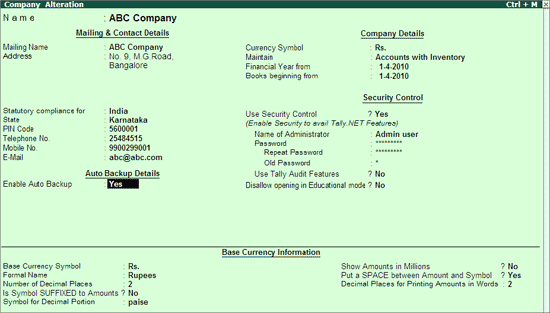
- Save the Company Creation/Alteration screen.
The data backup is stored in the data folder of the respective company.
E.g.: A company titled ABC Company has a folder 10009 located in C:\Tally.ERP9\Data. On enabling Auto Backup feature the backup file ABK.900 is created in C:\Tally.EPR9\Data\10009
Restoring Auto Backup Data
To restore the auto backup taken execute the following steps:
From the Gateway of Tally
- Press Ctrl + Alt + K.
- Restore Company on Disk screen appears.
- The Source field displays the data path of the company under Select Auto Backup to Restore screen. Press Enter.
- The List of Auto Backup(s) will list all the companies enabled for Auto Backup.
- Select the required company and press Enter.
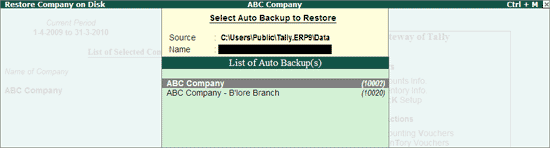
- The List of Auto Backup Versions screen appears listing the backup versions.
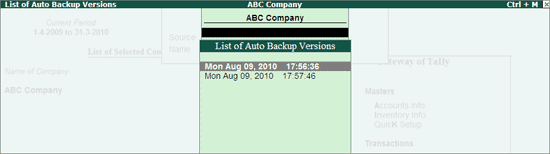
- Select the required version from the list and press Enter.
- The selected version of data backup is restored to the respective company folder.
- The auto backup utility prompts the user to overwrite the existing company.
- Press Y or click Yes to proceed with restoring the data.
- Press Alt + F1 to Shut the existing company.
- Select the restored company.
Tally ERP 9 Auditors Edition Introduction, Features, Characteristics
Tally is an ERP accounting software package that is used to record day to day business data of a company. The latest version of Tally is Tally ERP 9.
It is one of the most financial accounting systems used in India. For small and medium enterprises, it is complete enterprise software. It is a GST software with an ideal combination of function, control, and inbuilt customisability. It is the best accounting software. This software can integrate with other business applications like Inventory, Finance, Sales, Payroll, Purchasing, etc.
Features of Tally
- Tally is also called multi-lingual tally software because Tally ERP 9 supports multi-languages. In Tally, accounts can be maintained in one language, and reports can be viewed in other languages.
- Tally is largely considered the best because it is easy to use, has no codes, robust and powerful, executes in real-time, operates at high speed, and has full-proof online help.
- Using the Tally, you can create and maintain the accounts up to 99,999 companies.
- Tally has the synchronization feature, so the transaction which is maintained in multiple locations offices can be updated automatically.
- Tally is used to generate consolidated financial statements as per the requirements of the company.
- Using the feature of payroll, you can automate the employee records management.
- Tally can manage single or multiple groups.
- The feature of Tally customization makes the software suitable for distinctive business functions.
- Tally software is used to handle financial and inventory management, invoicing, sales and purchase management, reporting, and MIS.
Characteristics:
Separate Tracking:
This software helps to track the trading and non-trading accounts. It helps users to get the receipts, new bills and payments without any hassles.
Interest Calculation:
Tally software has a different transaction method that helps to customize the transaction process. The user can get a detailed report, after the transaction completion. The final report helps to get the balance amount that ought to receive.
Audit, Control and Budgeting:
Tally audit enables the user to have unlimited budgets and periods. With this support, a user can correct mistakes easily. A user can gain robust access control with high security.
Voucher Entry:
Using this software helps to identify the various business transaction details. Tally Classes in Chennai makes you more comfortable in accounting, use this opportunity and get a job in this field.
Billing details:
Tally accounting software enables users to handle billing information. It helps to allocate the payments regarding overdue and invoices. This helps to split the customers easily using billing data.
Interesting in Ledgers:
This software inculcates the multiple ledgers including Purchase Ledger, General Ledger and Sales Ledger. This ledger helps to create records and enter data simultaneously.
Advantages of Tally
Payroll management: Several calculations that need to be made while disbursing salary to employees. Tally is used to maintain the financial record of the company that includes net deduction, net payment, bonuses, and taxes.
Data reliability and security: In Tally, the entered data is reliable and secure. There is no scope of entering the data, after being entered into the software.
Management in the banking sector: Banks use Tally to manage various user accounts, and also calculate interests on deposits. Tally support ensures ease in the calculation and makes banking simpler. Tally Support can make the calculation easy and banking simpler.
Ease of maintaining a budget: Tally is used to maintain the budget. Tally is used to help the companies to work and manage expenses by keeping in mind the total budget which is being allotted.
Regulation of data across geographical locations: Tally software is used to manage the data of an organization globally. Tally can bring together all branches of the company and makes the common calculation for it at large. So no matter which location a company’s employee has access, it will be uniform throughout.
Simple tax returns filing: Tax GST is used to ensure that the company complies with all GST norms. Tax GST takes care of service tax returns, excise tax, VAT filing, TDS return, and profit and loss statement for all small businesses.
Remote Access of Data: In Tally, employees can access the financial data using the unique User ID and password. The logging and access of data can be done by sitting at the comforts of one’s office or house.
Audit tool for compliance: It acts as an audit tool. It is used to carry out regular audits of companies. It does a thorough compliance check towards the financial year beginning and ensures that all the monetary transactions are smoothly being carried out.
Quick Access to Documents: Tally can save all invoices, receipts, bills, vouchers in its archive folder. Using the Tally, we can quickly access any of the previously stored documents. We can immediately retrieve all the billing related files.
Tally.Net: Features, Requirements for remote connectivity Access information via SMS
Tally.NET is a technology within Tally. ERP 9 which powers revolutionary capabilities such as continuous upgrades & updates, central consolidation of branch data, central deployment of Customisation, instant support from within your Tally. ERP 9 and many more that enhances your business performance.
Tally.NET Services
On a broad level, Tally. ERP 9 comprises of:
- The product itself
- A set of capabilities (enabled via the Internet) by a service called Tally.NET
This ‘two component’ architecture was chosen as this delivers an unparalleled model of a host of services as below:
(Tally.NET Services Annual Subscription is included in your Tally. ERP 9 for the first one year. Subsequently you are advised to subscribe to avail the following services at a nominal charge of 20% of the then prevailing product price)
(a) Remote Access Services
Your business data stays with you locally, and is never stored on Tally.NET servers or on systems accessing that data via Remote Access.
(b) Integrated Support Services: Support Centre
Integrated within Tally. ERP 9 and Shoper 9, this new feature enables the users to report and track their queries from within the product. You can directly target the query to your regular Tally Service Provider (or any other Tally Service Provider, if you are making your first query) and get responses quickly. These can even be reported and viewed remotely. You can then use the reference number to escalate the issue to Tally’s Customer Centre in case you need to.
Over time, this capability will be extended to cover your Chartered Accountant or other business associates & friends using Tally. ERP 9 to broaden the horizon of your support ecosystem.
You can also access all the conversations centrally. This will simplify the process of having a summary view of the kinds of issues people in your company raise which will help you identify gaps of knowledge or other persistent system issues.
(c) Self-service using Control Centre
The Control Centre enables users to centrally configure and administer Site/ User belonging to an account. Thus, the Control Centre acts like an interface between the user and Tally. ERP 9 installed at different sites.
With the Control Centre you save time, travel and communication costs, manage Tally. ERP 9 installations efficiently and effectively because it enables you to:
- Manage Licenses
- Perform Central Configuration
- Manage Users
- Manage Company Profile
- Manage Accounts
- Change Passwords
- Maintain Activity History
(d) Self-service using Knowledge Base
Tally has compiled a large selection of articles for users to understand the product and its applications. Users can access the Knowledge Base and search from available topics at their convenience.
(e) Software Assurance Services
Get instant product updates and upgrades as and when they happen
(f) Data Synchronisation Services
Now exchange data with ease between two or more Tally licenses (implemented at different locations)
Requirements for remote connectivity Access information via SMS
You can securely access your Tally. ERP 9 from anywhere to record transactions, or view reports when working from a client’s office, or other remote locations. All you need at the remote location is a Tally. ERP 9 installation, and an internet connection. In your office you need to have a valid Tally. ERP 9 license, an active TSS, an internet connection, and your company connected to Tally.NET services. Server and remote systems must have the same release of Tally ERP 9.
Security and Control: You have complete control on who can access your companies, and which features are available to the user. Further, your data will always be in your computer. Whenever a user connects to your company, based on the access permissions you have provided, the user can access the required features. If your employee is at a client’s place and want to print an invoice or purchase order placed by the client, it can be done. However, the employee will not view your financial reports unless you have given the permission. If you want to check your financial reports when you are away from your office, you can use any computer with a Tally. ERP 9 installation and view the reports.
Anywhere, Any Tally. ERP 9 Installation: You can access your Tally. ERP 9 companies from anywhere using even a Tally. ERP 9 in Educational Mode, and an internet connection. When your employees are at clients’ locations, they can view the stock availability and commit delivery dates to the clients, or check the pending receivables from the clients. This will ensure availability of the latest details at that moment.
Audit Accounts: You can allow your auditor to do verification of your books using remote access. For this, you just need to allow remote access to your company for the auditor’s Tally.NET ID. Like you or your employees logging in to the company, auditor also can log in and do the work.
Print Reports and Vouchers: Users can open a voucher or report, and print it at the remote location. When your employee is at a client’s place to collect receivables, after collection a receipt can be recorded and a voucher can printed for the client.
Record or Alter Vouchers: The user with the required permissions can create or alter vouchers. If you or your employee meets a supplier, and strike a favourable deal, a purchase order can be raised immediately from your Tally. ERP 9 company.
Easy Setups: Connect your company, and allow users to access your company from anywhere. Note that only users with valid Tally.NET IDs are allowed to access your company remotely. Your account ID (e-mail ID used to activate your license) is a valid Tally.NET ID. You can create Tally.NET IDs for users who need to log in to Tally. ERP 9 remotely, allow access to these IDs. Similarly, you can allow your accountants or auditor who have their Tally.NET IDs to log in remotely.
Deemed owners, Composite rent
Deemed owner is an owner by implication, he may not be the person under whose name property is registered. Some instances in which a person who is not the owner of the property is considered to be the owner for the purpose of tax levy are
1) An individual who transferred his property without adequate consideration to his or her spouse (otherwise than in connection with an agreement to live apart) his minor child (not being married daughter) is deemed to be owner of that property.
If an individual transfers another asset and his spouse or minor child purchase house property from that asset, then such individual is not treated as deemed owner.
2) If property is allotted by company/co-operative society to its shareholders/members, then technically the company/cooperative society may be the owner. But the shareholder/member to whom property is allotted is deemed to be owner of property.
3) If buyer has taken the possession of the property without getting the sale deed registered is deemed to be owner of the property.
A person who is allowed to take or retain possession of any building (or part thereof) in part performance of a contract of the nature referred to in section 53A of the Transfer of Property Act, 1882, is also deemed as the owner of that building (or part thereof).
4) A person who acquires any rights (excluding any rights by way of a lease from month to month or for a period not exceeding one year) in or with respect to any building (or part thereof) by virtue of any such transaction as is referred to in section 269UA(f) [i.e. if a person takes a house on lease for a period of 12 months or more, Persons who purchase properties on the basis of Power of Attorney]
Composite Rent
When the total amount i.e. rent of the building along with the hire charges for other assets such as furniture or service charges for certain services such as security, lift, etc. is received by the owner of the building; such amount so received is defined as Composite Rent.
Tax Treatment of Composite Rent:
The taxability of Composite Rent can be well understandable by considering Two cases mentioned below:
Case1: Where Total amount is inseparable
Where composite rent consists of rent for the building & hire charges for other assets & the two rents are inseparable, then the entire amount is chargeable under the Business Income or Other Sources, as case may be.
Case2: Where Total amount are separable
Where composite rent consists of rent for the building & hire charges for other assets & the two rents are separable, then rent of the building is taxable under the head Income from House Property whereas hire charges of other assets is charged to tax under Other Sources.
Also, if the composite rent is the mixture of rent of the building & also includes service charges for some services, then the total amount is spilt into rent & service charges. Rent gets taxable under House-Property & Service charges under Business Income.
Pareto Chart
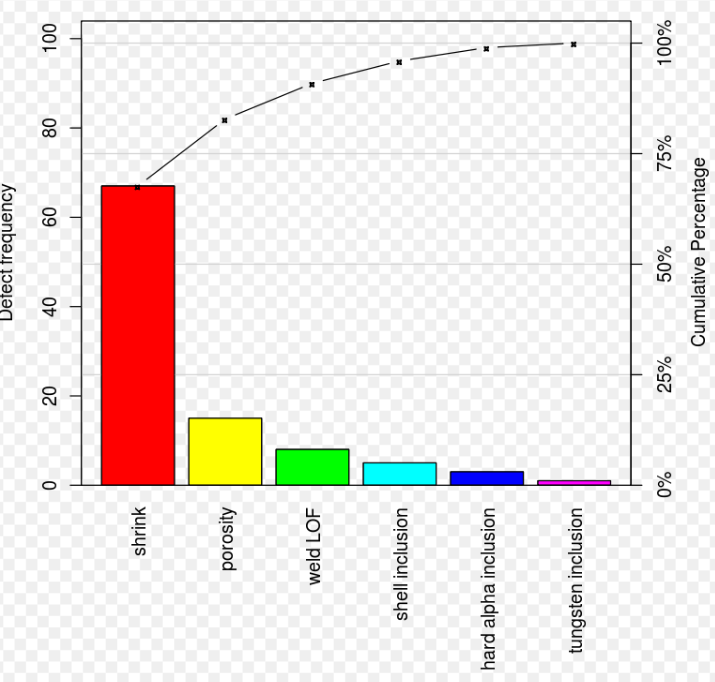
A Pareto chart is a type of chart that contains both bars and a line graph, where individual values are represented in descending order by bars, and the cumulative total is represented by the line. The chart is named for the Pareto principle, which, in turn, derives its name from Vilfredo Pareto, a noted Italian economist.
The left vertical axis is the frequency of occurrence, but it can alternatively represent cost or another important unit of measure. The right vertical axis is the cumulative percentage of the total number of occurrences, total cost, or total of the particular unit of measure. Because the values are in decreasing order, the cumulative function is a concave function. To take the example below, in order to lower the amount of late arrivals by 78%, it is sufficient to solve the first three issues.
The purpose of the Pareto chart is to highlight the most important among a (typically large) set of factors. In quality control, Pareto charts are useful to find the defects to prioritize in order to observe the greatest overall improvement. it often represents the most common sources of defects, the highest occurring type of defect, or the most frequent reasons for customer complaints, and so on. Wilkinson (2006) devised an algorithm for producing statistically based acceptance limits (similar to confidence intervals) for each bar in the Pareto chart.
These charts can be generated by simple spreadsheet programs, specialized statistical software tools, and online quality charts generators.
The Pareto chart is one of the seven basic tools of quality control.
Use a pareto chart
- When analyzing data about the frequency of problems or causes in a process.
- When there are many problems or causes and you want to focus on the most significant.
- When analyzing broad causes by looking at their specific components.
- When communicating with others about your data.
Pareto Chart Procedure
- Decide what categories you will use to group items.
- Decide what measurement is appropriate. Common measurements are frequency, quantity, cost and time.
- Decide what period of time the Pareto chart will cover: One work cycle? One full day? A week?
- Collect the data, recording the category each time, or assemble data that already exist.
- Subtotal the measurements for each category.
- Determine the appropriate scale for the measurements you have collected. The maximum value will be the largest subtotal from step 5. (If you will do optional steps 8 and 9 below, the maximum value will be the sum of all subtotals from step 5.) Mark the scale on the left side of the chart.
- Construct and label bars for each category. Place the tallest at the far left, then the next tallest to its right, and so on. If there are many categories with small measurements, they can be grouped as “other.”
Note: Steps 8 and 9 are optional but are useful for analysis and communication.
- Calculate the percentage for each category: the subtotal for that category divided by the total for all categories. Draw a right vertical axis and label it with percentages. Be sure the two scales match. For example, the left measurement that corresponds to one-half should be exactly opposite 50% on the right scale.
- Calculate and draw cumulative sums: add the subtotals for the first and second categories, and place a dot above the second bar indicating that sum. To that sum add the subtotal for the third category, and place a dot above the third bar for that new sum. Continue the process for all the bars. Connect the dots, starting at the top of the first bar. The last dot should reach 100% on the right scale.
Positive and Negative effects of workforce diversity in workplace
Positive effects
Productivity levels improve because of diversity in the workplace.
Even when a team doesn’t like the idea of being diverse, their productivity levels can rise by more than 30%. When people have co-workers who are different from them, then there is an increase in the sensitivity levels that are present in the workplace. People start to look for ways to find common ground. There is more time given to each team member to share ideas, and a higher emphasis on hiring women occurs.
Diversity in the workplace exposes societal bias.
Bias is what destroys diversity in the workplace before it can establish itself. Hiring managers tend to bring men on more than women, even if the qualifications of each candidate are equal. During a study funded by Harvard and Princeton, managers were given a set of applications and qualifications, but they did not reveal the gender of each identity. During this blind process, women were preferred over their male counterparts when gender was not part of the hiring process.
Diversity in the workplace creates more revenue-earning opportunities.
The companies which focus on diversification are the businesses which tend to see more sales and revenues because of their efforts. Emphasizing multiple language fluency for a team can boost their profits by 10% for every fluent language that is spoken. Gender diversity can help revenues grow by 40% in the first year of this effort. This advantage can open new markets for the organization that can help profits to start climbing as well without a significant increase in the work of the team.
Companies have access to more talent.
When diversity in the workplace is a top priority for an organization, then supervisors and hiring managers can expand their applicant screening processes to include more people. There are fewer restrictions on geographic location, educational accomplishments, or previous work histories. The top priority in the hiring process focuses on the talent and skills of the individual, and then how that person could fit into the team.
It increases the number of job opportunities for minority workers.
Diversity in the workplace looks at all population demographics when hiring for an open position. That means employers have an opportunity to find the best possible person for a job because they are not limited to a specific group of individuals. This advantage makes it possible to have more women working in society and promotes the hiring of minority groups. It applies at all levels of employment, from the local small business to multinational firms.
This design allows each team member to focus on their strengths.
If an employer can create diversity in the workplace, then each worker will have their strengths complement those of everyone else on the team. That means assignments can be handed out with greater specificity so that the quality of the work improves. Supervisors aren’t forced to guess at who might be the best option for an assignment because each person has a unique skill that they bring to the table.
Employers have more chances to cross-train workers and teams.
Diversity in the workplace creates teams where each person brings a unique strength to work every day. Individuals can specialize in their career, which means their skills and wisdom can be passed along to other team members. Everyone gets to learn and grow each day because there are higher levels of information exposure thanks to the varying backgrounds and educational opportunities each person accomplished.
Employers have more chances to cross-train workers and teams.
Diversity in the workplace creates teams where each person brings a unique strength to work every day. Individuals can specialize in their career, which means their skills and wisdom can be passed along to other team members. Everyone gets to learn and grow each day because there are higher levels of information exposure thanks to the varying backgrounds and educational opportunities each person accomplished.
This perspective can help companies to start growing bigger and faster.
Almost 70% of hiring managers in the United States say that the implementation of a diversity initiative was a contributing factor to the growth of their organization. This advantage helps the organization to create new opportunities for existing team members, install new positions, and raise wages as productivity and creativity levels rise to encourage a stronger sales atmosphere.
It is a way to increase the creativity of an entire team.
Almost 80% of employees working in the United States say that they are not using their creativity to its full potential. Diversity is one of the best environments to encourage this approach to a career because it offers numerous perspectives that can enhance the brainstorming sessions. The biggest complainers about a lack of creative energy in the modern workplace are those who limit the diversity of their teams.
Customers are attracted to diversity in the workplace.
Over 40% of employees say that their company has the right amount of diversity or that their teams should try to become more unique. Although it can be challenging to share a workplace environment with someone who is uniquely different, the advantages typically outweigh the problems which can develop over time. When everyone comes from the same perspective, then the daily routine becomes dull. Going to work becomes a boring experience. People can even lose their passion for what they do because there is a lack of diversity present on their team.
Negative effects
Unresolved Conflict
Greater differences in a workplace produces more potential for conflict among employees. People that come from different cultural backgrounds have different perspectives on how to handle issues or concerns that arise. An inability to see where the other person is coming from can prohibit effective resolution of conflicts. When employees feel like they cannot reach a point of agreement in conflict they may give up and simply let the ill feelings fester and create a negative tone.
Hiring managers focus on leadership qualities too often.
Diversity in the workplace seeks out experts who excel in their chosen career, job function, and team environment. The goal is to create a series of strengths that allows everyone to grow over time. These are all advantages, but it can become a problem if hiring managers are bringing in people who all want to be in charge. Competition can be healthy, but it can also be dangerous when it spirals out of control.
Potential Turnover
A significant bottom line effect of poorly managed diversity is high turnover. Dissatisfied employees that feel like the work environment is unsafe will leave. Constantly replacing employees lost to ill will or a general feeling of discontent is costly as the company has to pay to hire and train replacements. The business risks losing top talent to competitors if the workplace does not provide a safe and motivating culture where employees from diverse backgrounds are welcomed and treated fairly.
Diversity can create workers who are over-qualified for some jobs.
Communities grow and decline naturally as the economy settles into a comfortable pattern. Diversity in the workplace can create stable circumstances and more job security, but it can also create a series of problems where workers become over-qualified for what they are doing. If that individual were to lose their job for some reason, then it could become a struggle for them to find new employment elsewhere.
Poor Communication
Poor communication fuels conflict and can be one of the biggest negative effects of diversity in the workplace, according to This Way. If a workplace has employees from different countries with different native languages, communication is especially difficult. However, a number of barriers or filters can prohibit clear and meaningful communication between employees. It is imperative that companies train employees on cultural awareness and tolerance of differences to encourage them to openly discuss their different viewpoints on things as opposed to avoiding interaction or getting into conflict.
Diversity in the workplace can create too many opinions.
When hiring managers focus on diversity, then they are creating a series of differing opinions that can make it easier to find the right journey to take for forward progress. There are also times when the sheer number of available opinions can create a problem for the organization. When everyone gets a chance to be heard, then the speed of a project can slow down just as quickly as it can increase.
Time and Money
From the business’ perspective, the benefits of diversity must outweigh the time and expenses involved in managing it. Too many opinions can also be hard to sift through and waste valuable time, while potentially creating fog around the best answers, says FDI. Providing diversity training and creating a cooperative culture takes on going effort for time and management. Many companies hire trainers to come in and give background on differences and to teach the importance of accepting others and valuing their opinions.
Offshoring can become a point of emphasis with diversity in the workplace.
Domestic diversity can become an expensive proposition. It costs a lot, between salary and benefits, to hire the best people for your open positions. Because of this issue, it is not unusual for companies to look for offshoring opportunities that can help them to add unique perspectives to their corporate identity without a significant labor expense. This issue can create a lack of job security for existing workers, which can limit their focus and productivity.
Some teams become hostile during an increase in diversity.
Different perspectives create unique opinions and approaches to life that can create severe disagreements in the workplace. It is not unusual for every person to believe that their individual perspectives are the correct one, so they will share that information with others. If someone should happen to disagree, then some people will take that as a personal attack against their character, integrity, or even their spirituality.