Classification of Computer

Computers are classified based on various parameters such as size, functionality, purpose, and performance. Understanding the classification of computers helps in selecting the right type of computer for specific tasks.

1. Supercomputers

Supercomputers are the most powerful and fastest computers designed for complex computations. They are used in tasks that require immense processing power, such as climate modeling, nuclear simulations, and space research. These machines can perform trillions of calculations per second and are equipped with thousands of processors working in parallel. Due to their high cost and complexity, supercomputers are primarily used by government agencies, research institutions, and large corporations.

Examples: IBM Summit, Cray XC50.

2. Mainframe Computers

Mainframe computers are large systems designed for bulk data processing. They are used by organizations like banks, insurance companies, and airlines to handle massive amounts of transactions simultaneously. Known for their reliability, scalability, and security, mainframes can support thousands of users and applications at the same time. They are often used in industries where uninterrupted performance and high processing speeds are critical.

Examples: IBM Z Series, Unisys ClearPath.

3. Minicomputers

Minicomputers, also known as mid-range computers, are smaller and less powerful than mainframes but still capable of supporting multiple users simultaneously. They are used in medium-sized businesses for tasks like database management, accounting, and inventory control. Minicomputers offer a balance between cost and performance, making them ideal for organizations that do not require the capabilities of a mainframe but need more power than a personal computer.

Examples: PDP-11, VAX.

4. Microcomputers (Personal Computers)

Microcomputers are designed for individual use and are the most common type of computer. They include desktops, laptops, tablets, and smartphones. These computers are versatile, affordable, and used for a wide range of tasks such as word processing, gaming, internet browsing, and multimedia editing. The microcomputer’s popularity stems from its adaptability and ease of use, making it suitable for both personal and professional applications.

Examples: Apple MacBook, Dell Inspiron.

5. Workstations

Workstations are high-performance computers designed for technical and scientific applications. They are equipped with advanced processors, larger memory, and enhanced graphics capabilities. Workstations are used by engineers, architects, and graphic designers for tasks like 3D modeling, video editing, and simulation. Unlike standard personal computers, workstations are built to handle resource-intensive applications and provide greater reliability and performance.

Examples: HP Z Series, Dell Precision.

6. Embedded Computers

Embedded computers are specialized systems integrated into other devices to perform specific tasks. They are not standalone devices and are designed to operate within a larger system, such as appliances, automobiles, and medical devices. Embedded computers are highly efficient and tailored for real-time operations, offering limited functionalities optimized for their specific applications.

Examples: Microcontrollers in washing machines, processors in cars.

7. Hybrid Computers

Hybrid computers combine the features of both analog and digital computers. They are used in applications that require real-time data processing and precise calculations, such as in hospitals for monitoring patient vitals or in scientific research for data modeling. Hybrid computers are less common but are highly specialized for tasks that demand both qualitative and quantitative data handling.

Examples: CAT scan machines, industrial automation systems.

8. Analog Computers

Analog computers process data represented in continuous physical forms such as electrical signals, temperature, or speed. They are used in applications requiring measurement and comparison, such as scientific experiments, engineering designs, and control systems. Analog computers are highly specialized and are often used in conjunction with digital systems for more complex operations.

Examples: Slide rules, oscilloscopes.

9. Digital Computers

Digital computers process data in binary format (0s and 1s). They are the most widely used type of computer due to their accuracy, versatility, and ability to store large amounts of data. Digital computers are used in various fields, including business, education, and healthcare, for tasks ranging from simple calculations to advanced simulations.

Examples: Personal computers, servers.

Compiler and Interpreter

Compiler

Compiler is a software program that translates high-level programming language code into machine code, which can be directly executed by a computer’s processor. It performs this task in several stages: lexical analysis, syntax analysis, semantic analysis, optimization, and code generation. The input (source code) is thoroughly checked for errors during the process, ensuring correctness and efficiency. Compilers produce executable programs, unlike interpreters, which execute code line by line. Popular examples of compilers include GCC for C/C++ and the Java Compiler for Java. They are essential for software development, as they bridge the gap between human-readable code and machine execution.

Functions of Compiler:

1. Lexical Analysis

The compiler begins by performing lexical analysis, which involves scanning the source code and breaking it down into smaller units known as tokens. These tokens can be keywords, operators, identifiers, constants, or symbols. Lexical analysis helps the compiler understand the structure and elements of the source code, converting it into a form suitable for further processing.

Example: In the statement int x = 10;, the tokens would be int, x, =, 10, and ;.

2. Syntax Analysis

After lexical analysis, the compiler performs syntax analysis (or parsing), where it checks the code’s syntax according to the language’s grammar rules. It builds a syntax tree (or abstract syntax tree, AST) that represents the hierarchical structure of the source code. If there are syntax errors, the compiler reports them, making it clear which parts of the code are not structured correctly.

Example: If a programmer writes int x = + 5;, the compiler will flag this as a syntax error.

3. Semantic Analysis

Semantic analysis checks the source code for logical consistency and ensures that the statements in the code make sense. It verifies that operations are valid (e.g., ensuring that a variable is used before it is declared, or checking type compatibility between operands). This step ensures the program has meaningful operations and complies with the language’s semantic rules.

Example: In the expression int x = "string";, the compiler will identify a type mismatch and flag it as an error.

4. Intermediate Code Generation

After syntax and semantic checks, the compiler generates intermediate code. This is a low-level code representation, which is not machine-specific but is closer to the final machine code than the original source code. The intermediate code is easier to optimize and can be translated to different machine architectures.

Example: A compiler might translate int x = 10 + 20; into an intermediate representation like ADD 10, 20, x.

5. Optimization

The optimization phase enhances the efficiency of the intermediate code without changing its functionality. The goal is to improve performance by reducing execution time and memory usage. This can involve eliminating redundant calculations, reordering instructions, or minimizing memory access.

Example: If a variable is calculated multiple times with the same value, the compiler might optimize it by storing the result in a temporary variable.

6. Code Generation

During code generation, the compiler translates the optimized intermediate code into machine code or assembly code specific to the target architecture. This machine code can be directly executed by the CPU. The code generation phase ensures that the program’s instructions correspond accurately to the processor’s instruction set.

Example: A simple instruction like x = y + z might be translated into assembly language instructions such as MOV R1, y; ADD R1, z; MOV x, R1.

7. Code Linking

In this phase, the compiler links the program’s components, such as functions, libraries, and external modules, into a single executable. The linker resolves addresses and ensures that all referenced functions or variables are correctly located in the final program. If there are missing dependencies or external references, the linker will flag an error.

Example: If the program calls an external function like printf(), the linker ensures that the correct library or object file is included in the executable.

8. Code Optimization (Final Optimization)

Final optimization focuses on improving the machine code produced in the previous stage. This can include loop unrolling, instruction reordering, and reducing the number of instructions. The aim is to make the code as efficient as possible in terms of speed and memory usage while maintaining its correctness.

Example: The compiler might optimize memory access patterns to avoid cache misses or reduce the number of instructions in a loop.

Interpreter

An interpreter is a program that directly executes instructions written in a high-level programming language without translating them into machine code beforehand. It processes the source code line-by-line, analyzing and executing each statement in real-time. Unlike compilers, which generate a separate executable file, an interpreter executes the code directly, which makes it slower for large programs. However, interpreters are useful for debugging and running scripts quickly. They are commonly used for languages like Python, JavaScript, and Ruby. Interpreters offer flexibility and ease of use, as they allow immediate execution without needing an intermediate compiled file.

Functions of  Interpreter:

1. Lexical Analysis

The interpreter starts with lexical analysis, which involves scanning the source code to break it into smaller components called tokens. Tokens are the fundamental building blocks of the language, such as keywords, identifiers, operators, and punctuation. This process enables the interpreter to understand the structure of the code and prepare it for further processing.

Example: In the expression int x = 10;, the tokens are int, x, =, 10, and ;.

2. Syntax Analysis

After lexical analysis, the interpreter performs syntax analysis (or parsing). In this stage, the interpreter checks if the code follows the correct grammatical structure according to the language’s syntax rules. The interpreter constructs a parse tree or abstract syntax tree (AST) that reflects the hierarchical relationships of expressions and statements in the code. Any syntax errors are reported at this point.

Example: If the code is int x = 10 + ;, the interpreter will flag the missing operand as a syntax error.

3. Semantic Analysis

Semantic analysis ensures that the source code makes logical sense. This phase involves checking the meaning and context of the code. The interpreter checks for issues like variable declaration before use, type mismatches, and valid operations on variables. It ensures that the logic of the program is sound and complies with the programming language’s semantic rules.

Example: In the statement int x = "hello";, the interpreter will detect a type mismatch error as it tries to assign a string to an integer.

4. Memory Management

The interpreter handles memory management, which involves allocating memory for variables, functions, and objects during execution. It dynamically manages memory at runtime, making sure that memory is allocated when variables are declared and deallocated when they are no longer needed. This enables the interpreter to execute code without the need for a separate memory management step.

Example: When a variable x is assigned a value, the interpreter allocates memory space for storing x’s value and frees it once it’s out of scope.

5. Execution of Instructions

The primary function of an interpreter is to execute instructions. It reads the code line-by-line, interprets it, and directly executes each command. The interpreter translates high-level code into machine-level instructions on the fly, meaning no intermediate file is created. This real-time execution makes it slower than compiled languages but useful for quick debugging and development.

Example: The interpreter will execute the line x = 10; by assigning the value 10 to the variable x.

6. Error Detection and Reporting

An interpreter performs real-time error detection while executing the code. As it encounters each line, the interpreter checks for syntax, semantic, or runtime errors. Unlike a compiler, which might only report errors after parsing the entire code, an interpreter identifies issues immediately during execution. It provides immediate feedback on errors, which is beneficial for debugging.

Example: If the code attempts to access an undefined variable, the interpreter will flag it and stop execution at the error point.

7. Interactive Execution

One of the key features of an interpreter is interactive execution, allowing users to run code interactively, especially in environments like REPL (Read-Eval-Print Loop). This function is particularly useful for scripting, testing, and debugging small code snippets. Users can modify and immediately test the code in real time, enhancing the development process.

Example: In an interactive Python shell, a user can type a line like x = 5, and the interpreter will immediately execute and return the result.

Generation of Computer Language

The generation of computer languages refers to the evolution of programming languages over time, with each generation introducing more powerful and user-friendly features. These generations are typically categorized from the earliest machine languages to the high-level languages used today. Each generation has marked a significant milestone in terms of abstraction, usability, and performance.

1st Generation: Machine Language (1940s–1950s)

The first generation of computer languages is machine language, which is the lowest-level language directly understood by the computer’s central processing unit (CPU). Machine language consists entirely of binary code (0s and 1s) and represents raw instructions that the hardware can execute. Each instruction corresponds to a specific operation, such as loading data, performing arithmetic, or manipulating memory.

Characteristics:

  • Binary Code: Machine language is written in binary, making it very difficult for humans to write or understand.
  • Hardware-Specific: It is directly tied to the architecture of the computer, meaning that a program written for one machine cannot run on another without modification.
  • No Abstraction: There is no concept of variables, loops, or high-level constructs in machine language.

Example: A machine instruction for adding two numbers could look like 10110100 00010011 in binary code, representing an addition operation to the CPU.

2nd Generation: Assembly Language (1950s–1960s)

The second generation of computer languages is assembly language, which was developed to overcome the limitations of machine language. Assembly language uses symbolic representations of machine instructions, known as mnemonics. While still closely tied to the hardware, assembly language is more human-readable than machine language.

Characteristics:

  • Mnemonics: Instead of binary code, assembly uses symbols (e.g., MOV for move, ADD for addition) to represent operations.
  • Assembler: An assembler is used to translate assembly code into machine language so that it can be executed by the computer.
  • Low-Level: Assembly language is still hardware-specific, meaning that programs written in assembly language are not portable across different systems.

Example: In assembly language, the instruction to add two numbers could be written as ADD R1, R2, where R1 and R2 are registers.

3rd Generation: High-Level Languages (1960s–1970s)

Third generation of computer languages consists of high-level programming languages, such as Fortran, COBOL, Lisp, and Algol. These languages abstract away the complexities of machine code and assembly, allowing developers to write code using human-readable syntax that is independent of the computer hardware.

Characteristics:

  • Abstraction: High-level languages allow programmers to focus on logic and functionality rather than hardware-specific details.
  • Portability: Programs written in high-level languages can run on different hardware platforms, provided there is an appropriate compiler or interpreter.
  • More Complex Constructs: High-level languages support complex constructs such as variables, loops, conditionals, functions, and data structures.

Example: A simple addition operation in Fortran might look like this:

A = 10
B = 20
C = A + B

4th Generation: Fourth-Generation Languages (1980s–1990s)

Fourth-generation languages (4GLs) were developed to further simplify the programming process. These languages are closer to human language and are often used for database management, report generation, and business applications. They focus on automation and declarative programming, where the programmer specifies what should be done rather than how it should be done.

Characteristics:

  • Higher Abstraction: 4GLs allow developers to write even less code compared to 3GLs, with a focus on user-friendly syntax and more natural expressions.
  • Database-Driven: Many 4GLs are designed for building database applications (e.g., SQL).
  • Minimal Code: These languages often allow for writing complex tasks with fewer lines of code.

Example: SQL, a popular 4GL, is used to query and manage databases. A query to retrieve all records from a table might look like:

SELECT * FROM Employees;

5th Generation: Fifth-Generation Languages (1990s–Present)

Fifth generation of computer languages is focused on problem-solving and artificial intelligence (AI). These languages aim to make use of natural language processing (NLP) and advanced problem-solving techniques such as logic programming and machine learning. They are not primarily aimed at general-purpose programming but are designed to solve specific complex problems.

Characteristics:

  • Natural Language Processing: Fifth-generation languages often rely on the ability to understand and process human language.
  • Artificial Intelligence: These languages support advanced AI techniques like reasoning, learning, and inference.
  • Declarative Programming: These languages use a declarative approach, where the programmer specifies what the program should achieve, and the language decides how to achieve it.

Example: Prolog is a popular 5GL used in AI applications. It uses logical statements to represent facts and rules, such as:

father(john, mary).
father(mary, susan).

6th Generation: Evolution of AI-Based Languages (Future Vision)

The sixth generation of computer languages is largely speculative at this stage but is expected to evolve alongside quantum computing and more advanced artificial intelligence systems. These languages may incorporate elements like self-learning algorithms, augmented reality (AR), and genetic algorithms.

Characteristics (Speculative):

  • Quantum Computing: Integration with quantum computing for parallel processing and complex problem-solving.
  • Self-Adapting Systems: Software may evolve and adapt to new requirements automatically.
  • Human-Computer Collaboration: Future languages might enable closer collaboration between humans and computers in problem-solving.

Generation of Computer

The evolution of computers is categorized into five generations, each marked by significant technological advancements that revolutionized computing capabilities. From vacuum tubes to artificial intelligence, the journey of computers showcases continuous innovation and improvement.

1. First Generation (1940–1956): Vacuum Tube Technology

The first generation of computers relied on vacuum tubes for circuitry and magnetic drums for memory. These machines were enormous, consumed a lot of power, and generated significant heat. Programming was done using machine language, which made these computers difficult to operate and maintain.

Features:

  • Used vacuum tubes as the main component.
  • Consumed a large amount of electricity and required air conditioning.
  • Input was through punched cards, and output was printed.
  • Slow processing speeds and limited storage.

Examples:

  • ENIAC (Electronic Numerical Integrator and Computer)
  • UNIVAC (Universal Automatic Computer)

Limitations:

  • Bulky and expensive.
  • High failure rate due to the heat generated by vacuum tubes.

2. Second Generation (1956–1963): Transistor Technology

The second generation saw the replacement of vacuum tubes with transistors, which were smaller, faster, and more reliable. This innovation drastically reduced the size of computers and improved their efficiency. Assembly language replaced machine language, simplifying programming.

Features:

  • Transistors were used as the main component.
  • Smaller, more energy-efficient, and less heat-generating than the first generation.
  • Magnetic core memory for storage.
  • Batch processing and multiprogramming introduced.

Examples:

  • IBM 7094
  • UNIVAC II

Advantages:

  • More reliable and cost-effective.
  • Increased computational speed and reduced downtime.

3. Third Generation (1964–1971): Integrated Circuits (ICs)

The introduction of integrated circuits marked the third generation of computers. ICs allowed multiple transistors to be embedded on a single chip, which further reduced the size of computers and increased their processing power.

Features:

  • Use of ICs for faster and more efficient performance.
  • Smaller in size, consuming less power compared to previous generations.
  • Introduction of keyboards and monitors for input and output.
  • Operating systems for better management of hardware and software.

Examples:

  • IBM 360 Series
  • PDP-8

Impact:

  • Lowered the cost of computers, making them more accessible to businesses.
  • Paved the way for multiprogramming and time-sharing systems.

4. Fourth Generation (1971–Present): Microprocessors

The fourth generation introduced microprocessors, where thousands of ICs were integrated onto a single silicon chip. This innovation led to the development of personal computers (PCs), making computers accessible to individuals and small businesses.

Features:

  • Use of microprocessors as the core component.
  • Introduction of graphical user interfaces (GUIs).
  • Development of networking and the Internet.
  • Portable computers like laptops and handheld devices became common.

Examples:

  • Intel 4004 (first microprocessor)
  • IBM PC

Impact:

  • Revolutionized industries by making computers affordable and user-friendly.
  • Enabled the development of software for diverse applications like word processing, gaming, and spreadsheets.

5. Fifth Generation (Present and Beyond): Artificial Intelligence (AI)

The fifth generation focuses on the development of intelligent systems capable of learning, reasoning, and self-correction. These computers are based on AI technologies such as natural language processing, machine learning, and robotics.

Features:

  • Use of advanced technologies like quantum computing, AI, and nanotechnology.
  • Development of parallel processing and supercomputers.
  • Voice recognition and virtual assistants like Siri and Alexa.
  • Cloud computing and IoT (Internet of Things) integration.

Applications:

  • AI-driven tools in healthcare, finance, and education.
  • Real-time data analysis and decision-making.
  • Advanced robotics for automation and exploration.

Examples:

  • IBM Watson
  • Google DeepMind

Future Trends in Computing

As the fifth generation continues to evolve, emerging technologies like quantum computing and bio-computing are expected to shape the future. Quantum computers promise unparalleled processing power, while bio-computing explores the integration of biological and digital systems.

Inter conversion between number systems

As you know decimal, binary, octal and hexadecimal number systems are positional value number systems. To convert binary, octal and hexadecimal to decimal number, we just need to add the product of each digit with its positional value. Here we are going to learn other conversion among these number systems.

Decimal to Binary

Decimal numbers can be converted to binary by repeated division of the number by 2 while recording the remainder. Let’s take an example to see how this happens.

The remainders are to be read from bottom to top to obtain the binary equivalent.

4310 = 1010112

Decimal to Octal

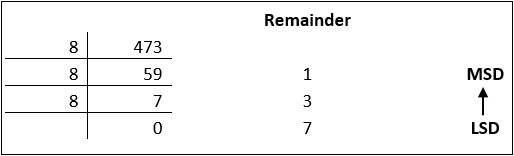
Decimal numbers can be converted to octal by repeated division of the number by 8 while recording the remainder. Let’s take an example to see how this happens.

Reading the remainders from bottom to top,

47310 = 7318

Decimal to Hexadecimal

Decimal numbers can be converted to octal by repeated division of the number by 16 while recording the remainder. Let’s take an example to see how this happens.

Reading the remainders from bottom to top we get,

42310 = 1A716

Binary to Octal and Vice Versa

To convert a binary number to octal number, these steps are followed:

  • Starting from the least significant bit, make groups of three bits.
  • If there are one or two bits less in making the groups, 0s can be added after the most significant bit
  • Convert each group into its equivalent octal number

Let’s take an example to understand this.

101100101012 = 26258

To convert an octal number to binary, each octal digit is converted to its 3-bit binary equivalent according to this table.

Octal Digit 0 1 2 3 4 5 6 7
Binary Equivalent 000 001 010 011 100 101 110 111

546738 = 1011001101110112

Binary to Hexadecimal

To convert a binary number to hexadecimal number, these steps are followed:

  • Starting from the least significant bit, make groups of four bits.
  • If there are one or two bits less in making the groups, 0s can be added after the most significant bit.
  • Convert each group into its equivalent octal number.

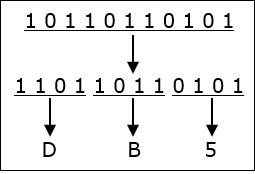
Let’s take an example to understand this.

101101101012 = DB516

To convert an octal number to binary, each octal digit is converted to its 3-bit binary equivalent.

Various fields of Computer

Computers have become indispensable in modern life, touching nearly every aspect of society. The vast capabilities of computers have led to their application in numerous fields, transforming industries and enhancing productivity.

1. Information Technology (IT)

IT encompasses the use of computers to manage, process, and store information. This field includes networking, database management, software development, and cybersecurity. IT professionals design and maintain the infrastructure that supports businesses, governments, and other organizations.

Applications:

  • Cloud computing platforms like AWS and Azure
  • IT support and helpdesk operations
  • Data management and business intelligence

2. Education

Computers have transformed education by enabling e-learning, online courses, and digital classrooms. Tools like learning management systems (LMS), virtual reality (VR), and simulations make learning interactive and accessible.

Applications:

  • Online learning platforms (e.g., Coursera, Khan Academy)
  • Virtual labs and simulations for practical training
  • Educational software and apps for students and teachers

3. Healthcare

In healthcare, computers play a crucial role in diagnosis, treatment, and patient management. From maintaining electronic health records (EHRs) to advanced imaging techniques, computers enhance the efficiency and accuracy of medical services.

Applications:

  • Diagnostic tools and medical imaging systems
  • Telemedicine for remote consultations
  • Robotic-assisted surgeries

4. Business and Finance

Computers streamline business operations, improve decision-making, and enhance customer experiences. In finance, they are essential for managing transactions, risk analysis, and fraud detection.

Applications:

  • Customer relationship management (CRM) systems
  • Online banking and mobile payment systems
  • Stock market analysis and trading algorithms

5. Entertainment and Media

The entertainment industry relies heavily on computers for content creation, distribution, and streaming. Media production tools and video editing software enable the development of high-quality content.

Applications:

  • Special effects and animation in movies
  • Video games and virtual reality experiences
  • Streaming platforms like Netflix and YouTube

6. Science and Research

In scientific research, computers are used for data analysis, simulations, and modeling. They assist researchers in solving complex problems and exploring new frontiers.

Applications:

  • Genome sequencing and bioinformatics
  • Climate modeling and weather forecasting
  • Space exploration and astronomical simulations

7. Transportation

Computers are critical in managing modern transportation systems, ensuring safety and efficiency. They are used in navigation, traffic control, and vehicle automation.

Applications:

  • GPS navigation and route planning
  • Autonomous vehicles and drones
  • Airline reservation and scheduling systems

8. Defense and Security

In defense, computers support surveillance, communication, and strategic operations. Advanced systems are used for cybersecurity and to protect sensitive information from cyber threats.

Applications:

  • Missile guidance and radar systems
  • Military simulations and training
  • Cybersecurity solutions to prevent data breaches

9. Artificial Intelligence and Machine Learning (AI/ML)

AI and ML represent the forefront of computer technology. These fields focus on developing intelligent systems that can learn, reason, and adapt.

Applications:

  • Natural language processing (e.g., chatbots like ChatGPT)
  • Image recognition and facial recognition systems
  • Predictive analytics for business and healthcare

10. Engineering and Manufacturing

Computers revolutionize engineering and manufacturing by automating processes and enabling precision. CAD (Computer-Aided Design) and CAM (Computer-Aided Manufacturing) are widely used.

Applications:

  • 3D modeling and printing
  • Robotics and automation in production lines
  • Quality control and testing

11. Gaming and Virtual Reality

The gaming industry leverages high-performance computers to create immersive experiences. Virtual reality (VR) and augmented reality (AR) are becoming popular for gaming and training.

Applications:

  • Multiplayer online games and simulations
  • VR-based training programs for industries
  • AR apps for retail and education

12. Social Media and Communication

Computers enable global communication through social media platforms, email, and messaging apps. These tools have transformed how people connect and share information.

Applications:

  • Platforms like Facebook, Instagram, and LinkedIn
  • Video conferencing tools like Zoom and Google Meet
  • Blogging and content-sharing websites

Business Data Processing, Functions, Process, Components, Uses

Business Data Processing refers to the collection, organization, analysis, and use of data to support business activities and decision making. It involves converting raw data such as sales figures, customer details, and transaction records into meaningful information. In Indian businesses, data processing is used in accounting, payroll, inventory control, banking, and customer management systems. Computers and software help process large amounts of data quickly and accurately. Proper data processing improves efficiency, reduces errors, and helps managers plan better strategies. For example, companies use processed data to track profits, control costs, and understand customer trends. With the growth of digital payments and online business in India, business data processing has become an essential part of modern business operations and technology.

Functions of Business Data Processing:

1. Data Collection and Capture

This is the foundational function of gathering raw data from its various sources. It involves systematically recording business transactions and events at their point of origin. This can be done manually (via forms, surveys) or automatically through digital means like point-of-sale (POS) scanners, website cookies, IoT sensors, or customer relationship management (CRM) system entries. The goal is to ensure all relevant data is acquired completely and accurately for future processing. Efficient capture, often using technologies like Optical Character Recognition (OCR), minimizes entry errors and forms the reliable input for the entire data processing cycle.

2. Data Validation and Verification

Once data is captured, this function ensures its quality, accuracy, and integrity before further processing. Validation checks if data meets predefined rules (e.g., a date field contains a valid date, a price is a positive number). Verification confirms the data’s correctness, often by comparing it against a trusted source or using checksums. This step is critical to prevent “garbage in, garbage out” scenarios, where erroneous input leads to faulty outputs and business decisions. Automated validation rules in software forms and database constraints are key tools for maintaining high-quality, trustworthy data.

3. Data Classification and Organization

This function involves sorting and categorizing the validated raw data into logical, structured formats for efficient storage and retrieval. Data is classified based on shared characteristics, such as transaction type, customer segment, product category, or date. It is then organized into records and fields within a structured database or data warehouse. Proper classification, often using coding schemes or taxonomies, transforms chaotic data into an organized resource. This enables systematic analysis, supports reporting by various dimensions (e.g., sales by region), and is essential for implementing effective data management policies.

4. Data Calculation and Aggregation

This is the core computational function where raw data is transformed into meaningful information. It involves performing arithmetic and logical operations. This includes calculation (computing values like sales tax, total invoice amounts, or profit margins) and aggregation (summarizing detailed data into totals, averages, counts, or other statistical measures—e.g., total quarterly revenue, average customer spend). These processes convert individual transaction data into consolidated figures that reveal trends, performance metrics, and key business insights, forming the basis for managerial reporting and financial statements.

5. Data Storage and Retrieval

This function pertains to the secure and efficient archiving of processed and unprocessed data for future use. Processed information is stored in organized databases, data warehouses, or cloud storage systems. An effective system must allow for rapid retrieval of specific data or reports when needed by authorized users. This involves database management systems (DBMS) that use queries (e.g., SQL) to locate information. Proper storage ensures data durability, supports historical analysis, and provides a reliable audit trail, all while balancing cost, accessibility, and security requirements.

6. Data Analysis and Reporting

This function transforms stored, aggregated data into actionable intelligence for decision-makers. Analysis involves examining data using statistical tools, Business Intelligence (BI) software, or data mining techniques to identify patterns, correlations, and trends (e.g., seasonal sales spikes). Reporting is the process of presenting this analyzed information in a structured format—such as standard printed reports, interactive digital dashboards, or visual charts. The goal is to communicate key performance indicators (KPIs) and insights clearly and timely to various stakeholders, enabling informed operational control and strategic planning.

7. Data Communication and Distribution

This function ensures that processed information—reports, analyses, transactional confirmations—reaches the correct internal or external users in a usable format. Internally, it involves distributing sales reports to managers or inventory alerts to the warehouse. Externally, it includes sending invoices to customers, remittance advices to suppliers, or regulatory filings to government bodies. Modern systems automate this via email, enterprise portals, EDI (Electronic Data Interchange), or API integrations. Effective communication ensures all stakeholders have the information they need to act, closing the loop between data processing and business action.

8. Data Security and Integrity Maintenance

This is the protective function that safeguards data throughout its lifecycle. It ensures confidentiality (preventing unauthorized access via encryption, access controls), integrity (preventing unauthorized alteration via checksums, audit logs), and availability (ensuring data is accessible when needed via backups, redundancy). It involves implementing cybersecurity measures, establishing clear data governance policies, and complying with regulations like GDPR or India’s DPDP Act. This function is critical for maintaining trust, preventing financial loss from breaches or corruption, and ensuring business continuity, making it a non-negotiable aspect of modern data processing.

Process of Business Data Processing:

1. Origination: The Data Creation Point

This is the initial stage where a business transaction or event occurs, generating raw data. It is the source of all subsequent processing. Examples include a customer placing an order online, an employee logging hours, or a sensor reading inventory levels. The goal at this stage is to capture the data accurately at its point of origin. How data is originated (e.g., digital form, paper invoice, IoT stream) significantly impacts the efficiency and accuracy of the entire process. Effective origination often involves designing user-friendly interfaces and automated data capture to minimize initial errors.

2. Input: Data Entry and Collection

In this stage, the raw data from the source is converted into a machine-readable format and entered into the business’s information system. This can be manual (a clerk keying in invoice details) or automated (a barcode scanner reading a product SKU, an API pulling data from a website form). The focus is on efficient and error-free data entry. Techniques like source data automation (using scanners, sensors) and input validation rules are crucial here to ensure quality and completeness before the data moves to the next phase of the cycle.

3. Processing: The Transformation Core

This is the central stage where input data is manipulated, calculated, and transformed into meaningful information. Processing involves actions like:

  • Classifying: Sorting data into categories (e.g., sales region).

  • Sorting: Arranging data in a sequence (e.g., alphabetical, by date).

  • Calculating: Performing arithmetic (e.g., computing totals, taxes, discounts).

  • Summarizing: Aggregating data (e.g., creating daily sales totals).

This can be done via batch processing (processing accumulated transactions at once, often overnight) or real-time/online processing (handling each transaction immediately, as in ATM withdrawals).

4. Output: Information Delivery

In this stage, the processed data is converted into a useful, human-intelligible format and presented to the end-user. Output can take many forms: printed reports (payroll registers), visual dashboards on a screen, electronic files (e-mailed invoices), or even audio responses. The key is that the data is now organized information ready to support decision-making. Effective output design ensures the information is clear, relevant, timely, and accessible to the intended audience, whether it’s a manager, a customer, or another system.

5. Storage: Data Archiving and Retrieval

After processing, both the raw input data and the processed information are stored for future reference. This involves saving data to secure, organized storage media like databases, data warehouses, or cloud servers. Storage serves multiple purposes: it creates a permanent audit trail for transactions, provides historical data for trend analysis, and allows for the retrieval of information for subsequent reporting or processing cycles. A robust storage strategy balances accessibility, security, and cost, ensuring data integrity and compliance with data retention policies.

6. Distribution and Communication

This step involves transmitting the processed information (output) to the people or systems that need it to take action or make decisions. Distribution can be internal (sending a sales report to regional managers via a company portal) or external (e-mailing an invoice to a customer, submitting a regulatory filing via a government gateway). Modern systems automate this through workflows, EDI (Electronic Data Interchange), and integrated communication channels, ensuring the right information reaches the right destination promptly and securely to facilitate business operations and responses.

7. Feedback and Control Loop

This final, critical stage ensures the entire data processing cycle remains accurate and effective. Feedback involves monitoring the system’s output and comparing it against expected results or predefined standards (e.g., does the trial balance match?). If discrepancies or errors are found—such as a reporting anomaly or an input error—corrective control actions are taken. This could mean re-entering data, adjusting processing rules, or refining collection methods. This closed-loop process allows for continuous system verification, error correction, and improvement, maintaining the reliability and relevance of the business’s information system.

Components of Business Data Processing:

1. Input Devices and Data Capture Tools

These are the hardware and software components used to collect raw data from its source and convert it into a digital format for the system. This includes traditional tools like keyboards, barcodes, and scanners, as well as modern interfaces like web forms, mobile app inputs, IoT sensors, and APIs that automatically capture data from external systems. Their efficiency and accuracy directly impact data quality. Modern businesses prioritize source data automation (e.g., QR code scanners, OCR) to minimize manual entry errors and accelerate the initial stage of the processing cycle.

2. Central Processing Unit (CPU) and Servers

The CPU is the “brain” of the computer system where the actual processing occurs—performing calculations, executing logical operations, and controlling other components. In a business context, this function is scaled through servers and data centers (or cloud computing resources) that handle massive volumes of concurrent transactions. These systems run the software algorithms that sort, classify, calculate, and summarize raw data. Their processing power, speed, and reliability are critical for handling complex business logic, from real-time inventory updates to large-scale financial batch processing.

3. Storage Media and Databases

This component provides the permanent and temporary memory for holding data at every stage—input, in-process, and output. It includes primary storage (RAM for immediate processing) and secondary storage like hard disks, solid-state drives, and cloud storage for long-term retention. Database Management Systems (DBMS) like Oracle, MySQL, or SQL Server are specialized software that organize, store, and manage this data in structured, relational formats, enabling efficient querying, retrieval, and data integrity. This infrastructure is the foundation for a company’s “single source of truth” and historical record-keeping.

4. Output Devices and Presentation Layer

These are the components that communicate the processed information back to the end-user in a comprehensible format. They transform digital data into usable business intelligence. This includes physical devices like monitors, printers, and speakers, as well as the software interfaces that present the data: report generators, Business Intelligence (BI) dashboards, data visualization tools (like graphs and charts), and automated channels like email or portal notifications. An effective presentation layer is crucial for translating complex processed data into actionable insights for decision-makers at all levels.

5. System Software and Operating Environment

This is the foundational software that manages the hardware resources and provides a platform for running application software. The Operating System (OS) (like Windows Server, Linux) controls basic functions, while utility programs handle tasks like data backup, security, and disk management. This layer ensures all physical components (input, CPU, storage, output) work together harmoniously. It provides the essential services—file management, memory allocation, and user access control—that allow business application software to execute data processing tasks efficiently and securely.

6. Application Software and Business Logic

This is the specialized software programmed to perform the specific data processing tasks of the business. It contains the business rules and logic (e.g., formulas for tax calculation, rules for inventory reordering). Examples include Enterprise Resource Planning (ERP), Customer Relationship Management (CRM), and custom accounting software. This software uses the system software and hardware to execute the core functions of the data processing cycle: it accepts input, processes it according to defined procedures, directs storage, and generates the required reports and outputs that drive daily business operations.

7. Communication Networks and Connectivity

This component enables the flow of data between all other components, users, and sometimes external entities. It includes the physical networking hardware (routers, switches, modems) and protocols/software (TCP/IP) that connect input devices to servers, servers to storage, and the system to output channels. In modern distributed environments, this also encompasses internet connectivity, VPNs, and cloud integration. Robust network infrastructure is vital for real-time data processing, supporting e-commerce, cloud-based applications, and seamless data exchange across departments and geographic locations, ensuring the system operates as a cohesive unit.

8. Procedures and Human Resources

The most critical component is the set of documented procedures, rules, and instructions that govern how the system is used, and the people who execute them. This includes the IT staff who design and maintain the system, data entry operators, managers who interpret outputs, and end-users who initiate transactions. Clear procedures for data entry, error handling, backup, and security protocols are essential. Even the most advanced system fails without trained personnel following correct methods, making this human and procedural element the keystone for successful and reliable business data processing.

Uses of Business Data Processing:

1. Transaction Processing and Record Keeping

The foundational use of business data processing is the systematic recording of daily commercial transactions. This includes processing sales orders, purchase invoices, payroll, and inventory movements. By converting these events into digital records, the system creates a complete, accurate, and auditable financial history of the company. This automated record-keeping eliminates manual ledgers, reduces clerical errors, and ensures compliance with accounting standards and tax regulations. It provides the essential data trail for financial statements, internal audits, and regulatory reporting, forming the indisputable backbone of the company’s operational and financial integrity.

2. Customer Relationship Management (CRM)

Data processing powers CRM systems by consolidating and analyzing all customer interactions. It processes data from sales calls, support tickets, website visits, and purchase history to build comprehensive customer profiles. This enables personalized marketing campaigns, targeted sales follow-ups, and proactive customer service. By analyzing purchase patterns and feedback, businesses can anticipate needs, segment customers for tailored offers, and increase customer lifetime value. Effective CRM processing transforms raw customer data into actionable intelligence, driving loyalty, retention, and revenue growth through a deep, data-driven understanding of the customer base.

3. Inventory and Supply Chain Management

This use involves processing real-time data on stock levels, supplier lead times, order status, and sales forecasts. The system automatically updates inventory counts after each sale or receipt, triggers reorder points, and optimizes warehouse logistics. By processing data from the entire supply chain, businesses can achieve just-in-time inventory, reduce carrying costs, minimize stockouts and overstock, and improve order fulfillment accuracy. This end-to-end visibility and automation enhance operational efficiency, reduce waste, and create a more resilient and responsive supply network capable of adapting to demand fluctuations.

4. Financial Analysis and Management Reporting

Business data processing aggregates transactional data to generate critical financial reports and performance analyses. It automatically produces profit & loss statements, balance sheets, cash flow statements, and budget variance reports. Beyond standard accounting, it enables detailed management reporting—such as departmental P&L, sales performance by region, or product line profitability. By processing data into structured reports and visual dashboards, it provides executives and managers with timely insights into financial health, profitability drivers, and cost centers, supporting strategic planning, investment decisions, and operational control.

5. Human Resources and Payroll Administration

This use automates the core administrative functions of HR. Data processing systems manage employee databases, track attendance and leave, calculate complex payrolls (including taxes, deductions, and benefits), and ensure statutory compliance (like PF, ESIC). They process performance review data to aid in talent management and succession planning. By automating these labor-intensive tasks, HR data processing reduces errors, ensures timely and accurate salary disbursements, maintains confidential records securely, and frees the HR department to focus on strategic initiatives like employee engagement and development.

6. Marketing Analysis and Campaign Management

Data processing transforms marketing from a creative guesswork into a measurable science. It analyzes data from digital campaigns, social media engagement, website analytics, and sales conversions to measure ROI, customer acquisition costs, and channel effectiveness. By processing customer demographic and behavioral data, it enables precise audience segmentation for targeted campaigns (email, social ads). Marketers can test different strategies, process the response data, and continuously optimize campaigns for better performance, ensuring marketing budgets are spent efficiently to generate maximum leads and sales.

7. Business Intelligence and Strategic Decision Support

This advanced use involves processing large volumes of historical and current data to uncover trends, patterns, and predictive insights. Using Online Analytical Processing (OLAP), data mining, and predictive modeling, it answers strategic questions like “What will be the demand next quarter?” or “Which market should we enter?” By processing data into interactive dashboards and scenario models, it provides a fact-based foundation for long-term strategic decisions regarding market expansion, new product development, mergers & acquisitions, and competitive positioning, moving the business from reactive to proactive management.

8. Risk Management and Compliance Monitoring

Data processing is crucial for identifying, assessing, and mitigating business risks. It monitors transactional data in real-time to flag anomalies indicative of fraud or operational risk. It processes data to ensure adherence to internal controls and external regulations (e.g., SEBI, GDPR, RBI guidelines). By automating compliance checks and generating audit trails, it helps businesses avoid penalties, protect assets, and maintain their reputation. This use transforms risk management from a periodic audit exercise into a continuous, embedded process that safeguards the enterprise.

Cache memory

Cache Memory is a special very high-speed memory. It is used to speed up and synchronizing with high-speed CPU. Cache memory is costlier than main memory or disk memory but economical than CPU registers. Cache memory is an extremely fast memory type that acts as a buffer between RAM and the CPU. It holds frequently requested data and instructions so that they are immediately available to the CPU when needed.

Cache memory is used to reduce the average time to access data from the Main memory. The cache is a smaller and faster memory which stores copies of the data from frequently used main memory locations. There are various different independent caches in a CPU, which store instructions and data.

Levels of memory:

  • Level 1 or Register
    It is a type of memory in which data is stored and accepted that are immediately stored in CPU. Most commonly used register is accumulator, Program counter, address register etc.
  • Level 2 or Cache memory
    It is the fastest memory which has faster access time where data is temporarily stored for faster access.
  • Level 3 or Main Memory
    It is memory on which computer works currently. It is small in size and once power is off data no longer stays in this memory.
  • Level 4 or Secondary Memory
    It is external memory which is not as fast as main memory but data stays permanently in this memory.

Cache Performance:

When the processor needs to read or write a location in main memory, it first checks for a corresponding entry in the cache.

  • If the processor finds that the memory location is in the cache, a cache hit has occurred and data is read from cache
  • If the processor does not find the memory location in the cache, a cache miss has occurred. For a cache miss, the cache allocates a new entry and copies in data from main memory, then the request is fulfilled from the contents of the cache.

The performance of cache memory is frequently measured in terms of a quantity called Hit ratio.

Hit ratio = hit / (hit + miss) =  no. of hits/total accesses

We can improve Cache performance using higher cache block size, higher associativity, reduce miss rate, reduce miss penalty, and reduce Reduce the time to hit in the cache.

Cache Mapping:

There are three different types of mapping used for the purpose of cache memory which are as follows: Direct mapping, Associative mapping, and Set-Associative mapping. These are explained below.

  1. Direct Mapping
    The simplest technique, known as direct mapping, maps each block of main memory into only one possible cache line. or
    In Direct mapping, assigne each memory block to a specific line in the cache. If a line is previously taken up by a memory block when a new block needs to be loaded, the old block is trashed. An address space is split into two parts index field and a tag field. The cache is used to store the tag field whereas the rest is stored in the main memory. Direct mapping`s performance is directly proportional to the Hit ratio.

i = j modulo m

where

i=cache line number

j= main memory block number

m=number of lines in the cache

For purposes of cache access, each main memory address can be viewed as consisting of three fields. The least significant w bits identify a unique word or byte within a block of main memory. In most contemporary machines, the address is at the byte level. The remaining s bits specify one of the 2s blocks of main memory. The cache logic interprets these s bits as a tag of s-r bits (most significant portion) and a line field of r bits. This latter field identifies one of the m=2r lines of the cache.

  1. Associative Mapping:
    In this type of mapping, the associative memory is used to store content and addresses of the memory word. Any block can go into any line of the cache. This means that the word id bits are used to identify which word in the block is needed, but the tag becomes all of the remaining bits. This enables the placement of any word at any place in the cache memory. It is considered to be the fastest and the most flexible mapping form.
  2. Set-associative Mapping:
    This form of mapping is an enhanced form of direct mapping where the drawbacks of direct mapping are removed. Set associative addresses the problem of possible thrashing in the direct mapping method. It does this by saying that instead of having exactly one line that a block can map to in the cache, we will group a few lines together creating a set. Then a block in memory can map to any one of the lines of a specific set..Set-associative mapping allows that each word that is present in the cache can have two or more words in the main memory for the same index address. Set associative cache mapping combines the best of direct and associative cache mapping techniques.

Application of Cache Memory:

  1. Usually, the cache memory can store a reasonable number of blocks at any given time, but this number is small compared to the total number of blocks in the main memory.
  2. The correspondence between the main memory blocks and those in the cache is specified by a mapping function.

Types of Cache:

  • Primary Cache:
    A primary cache is always located on the processor chip. This cache is small and its access time is comparable to that of processor registers.
  • Secondary Cache:
    Secondary cache is placed between the primary cache and the rest of the memory. It is referred to as the level 2 (L2) cache. Often, the Level 2 cache is also housed on the processor chip.

Locality of reference:
Since size of cache memory is less as compared to main memory. So to check which part of main memory should be given priority and loaded in cache is decided based on locality of reference.

Types of Locality of reference

  1. Spatial Locality of reference
    This says that there is a chance that element will be present in the close proximity to the reference point and next time if again searched then more close proximity to the point of reference.
  2. Temporal Locality of reference
    In this Least recently used algorithm will be used. Whenever there is page fault occurs within a word will not only load word in main memory but complete page fault will be loaded because spatial locality of reference rule says that if you are referring any word next word will be referred in its register that’s why we load complete page table so the complete block will be loaded.

File Management system

A file management system is a type of software that manages data files in a computer system. It has limited capabilities and is designed to manage individual or group files, such as special office documents and records. It may display report details, like owner, creation date, state of completion and similar features useful in an office environment.

A file management system is also known as a file manager.

A file management system should not be confused with a file system, which manages all types of data and files in an operating system (OS), or a database management system (DBMS), which has relational database capabilities and includes a programming language for further data manipulation.

A file management system’s tracking component is key to the creation and management of this system, where documents containing various stages of processing are shared and interchanged on an ongoing basis.

Six Best File Management System

  1. PDF element for Business

PDFelement for Business is one of its kinds in features, manageability, and ease of use. It can easily be considered as the best file management system software. There are several features which will make your business document processing and management a whole lot easier. First comes the security. Not all documents in an organization are accessible to every employee. Some documents need restricted access and with the help of password protect feature, this task is managed very conveniently.

Top level management is always in negotiations to make business better. With the help of electronic signature or digital signature feature, any type of contract or agreement which needs multiple signatures is preceded easily. Just add your signature, send it to others and wait for their signature. All done virtually. These signatures have a legal value so you don’t get in any kind of unwanted trouble.

  1. Agiloft

Agiloft is great in terms of managing large enterprise documents. Graphical Workflow feature lets you create a step by step model on how a certain document should be processed on each step. More information and less hassle lead to efficient task execution. With Audit Trail feature, you can easily find what changes were made at a certain time and who was responsible. Round Robin Assignment feature helps distribute work fairly.

With so many options to customize this platform, there can be a number of complications sometimes and can lead to slower than normal work progress.

  1. Alfresco One

Alfresco One is available in both cloud and self-hosted option. This file management system’s compatibility with different devices and operating systems make it easy for users to view, manage and change the documents from anywhere. Robust and secure content repository ensures that no intruder pry on your sensitive data. Alfresco is available in both cloud and self-hosted options.

  1. Cabinet

This file management system is also available in self-hosted and cloud options. It is not a simple file management system as you can view and manage your documents from anywhere. It is compatible with several accounting software and email clients. Document sharing is made secure with industrial standard encryption. Electronic Signatures can also be inserted into documents. Document storage, search, and retrieval are easy and efficient.

The only problem is the Cloud requirements when a large enterprise needs higher upload and download speeds.

  1. Contentverse

This file management system is designed in a very versatile way so that it can fit the requirements of any organization small or large. File storage and finding or retrieving is really fast. With the help of workflow management, you can set milestones and goals for your team.

With the help of cross-platform compatibility, you can work from anywhere you want. All your business content is safe because of state of the art digital security provided by Contentverse. Audit trails can help you find what was changed when and by whom.

  1. Digital Drawer

This file management system is only available in on-premises options. Importing a document is an easy process as you can scan or upload documents. Every document is secure and nobody can access your data without authorization. Documents organization is efficient as you can place files in a window like a tree folder structure. Document management is really efficient and you can search for and access any file within seconds.

With the help of cross-platform compatibility, you can work from anywhere you want. All your business content is safe because of state of the art digital security provided by Contentverse. Audit trails can help you find what was changed when and by whom.

Magnetic tape, Magnetic Disk, Optical disk etc.

The most common type of storage device is magnetic storage device. In magnetic storage devices, data is stored on a magnetized medium. Magnetic storage use different patterns of magnetization to in a magnetizable medium to store data.

There are primarily 3 types of Magnetic Storage Devices as follows,

  1. Disk Drives:

Magnetic storage devices primarily made of disks are Disk Drives. Hard Disk Drive is a Disk Drive. HDD contains one or more disks that runs in a very high speed and coated with magnetizable medium. Each disk in a HDD comes with a READ/WRITE head that reads and write data from and onto the disk.

  1. Diskette Drives:

Diskette drives or floppy disks are removable disk drives. The discs in Hard Disk Drives are not meant to be removed, but in case of Floppy disks, the disks are removable from the drive which is called Floppy Disk Drive or FDD. Floppy disks comes with very little storage capacity and meant to be used as portable storage to transfer data from one machine to another. The FDD reads and writes data from and to the floppy disk. The floppy disk itself is covered with plastic and fabric to remove dust. Floppy disk does not contain any read and write head, the FDD contains the head.

  1. Magnetic Tape:

Magnetic tapes are those reels of tapes which are coated with magnetizable elements to hold and server written on it in one of the many magnetizing data storage pattern. Tape drives come with very high capacity of storage and still in use though personal computers, server etc. uses hard disk drives or other modern type of storage mechanism, tape drives are still in use for archiving hundreds of terabytes of data.

Operating Storage Types

Optical storage refers to recording data using light. Typically, that’s done using a drive that can contain a removable disk and a system based on lasers that can read or write to the disk. If you’ve ever used a DVD player to watch a movie, put a CD in a player to listen to music or used similar disks in your desktop or laptop computer, you’ve used optical storage.

Compared to other types of storage such as magnetic hard drives, the disks used in optical storage can be quite inexpensive and lightweight, making them easy to ship and transport. They also have the advantage of being removable, unlike disks in typical hard drive, and they’re able to store much more information than previous types of removable media such as floppy disks.

Among the most familiar types of optical storage devices are the CD, DVD and Blu-ray disc drives commonly found in computers. Initially, many of these drives were read-only, meaning they could only access data on already created disks and couldn’t write new content to existing or blank disks. Still, the read-only devices called CD-ROM drives revolutionized home and business computing in the 1990s, making it possible to distribute multimedia material like graphically rich games, encyclopedias and video material that anyone could access on a computer. Now, most drives can both read and write the types of optical disks they are compatible with.

Disks are available that can be written once, usually marked with the letter “R” as in “DVD-R,” or that can be written multiple times, usually marked with the letters “RW.” Similar drives are also found in most modern home video game consoles in order to read game software. Drives in computers and gaming systems can typically play movies and music on optical disks as well. Make sure you buy disks that are compatible with your drives and players.

Standalone players for audio CDs and TV-compatible players for Blu-ray discs are also widely available. Drives and players for older formats like HD-DVD and LaserDisc are still available as well, although they can be more difficult to find.

Flash Memory

Flash memory (Known as Flash Storage) is a type of non-volatile storage memory that can be written or programmed in units called “Sector” or a “Block.” Flash Memory is EEPROM (Electronically Erasable Programmable Read-Only Memory) means that it can retain its contents when the power supply removed, but whose contents can be quickly erased and rewritten at the byte level by applying a short pulse of higher voltage. This is called flash erasure, hence the name. Flash memory is currently both too expensive and too slow to serve as main memory.

Flash memory (sometimes called “Flash RAM”) is a distinct EEPROM that can read block-wise. Typically the sizes of the block can be from hundreds to thousands of bits. Flash Storage block can be divided into at least two logical sub-blocks.

Flash memory mostly used in consumer storage devices, and for networking technology. It commonly found in mobile phones, USB flash drives, tablet computers, and embedded controllers.

Flash memory is often used to hold control code such as the basic input/output system (BIOS) in a personal computer. When BIOS needs to be changed (rewritten), the flash memory can be written to in block (rather than byte) sizes, making it easy to update. On the other hand, flash memory is not usedas random access memory (RAM) because RAM needs to be addressable at the byte (not the block) level.

Flash memories are based on Floating-Gate Transistors. Floating gate transistors are used in memory to store a bit of information. Flash memories are used in the device to store a large number of songs, images, files, software, andvideo for an extended period,etc.

History Flash Memory

In 1980’s Flash memory as invented by Fujio Masuoka, while working in Toshiba. In 1988, Intel introduced NOR flash memory chip having random access to memory location. These NOR chips were a well-suited replacement for older ROM chips. In 1989, with more improvement, NAND flash memory was introduced by Toshiba. NAND flash memory is similar to a Hard disk with more data storage capacity. After that, there has been a rapid growth in flash memory over the years passes.

Flash memory is an electronic chip that retains its stored data without any power. Flash memory is different from RAM.RAM is volatile memory, needs electricity and power to maintain its content. However, flash memory does notrequire the power for holding data. Flash memory was used in many devices like in form SD card, Pen-drive (moveable storage), camera card and video card, and so forth. Flash memory gives faster access to data content ascompared to hard disk. In hard-disk, disk rotation takes time to move on the particularcylinder, track orsector.However,in a flash, no rotating time dischas created abarrier for fast access.

Types of Flash Memory

Flash memory is available in two kinds NAND Flash and NOR Flash Memory. NAND and NOR flash memory both have different architecture and used for specific purpose.

  • NAND Flash Memory

In today is an environment where all devices require high data density, faster speed access and cost-effective chip for data storage. NAND memory has needed less chip area hence more data density. NAND Memory used the concept of the block to access and erases the data. Each block contains thedifferent size of pages various from bytes. MMU (Memory Management Unit) helps NAND to the first page the content or copied into RAM and then executed.

  • NOR Flash Memory

In the circuit of flash memory, memory cells are connected in parallel. It provides random or sequentially access memory. Data Reading process for NOR and RAM are similar. We can execute the code directly from NOR without copying into RAM. NOR memory ideal for runs small code instructions program. It referred to Code-storage applications. It used for low-density applications.

NOR flash provides support to bad block management. Bad block in memory is handled by controller devices to improve functionality.

We can use the combination of both NOR and NAND memory. NOR (software ROM) used for instruction execution,and NAND used for non-volatile data storage.

Limitation of Flash Memory

Although Flash memory gives many advantages, yet it has some flaw.

1) We can quickly read or programmed a byte at a time, but we cannot erase a byte or word. It can delete data in blocks at a time.

2) Bit flipping: Bit Flipping problem is more occur in NAND memory as compare to NOR. In Bit Flipping, a bit get reversed and create errors. For checking and correcting the bit error (EDC/ECC) detection and error correction code are implemented.

3) Bad block: Bad block are the blocks which can’t be used for storage. If scanning system gets fails to check and recognize badblock in memory. Then reliability of system gets reduced.

4) Usage of NOR and NAND memory: NOR is easy to use. Just connect it and use it. However, NAND not used like that. NAND has I/O interface and requires adriver for performing any operation. Read operation from NOR do notneedany driver.

error: Content is protected !!