SASD, DASD concept

The Sequential Access Storage Device (SASD) is a computer storage device whose content is accessed sequentially, as opposed to directly.

For example, a tape drive is a SASD,

while a disk drive is a Direct Access Storage Device(DASD).

A direct-access storage device (DASD) is another name for secondary storage devices that store data in discrete locations with a unique address, such as hard disk drives, optical drives and most magnetic storage devices.

It is a technology and term coined for storage devices that IBM developed for use with mainframe computers and some microcomputers. These developed into the modern hard disk and its variants like the optical disk, which today we would simply call secondary storage.

Direct-access storage devices allow the host computer to access data directly from wherever it is stored within the storage device because each data chunk is saved in a discrete and separate location from other chunks, complete with a unique address. This allows the computer to directly point to that location to get the data. Access methods include indexed, sequential and direct (incorrectly referred as random access).

Even if the exact location of the data is known, the speed of access is largely dependent on the capability of the storage device; for example, even if the exact data location within a tape drive is known, the only access method is sequential access because of the inherent design of the tape, which means it must go through all of the locations preceding the one that is needed. Additionally, the tape cannot run very fast. This is in contrast to a direct access disk, which can quickly spin the disk and move the read/write head to the correct track and sector in fractions of a second.

Modern DASDs are internal and external hard disk drives that connect directly to the host computer via an IDE, SATA, eSATA, USB or FireWire interface. Unlike network-attached storage (NAS), DASDs become inaccessible once the device they are connected to goes offline.

Secondary Memory, Characteristics, Types

Secondary Memory refers to non-volatile storage devices used to store data permanently or for long-term use. Unlike primary memory (RAM), which is fast but temporary, secondary memory is slower but provides much larger storage capacity. Common types of secondary memory include hard disk drives (HDD), solid-state drives (SSD), optical disks (CDs/DVDs), and flash drives. These devices are used to store operating systems, software, documents, and media files, ensuring that data persists even when the computer is powered off. Secondary memory is essential for data storage, backup, and retrieval in modern computing systems.

Characteristics of Secondary Memory:

  • Non-Volatility:

Secondary memory is non-volatile, which means it does not lose data when the power is turned off. This characteristic makes it ideal for long-term data storage. Unlike primary memory (RAM), which loses its contents once the computer is powered down, secondary memory devices like hard drives, solid-state drives (SSDs), and optical media store data persistently, ensuring that information is saved until it is manually deleted or overwritten.

  • Large Storage Capacity:

Secondary memory typically provides much larger storage capacity compared to primary memory. While RAM might range from a few gigabytes to a few terabytes in modern systems, secondary storage devices can offer capacities from hundreds of gigabytes to several terabytes or more. Devices such as hard disk drives (HDDs) and solid-state drives (SSDs) provide large-scale storage, making them essential for storing extensive data like operating systems, applications, and user files.

  • Slower Speed:

Secondary memory is significantly slower than primary memory. Accessing data from secondary storage requires more time compared to the high-speed access in RAM. However, the trade-off for the slower speed is the greater storage capacity and lower cost per unit of data storage. For example, while SSDs are faster than HDDs, both are still slower than RAM.

  • Cost-Effective:

Secondary memory is relatively more cost-effective in terms of storage capacity. It offers a lower cost per gigabyte of storage compared to primary memory. Devices such as HDDs or optical disks provide significant storage at a much lower price, making them ideal for long-term data storage.

  • Data Persistence:

The data in secondary memory remains intact even when the system is powered off. This persistence is crucial for storing files, programs, and system data that need to be preserved for future use, ensuring the system can retrieve them when needed without data loss.

  • Variety of Forms:

Secondary memory comes in various forms, including hard disk drives (HDDs), solid-state drives (SSDs), optical disks (such as CDs and DVDs), and flash drives. Each type has its unique features, like different speeds, capacities, and durability, catering to different storage needs and use cases. Some devices are portable (e.g., USB flash drives), while others are integrated into the system (e.g., HDDs, SSDs).

Types of Secondary Memory:

1. Hard Disk Drive (HDD):

Hard Disk Drive (HDD) is one of the most common types of secondary storage used in computers. It consists of one or more spinning disks (platters) coated with magnetic material. Data is written to and read from these platters using a read/write head. HDDs offer high storage capacity, typically ranging from hundreds of gigabytes to several terabytes, making them ideal for storing large amounts of data like operating systems, applications, and personal files. Although they are relatively slower compared to other storage devices, they are cost-effective, offering a good balance between performance and price.

2. Solid-State Drive (SSD)

Solid-State Drive (SSD) is a newer form of secondary storage that uses flash memory to store data. Unlike HDDs, SSDs have no moving parts, which makes them faster, more durable, and less prone to mechanical failure. SSDs offer faster read and write speeds compared to HDDs, which significantly improves overall system performance. They are widely used in modern computers, laptops, and gaming consoles. However, SSDs are generally more expensive per gigabyte than HDDs, making them less cost-effective for bulk storage.

3. Optical Discs (CD/DVD):

Optical Discs like Compact Discs (CDs) and Digital Versatile Discs (DVDs) are used for storing data in the form of light reflections. Data is encoded as pits and lands on the surface, and a laser is used to read the information. Optical discs are commonly used for media distribution (like music and movies), software installation, and data backup. They are portable and offer a reliable form of storage, though they are slower compared to other devices like HDDs and SSDs and have lower storage capacity (typically 700 MB for CDs and up to 4.7 GB for DVDs).

4. USB Flash Drives:

USB Flash Drive, also known as a thumb drive or pen drive, is a portable secondary storage device that uses flash memory to store data. They connect to a computer through a USB port and provide convenient and quick access to files. Flash drives are widely used for transferring files between computers, data backup, and as portable storage. Their storage capacity ranges from a few gigabytes to several terabytes, and they are lightweight, durable, and require no external power source. However, they can be slower than SSDs, particularly for large data transfers.

5. Magnetic Tape:

Magnetic Tape is one of the oldest forms of secondary storage. It stores data on long, narrow strips of magnetic material wound on a reel. Magnetic tape is primarily used for archiving and backing up large amounts of data. It offers high storage capacity at a low cost, but its data retrieval speeds are slower compared to other storage devices. Despite this limitation, magnetic tape is still widely used in industries requiring vast data storage, like in data centers, due to its affordability and long-term reliability.

Details of Basis System configuration

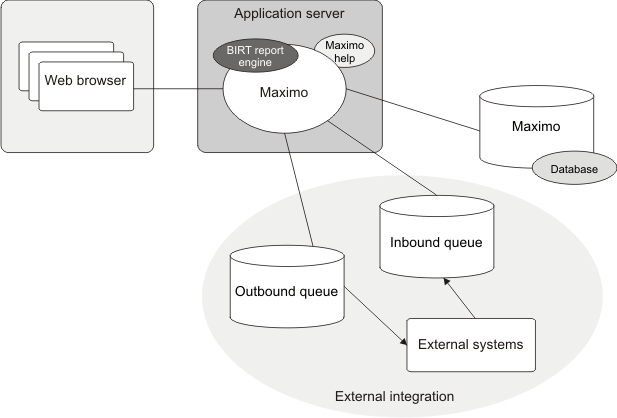
A basic system configuration consists of a single instance of the system running on an application server. That server connects to a single instance of the database that is available on a database server.

If the integration framework is also configured for deployment, then you must set up additional messaging queues. The additional queues enable the system to send data to the external systems and receive data from the external systems by using queues.

The basic configuration is appropriate for the following situations:

  • Development configuration
  • Quality assurance configuration (to test the development work)
  • Production system with a user load of 50 users or fewer users

A basic configuration might overload, depending on how much processing is performed within the application. If you need a configuration that handles more traffic than a basic configuration, then you can add Java™ virtual machines, or you can use the clustered configuration.

Even with fewer than 50 user loads, the basic system configuration can overload if there is significant processing. For example, scheduled jobs (such as cron tasks) and reports require significant memory and processing power. If the basic system configuration performs poorly, you can deploy the clustered configuration.

The default reporting engine is run from the application server that provides reporting capabilities.

The following diagram shows the main components in the basic configuration.

Figure 1. Basic system configuration

File Manipulation

An operating system (OS) is basically a collection of software that manages computer hardware resources and provides common services for computer programs. Operating system is a crucial component of the system software in a computer system.

These are some few common services provided by an operating system:

  • Program execution
  • I/O operations
  • File System manipulation
  • Communication
  • Error Detection
  • Resource Allocation
  • Protection

A file represents a collection of related information. Computers may store files on the disk (secondary storage), for long-term storage purpose. Some Examples: magnetic tape, magnetic disk and optical disk drives like CD, DVD. They have its own properties like speed, capacity, data transfer rate and data access methods.

A file system is generally organized into directories for easy navigation and usage. These directories can contain files and other directions. Some of the major activities of an operating system with respect to file management are:

  • Program requires to read a file or write a file.
  • Operating system gives the permission to the program for operation on file.
  • This permission varies from read-only, read-write, denied and so on.
  • The Operating System provides an interface to the user to create/delete files and directories.
  • The Operating System provides an interface to create the backup of file system.

Functions of Operating system

Important functions of an operating System:

  1. Security: The operating system uses password protection to protect user data and similar other techniques. it also prevents unauthorized access to programs and user data.
  2. Control over system performance: Monitors overall system health to help improve performance. records the response time between service requests and system response to have a complete view of the system health. This can help improve performance by providing important information needed to troubleshoot problems.
  3. Job accounting: Operating system Keeps track of time and resources used by various tasks and users, this information can be used to track resource usage for a particular user or group of user.
  4. Error detecting aids:
    Operating system constantly monitors the system to detect errors and avoid the malfunctioning of computer system.
  5. Coordination between other software and users: Operating systems also coordinate and assign interpreters, compilers, assemblers and other software to the various users of the computer systems.
  6. Memory Management: The operating system manages the Primary Memory or Main Memory. Main memory is made up of a large array of bytes or words where each byte or word is assigned a certain address. Main memory is a fast storage and it can be accessed directly by the CPU. For a program to be executed, it should be first loaded in the main memory. An Operating System performs the following activities for memory management: It keeps tracks of primary memory, i.e., which bytes of memory are used by which user program. The memory addresses that have already been allocated and the memory addresses of the memory that has not yet been used. In multi programming, the OS decides the order in which process are granted access to memory, and for how long. It Allocates the memory to a process when the process requests it and deallocates the memory when the process has terminated or is performing an I/O operation.
  7. Processor Management: In a multi programming environment, the OS decides the order in which processes have access to the processor, and how much processing time each process has. This function of OS is called process scheduling. An Operating System performs the following activities for processor management. Keeps tracks of the status of processes. The program which perform this task is known as traffic controller. Allocates the CPU that is processor to a process. De-allocates processor when a process is no more required.
  8. Device Management: An OS manages device communication via their respective drivers. It performs the following activities for device management. Keeps tracks of all devices connected to system. designates a program responsible for every device known as the Input/Output controller. Decides which process gets access to a certain device and for how long. Allocates devices in an effective and efficient way. Deallocates devices when they are no longer required.
  9. File Management: A file system is organized into directories for efficient or easy navigation and usage. These directories may contain other directories and other files. An Operating System carries out the following file management activities. It keeps track of where information is stored, user access settings and status of every file and more… These facilities are collectively known as the file system.

Moreover, Operating System also provides certain services to the computer system in one form or the other.
The Operating System provides certain services to the users which can be listed in the following manner:

  1. Program Execution: The Operating System is responsible for execution of all types of programs whether it be user programs or system programs. The Operating System utilises various resources available for the efficient running of all types of functionalities.
  2. Handling Input/Output Operations: The Operating System is responsible for handling all sort of inputs, i.e, from keyboard, mouse, desktop, etc. The Operating System does all interfacing in the most appropriate manner regrading all kind of Inputs and Outputs.
    For example, there is difference in nature of all types of peripheral devices such as mouse or keyboard, then Operating System is responsible for handling data between them.
  3. Manipulation of File System: The Operating System is responsible for making of decisions regarding the storage of all types of data or files, i.e, floppy disk/hard disk/pen drive, etc. The Operating System decides as how should the data should be manipulated and stored.
  4. Error Detection and Handling: The Operating System is responsible for detection of any types of error or bugs that can occur while any task. The well secured OS sometimes also acts as countermeasure for preventing any sort of breach to the Computer System from any external source and probably handling them.
  5. Resource Allocation: The Operating System ensures the proper use of all the resources available by deciding which resource to be used by whom for how much time. All the decisions are taken by the Operating System.
  6. Accounting: The Operating System tracks an account of all the functionalities taking place in the computer system at a time. All the details such as the types of errors occurred are recorded by the Operating System.
  7. Information and Resource Protection: The Operating System is responsible for using all the information and resources available on the machine in the most protected way. The Operating System must foil an attempt from any external resource to hamper any sort of data or information.

All these services are ensured by the Operating System for the convenience of the users to make the programming task easier. All different kinds of Operating System more or less provide the same services.

Introduction to GUI: Windows operating system

GUI is an interface that uses icons or other visual indicators to interact with electronic devices, rather than only text via a command line. For example, all versions of Microsoft Windows is a GUI, whereas MS-DOS is a command line. The GUI was first developed at Xerox PARC by Alan Kay, Douglas Engelbart, and a group of other researchers in 1981. Later, Apple introduced the Lisa computer with a GUI on January 19, 1983.

The actions in a GUI are usually performed through direct manipulation of the graphical elements. Beyond computers, GUIs are used in many handheld mobile devices such as MP3 players, portable media players, gaming devices, smartphones and smaller household, office and industrial controls. The term GUI tends not to be applied to other lower-display resolution types of interfaces, such as video games (where head-up display (HUD) is preferred), or not including flat screens, like volumetric displays because the term is restricted to the scope of two-dimensional display screens able to describe generic information, in the tradition of the computer science research at the Xerox Palo Alto Research Center.

How does a GUI work?

A GUI uses windows, icons, and menus to carry out commands, such as opening, deleting, and moving files. Although a GUI operating system is primarily navigated using a mouse, the keyboard can also be used to navigate using keyboard shortcuts or the arrow keys.

As an example, if you wanted to open a software program on a GUI operating system, you would move the mouse pointer to the program’s icon and double-click the icon.

Benefits of GUI

Unlike a command line operating system or CUI, like Unix or MS-DOS, GUI operating systems are much easier to learn and use because commands do not need to be memorized. Additionally, users do not need to know any programming languages. Because of their ease of use, GUI operating systems have become the dominant operating system used by today’s end-users.

What are examples of a GUI operating system?

  • Microsoft Windows
  • Apple System 7 and macOS
  • Chrome OS
  • Linux variants like Ubuntu using a GUI interface.

Are all operating systems GUI?

No. Early command line operating systems like MS-DOS and even some versions of Linux today have no GUI interface.

What are examples of a GUI interface?

  • GNOME
  • KDE
  • Any Microsoft program (e.g., Word, Excel, and Outlook).
  • Internet browser (e.g., Internet Explorer, Chrome, and Firefox).

How does the user interact with a GUI?

The user uses a pointing device such as the mouse to interact and use most aspects of the GUI. However, it is also possible to interact with a GUI using a keyboard or other input devices.

Windows operating system

Functions of an Operating System

An operating system performs various functions, and each function serves a specific purpose:

  1. Process Management: Manages the creation, deletion, and execution of processes. It provides mechanisms for synchronization and communication among processes to ensure efficient utilization of system resources.
  2. Memory Management: Allocates and de-allocates memory space to programs, handling the organization and retrieval of data from primary and secondary memory.
  3. File Management: Controls file-related activities, including storage, retrieval, naming, sharing, and protection of files. It ensures efficient access and manipulation of data stored in files.
  4. Device Management: Keeps track of all devices connected to the system, handling the allocation and de-allocation of devices for various processes.
  5. I/O System Management: Hides hardware peculiarities from the user, ensuring seamless input and output operations between the user and the hardware devices.
  6. Secondary-Storage Management: Manages different levels of storage, such as primary storage, secondary storage, and cache storage. It ensures that instructions and data are appropriately stored for efficient program execution.
  7. Security: Protects the computer system’s data and information from unauthorized access and malware threats, ensuring the integrity and confidentiality of sensitive data.
  8. Command Interpretation: Interprets commands given by users and directs system resources to process these commands effectively.
  9. Networking: Facilitates communication and coordination among distributed systems, enabling processors to communicate through a network without shared memory or hardware devices.
  10. Job Accounting: Keeps track of the time and resources utilized by different jobs and users for monitoring and billing purposes.
  11. Communication Management: Coordinates and assigns software resources (e.g., compilers, interpreters) among various users of the computer system.

Types of Operating system

  • Batch Operating System
  • Multitasking/Time Sharing OS
  • Multiprocessing OS
  • Real Time OS
  • Distributed OS
  • Network OS
  • Mobile OS

Batch Operating System

Some computer processes are very lengthy and time-consuming. To speed the same process, a job with a similar type of needs are batched together and run as a group.

The user of a batch operating system never directly interacts with the computer. In this type of OS, every user prepares his or her job on an offline device like a punch card and submit it to the computer operator.

Multi-Tasking/Time-sharing Operating systems

Time-sharing operating system enables people located at a different terminal(shell) to use a single computer system at the same time. The processor time (CPU) which is shared among multiple users is termed as time sharing.

Real time OS

A real time operating system time interval to process and respond to inputs is very small. Examples: Military Software Systems, Space Software Systems.

Distributed Operating System

Distributed systems use many processors located in different machines to provide very fast computation to its users.

Network Operating System

Network Operating System runs on a server. It provides the capability to serve to manage data, user, groups, security, application, and other networking functions.

Mobile OS

Mobile operating systems are those OS which is especially that are designed to power smartphones, tablets, and wearables devices.

Some most famous mobile operating systems are Android and iOS, but others include BlackBerry, Web, and watchOS.

Difference between Firmware and Operating System

Basis of Comparison Firmware Operating System
Definition Permanent software embedded in hardware Software that manages hardware and software resources
Function Provides low-level control to hardware devices Manages higher-level operations and user interactions
Location Stored in non-volatile memory (ROM/Flash) Installed on storage media (HDD/SSD) and loaded into RAM during boot
Execution Executes on specific hardware directly at startup Executes on top of firmware, coordinating various hardware components
Scope Typically limited to a specific device or component Runs on a wide range of devices and supports various applications
Customizability Often difficult to modify or update Frequently updated and customizable to support new features and enhancements
Interaction Usually has no direct user interaction Provides a user-friendly interface for user interactions
Examples BIOS, UEFI (for computers) Windows, macOS, Linux (for computers)
Primary Purpose To initialize and control hardware components To manage resources, provide services, and execute applications
Upgrades and Updates Firmware updates are less frequent and may require special tools OS updates are regular, easily accessible, and user-installable

Difference between 32-Bit vs. 64 Bit Operating System

Basis of Comparison 32-Bit OS 64-Bit OS
Bit Size Uses 32 bits to represent data and memory Uses 64 bits to represent data and memory
Memory Limit Limited to addressing 4 GB of RAM Can address a significantly larger amount of RAM (over 4 GB)
Application Support May not support all 64-bit applications Fully supports both 32-bit and 64-bit applications
Performance Generally, may be slightly less efficient due to smaller data chunks and memory limitations Generally offers improved performance due to larger data chunks and enhanced memory addressing
Hardware Compatibility Compatible with both 32-bit and 64-bit processors Compatible only with 64-bit processors
System Requirements Can run on both 32-bit and 64-bit hardware Requires 64-bit hardware to run
Recommended Use Suitable for older or resource-constrained systems Recommended for modern systems with ample RAM and processing power
Security May have slightly lower security due to limitations in address space randomization Offers improved security features, including higher address space randomization
Software Updates May receive fewer updates and enhancements compared to 64-bit OS Generally, more actively supported with regular updates and improvements
Software Compatibility May have compatibility issues with some newer applications optimized for 64-bit OS Fully compatible with a wide range of modern software

Advantage of using Operating System

  • Allows you to hide details of hardware by creating an abstraction
  • Easy to use with a GUI
  • Offers an environment in which a user may execute programs/applications
  • The operating system must make sure that the computer system convenient to use
  • Operating System acts as an intermediary among applications and the hardware components
  • It provides the computer system resources with easy to use format
  • Acts as an intermediator between all hardware’s and software’s of the system

Disadvantages of using Operating System

  • If any issue occurs in OS, you may lose all the contents which have been stored in your system
  • Operating system’s software is quite expensive for small size organization which adds burden on them. Example Windows
  • It is never entirely secure as a threat can occur at any time

Types of Operating system

An Operating System performs all the basic tasks like managing file,process, and memory. Thus operating system acts as manager of all the resources, i.e. resource manager. Thus operating system becomes an interface between user and machine.

Types of Operating Systems: Some of the widely used operating systems are as follows:

  1. Batch Operating System:
    This type of operating system does not interact with the computer directly. There is an operator which takes similar jobs having same requirement and group them into batches. It is the responsibility of operator to sort the jobs with similar needs.

Advantages of Batch Operating System:

  • It is very difficult to guess or know the time required by any job to complete. Processors of the batch systems know how long the job would be when it is in queue
  • Multiple users can share the batch systems
  • The idle time for batch system is very less
  • It is easy to manage large work repeatedly in batch systems

Disadvantages of Batch Operating System:

  • The computer operators should be well known with batch systems
  • Batch systems are hard to debug
  • It is sometime costly
  • The other jobs will have to wait for an unknown time if any job fails

Examples of Batch based Operating System: Payroll System, Bank Statements etc.

  1. Time-Sharing Operating Systems:
    Each task is given some time to execute, so that all the tasks work smoothly. Each user gets time of CPU as they use single system. These systems are also known as Multitasking Systems. The task can be from single user or from different users also. The time that each task gets to execute is called quantum. After this time interval is over OS switches over to next task.

Advantages of Time-Sharing OS:

  • Each task gets an equal opportunity
  • Less chances of duplication of software
  • CPU idle time can be reduced

Disadvantages of Time-Sharing OS:

  • Reliability problem
  • One must have to take care of security and integrity of user programs and data
  • Data communication problem

Examples of Time-Sharing OSs are: Multics, Unix etc.

  1. Distributed Operating System:
    These types of operating system is a recent advancement in the world of computer technology and are being widely accepted all-over the world and, that too, with a great pace. Various autonomous interconnected computers communicate each other using a shared communication network. Independent systems possess their own memory unit and CPU. These are referred as loosely coupled systems or distributed systems. These system’s processors differ in size and function. The major benefit of working with these types of operating system is that it is always possible that one user can access the files or software which are not actually present on his system but on some other system connected within this network i.e., remote access is enabled within the devices connected in that network.

Advantages of Distributed Operating System:

  • Failure of one will not affect the other network communication, as all systems are independent from each other
  • Electronic mail increases the data exchange speed
  • Since resources are being shared, computation is highly fast and durable
  • Load on host computer reduces
  • These systems are easily scalable as many systems can be easily added to the network
  • Delay in data processing reduces

Disadvantages of Distributed Operating System:

  • Failure of the main network will stop the entire communication
  • To establish distributed systems the language which are used are not well defined yet
  • These types of systems are not readily available as they are very expensive. Not only that the underlying software is highly complex and not understood well yet

Examples of Distributed Operating System are- LOCUS etc.

  1. Network Operating System:
    These systems run on a server and provide the capability to manage data, users, groups, security, applications, and other networking functions. These type of operating systems allow shared access of files, printers, security, applications, and other networking functions over a small private network. One more important aspect of Network Operating Systems is that all the users are well aware of the underlying configuration, of all other users within the network, their individual connections etc. and that’s why these computers are popularly known as tightly coupled systems.

Advantages of Network Operating System:

  • Highly stable centralized servers
  • Security concerns are handled through servers
  • New technologies and hardware up-gradation are easily integrated to the system
  • Server access are possible remotely from different locations and types of systems

Disadvantages of Network Operating System:

  • Servers are costly
  • User has to depend on central location for most operations
  • Maintenance and updates are required regularly

Examples of Network Operating System are: Microsoft Windows Server 2003, Microsoft Windows Server 2008, UNIX, Linux, Mac OS X, Novell NetWare, and BSD etc.

  1. Real-Time Operating System:
    These types of OSs serves the real-time systems. The time interval required to process and respond to inputs is very small. This time interval is called response time.

Real-time systems are used when there are time requirements are very strict like missile systems, air traffic control systems, robots etc.

Two types of Real-Time Operating System which are as follows:

  • Hard Real-Time Systems:
    These OSs are meant for the applications where time constraints are very strict and even the shortest possible delay is not acceptable. These systems are built for saving life like automatic parachutes or air bags which are required to be readily available in case of any accident. Virtual memory is almost never found in these systems.
  • Soft Real-Time Systems:
    These OSs are for applications where for time-constraint is less strict.

Advantages of RTOS:

  • Maximum Consumption: Maximum utilization of devices and system,thus more output from all the resources
  • Task Shifting: Time assigned for shifting tasks in these systems are very less. For example in older systems it takes about 10 micro seconds in shifting one task to another and in latest systems it takes 3 micro seconds.
  • Focus on Application: Focus on running applications and less importance to applications which are in queue.
  • Real time operating system in embedded system: Since size of programs are small, RTOS can also be used in embedded systems like in transport and others.
  • Error Free: These types of systems are error free.
  • Memory Allocation: Memory allocation is best managed in these type of systems.

Disadvantages of RTOS:

  • Limited Tasks: Very few tasks run at the same time and their concentration is very less on few applications to avoid errors.
  • Use heavy system resources: Sometimes the system resources are not so good and they are expensive as well.
  • Complex Algorithms: The algorithms are very complex and difficult for the designer to write on.
  • Device driver and interrupt signals: It needs specific device drivers and interrupt signals to response earliest to interrupts.
  • Thread Priority: It is not good to set thread priority as these systems are very less prone to switching tasks.

Examples of Real-Time Operating Systems are: Scientific experiments, medical imaging systems, industrial control systems, weapon systems, robots, air traffic control systems, etc.

Analog and Digital Transmission

An Analog signal is any continuous signal for which the time varying feature (variable) of the signal is a representation of some other time varying quantity, i.e., analogous to another time varying signal. It differs from a digital signal in terms of small fluctuations in the signal which are meaningful.

A digital signal uses discrete (discontinuous) values. By contrast, non-digital (or analog) systems use a continuous range of values to represent information. Although digital representations are discrete, the information represented can be either discrete, such as numbers or letters, or continuous, such as sounds, images, and other measurements of continuous systems.

Analog versus Digital comparison chart

Analog

Digital

Signal Analog signal is a continuous signal which represents physical measurements. Digital signals are discrete time signals generated by digital modulation.
Waves Denoted by sine waves Denoted by square waves
Representation Uses continuous range of values to represent information Uses discrete or discontinuous values to represent information
Example Human voice in air, analog electronic devices. Computers, CDs, DVDs, and other digital electronic devices.
Technology Analog technology records wave forms as they are. Samples analog wave forms into a limited set of numbers and records them.
Data transmissions Subjected to deterioration by noise during transmission and write/read cycle. Can be noise-immune without deterioration during transmission and write/read cycle.
Response to Noise More likely to get affected reducing accuracy Less affected since noise response are analog in nature
Flexibility Analog hardware is not flexible. Digital hardware is flexible in implementation.
Uses Can be used in analog devices only. Best suited for audio and video transmission. Best suited for Computing and digital electronics.
Applications Thermometer PCs, PDAs
Bandwidth Analog signal processing can be done in real time and consumes less bandwidth. There is no guarantee that digital signal processing can be done in real time and consumes more bandwidth to carry out the same information.
Memory Stored in the form of wave signal Stored in the form of binary bit
Power Analog instrument draws large power Digital instrument draws only negligible power
Cost Low cost and portable Cost is high and not easily portable
Impedance Low High order of 100 mega ohm
Errors Analog instruments usually have a scale which is cramped at lower end and give considerable observational errors. Digital instruments are free from observational errors like parallax and approximation errors.

Properties of Digital vs Analog signals

Digital information has certain properties that distinguish it from analog communication methods. These include

  • Synchronization: Digital communication uses specific synchronization sequences for determining synchronization.
  • Language: Digital communications requires a language which should be possessed by both sender and receiver and should specify meaning of symbol sequences.
  • Errors: Disturbances in analog communication causes errors in actual intended communication but disturbances in digital communication does not cause errors enabling error free communication. Errors should be able to substitute, insert or delete symbols to be expressed.
  • Copying: Analog communication copies are quality wise not as good as their originals while due to error free digital communication, copies can be made indefinitely.
  • Granularity: For a continuously variable analog value to be represented in digital form there occur quantization error which is difference in actual analog value and digital representation and this property of digital communication is known as granularity.

Differences in Usage in Equipment

Many devices come with built in translation facilities from analog to digital. Microphones and speaker are perfect examples of analog devices. Analog technology is cheaper but there is a limitation of size of data that can be transmitted at a given time.

Digital technology has revolutionized the way most of the equipments work. Data is converted into binary code and then reassembled back into original form at reception point. Since these can be easily manipulated, it offers a wider range of options. Digital equipment is more expensive than analog equipment.

Comparison of Analog vs Digital Quality

Digital devices translate and reassemble data and in the process are more prone to loss of quality as compared to analog devices. Computer advancement has enabled use of error detection and error correction techniques to remove disturbances artificially from digital signals and improve quality.

Differences in Applications

Digital technology has been most efficient in cellular phone industry. Analog phones have become redundant even though sound clarity and quality was good.

Analog technology comprises of natural signals like human speech. With digital technology this human speech can be saved and stored in a computer. Thus digital technology opens up the horizon for endless possible uses.

Advantages of Digital Communication

As the signals are digitized, there are many advantages of digital communication over analog communication, such as:

  • The effect of distortion, noise, and interference is much less in digital signals as they are less affected.
  • Digital circuits are more reliable.
  • Digital circuits are easy to design and cheaper than analog circuits.
  • The hardware implementation in digital circuits, is more flexible than analog.
  • The occurrence of cross-talk is very rare in digital communication.
  • The signal is un-altered as the pulse needs a high disturbance to alter its properties, which is very difficult.
  • Signal processing functions such as encryption and compression are employed in digital circuits to maintain the secrecy of the information.
  • The probability of error occurrence is reduced by employing error detecting and error correcting codes.
  • Spread spectrum technique is used to avoid signal jamming.
  • Combining digital signals using Time Division Multiplexing TDM

is easier than combining analog signals using Frequency Division Multiplexing FDM

  • The configuring process of digital signals is easier than analog signals.
  • Digital signals can be saved and retrieved more conveniently than analog signals.
  • Many of the digital circuits have almost common encoding techniques and hence similar devices can be used for a number of purposes.
  • The capacity of the channel is effectively utilized by digital signals.

Elements of Digital Communication

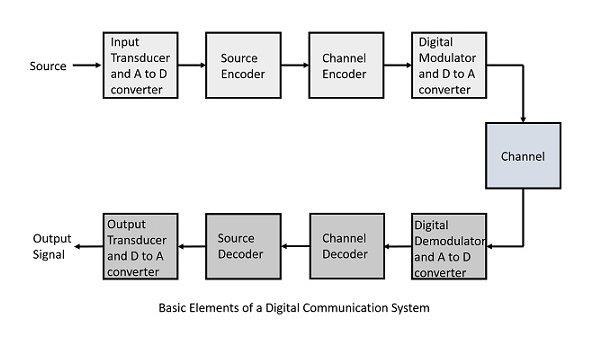
The elements which form a digital communication system is represented by the following block diagram for the ease of understanding.

Following are the sections of the digital communication system.

Source

The source can be an analog signal. Example: A Sound signal

Input Transducer

This is a transducer which takes a physical input and converts it to an electrical signal (Example: microphone). This block also consists of an analog to digital converter where a digital signal is needed for further processes.

A digital signal is generally represented by a binary sequence.

Source Encoder

The source encoder compresses the data into minimum number of bits. This process helps in effective utilization of the bandwidth. It removes the redundant bits unnecessary excess bits,i.e.,zeroes

Channel Encoder

The channel encoder, does the coding for error correction. During the transmission of the signal, due to the noise in the channel, the signal may get altered and hence to avoid this, the channel encoder adds some redundant bits to the transmitted data. These are the error correcting bits.

Digital Modulator

The signal to be transmitted is modulated here by a carrier. The signal is also converted to analog from the digital sequence, in order to make it travel through the channel or medium.

Channel

The channel or a medium, allows the analog signal to transmit from the transmitter end to the receiver end.

Digital Demodulator

This is the first step at the receiver end. The received signal is demodulated as well as converted again from analog to digital. The signal gets reconstructed here.

Channel Decoder

The channel decoder, after detecting the sequence, does some error corrections. The distortions which might occur during the transmission, are corrected by adding some redundant bits. This addition of bits helps in the complete recovery of the original signal.

Source Decoder

The resultant signal is once again digitized by sampling and quantizing so that the pure digital output is obtained without the loss of information. The source decoder recreates the source output.

Output Transducer

This is the last block which converts the signal into the original physical form, which was at the input of the transmitter. It converts the electrical signal into physical output (Example: loud speaker).

Output Signal

This is the output which is produced after the whole process. Example: The sound signal received.

This unit has dealt with the introduction, the digitization of signals, the advantages and the elements of digital communications. In the coming chapters, we will learn about the concepts of Digital communications, in detail.

Indian Financial System

The organization of the capital market in India presents a striking contrast to the institutional structure in the industrially advanced countries of the West. The rise of institutional finance for industry abroad has been the result mainly of institutionalization of personal savings through savings media like life insurance, pension and provident funds and unit trusts and so on.

The growth of institutional finance for industry in India has come largely through industrial financing institutions created by the government both at the national and regional levels, collectively referred to as development banks.

In other words, a pronounced feature of the system of industrial financing in India is the heavy domination of its structure by the development banks and the relatively minor role of the normal channels of financing.

As a result, industry has come to rely very heavily on the development banks as far as its financing requirements are concerned. In terms of their massive role development banks have out-grown their supplementary character of suppliers of finance in terms of their conception as ‘gap-fillers’.

It, undoubtedly, redounds to their credit that they have been able to channel sufficient funds into the productive system despite un-favourable conditions in the investment market.

The rigorous, exacting and detailed appraisal that development banks conduct is an integral part of term lending, tones up the quality of projects and ensures efficient use of available resources. Moreover, the evaluation of projects by them is objective and impersonal.

This has led to the availability of funds to varied types of enterprises, in particular new or relatively new firms of industries. The provision of financial facilities to such enterprises is of special significance at the present stage of India’s industrialization.

The relevance of the development banks in the industrial financing system is not merely quantitative; it has overwhelmingly qualitative dimensions in terms of their promotional and innovational function.

With the evolution of a meaningful industrial strategy, the accent in financing by the development banks is geared so that industrial development would sub-serve the basic economic objectives of balanced regional development, growth of new entrepreneurial talents and small enterprises and development of indigenous industrial technology, and thus, contribute to the emergence of a widely-diffused yet viable process of industrialization consistent with the socio-economic objective of State policy.

The development banks, in fact, constitute the backbone of the Indian capital market.

This overwhelming relevance of development banks in India notwithstanding their phenomenal growth and the massive reliance of industry on them in consequence have far-reaching implications in so far as the ability of the market to cope with the future requirements of the accelerated programmes of industrial development is concerned.

The present experience of the supply of industrial capital gives a distorted view of this ability. This ‘distortion’ has, inter alia, two serious dimensions.

The first aspect of this ‘distortion’ relates to the real ability of the financing system to cope with the growing requirements of an expanding corporate sector of private industry resulting from accelerated program of industrial development under the five-year plans.

The relevance of capital markets to economic development is based on mobilization of savings and their distribution to productive enterprises. These two interrelated functions are a sine-qua- none of an efficient capital market.

Judged in these terms development banks play rather partial and limited role and a system of industrial financing so heavily dominated by them as the one in India has certainly failed to grow pari-pasu with the planned growth of industry.

This is because the development banks, as financial intermediaries, are essentially distributive agencies as they derive most of their funds from their sponsors and, to that extent, a divorce between collection of savings and their allocation has come into being.

This is a serious obstacle to the growth of an autonomous financing system in the sense of equilibrium between the demand for, and supply of, capital funds. Attention to this weakness of the Indian capital market was drawn in the following words:-

“A weakness of the present institutional structure with its heavy dependence on special institutions is that the system is not organically linked to the ultimate source of savings and depends a little too much on ad-hoc allocation from the treasury. It will be desirable to forge links between the distributory mechanism, on the one hand, and the normal channels of savings on the other, so that the distributing mechanism becomes increasingly capable of growing autonomously with the needs of the economy on the basis of available savings.”

The domination of the institutional structure of the capital market by development banks in India has created yet another serious ‘distortion’ in the form of financial practices of questionable prudence. Since the development banks provided most of the funds in the form of term loans, there is a preponderance of debt in the financial structure of corporate enterprises.

There is, of course, no doubt that term loans, as a form of financing, reduce the dependence of investment on the erratic stock exchanges and the detailed scrutiny of the loan agreement have the effect of promoting greater financial discipline among the borrowers, on the one hand, and more effective public control over the private enterprise, on the other, but the predominant position of debt capital has made the capital structure of the borrowing concerns lopsided and unbalanced and, on considerations of orthodox canons of corporate financing, highly imprudent.

The sympathetic and flexible attitude of development banks as public financial institutions in case of defaults arising out of temporary difficulties can, of course, permit a greater use of debt than is warranted by the traditional concept of a sound capital structure but it does not justify the unlimited use of debt capital as it is likely to jeopardize the future of the company itself.

The solution to the problem implicit in these distortions obviously lies in securing an organic link between the distributive mechanism and the ultimate pool of the savings of community.

Banking System in India

In India the banks and banking have been divided in different groups. Each group has their own benefits and limitations in their operations. They have their own dedicated target market. Some are concentrated their work in rural sector while others in both rural as well as urban. Most of them are only catering in cities and major towns.

Indian Banking System: Structure

Bank is an institution that accepts deposits of money from the public.

Anybody who has account in the bank can withdraw money. Bank also lends money.

Indigenous Banking

The exact date of existence of indigenous bank is not known. But, it is certain that the old banking system has been functioning for centuries. Some people trace the presence of indigenous banks to the Vedic times of 2000-1400 BC. It has admirably fulfilled the needs of the country in the past.

However, with the coming of the British, its decline started. Despite the fast growth of modern commercial banks, however, the indigenous banks continue to hold a prominent position in the Indian money market even in the present times. It includes shroffs, seths, mahajans, chettis, etc. The indigenous bankers lend money; act as money changers and finance internal trade of India by means of hundis or internal bills of exchange.

Disvantages

(i) They are unorganized and do not have any contact with other sections of the banking world.

(ii) They combine banking with trading and commission business and thus have introduced trade risks into their banking business.

(iii) They do not distinguish between short term and long term finance and also between the purpose of finance.

(iv) They follow vernacular methods of keeping accounts. They do not give receipts in most cases and interest which they charge is out of proportion to the rate of interest charged by other banking institutions in the country.

Suggestions for Improvements

(i) The banking practices need to be upgraded.

(ii) Encouraging them to avail of certain facilities from the banking system, including the RBI.

(iii) These banks should be linked with commercial banks on the basis of certain understanding in the respect of interest charged from the borrowers, the verification of the same by the commercial banks and the passing of the concessions to the priority sectors etc.

(iv) These banks should be encouraged to become corporate bodies rather than continuing as family based enterprises.

Structure of Organized Indian Banking System

The organized banking system in India can be classified as given below:

Reserve Bank of India (RBI)

The country had no central bank prior to the establishment of the RBI. The RBI is the supreme monetary and banking authority in the country and controls the banking system in India. It is called the Reserve Bank’ as it keeps the reserves of all commercial banks.

Commercial Banks

Commercial banks mobilise savings of general public and make them available to large and small industrial and trading units mainly for working capital requirements.

Commercial banks in India are largely Indian-public sector and private sector with a few foreign banks. The public sector banks account for more than 92 percent of the entire banking business in India—occupying a dominant position in the commercial banking. The State Bank of India and its 7 associate banks along with another 19 banks are the public sector banks.

Scheduled and Non-Scheduled Banks

The scheduled banks are those which are enshrined in the second schedule of the RBI Act, 1934. These banks have a paid-up capital and reserves of an aggregate value of not less than Rs. 5 lakhs, hey have to satisfy the RBI that their affairs are carried out in the interest of their depositors.

All commercial banks (Indian and foreign), regional rural banks, and state cooperative banks are scheduled banks. Non- scheduled banks are those which are not included in the second schedule of the RBI Act, 1934. At present these are only three such banks in the country.

Regional Rural Banks

The Regional Rural Banks (RRBs) the newest form of banks, came into existence in the middle of 1970s (sponsored by individual nationalized commercial banks) with the objective of developing rural economy by providing credit and deposit facilities for agriculture and other productive activities of al kinds in rural areas.

The emphasis is on providing such facilities to small and marginal farmers, agricultural labourers, rural artisans and other small entrepreneurs in rural areas.

Other special features of these banks are

(i) Their area of operation is limited to a specified region, comprising one or more districts in any state.

(ii) Their lending rates cannot be higher than the prevailing lending rates of cooperative credit societies in any particular state.

(iii) The paid-up capital of each rural bank is Rs. 25 lakh, 50 percent of which has been contributed by the Central Government, 15 percent by State Government and 35 percent by sponsoring public sector commercial banks which are also responsible for actual setting up of the RRBs.

These banks are helped by higher-level agencies: the sponsoring banks lend them funds and advise and train their senior staff, the NABARD (National Bank for Agriculture and Rural Development) gives them short-term and medium, term loans: the RBI has kept CRR (Cash Reserve Requirements) of them at 3% and SLR (Statutory Liquidity Requirement) at 25% of their total net liabilities, whereas for other commercial banks the required minimum ratios have been varied over time.

Cooperative Banks

Cooperative banks are so-called because they are organized under the provisions of the Cooperative Credit Societies Act of the states. The major beneficiary of the Cooperative Banking is the agricultural sector in particular and the rural sector in general.

The cooperative credit institutions operating in the country are mainly of two kinds: agricultural (dominant) and non-agricultural. There are two separate cooperative agencies for the provision of agricultural credit: one for short and medium-term credit, and the other for long-term credit. The former has three tier and federal structure.

At the apex is the State Co-operative Bank (SCB) (cooperation being a state subject in India), at the intermediate (district) level are the Central Cooperative Banks (CCBs) and at the village level are Primary Agricultural Credit Societies (PACs).

Long-term agriculture credit is provided by the Land Development Banks. The funds of the RBI meant for the agriculture sector actually pass through SCBs and CCBs. Originally based in rural sector, the cooperative credit movement has now spread to urban areas also and there are many urban cooperative banks coming under SCBs.

error: Content is protected !!