Flow Chart

Flowchart is a graphical representation of an algorithm. Programmers often use it as a program-planning tool to solve a problem. It makes use of symbols which are connected among them to indicate the flow of information and processing.

The process of drawing a flowchart for an algorithm is known as “flowcharting”.

Basic Symbols used in Flowchart Designs

  1. Terminal

The oval symbol indicates Start, Stop and Halt in a program’s logic flow. A pause/halt is generally used in a program logic under some error conditions. Terminal is the first and last symbols in the flowchart.

  1. Input/Output

A parallelogram denotes any function of input/output type. Program instructions that take input from input devices and display output on output devices are indicated with parallelogram in a flowchart.

  1. Processing

A box represents arithmetic instructions. All arithmetic processes such as adding, subtracting, multiplication and division are indicated by action or process symbol.

  1. Decision

Diamond symbol represents a decision point. Decision based operations such as yes/no question or true/false are indicated by diamond in flowchart.

  1. Connectors

Whenever flowchart becomes complex or it spreads over more than one page, it is useful to use connectors to avoid any confusions. It is represented by a circle.

  1. Flow lines

Flow lines indicate the exact sequence in which instructions are executed. Arrows represent the direction of flow of control and relationship among different symbols of flowchart.

Example: Draw a flowchart to input two numbers from user and display the largest of two numbers

Programme Coding

So how does coding work, really? The short answer is that writing code tells the computer what to do, but it’s not quite that simple.

A computer can only understand two distinct types of data: on and off. In fact, a computer is really just a collection of on/off switches (transistors). Anything that a computer can do is nothing more than a unique combination of some transistors turned on and some transistors turned off.

Binary code is the representation of these combinations as 1s and 0s, where each digit represents one transistor. Binary code is grouped into bytes, groups of 8 digits representing 8 transistors. For example, 11101001. Modern computers contain millions or even billions of transistors, which means an unimaginably large number of combinations.

But one problem arises here. To be able to write a computer program by typing out billions of 1s and 0s would require superhuman brainpower, and even then it would probably take you a lifetime or two to write.

This is where programming languages come in…

Programming Languages

Here’s a simple example of some code:

Print ‘Hello, world!’

That line of code is written in the Python programming language. Put simply, a programming (or coding) language is a set of syntax rules that define how code should be written and formatted.

Thousands of different programming languages make it possible for us to create computer software, apps and websites. Instead of writing binary code, they let us write code that is (relatively) easy for us to write, read and understand. Each language comes with a special program that takes care of translating what we write into binary code.

Why Do We Have So Many Languages?

Because different languages are designed to be used for different purposes – some are useful for web development, others useful for writing desktop software, others useful for solving scientific and numeric problems, and so on.

Low-Level and High-Level Languages

Programming languages can also be low-level or high-level.

Low-level languages are closer to the binary code a computer understands, while high-level languages bear a lot less resemblance to binary code. High-level languages are easier to program in, because they’re less detailed and designed to be easy for us to write.

Nearly all of the main programming languages in use today are high-level languages.

Programs

A program is simply a text file, written in a certain coding language. The code inside a program file is called the source code. Every coding language has its own file extension for identifying code files written in that language. For example, Python’s is ‘.py’.

To make a program, you write the code in a plain text editor like Notepad and save the file to your computer. That’s it. For example, the below line of code could be the contents of a very short Python program called hello.py:

Print ‘Hello, world!’

How do you run a program and actually get it to perform its commands? That varies between coding languages. Some languages save a separate binary file that the computer can directly run, while other languages have their programs run indirectly by certain software.

For example, a JavaScript program file would get run by a web browser like Chrome. A PHP program file would get run by a web server like LAMP.

In the case of our hello.py file, the Python language comes with a command line which will display the output of the program – the text ‘Hello, world!’. If you were to enter the code into the command line and press enter, the program gets run and the command will get executed.

What Happens When You Run a Program?

A computer doesn’t actually understand the phrase ‘Hello, world!’, and it doesn’t know how to display it on screen. It only understands on and off. So to actually run a command like print ‘Hello, world!’, it has to translate all the code in a program into a series of ons and offs that it can understand.

To do that, a number of things happen:

  • The source code is translated into assembly language.
  • The assembly code is translated into machine language.
  • The machine language is directly executed as binary code.

Confused? Let’s go into a bit more detail. The coding language first has to translate its source code into assembly language, a super low-level language that uses words and numbers to represent binary patterns. Depending on the language, this may be done with an interpreter (where the program is translated line-by-line), or with a compiler (where the program is translated as a whole).

The coding language then sends off the assembly code to the computer’s assembler, which converts it into the machine language that the computer can understand and execute directly as binary code.

Conclusion

Isn’t it amazing to think that something as deceptively simple and primitive as binary code can create things as complex as what goes on inside a computer?

Your screen, operating system, photos, videos, the Internet, Facebook, your online bank account, and this website – all these things can be constructed from nothing but 1s and 0s. It’s a real symbol of human achievement.

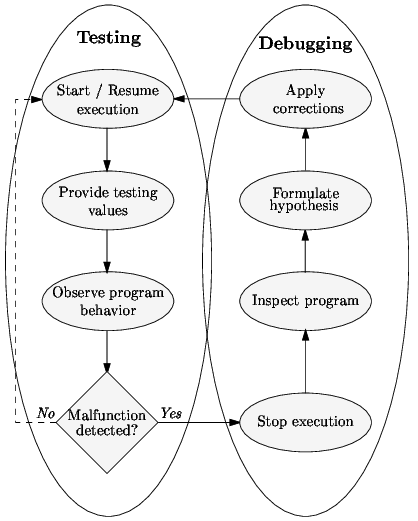
Testing and Debugging

Testing

Testing is the process of verifying and validating that a software or application is bug free, meets the technical requirements as guided by its design and development and meets the user requirements effectively and efficiently with handling all the exceptional and boundary cases.

Debugging

Debugging is the process of fixing a bug in the software. It can defined as the identifying, analyzing and removing errors. This activity begins after the software fails to execute properly and concludes by solving the problem and successfully testing the software. It is considered to be an extremely complex and tedious task because errors need to be resolved at all stages of debugging.

Below is the difference between testing and debugging:

Testing

Debugging

Testing is the process to find bugs and errors. Debugging is the process to correct the bugs found during testing.
It is the process to identify the failure of implemented code.           It is the process to give the absolution to code failure.
Testing is the display of errors.  Debugging is a deductive process.
Testing is done by the tester. Debugging is done by either programmer or developer.
There is no need of design knowledge in the testing process.      Debugging can’t be done without proper design knowledge.
Testing can be done by insider as well as outsider. Debugging is done only by insider. Outsider can’t do debugging.
Testing can be manual or automated. Debugging is always manual. Debugging can’t be automated.
It is based on different testing levels i.e. unit testing, integration testing, system testing etc.     Debugging is based on different types of bugs.
Testing is a stage of software development life cycle (SDLC).     Debugging is not an aspect of software development life cycle, it occurs as a consequence of testing.
Testing is composed of validation and verification of software.   While debugging process seeks to match symptom with cause, by that it leads to the error correction.
Testing is initiated after the code is written.            Debugging commences with the execution of a test case.


Testing and Debugging Cycle

C (Programming Language)

C is a procedural programming language. It was initially developed by Dennis Ritchie in the year 1972. It was mainly developed as a system programming language to write an operating system. The main features of C language include low-level access to memory, a simple set of keywords, and clean style, these features make C language suitable for system programmings like an operating system or compiler development.

Many later languages have borrowed syntax/features directly or indirectly from C language. Like syntax of Java, PHP, JavaScript, and many other languages are mainly based on C language. C++ is nearly a superset of C language (There are few programs that may compile in C, but not in C++).

Beginning with C programming:

  1. Structure of a C program

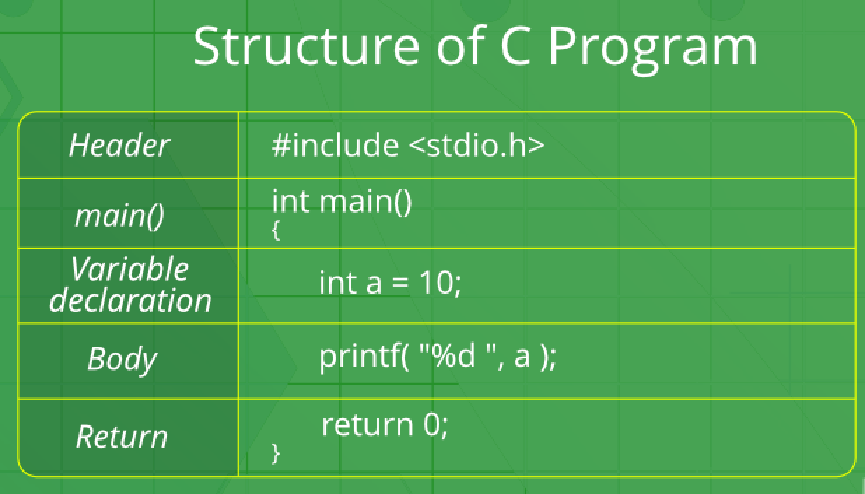
After the above discussion, we can formally assess the structure of a C program. By structure, it is meant that any program can be written in this structure only. Writing a C program in any other structure will hence lead to a Compilation Error.

The structure of a C program is as follows:

The components of the above structure are:

(i) Header Files Inclusion: The first and foremost component is the inclusion of the Header files in a C program.

A header file is a file with extension .h which contains C function declarations and macro definitions to be shared between several source files.

Some of C Header files:

  • h – Defines several useful types and macros.
  • h – Defines exact width integer types.
  • h – Defines core input and output functions
  • h – Defines numeric conversion functions, pseudo-random network generator, memory allocation
  • h – Defines string handling functions
  • h – Defines common mathematical functions

Syntax to include a header file in C:

#include

(ii) Main Method Declaration: The next part of a C program is to declare the main() function. The syntax to declare the main function is:

Syntax to Declare main method:

int main()

{}

(iii) Variable Declaration: The next part of any C program is the variable declaration. It refers to the variables that are to be used in the function. Please note that in the C program, no variable can be used without being declared. Also in a C program, the variables are to be declared before any operation in the function.

Example:

int main()

{

    int a;

.

.

(iv) Body: Body of a function in C program, refers to the operations that are performed in the functions. It can be anything like manipulations, searching, sorting, printing, etc.

Example:

int main()

{

    int a;

    printf(“%d”, a);

.

.

(v) Return Statement: The last part in any C program is the return statement. The return statement refers to the returning of the values from a function. This return statement and return value depend upon the return type of the function. For example, if the return type is void, then there will be no return statement. In any other case, there will be a return statement and the return value will be of the type of the specified return type.

Example:

int main()

{

    int a;

    printf(“%d”, a);

    return 0;

}

  1. Writing first program

Following is first program in C

#include <stdio.h>

int main(void)

{

    printf(“GeeksQuiz”);

    return 0;

}

Let us analyze the program line by line.

Line 1: [ #include <stdio.h> ] In a C program, all lines that start with # are processed by preprocessor which is a program invoked by the compiler. In a very basic term, preprocessor takes a C program and produces another C program. The produced program has no lines starting with #, all such lines are processed by the preprocessor. In the above example, preprocessor copies the preprocessed code of stdio.h to our file. The .h files are called header files in C. These header files generally contain declaration of functions. We need stdio.h for the function printf() used in the program.

Line 2 [ int main(void) ] There must to be starting point from where execution of compiled C program begins. In C, the execution typically begins with first line of main(). The void written in brackets indicates that the main doesn’t take any parameter (See this for more details). main() can be written to take parameters also. We will be covering that in future posts.

The int written before main indicates return type of main(). The value returned by main indicates status of program termination. See this post for more details on return type.

Line 3 and 6: [ { and } ] In C language, a pair of curly brackets define a scope and mainly used in functions and control statements like if, else, loops. All functions must start and end with curly brackets.

Line 4 [ printf(“GeeksQuiz”); ] printf() is a standard library function to print something on standard output. The semicolon at the end of printf indicates line termination. In C, semicolon is always used to indicate end of statement.

Line 5 [ return 0; ] The return statement returns the value from main(). The returned value may be used by operating system to know termination status of your program. The value 0 typically means successful termination.

  1. How to excecute the above program?

Inorder to execute the above program, we need to have a compiler to compile and run our programs. There are certain online compilers like https://ide.geeksforgeeks.org/, http://ideone.com/ or http://codepad.org/ that can be used to start C without installing a compiler.

Windows: There are many compilers available freely for compilation of C programs like Code Blocks  and Dev-CPP.   We strongly recommend Code Blocks.

Linux: For Linux, gcc comes bundled with the linux,  Code Blocks can also be used with Linux.

Data Types, Variable and Constant in C

Variables

If you declare a variable in C (later on we talk about how to do this), you ask the operating system for a piece of memory. This piece of memory you give a name and you can store something in that piece of memory (for later use). There are two basic kinds of variables in C which are numeric and character.

Numeric variables

Numeric variables can either be of the type integer (int) or of the type real (float). Integer (int) values are whole numbers (like 10 or -10). Real (float) values can have a decimal point in them. (Like 1.23 or -20.123).

Character variables

Character variables are letters of the alphabet, ASCII characters or numbers 0-9. If you declare a character variable you must always put the character between single quotes (like so ‘A’ ). So remember a number without single quotes is not the same as a character with single quotes.

Constants

The difference between variables and constants is that variables can change their value at any time but constants can never change their value. (The constants value is lockedfor the duration of the program). Constants can be very useful, Pi for instance is a good example to declare as a constant.

Data Types

So you now know that there are three types of variables: numeric – integer, numeric-real and character. A variable has a type-name, a type and a range (minimum / maximum). In the following table you can see the type-name, type and range:

Type-name Type Range
int                   Numeric – Integer -32 768 to 32 767
Short Numeric – Integer -32 768 to 32 767
Long Numeric – Integer -2 147 483 648 to 2 147 483 647
Float Numeric – Real 1.2 X 10-38 to 3.4 X 1038
Double Numeric – Real 2.2 X 10-308 to 1.8 X 10308
Char Character All ASCII characters

C Programming Expression

C Programming Expression

  • In programming, an expression is any legal combination of symbols that represents a value.
  • C Programming Provides its own rules of Expression, whether it is legal expression or illegal expression. For example, in the C language x+5 is a legal expression.
  • Every expression consists of at least one operand and can have one or more operators.
  • Operands are values and Operators are symbols that represent particular actions.

Valid C Programming Expression

C Programming code gets compiled firstly before execution. In the different phases of compiler, c programming expression is checked for its validity.

Expressions Validity
a + b Expression is valid since it contain + operator which is binary operator
+ + a + b Invalid Expression

Priority and Expression

In order to solve any expression we should have knowledge of C Programming Operators and their priorities.

Types of Expression

In Programming, different verities of expressions are given to the compiler. Expressions can be classified on the basis of Position of Operators in an expression:

Type   Explanation  Example
Infix Expression in which Operator is in between Operands a + b
Prefix Expression in which Operator is written before Operands + a b
Postfix Expression in which Operator is written after Operands a b +

Examples of Expression

Now we will be looking into some of the C Programming Expressions, Expression can be created by combining the operators and operands

Each of the expression results into the some resultant output value. Consider few expressions in below table

Expression Examples, Explanation

n1 + n2,This is an expression which is going to add two numbers and we can assign the result of addition to another variable.

x = y,This is an expression which assigns the value of right hand side operand to left side variable

v = u + a * t,We are multiplying two numbers and result is added to ‘u’ and total result is assigned to v

x <= y,This expression will return Boolean value because comparison operator will give us output either true or false ++j,This is expression having pre increment operator\, it is used to increment the value of j before using it in expression [/table]

Assignment Operator in C Programming, Dynamic Data Structure in C – Pointers

Assignment Operator in C Programming Language:

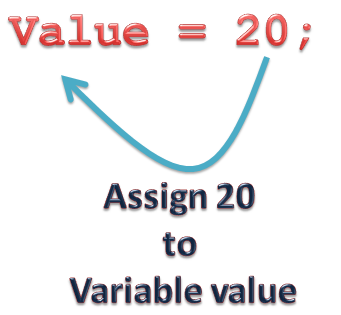
  • Assignment Operator is used to assign value to an variable.
  • Assignment Operator is denoted by equal to sign
  • Assignment Operator is binary operator which operates on two operands.
  • Assignment Operator have Two Values: L-Value and R-Value. Operator copies R-Value into L-Value.
  • Assignment Operator have lower precedence than all available operators but has higher precedence than comma Operator.

Dynamic Data Structure in C – Pointers

For programs dealing with large sets of data, it would be a nuisance to have to name every structure variable containing every piece of data in the code — for one thing, it would be inconvenient to enter new data at run time because you would have to know the name of the variable in which to store the data when you wrote the program. For another thing, variables with names are permanent — they cannot be freed and their memory reallocated, so you might have to allocate an impractically large block of memory for your program at compile time, even though you might need to store much of the data you entered at run time temporarily.

Fortunately, complex data structures are built out of dynamically allocated memory, which does not have these limitations. All your program needs to do is keep track of a pointer to a dynamically allocated block, and it will always be able to find the block.

A complex data structure is usually built out of the following components:

  • Nodes: Dynamically-allocated blocks of data, usually structures.
  • Links: Pointers from nodes to their related nodes.
  • Root: The node where a data structure starts, also known as the root node. The address of the root of a data structure must be stored explicitly in a C variable, or else you will lose track of it.

There are some advantages to the use of dynamic storage for data structures:

  • As mentioned above, since memory is allocated as needed, we don’t need to declare how much we shall use in advance.
  • Complex data structures can be made up of lots of “lesser” data structures in a modular way, making them easier to program.
  • Using pointers to connect structures means that they can be re-connected in different ways as the need arises. (Data structures can be sorted, for example.)

Structure and Unions, User Defined Variables

Similarities between Structure and Union

  1. Both are user-defined data types used to store data of different types as a single unit.
  2. Their members can be objects of any type, including other structures and unions or arrays. A member can also consist of a bit field.
  3. Both structures and unions support only assignment = and sizeof operators. The two structures or unions in the assignment must have the same members and member types.
  4. A structure or a union can be passed by value to functions and returned by value by functions. The argument must have the same type as the function parameter. A structure or union is passed by value just like a scalar variable as a corresponding parameter.
  5. Operator is used for accessing members.

Structure and union both are user defined data types which contains variables of different data types. Both of them have same syntax for definition, declaration of variables and for accessing members. Still there are many difference between structure and union. In this tutorial we will take a look on those differences.

Difference between Structure and Union

Structure Union

In structure each member get separate space in memory. Take below example.

struct student { int rollno; char gender; float marks; }s1;

The total memory required to store a structure variable is equal to the sum of size of all the members. In above case 7 bytes (2+1+4) will be required to store structure variable s1.

In union, the total memory space allocated is equal to the member with largest size. All other members share the same memory space. This is the biggest difference between structure and union.

union student { int rollno; char gender; float marks; }s1;

In above example variable marks is of float type and have largest size (4 bytes). So the total memory required to store union variable s1 is 4 bytes.

We can access any member in any sequence.

s1.rollno = 20; s1.marks = 90.0; printf(“%d”,s1.rollno);

The above code will work fine but will show erroneous output in the case of union. We can access only that variable whose value is recently stored.

s1.rollno = 20; s1.marks = 90.0; printf(“%d”,s1.rollno);

The above code will show erroneous output. The value of rollno is lost as most recently we have stored value in marks. This is because all the members share same memory space.

All the members can be initialized while declaring the variable of structure. Only first member can be initialized while declaring the variable of union. In above example we can initialize only variable rollno at the time of declaration of variable.

User Defined Variables

User-defined variables are variables which can be created by the user and exist in the session. This means that no one can access user-defined variables that have been set by another user, and when the session is closed these variables expire. However, these variables can be shared between several queries and stored programs.

User-defined variables names must be preceded by a single at character (@). While it is safe to use a reserved word as a user-variable name, the only allowed characters are ASCII letters, digits, dollar sign ($), underscore (_) and dot (.). If other characters are used, the name can be quoted in one of the following ways:

  • @`var_name`
  • @’var_name’
  • @”var_name”

These characters can be escaped as usual.

User-variables names are case insensitive, though they were case sensitive in MySQL 4.1 and older versions.

User-defined variables cannot be declared. They can be read even if no value has been set yet; in that case, they are NULL. To set a value for a user-defined variable you can use:

SET statement;

:= operator within a SQL statement;

SELECT … INTO.

Since user-defined variables type cannot be declared, the only way to force their type is using CAST() or CONVERT():

SET @str = CAST(123 AS CHAR(5));

If a variable has not been used yet, its value is NULL:

SELECT @x IS NULL;

+————+

| @x IS NULL |

+————+

|          1 |

+————+

It is unsafe to read a user-defined variable and set its value in the same statement (unless the command is SET), because the order of these actions is undefined.

User-defined variables can be used in most MariaDB’s statements and clauses which accept an SQL expression. However there are some exceptions, like the LIMIT clause.

They must be used to PREPARE a prepared statement:

@sql = ‘DELETE FROM my_table WHERE c>1;’;

PREPARE stmt FROM @sql;

EXECUTE stmt;

DEALLOCATE PREPARE stmt;

Another common use is to include a counter in a query:

SET @var = 0;

SELECT a, b, c, (@var:=@var+1) AS counter FROM my_table;

File Handling, C – Preprocessors

File Handling in C

In programming, we may require some specific input data to be generated several numbers of times. Sometimes, it is not enough to only display the data on the console. The data to be displayed may be very large, and only a limited amount of data can be displayed on the console, and since the memory is volatile, it is impossible to recover the programmatically generated data again and again. However, if we need to do so, we may store it onto the local file system which is volatile and can be accessed every time. Here, comes the need of file handling in C.

File handling in C enables us to create, update, read, and delete the files stored on the local file system through our C program. The following operations can be performed on a file.

  • Creation of the new file
  • Opening an existing file
  • Reading from the file
  • Writing to the file
  • Deleting the file

C – Preprocessors

The C Preprocessor is not a part of the compiler, but is a separate step in the compilation process. In simple terms, a C Preprocessor is just a text substitution tool and it instructs the compiler to do required pre-processing before the actual compilation. We’ll refer to the C Preprocessor as CPP.

All preprocessor commands begin with a hash symbol (#). It must be the first nonblank character, and for readability, a preprocessor directive should begin in the first column.

The following section lists down all the important preprocessor directives:

  • #define: Substitutes a preprocessor macro.
  • #include: Inserts a particular header from another file.
  • #undef: Undefines a preprocessor macro.
  • #ifdef: Returns true if this macro is defined
  • #ifndef: Returns true if this macro is not defined
  • #if: Tests if a compile time condition is true
  • #else: The alternative for #if
  • #elif: #else and #if in one statement
  • #endif: Ends preprocessor conditional
  • #error: Prints error message on stderr.
  • #pragma: Issues special commands to the compiler, using a standardized method

C – Standard Library

The C standard library or libc is the standard library for the C programming language, as specified in the ANSI C standard. It was developed at the same time as the C library POSIX specification, which is a superset of it. Since ANSI C was adopted by the International Organization for Standardization, the C standard library is also called the ISO C library.

The C standard library provides macros, type definitions and functions for tasks such as string handling, mathematical computations, input/output processing, memory management, and several other operating system services.

Implementations of C-Standard Library

Unix-like systems typically have a C library in shared library form, but the header files (and compiler toolchain) may be absent from an installation so C development may not be possible. The C library is considered part of the operating system on Unix-like systems. The C functions, including the ISO C standard ones, are widely used by programs, and are regarded as if they were not only an implementation of something in the C language, but also de facto part of the operating system interface. Unix-like operating systems generally cannot function if the C library is erased. This is true for applications which are dynamically as opposed to statically linked. Further, the kernel itself (at least in the case of Linux) operates independently of any libraries.

On Microsoft Windows, the core system dynamic libraries (DLLs) provide an implementation of the C standard library for the Microsoft Visual C++ compiler v6.0; the C standard library for newer versions of the Microsoft Visual C++ compiler is provided by each compiler individually, as well as redistributable packages. Compiled applications written in C are either statically linked with a C library, or linked to a dynamic version of the library that is shipped with these applications, rather than relied upon to be present on the targeted systems. Functions in a compiler’s C library are not regarded as interfaces to Microsoft Windows.

Many other implementations exist, provided with both various operating systems and C compilers. Some of the popular implementations are the following:

  • BSD libc, implementations distributed under BSD operating systems
  • GNU C Library (glibc), used in GNU Hurd, GNU/kFreeBSD and Linux
  • Microsoft C run-time library, part of Microsoft Visual C++
  • dietlibc, an alternative small implementation of the C standard library (MMU-less)
  • μClibc, a C standard library for embedded μClinux systems (MMU-less)
  • Newlib, a C standard library for embedded systems (MMU-less)
  • klibc, primarily for booting Linux systems
  • musl, another lightweight C standard library implementation for Linux systems
  • Bionic, originally developed by Google for the Android embedded system operating system, derived from BSD libc.

Advantages of Using C library functions

  1. They work

One of the most important reasons you should use library functions is simply because they work. These functions have gone through multiple rigorous testing and are easy to use.

  1. The functions are optimized for performance

Since, the functions are “standard library” functions, a dedicated group of developers constantly make them better. In the process, they are able to create the most efficient code optimized for maximum performance.

  1. It saves considerable development time

Since the general functions like printing to a screen, calculating the square root, and many more are already written. You shouldn’t worry about creating them once again.

  1. The functions are portable

With ever-changing real-world needs, your application is expected to work every time, everywhere. And, these library functions help you in that they do the same thing on every computer.

error: Content is protected !!