Various fields of Computer

Computers have become indispensable in modern life, touching nearly every aspect of society. The vast capabilities of computers have led to their application in numerous fields, transforming industries and enhancing productivity.

1. Information Technology (IT)

IT encompasses the use of computers to manage, process, and store information. This field includes networking, database management, software development, and cybersecurity. IT professionals design and maintain the infrastructure that supports businesses, governments, and other organizations.

Applications:

  • Cloud computing platforms like AWS and Azure
  • IT support and helpdesk operations
  • Data management and business intelligence

2. Education

Computers have transformed education by enabling e-learning, online courses, and digital classrooms. Tools like learning management systems (LMS), virtual reality (VR), and simulations make learning interactive and accessible.

Applications:

  • Online learning platforms (e.g., Coursera, Khan Academy)
  • Virtual labs and simulations for practical training
  • Educational software and apps for students and teachers

3. Healthcare

In healthcare, computers play a crucial role in diagnosis, treatment, and patient management. From maintaining electronic health records (EHRs) to advanced imaging techniques, computers enhance the efficiency and accuracy of medical services.

Applications:

  • Diagnostic tools and medical imaging systems
  • Telemedicine for remote consultations
  • Robotic-assisted surgeries

4. Business and Finance

Computers streamline business operations, improve decision-making, and enhance customer experiences. In finance, they are essential for managing transactions, risk analysis, and fraud detection.

Applications:

  • Customer relationship management (CRM) systems
  • Online banking and mobile payment systems
  • Stock market analysis and trading algorithms

5. Entertainment and Media

The entertainment industry relies heavily on computers for content creation, distribution, and streaming. Media production tools and video editing software enable the development of high-quality content.

Applications:

  • Special effects and animation in movies
  • Video games and virtual reality experiences
  • Streaming platforms like Netflix and YouTube

6. Science and Research

In scientific research, computers are used for data analysis, simulations, and modeling. They assist researchers in solving complex problems and exploring new frontiers.

Applications:

  • Genome sequencing and bioinformatics
  • Climate modeling and weather forecasting
  • Space exploration and astronomical simulations

7. Transportation

Computers are critical in managing modern transportation systems, ensuring safety and efficiency. They are used in navigation, traffic control, and vehicle automation.

Applications:

  • GPS navigation and route planning
  • Autonomous vehicles and drones
  • Airline reservation and scheduling systems

8. Defense and Security

In defense, computers support surveillance, communication, and strategic operations. Advanced systems are used for cybersecurity and to protect sensitive information from cyber threats.

Applications:

  • Missile guidance and radar systems
  • Military simulations and training
  • Cybersecurity solutions to prevent data breaches

9. Artificial Intelligence and Machine Learning (AI/ML)

AI and ML represent the forefront of computer technology. These fields focus on developing intelligent systems that can learn, reason, and adapt.

Applications:

  • Natural language processing (e.g., chatbots like ChatGPT)
  • Image recognition and facial recognition systems
  • Predictive analytics for business and healthcare

10. Engineering and Manufacturing

Computers revolutionize engineering and manufacturing by automating processes and enabling precision. CAD (Computer-Aided Design) and CAM (Computer-Aided Manufacturing) are widely used.

Applications:

  • 3D modeling and printing
  • Robotics and automation in production lines
  • Quality control and testing

11. Gaming and Virtual Reality

The gaming industry leverages high-performance computers to create immersive experiences. Virtual reality (VR) and augmented reality (AR) are becoming popular for gaming and training.

Applications:

  • Multiplayer online games and simulations
  • VR-based training programs for industries
  • AR apps for retail and education

12. Social Media and Communication

Computers enable global communication through social media platforms, email, and messaging apps. These tools have transformed how people connect and share information.

Applications:

  • Platforms like Facebook, Instagram, and LinkedIn
  • Video conferencing tools like Zoom and Google Meet
  • Blogging and content-sharing websites

Magnetic tape, Magnetic Disk, Optical disk etc.

The most common type of storage device is magnetic storage device. In magnetic storage devices, data is stored on a magnetized medium. Magnetic storage use different patterns of magnetization to in a magnetizable medium to store data.

There are primarily 3 types of Magnetic Storage Devices as follows,

  1. Disk Drives:

Magnetic storage devices primarily made of disks are Disk Drives. Hard Disk Drive is a Disk Drive. HDD contains one or more disks that runs in a very high speed and coated with magnetizable medium. Each disk in a HDD comes with a READ/WRITE head that reads and write data from and onto the disk.

  1. Diskette Drives:

Diskette drives or floppy disks are removable disk drives. The discs in Hard Disk Drives are not meant to be removed, but in case of Floppy disks, the disks are removable from the drive which is called Floppy Disk Drive or FDD. Floppy disks comes with very little storage capacity and meant to be used as portable storage to transfer data from one machine to another. The FDD reads and writes data from and to the floppy disk. The floppy disk itself is covered with plastic and fabric to remove dust. Floppy disk does not contain any read and write head, the FDD contains the head.

  1. Magnetic Tape:

Magnetic tapes are those reels of tapes which are coated with magnetizable elements to hold and server written on it in one of the many magnetizing data storage pattern. Tape drives come with very high capacity of storage and still in use though personal computers, server etc. uses hard disk drives or other modern type of storage mechanism, tape drives are still in use for archiving hundreds of terabytes of data.

Operating Storage Types

Optical storage refers to recording data using light. Typically, that’s done using a drive that can contain a removable disk and a system based on lasers that can read or write to the disk. If you’ve ever used a DVD player to watch a movie, put a CD in a player to listen to music or used similar disks in your desktop or laptop computer, you’ve used optical storage.

Compared to other types of storage such as magnetic hard drives, the disks used in optical storage can be quite inexpensive and lightweight, making them easy to ship and transport. They also have the advantage of being removable, unlike disks in typical hard drive, and they’re able to store much more information than previous types of removable media such as floppy disks.

Among the most familiar types of optical storage devices are the CD, DVD and Blu-ray disc drives commonly found in computers. Initially, many of these drives were read-only, meaning they could only access data on already created disks and couldn’t write new content to existing or blank disks. Still, the read-only devices called CD-ROM drives revolutionized home and business computing in the 1990s, making it possible to distribute multimedia material like graphically rich games, encyclopedias and video material that anyone could access on a computer. Now, most drives can both read and write the types of optical disks they are compatible with.

Disks are available that can be written once, usually marked with the letter “R” as in “DVD-R,” or that can be written multiple times, usually marked with the letters “RW.” Similar drives are also found in most modern home video game consoles in order to read game software. Drives in computers and gaming systems can typically play movies and music on optical disks as well. Make sure you buy disks that are compatible with your drives and players.

Standalone players for audio CDs and TV-compatible players for Blu-ray discs are also widely available. Drives and players for older formats like HD-DVD and LaserDisc are still available as well, although they can be more difficult to find.

Flash Memory

Flash memory (Known as Flash Storage) is a type of non-volatile storage memory that can be written or programmed in units called “Sector” or a “Block.” Flash Memory is EEPROM (Electronically Erasable Programmable Read-Only Memory) means that it can retain its contents when the power supply removed, but whose contents can be quickly erased and rewritten at the byte level by applying a short pulse of higher voltage. This is called flash erasure, hence the name. Flash memory is currently both too expensive and too slow to serve as main memory.

Flash memory (sometimes called “Flash RAM”) is a distinct EEPROM that can read block-wise. Typically the sizes of the block can be from hundreds to thousands of bits. Flash Storage block can be divided into at least two logical sub-blocks.

Flash memory mostly used in consumer storage devices, and for networking technology. It commonly found in mobile phones, USB flash drives, tablet computers, and embedded controllers.

Flash memory is often used to hold control code such as the basic input/output system (BIOS) in a personal computer. When BIOS needs to be changed (rewritten), the flash memory can be written to in block (rather than byte) sizes, making it easy to update. On the other hand, flash memory is not usedas random access memory (RAM) because RAM needs to be addressable at the byte (not the block) level.

Flash memories are based on Floating-Gate Transistors. Floating gate transistors are used in memory to store a bit of information. Flash memories are used in the device to store a large number of songs, images, files, software, andvideo for an extended period,etc.

History Flash Memory

In 1980’s Flash memory as invented by Fujio Masuoka, while working in Toshiba. In 1988, Intel introduced NOR flash memory chip having random access to memory location. These NOR chips were a well-suited replacement for older ROM chips. In 1989, with more improvement, NAND flash memory was introduced by Toshiba. NAND flash memory is similar to a Hard disk with more data storage capacity. After that, there has been a rapid growth in flash memory over the years passes.

Flash memory is an electronic chip that retains its stored data without any power. Flash memory is different from RAM.RAM is volatile memory, needs electricity and power to maintain its content. However, flash memory does notrequire the power for holding data. Flash memory was used in many devices like in form SD card, Pen-drive (moveable storage), camera card and video card, and so forth. Flash memory gives faster access to data content ascompared to hard disk. In hard-disk, disk rotation takes time to move on the particularcylinder, track orsector.However,in a flash, no rotating time dischas created abarrier for fast access.

Types of Flash Memory

Flash memory is available in two kinds NAND Flash and NOR Flash Memory. NAND and NOR flash memory both have different architecture and used for specific purpose.

  • NAND Flash Memory

In today is an environment where all devices require high data density, faster speed access and cost-effective chip for data storage. NAND memory has needed less chip area hence more data density. NAND Memory used the concept of the block to access and erases the data. Each block contains thedifferent size of pages various from bytes. MMU (Memory Management Unit) helps NAND to the first page the content or copied into RAM and then executed.

  • NOR Flash Memory

In the circuit of flash memory, memory cells are connected in parallel. It provides random or sequentially access memory. Data Reading process for NOR and RAM are similar. We can execute the code directly from NOR without copying into RAM. NOR memory ideal for runs small code instructions program. It referred to Code-storage applications. It used for low-density applications.

NOR flash provides support to bad block management. Bad block in memory is handled by controller devices to improve functionality.

We can use the combination of both NOR and NAND memory. NOR (software ROM) used for instruction execution,and NAND used for non-volatile data storage.

Limitation of Flash Memory

Although Flash memory gives many advantages, yet it has some flaw.

1) We can quickly read or programmed a byte at a time, but we cannot erase a byte or word. It can delete data in blocks at a time.

2) Bit flipping: Bit Flipping problem is more occur in NAND memory as compare to NOR. In Bit Flipping, a bit get reversed and create errors. For checking and correcting the bit error (EDC/ECC) detection and error correction code are implemented.

3) Bad block: Bad block are the blocks which can’t be used for storage. If scanning system gets fails to check and recognize badblock in memory. Then reliability of system gets reduced.

4) Usage of NOR and NAND memory: NOR is easy to use. Just connect it and use it. However, NAND not used like that. NAND has I/O interface and requires adriver for performing any operation. Read operation from NOR do notneedany driver.

Secondary Memory, Characteristics, Types

Secondary Memory refers to non-volatile storage devices used to store data permanently or for long-term use. Unlike primary memory (RAM), which is fast but temporary, secondary memory is slower but provides much larger storage capacity. Common types of secondary memory include hard disk drives (HDD), solid-state drives (SSD), optical disks (CDs/DVDs), and flash drives. These devices are used to store operating systems, software, documents, and media files, ensuring that data persists even when the computer is powered off. Secondary memory is essential for data storage, backup, and retrieval in modern computing systems.

Characteristics of Secondary Memory:

  • Non-Volatility:

Secondary memory is non-volatile, which means it does not lose data when the power is turned off. This characteristic makes it ideal for long-term data storage. Unlike primary memory (RAM), which loses its contents once the computer is powered down, secondary memory devices like hard drives, solid-state drives (SSDs), and optical media store data persistently, ensuring that information is saved until it is manually deleted or overwritten.

  • Large Storage Capacity:

Secondary memory typically provides much larger storage capacity compared to primary memory. While RAM might range from a few gigabytes to a few terabytes in modern systems, secondary storage devices can offer capacities from hundreds of gigabytes to several terabytes or more. Devices such as hard disk drives (HDDs) and solid-state drives (SSDs) provide large-scale storage, making them essential for storing extensive data like operating systems, applications, and user files.

  • Slower Speed:

Secondary memory is significantly slower than primary memory. Accessing data from secondary storage requires more time compared to the high-speed access in RAM. However, the trade-off for the slower speed is the greater storage capacity and lower cost per unit of data storage. For example, while SSDs are faster than HDDs, both are still slower than RAM.

  • Cost-Effective:

Secondary memory is relatively more cost-effective in terms of storage capacity. It offers a lower cost per gigabyte of storage compared to primary memory. Devices such as HDDs or optical disks provide significant storage at a much lower price, making them ideal for long-term data storage.

  • Data Persistence:

The data in secondary memory remains intact even when the system is powered off. This persistence is crucial for storing files, programs, and system data that need to be preserved for future use, ensuring the system can retrieve them when needed without data loss.

  • Variety of Forms:

Secondary memory comes in various forms, including hard disk drives (HDDs), solid-state drives (SSDs), optical disks (such as CDs and DVDs), and flash drives. Each type has its unique features, like different speeds, capacities, and durability, catering to different storage needs and use cases. Some devices are portable (e.g., USB flash drives), while others are integrated into the system (e.g., HDDs, SSDs).

Types of Secondary Memory:

1. Hard Disk Drive (HDD):

Hard Disk Drive (HDD) is one of the most common types of secondary storage used in computers. It consists of one or more spinning disks (platters) coated with magnetic material. Data is written to and read from these platters using a read/write head. HDDs offer high storage capacity, typically ranging from hundreds of gigabytes to several terabytes, making them ideal for storing large amounts of data like operating systems, applications, and personal files. Although they are relatively slower compared to other storage devices, they are cost-effective, offering a good balance between performance and price.

2. Solid-State Drive (SSD)

Solid-State Drive (SSD) is a newer form of secondary storage that uses flash memory to store data. Unlike HDDs, SSDs have no moving parts, which makes them faster, more durable, and less prone to mechanical failure. SSDs offer faster read and write speeds compared to HDDs, which significantly improves overall system performance. They are widely used in modern computers, laptops, and gaming consoles. However, SSDs are generally more expensive per gigabyte than HDDs, making them less cost-effective for bulk storage.

3. Optical Discs (CD/DVD):

Optical Discs like Compact Discs (CDs) and Digital Versatile Discs (DVDs) are used for storing data in the form of light reflections. Data is encoded as pits and lands on the surface, and a laser is used to read the information. Optical discs are commonly used for media distribution (like music and movies), software installation, and data backup. They are portable and offer a reliable form of storage, though they are slower compared to other devices like HDDs and SSDs and have lower storage capacity (typically 700 MB for CDs and up to 4.7 GB for DVDs).

4. USB Flash Drives:

USB Flash Drive, also known as a thumb drive or pen drive, is a portable secondary storage device that uses flash memory to store data. They connect to a computer through a USB port and provide convenient and quick access to files. Flash drives are widely used for transferring files between computers, data backup, and as portable storage. Their storage capacity ranges from a few gigabytes to several terabytes, and they are lightweight, durable, and require no external power source. However, they can be slower than SSDs, particularly for large data transfers.

5. Magnetic Tape:

Magnetic Tape is one of the oldest forms of secondary storage. It stores data on long, narrow strips of magnetic material wound on a reel. Magnetic tape is primarily used for archiving and backing up large amounts of data. It offers high storage capacity at a low cost, but its data retrieval speeds are slower compared to other storage devices. Despite this limitation, magnetic tape is still widely used in industries requiring vast data storage, like in data centers, due to its affordability and long-term reliability.

E-commerce Business Models

E-commerce models represent the different frameworks through which online transactions of goods, services, or information are conducted between parties. These models define the type of participants involved in online business, such as businesses, consumers, or government entities, and the way they interact digitally. The concept of e-commerce models emerged with the growth of the internet and has become the foundation for global trade in the digital age.

The most common models include Business-to-Consumer (B2C), where companies sell directly to individuals; Business-to-Business (B2B), which involves transactions between firms; Consumer-to-Consumer (C2C), enabling individuals to sell to each other via platforms; and Consumer-to-Business (C2B), where individuals provide services or products to organizations. Additionally, Business-to-Government (B2G) and Government-to-Consumer (G2C) models focus on digital interactions between private enterprises, governments, and citizens.

Each model has its own characteristics, benefits, and challenges but collectively they highlight the flexibility of e-commerce in catering to diverse needs. By enabling convenience, cost-efficiency, and wide accessibility, e-commerce models have transformed traditional business practices into dynamic, technology-driven systems. They form the backbone of digital trade, empowering businesses and consumers to connect seamlessly across geographical boundaries.

Major Ecommerce Business Classifications:

Electronic commerce encompasses all online marketplaces that connect buyers and sellers. The internet is used to process all electronic transactions.

1. BusinesstoConsumer (B2C)

The B2C model is the most widely recognized form of e-commerce where businesses sell products or services directly to consumers through online platforms. Examples include Amazon, Flipkart, or Myntra, which connect companies with end-users. This model focuses on convenience, accessibility, and a personalized shopping experience. B2C transactions are usually smaller in value compared to B2B, but they occur in large volumes. Marketing strategies such as digital advertising, discounts, and promotions play a major role in attracting customers. The model thrives on user-friendly websites, secure payment systems, and fast delivery services. Its popularity lies in providing consumers with a wide range of products at competitive prices without the limitations of physical retail.

2. BusinesstoBusiness (B2B)

In the B2B model, companies sell goods or services to other businesses rather than individual consumers. It often involves bulk purchasing, supply chain management, and long-term contracts. Examples include Alibaba, IndiaMART, and wholesale distributors. Transactions in B2B are usually high in value and require negotiation, customization, and relationship management. The focus here is on efficiency, reliability, and cost-effectiveness rather than flashy marketing. Businesses depend on B2B platforms for raw materials, components, or specialized services to run their operations. This model helps companies streamline procurement, reduce costs, and build strong partnerships. Its digital presence enables global reach, connecting businesses with suppliers and buyers across geographical boundaries.

3. ConsumertoConsumer (C2C)

The C2C model allows individuals to sell products and services directly to other consumers through online marketplaces or auction platforms. Websites like OLX, eBay, and Quikr are classic examples of this approach. In this model, the platform usually acts as a facilitator by providing listing services, transaction support, and dispute resolution systems. C2C creates opportunities for people to monetize unused goods, second-hand items, or handmade products. It thrives on trust and reputation, often relying on user reviews and ratings. While it offers buyers affordable options and sellers easy market access, challenges such as product quality, fraud, and delivery reliability must be addressed. Nonetheless, C2C has grown significantly due to peer-to-peer convenience.

4. ConsumertoBusiness (C2B)

In the C2B model, individuals provide products, services, or value to businesses. This approach reverses the traditional business-to-consumer dynamic. Examples include freelancers offering services on platforms like Fiverr or Upwork, and influencers promoting brands in exchange for compensation. Consumers, in this case, set the terms by defining prices, conditions, or skills they bring to businesses. Companies benefit by accessing a diverse talent pool, innovative ideas, and flexible services without maintaining permanent staff. For consumers, it creates opportunities to monetize skills, creativity, or data. The C2B model has expanded with the gig economy and digital marketing, bridging the gap between independent individuals and businesses seeking customized, cost-effective solutions.

5. BusinesstoGovernment (B2G)

The B2G model involves transactions between businesses and government entities. Companies provide goods, services, or technological solutions to public institutions through online procurement systems or tenders. Examples include IT firms developing e-governance solutions or contractors supplying equipment to government bodies. This model emphasizes transparency, compliance, and reliability as public funds are involved. Businesses benefit from large contracts, while governments gain access to specialized expertise and efficient services. B2G operations are often formalized through strict bidding processes and regulations. It also supports the development of infrastructure, public services, and digital governance. Although complex and highly regulated, B2G creates long-term opportunities for businesses and contributes significantly to economic growth.

6. GovernmenttoConsumer (G2C)

The G2C model represents online interactions between government and citizens. Through this model, governments deliver services, collect payments, or provide information via digital platforms. Examples include online tax filing systems, Aadhaar-linked services, and e-governance portals. The focus is on convenience, transparency, and efficiency in providing public services. Citizens benefit by avoiding bureaucratic delays, long queues, or paperwork, while governments reduce administrative costs and improve service delivery. G2C platforms often include features like bill payments, application submissions, and grievance redressal. This model enhances governance by making public services more accessible, bridging gaps between citizens and institutions. As digitalization advances, G2C has become central to inclusive and responsive governance.

Decision Making and Management Information System

Management Information System (MIS) is an organized approach that collects, processes, stores, and distributes information to support decision-making within an organization. It integrates people, technology, processes, and data to provide timely, accurate, and relevant information. MIS transforms raw business data into structured reports and summaries that help managers analyze trends, monitor performance, and plan future strategies. It is widely applied in finance, marketing, human resources, and operations. The main objective of MIS is to ensure that the right information reaches the right people at the right time.

In today’s competitive business environment, information plays a critical role in organizational success. A Management Information System (MIS) acts as a backbone for businesses by converting raw data into meaningful insights. It ensures that managers at different levels—top, middle, and operational—can access updated and reliable data for strategic, tactical, and operational decision-making.

MIS combines the use of software, hardware, and communication technologies with systematic data management techniques. For example, financial reports, inventory tracking, and sales forecasts are common MIS outputs that help organizations align resources effectively. MIS not only improves efficiency and accuracy in reporting but also reduces duplication of effort by centralizing data processing.

Role of Management Information Systems in Decision-Making:

1. Providing Accurate and Timely Information

One of the most important roles of MIS in decision-making is delivering accurate and timely information. Decisions often fail when they are based on outdated or incorrect data. MIS ensures that managers receive real-time insights from reliable sources such as transaction records, financial statements, or performance dashboards. This minimizes uncertainty and improves the quality of choices made at strategic, tactical, and operational levels. With quick access to updated data, managers can respond faster to challenges and opportunities, improving overall business agility and competitiveness.

2. Supporting Structured and Unstructured Decisions

MIS helps in managing both structured and unstructured decisions. Structured decisions, like preparing budgets or calculating payroll, are repetitive and routine. MIS automates these processes by generating accurate outputs quickly. Unstructured decisions, such as entering a new market or launching a new product, require more analytical inputs. MIS assists by providing forecasting tools, trend analyses, and scenario modeling. Thus, MIS plays a dual role by handling routine activities efficiently while also offering valuable support in complex, non-routine decision-making situations. This balance enables organizations to operate efficiently and strategically.

3. Enhancing Strategic Planning

Strategic decisions require long-term planning that affects the entire organization. MIS supports strategic planning by providing comprehensive reports, market trends, competitor analysis, and financial projections. For example, when a company considers international expansion, MIS supplies information about demand patterns, economic forecasts, and investment feasibility. By integrating both internal and external data, MIS empowers top-level management to make informed choices about growth opportunities, diversification, or mergers. The role of MIS here is crucial because it reduces the risks associated with large-scale business strategies and ensures alignment with long-term goals.

4. Improving Operational Efficiency

Operational decision-making deals with day-to-day activities such as inventory management, production scheduling, and customer service. MIS enhances operational efficiency by providing real-time monitoring systems and automated reporting. For instance, managers can quickly track stock levels, detect shortages, and order supplies before disruption occurs. Similarly, service-based firms use MIS to monitor customer complaints and response times. By reducing delays and redundancies, MIS ensures smooth operations and cost savings. This operational efficiency strengthens productivity, helps maintain customer satisfaction, and provides a reliable foundation for higher-level decision-making.

5. Facilitating Tactical Decision-Making

Middle managers often engage in tactical decision-making, such as allocating resources, setting departmental goals, or adjusting marketing campaigns. MIS plays a significant role here by providing comparative reports, performance metrics, and cost-benefit analyses. For example, sales managers can analyze which products perform best in specific regions and adjust promotional strategies accordingly. By offering insights into departmental operations, MIS helps managers choose the most effective course of action. Tactical decisions bridge the gap between daily operations and long-term strategy, and MIS ensures they are based on accurate and well-structured data.

6. Assisting in Problem Identification and Solution

MIS supports decision-making by helping managers identify problems at an early stage. For example, a sudden decline in sales can be highlighted through MIS-generated sales reports and customer feedback summaries. Once the problem is identified, MIS provides tools to analyze root causes, such as shifts in consumer demand, pricing issues, or supply chain disruptions. Additionally, MIS can suggest alternative solutions through simulation models or trend analysis. This role is vital in ensuring that decisions are proactive rather than reactive, reducing the risks of delayed responses and business losses.

7. Enabling Data-Driven Decision-Making

In modern business environments, decisions must be data-driven rather than based on intuition alone. MIS enables managers to base their decisions on reliable data sets such as financial performance, customer behavior, or operational efficiency. For instance, in marketing campaigns, MIS provides demographic data, purchase trends, and feedback analysis, ensuring that strategies are targeted and effective. This reduces the risks of poor decisions and improves overall accuracy. By combining data collection, analysis, and presentation, MIS strengthens decision-making with measurable evidence instead of guesswork, aligning choices with actual business performance.

8. Supporting Coordination and Communication

Decision-making requires smooth coordination among departments such as finance, marketing, production, and HR. MIS acts as a central platform for communication by providing standardized reports and dashboards accessible across the organization. For example, production managers can align their schedules with sales forecasts provided by marketing teams through MIS. This cross-functional integration ensures that decisions are not taken in isolation but consider interdepartmental requirements. By supporting transparent communication, MIS reduces duplication of efforts, prevents conflicts, and helps managers make collaborative decisions that are beneficial for the entire organization.

9. Reducing Decision-Making Risks

Every decision involves some degree of risk. MIS reduces risks by equipping managers with forecasting tools, trend analysis, and scenario simulations. For example, before launching a new product, managers can use MIS to simulate demand forecasts, estimate costs, and analyze competitor responses. This reduces uncertainty and prepares the organization for different outcomes. By systematically organizing historical and real-time data, MIS helps decision-makers evaluate both potential opportunities and risks. In this way, MIS not only improves confidence in decision-making but also minimizes the chances of costly business mistakes.

10. Enhancing Performance Monitoring and Feedback

Decision-making is incomplete without performance evaluation. MIS provides managers with tools to monitor outcomes and compare them against planned objectives. For instance, after implementing a new marketing strategy, MIS can generate performance reports on sales, customer engagement, and ROI. This feedback helps managers evaluate the effectiveness of their decisions and take corrective action if necessary. By offering continuous monitoring and feedback, MIS creates a cycle of improvement, ensuring that decision-making becomes more refined over time. It enables managers to adapt quickly and maintain business competitiveness.

11. Implementation and Evaluation

While you make your decisions with specific goals in mind and have the documentation from management information systems and trend analysis to support your expectations, you have to track company results to make sure they develop as planned. Management information systems give you the data you need to determine whether your decisions have had the desired effect, or whether you have to take corrective action to reach your goals. If specific results are not on track, you can use management information systems to evaluate the situation and decide to take additional measures if necessary.

Type of Databases

Databases are structured collections of data used to store, retrieve, and manage information efficiently. They are essential in modern computing, supporting applications in business, healthcare, finance, and more. Different types of databases cater to various needs, ranging from structured tabular data to unstructured multimedia content.

  • Relational Database (RDBMS)

Relational Database stores data in structured tables with predefined relationships between them. Each table consists of rows (records) and columns (attributes), and data is accessed using Structured Query Language (SQL). Relational databases ensure data integrity, normalization, and consistency, making them ideal for applications requiring structured data storage, such as banking, inventory management, and enterprise resource planning (ERP) systems. Popular relational databases include MySQL, PostgreSQL, Microsoft SQL Server, and Oracle Database. However, they may struggle with handling unstructured or semi-structured data, requiring additional tools for scalability and performance optimization.

  • NoSQL Database

NoSQL (Not Only SQL) databases are designed for scalability and flexibility, handling unstructured and semi-structured data. NoSQL databases do not use fixed schemas or tables; instead, they follow different data models such as key-value stores, document stores, column-family stores, and graph databases. These databases are widely used in big data applications, real-time analytics, social media platforms, and IoT. Popular NoSQL databases include MongoDB (document-based), Cassandra (column-family), Redis (key-value), and Neo4j (graph-based). They offer high availability and horizontal scalability but may lack ACID (Atomicity, Consistency, Isolation, Durability) compliance found in relational databases.

  • Hierarchical Database

Hierarchical Database organizes data in a tree-like structure, where each record has a parent-child relationship. This model is efficient for fast data retrieval but can be rigid due to its strict hierarchy. Commonly used in legacy systems, telecommunications, and geographical information systems (GIS), hierarchical databases work well when data relationships are well-defined. IBM’s Information Management System (IMS) is a well-known hierarchical database. However, its inflexibility and difficulty in modifying hierarchical structures make it less suitable for modern, dynamic applications. Navigating complex relationships in hierarchical models can be challenging, requiring specific querying techniques like XPath in XML databases.

  • Network Database

Network Database extends the hierarchical model by allowing multiple parent-child relationships, forming a graph-like structure. This improves flexibility by enabling many-to-many relationships between records. Network databases are used in supply chain management, airline reservation systems, and financial record-keeping. The CODASYL (Conference on Data Systems Languages) database model is a well-known implementation. While faster than relational databases in certain scenarios, network databases require complex navigation methods like pointers and set relationships. Modern graph databases, such as Neo4j, have largely replaced traditional network databases, offering better querying capabilities using graph traversal algorithms.

  • Object-Oriented Database (OODBMS)

An Object-Oriented Database (OODBMS) integrates database capabilities with object-oriented programming (OOP) principles, allowing data to be stored as objects. This model is ideal for applications that use complex data types, multimedia files, and real-world objects, such as computer-aided design (CAD), engineering simulations, and AI-driven applications. Unlike relational databases, OODBMS supports inheritance, encapsulation, and polymorphism, making it more aligned with modern programming paradigms. Popular object-oriented databases include db4o and ObjectDB. However, OODBMS adoption is lower due to its complexity, lack of standardization, and limited compatibility with SQL-based systems.

  • Graph Database

Graph Database is designed to handle data with complex relationships using nodes (entities) and edges (connections). Unlike traditional relational databases, graph databases efficiently represent and query interconnected data, making them ideal for social networks, fraud detection, recommendation engines, and knowledge graphs. Neo4j, Amazon Neptune, and ArangoDB are popular graph databases that support graph traversal algorithms like Dijkstra’s shortest path. They excel at handling dynamic and interconnected datasets but may require specialized query languages like Cypher instead of standard SQL. Their scalability depends on graph size, and managing large graphs can be computationally expensive.

  • Time-Series Database

Time-Series Database (TSDB) is optimized for storing and analyzing time-stamped data, such as sensor readings, financial market data, and IoT device logs. Unlike relational databases, TSDBs efficiently handle high-ingestion rates and time-based queries, enabling real-time analytics and anomaly detection. Popular time-series databases include InfluxDB, TimescaleDB, and OpenTSDB. They offer fast retrieval of historical data, downsampling, and efficient indexing mechanisms. However, their focus on time-stamped data limits their use in general-purpose applications. They are widely used in stock market analysis, predictive maintenance, climate monitoring, and healthcare (e.g., ECG data storage and analysis).

  • Cloud Database

Cloud Database is hosted on a cloud computing platform, offering on-demand scalability, high availability, and managed infrastructure. Cloud databases eliminate the need for on-premise hardware, reducing maintenance costs and operational complexity. They can be relational (SQL-based) or NoSQL-based, depending on the application’s needs. Examples include Amazon RDS (Relational), Google Cloud Spanner (Hybrid SQL-NoSQL), and Firebase (NoSQL Document Store). Cloud databases enable global accessibility, automated backups, and seamless integration with AI and analytics tools. However, concerns about data security, vendor lock-in, and latency exist, especially when handling sensitive enterprise data.

Network Topology

Network Topology refers to the arrangement or layout of different elements (such as nodes, links, and devices) in a computer network. It defines how devices are connected and how data flows within the network. Common network topologies include bus, star, ring, mesh, tree, and hybrid. Each topology has its own advantages and disadvantages in terms of cost, scalability, reliability, and performance. The choice of network topology impacts the network’s efficiency, fault tolerance, and ease of maintenance. A well-designed topology is crucial for optimizing network performance and ensuring smooth communication.

Types of Network Topology:

The arrangement of a network which comprises of nodes and connecting lines via sender and receiver is referred as network topology. The various network topologies are:-

  1. Mesh Topology

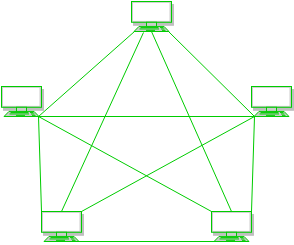
In mesh topology, every device is connected to another device via particular channel.

Every device is connected with another via dedicated channels. These channels are known as links.

  • If suppose, N number of devices are connected with each other in mesh topology, then total number of ports that is required by each device is ​ N-1. In the Figure 1, there are 5 devices connected to each other, hence total number of ports required is 4.
  • If suppose, N number of devices are connected with each other in mesh topology, then total number of dedicated links required to connect them is NC2 i.e. N(N-1)/2. In the Figure 1, there are 5 devices connected to each other, hence total number of links required is 5*4/2 = 10.

Advantages of Mesh Topology

  • It is robust.
  • Fault is diagnosed easily. Data is reliable because data is transferred among the devices through dedicated channels or links.
  • Provides security and privacy.

Problems with Mesh Topology

  • Installation and configuration is difficult.
  • Cost of cables are high as bulk wiring is required, hence suitable for less number of devices.
  • Cost of maintenance is high.
  1. Star Topology

​ In star topology, all the devices are connected to a single hub through a cable. This hub is the central node and all others nodes are connected to the central node. The hub can be passive ​in nature i.e. not intelligent hub such as broadcasting devices, at the same time the hub can be intelligent known as active ​hubs. Active hubs have repeaters in them.

A star topology having four systems connected to single point of connection i.e. hub.

Advantages of Star Topology

  • If N devices are connected to each other in star topology, then the number of cables required to connect them is N. So, it is easy to set up.
  • Each device require only 1 port i.e. to connect to the hub.

Problems with Star Topology

  • If the concentrator (hub) on which the whole topology relies fails, the whole system will crash down.
  • Cost of installation is high.
  • Performance is based on the single concentrator i.e. hub.
  1. Bus Topology

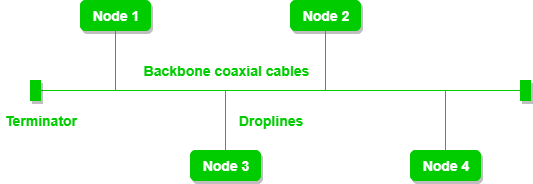
​ Bus topology is a network type in which every computer and network device is connected to single cable. It transmits the data from one end to another in single direction. No bi-directional feature is in bus topology.

A bus topology with shared backbone cable. The nodes are connected to the channel via drop lines.

Advantages of Bus Topology

  • If N devices are connected to each other in bus topology, then the number of cables required to connect them is 1 ​which is known as backbone cable and N drop lines are required.
  • Cost of the cable is less as compared to other topology, but it is used to built small networks.

Problems with Bus Topology

  • If the common cable fails, then the whole system will crash down.
  • If the network traffic is heavy, it increases collisions in the network. To avoid this, various protocols are used in MAC layer known as Pure Aloha, Slotted Aloha, CSMA/CD etc.
  1. Ring Topology

​ In this topology, it forms a ring connecting a devices with its exactly two neighbouring devices.

A ring topology comprises of 4 stations connected with each forming a ring..

The following operations takes place in ring topology are:-

One station is known as monitor station which takes all the responsibility to perform the operations.

To transmit the data, station has to hold the token. After the transmission is done, the token is to be released for other stations to use.

When no station is transmitting the data, then the token will circulate in the ring.

There are two types of token release techniques: Early token release releases the token just after the transmitting the data and Delay token release releases the token after the acknowledgement is received from the receiver.

Advantages of Ring topology

  • The possibility of collision is minimum in this type of topology.
  • Cheap to install and expand.

Problems with Ring topology

  • Troubleshooting is difficult in this topology.
  • Addition of stations in between or removal of stations can disturb the whole topology.
  1. Hybrid Topology

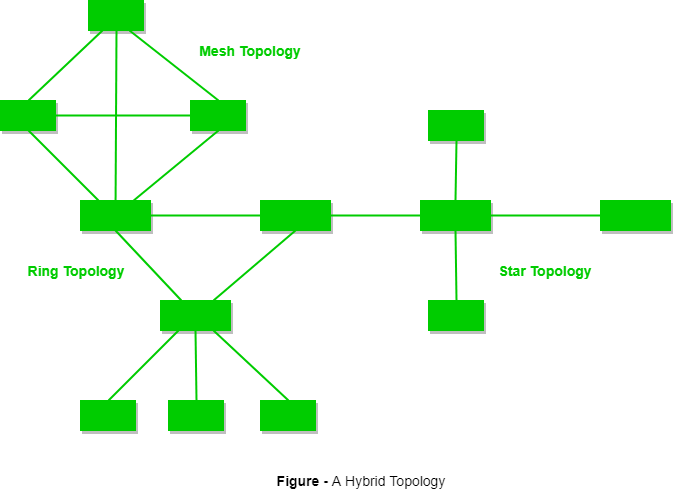
​This topology is a collection of two or more topologies which are described above. This is a scalable topology which can be expanded easily. It is reliable one but at the same it is a costly topology.

A hybrid topology which is a combination of ring and star topology.

Operating System, Concepts, Objectives, Functions, Types and Importance

Operating System (OS) is a system software that acts as an interface between the user and computer hardware. It manages all hardware resources and provides a platform on which application software runs. Without an operating system, a computer cannot function properly. Examples of operating systems include Windows, Linux, macOS, and UNIX.

The operating system performs essential tasks such as process management, memory management, file management, device management, and security control. It allocates CPU time to programs, manages main memory, controls input–output devices, and maintains files and folders on storage devices. In business environments, operating systems ensure smooth multitasking, data security, and efficient utilization of system resources. A reliable operating system improves productivity by enabling users to run multiple applications, communicate over networks, and perform business operations efficiently.

Examples of Operating Systems

  • Microsoft Windows: Known for its user-friendly GUI, Windows dominates personal and business desktops.
  • Linux: Open-source and versatile, Linux is popular for servers, developers, and enthusiasts.
  • macOS: Developed by Apple, macOS offers seamless integration with Apple devices and a secure environment.
  • Android: The most widely used mobile OS, known for its customization and vast app ecosystem.
  • iOS: Apple’s mobile OS, offering high security, fluid user experience, and exclusive features.

Objectives of Operating System

  • Convenience to Users

One of the primary objectives of an operating system is to make the computer system easy and convenient to use. It provides a user-friendly interface through graphical or command-based systems, allowing users to interact with the computer without understanding hardware complexities. By managing tasks automatically, the operating system enables users to perform computing activities efficiently and comfortably.

  • Efficient Utilization of Hardware Resources

The operating system aims to ensure the optimum use of hardware resources such as CPU, memory, storage devices, and input–output devices. It allocates resources to different programs in a balanced manner to avoid wastage. Efficient resource utilization improves system performance and ensures smooth execution of multiple tasks.

  • Process Management

An important objective of the operating system is process management. It controls the execution of programs by scheduling processes, allocating CPU time, and handling multitasking. The operating system ensures that multiple programs can run simultaneously without conflict, maintaining system stability and performance.

  • Memory Management

Memory management is a key objective of an operating system. It manages the allocation and deallocation of main memory to programs and processes. The operating system ensures that each program gets sufficient memory and prevents unauthorized access, thereby improving system efficiency and preventing memory-related errors.

  • File Management

The operating system provides a systematic method for storing, organizing, and retrieving files. It manages file creation, deletion, access permissions, and directory structures. Efficient file management ensures data security, quick access, and proper utilization of storage resources, which is essential in business environments.

  • Device Management

Another objective of the operating system is to manage input and output devices such as printers, keyboards, and monitors. It acts as an intermediary between hardware devices and users, ensuring proper communication and efficient use of peripherals through device drivers.

  • Security and Protection

The operating system aims to provide security and protection for data and system resources. It controls user access, protects files from unauthorized use, and prevents system misuse. Security features such as passwords and access controls are crucial for safeguarding sensitive business information.

  • Error Detection and System Control

The operating system continuously monitors the system to detect errors in hardware or software. It handles system failures gracefully and provides error messages for corrective action. This objective helps maintain system reliability and ensures uninterrupted computer operations.

Functions of an Operating System

  • Process Management

Process management is a core function of an operating system. It controls the execution of programs by creating, scheduling, and terminating processes. The operating system allocates CPU time to different processes to enable multitasking. It also handles process synchronization and prevents conflicts, ensuring smooth and efficient execution of multiple applications at the same time.

  • Memory Management

Memory management involves managing the computer’s main memory. The operating system allocates memory to programs when they are executed and frees it after completion. It ensures efficient utilization of memory and prevents programs from accessing each other’s memory space. This function improves system performance and stability.

  • File Management

File management allows the operating system to organize data into files and directories. It manages file creation, deletion, naming, storage, and access permissions. This function ensures that data is stored systematically and can be retrieved easily. File management also protects data from unauthorized access and accidental loss.

  • Device Management

The operating system manages input and output devices such as keyboards, printers, and scanners. It communicates with hardware through device drivers and controls device operations. Device management ensures efficient and fair use of peripherals by multiple programs and users.

  • Storage Management

Storage management involves handling secondary storage devices such as hard disks and SSDs. The operating system organizes data on storage devices and manages free space. It ensures data is stored securely and accessed efficiently, supporting large volumes of business data.

  • Security and Protection

Security is an important function of an operating system. It protects system resources and data through user authentication, passwords, and access controls. The operating system prevents unauthorized access and ensures data confidentiality, which is essential for business operations.

  • User Interface Management

The operating system provides a user interface, such as a graphical user interface (GUI) or command-line interface (CLI). This allows users to interact with the computer easily. A good interface improves usability and productivity.

  • Error Detection and Handling

The operating system detects hardware and software errors and takes corrective actions. It provides error messages and logs for troubleshooting. This function ensures system reliability and minimizes downtime.

Types of Operating Systems

1. Batch Operating System

Batch operating system is designed to handle jobs in batches without requiring user interaction during execution. Users submit jobs, which are collected and processed sequentially by the system. Each job includes input data, program instructions, and output requirements. Batch OS improves CPU utilization by minimizing idle time between jobs. It is mostly used in large-scale data processing tasks, such as payroll, billing, and scientific calculations. The main limitation is the lack of interaction with users during processing, meaning errors cannot be corrected immediately. Examples include early IBM mainframes using IBSYS.

2. Time-Sharing Operating System

Time-sharing operating system (TSOS) allows multiple users to interact with the computer simultaneously. The CPU divides time into small slices and allocates them to different tasks, enabling concurrent processing. Each user feels they have dedicated access to the system. TSOS improves system responsiveness and ensures efficient utilization of resources. It is widely used in educational institutions, laboratories, and offices where multiple users require simultaneous access. Examples include UNIX, Multics, and modern versions of Windows Server.

3. Multiprogramming Operating System

Multiprogramming operating system allows multiple programs to reside in memory at the same time. The CPU switches between programs to maximize resource utilization and minimize idle time. It ensures continuous processing, as when one program waits for I/O operations, the CPU can execute another program. Multiprogramming is particularly effective in large organizations and data centers handling multiple tasks simultaneously. Limitations include complexity in scheduling and memory management. Examples include IBM OS/360 and early mainframe operating systems.

4. Multitasking Operating System

Multitasking operating system enables a single user to execute multiple programs simultaneously. It allocates CPU time to each program efficiently, giving the user the impression that all tasks are running at the same time. Multitasking OS improves productivity and resource utilization. Modern desktop operating systems like Windows, macOS, and Linux are multitasking systems. They allow users to browse the internet, run software applications, and download files concurrently. Limitations include high CPU and memory requirements to manage multiple tasks effectively.

5. Multi-User Operating System

Multi-user operating system allows multiple users to access the computer system at the same time through different terminals. It provides resource sharing, process scheduling, and security controls for each user. Multi-user OS is ideal for servers, enterprise applications, and mainframes where multiple users require simultaneous access to resources. Examples include UNIX, Linux, and Windows Server. Challenges include ensuring security, preventing unauthorized access, and managing CPU and memory allocation efficiently.

6. Real-Time Operating System (RTOS)

Real-time operating system processes data and executes tasks within a predetermined time limit. RTOS is critical in environments where immediate response is essential, such as industrial automation, medical equipment, aviation, and defense systems. It ensures predictability and reliability in time-sensitive applications. RTOS can be hard real-time, where missing a deadline is catastrophic, or soft real-time, where occasional delays are acceptable. Examples include VxWorks, QNX, and RTLinux. Limitations include high complexity and cost.

7. Distributed Operating System

Distributed operating system manages multiple computers connected over a network and makes them appear as a single unified system. It provides resource sharing, load balancing, and fault tolerance, improving efficiency and reliability. Distributed OS is widely used in cloud computing, data centers, and large organizations for collaborative processing. Examples include Amoeba, Plan 9, and LOCUS. Challenges include network dependency, synchronization, and maintaining data consistency across multiple nodes.

8. Network Operating System

Network operating system (NOS) provides services and manages resources for computers connected in a network. It controls file sharing, printer access, security, and communication among networked computers. NOS is used in offices, schools, and enterprises to ensure centralized management and collaboration. Examples include Novell NetWare, Windows Server, and UNIX/Linux server editions. Limitations involve higher installation costs, maintenance requirements, and dependency on network infrastructure.

9. Embedded Operating System

Embedded operating system is designed for devices with specific functions and limited hardware resources. It is used in smartphones, ATMs, appliances, and IoT devices. Embedded OS focuses on efficiency, real-time operation, and reliability rather than general-purpose functionality. Examples include Android (for embedded devices), FreeRTOS, and Windows Embedded. Limitations include restricted flexibility, minimal user interface, and dependency on hardware specifications.

Importance of Operating Systems

  • Resource Management

Operating systems are crucial for managing computer resources such as CPU, memory, storage, and input/output devices. They allocate resources efficiently among various applications and processes, ensuring optimal performance. Proper resource management prevents conflicts, reduces idle time, and improves system reliability, which is essential for businesses relying on continuous computing operations.

  • User Convenience

Operating systems provide a user-friendly interface, such as graphical or command-line interfaces, making computers easy to operate. Users can interact with hardware without needing detailed technical knowledge. This convenience improves productivity and reduces learning time, allowing both individuals and organizations to perform tasks efficiently.

  • Multitasking and Multiprogramming

Operating systems allow multitasking and multiprogramming, enabling multiple applications to run simultaneously. This ensures that the CPU is utilized effectively and reduces waiting time for processes. In business environments, multitasking improves workflow, supports concurrent tasks, and enhances overall productivity.

  • Security and Protection

An operating system provides security measures such as user authentication, access control, and data protection. It prevents unauthorized access to sensitive files and system resources. Security features are critical for businesses to protect confidential data, maintain compliance, and safeguard against cyber threats.

  • File and Storage Management

Operating systems manage file systems and storage devices, organizing data into files and directories. This ensures easy retrieval, systematic storage, and efficient space utilization. Proper file management is essential for maintaining business records, databases, and other digital assets securely.

  • Hardware and Device Management

Operating systems act as intermediaries between hardware devices and software applications. They manage peripherals such as printers, scanners, and keyboards, ensuring smooth communication and proper functioning. Effective device management improves operational efficiency and prevents hardware conflicts.

  • Error Detection and System Reliability

Operating systems constantly monitor hardware and software to detect errors. They provide alerts, logs, and corrective measures to maintain system reliability. Reliable error detection reduces downtime, which is vital for businesses that require uninterrupted computing services.

  • Networking and Communication

Modern operating systems facilitate networking and communication between computers and devices. They manage data exchange, network security, and resource sharing, enabling collaboration in offices, enterprises, and remote work environments. Efficient networking support enhances productivity and connectivity.

Computer Hardware

CENTRAL PROCESSING UNIT (CPU)

Central processing unit (CPU) is the central component of the Computer System. Sometimes it is called as microprocessor or processor. It is the brain that runs the show inside the Computer. All functions and processes that is done on a computer is performed directly or indirectly by the processor. Obviously, computer processor is one of the most important element of the Computer system. CPU is consist of transistors, that receives inputs and produces output. Transistors perform logical operations which is called processing. It is also, scientifically, not only one of the most amazing parts of the PC, but one of the most amazing devices in the world of technology.

Motherboard

Alternatively referred to as the mb, mainboard, mboard, mobo, mobd, backplane board, base board, main circuit board, planar board, system board, or a logic board on Apple computers. The motherboard is a printed circuit board and foundation of a computer that is the biggest board in a computer chassis. It allocates power and allows communication to and between the CPU, RAM, and all other computer hardware components.

A motherboard provides connectivity between the hardware components of a computer, like the processor (CPU), memory (RAM), hard drive, and video card. There are multiple types of motherboards, designed to fit different types and sizes of computers.

Each type of motherboard is designed to work with specific types of processors and memory, so they are not capable of working with every processor and type of memory. However, hard drives are mostly universal and work with the majority of motherboards, regardless of the type or brand.

Microprocessor

Microprocessor is a controlling unit of a micro-computer, fabricated on a small chip capable of performing ALU (Arithmetic Logical Unit) operations and communicating with the other devices connected to it.

Microprocessor consists of an ALU, register array, and a control unit. ALU performs arithmetical and logical operations on the data received from the memory or an input device. Register array consists of registers identified by letters like B, C, D, E, H, L and accumulator. The control unit controls the flow of data and instructions within the computer.

How does a Microprocessor Work?

The microprocessor follows a sequence: Fetch, Decode, and then Execute.

Initially, the instructions are stored in the memory in a sequential order. The microprocessor fetches those instructions from the memory, then decodes it and executes those instructions till STOP instruction is reached. Later, it sends the result in binary to the output port. Between these processes, the register stores the temporarily data and ALU performs the computing functions.

List of Terms Used in a Microprocessor

Here is a list of some of the frequently used terms in a microprocessor −

  • Instruction Set − It is the set of instructions that the microprocessor can understand.
  • Bandwidth − It is the number of bits processed in a single instruction.
  • Clock Speed − It determines the number of operations per second the processor can perform. It is expressed in megahertz (MHz) or gigahertz (GHz).It is also known as Clock Rate.
  • Word Length − It depends upon the width of internal data bus, registers, ALU, etc. An 8-bit microprocessor can process 8-bit data at a time. The word length ranges from 4 bits to 64 bits depending upon the type of the microcomputer.
  • Data Types − The microprocessor has multiple data type formats like binary, BCD, ASCII, signed and unsigned numbers.

Features of a Microprocessor

Here is a list of some of the most prominent features of any microprocessor −

  • Cost-effective: The microprocessor chips are available at low prices and results its low cost.
  • Size: The microprocessor is of small size chip, hence is portable.
  • Low Power Consumption: Microprocessors are manufactured by using metaloxide semiconductor technology, which has low power consumption.
  • Versatility: The microprocessors are versatile as we can use the same chip in a number of applications by configuring the software program.
  • Reliability: The failure rate of an IC in microprocessors is very low, hence it is reliable.

The Intel Pentium III AMD

The Pentium III model, introduced in 1999, represents Intel’s 32-bit x86 desktop and mobile microprocessors in accordance with the sixth-generation P6 micro-architecture.

The Pentium III processor included SDRAM, enabling incredibly fast data transfer between the memory and the microprocessor. Pentium III was also faster than its predecessor, the Pentium II, featuring clock speeds of up to 1.4 GHz. The Pentium III included 70 new computer instructions which allowed 3-D rendering, imaging, video streaming, speech recognition and audio applications to run more quickly.

The Pentium III processor was produced from 1999 to 2003, with variants codenamed Katmai, Coppermine, Coppermine T and Tualatin. The variants’ clock speeds varied from 450 MHz to 1.4 GHz. The Pentium III processor’s new instructions were optimized for multimedia applications called MMX. It supported floating-point units and integer calculations, which are often required for still or video images to be modified for computer displays. The new instructions also supported single instruction multiple data (SIMD) instructions, which allowed a type of parallel processing.

Other Intel brands associated with the Pentium III were Celeron (for low-end versions) and Xeon (for high-end versions).

Cyrix

Cyrix Corporation was a microprocessor developer that was founded in 1988 in Richardson, Texas, as a specialist supplier of math coprocessors for 286 and 386 microprocessors. The company was founded by Tom Brightman and Jerry Rogers. Cyrix founder, President and CEO Jerry Rogers, aggressively recruited engineers and pushed them, eventually assembling a small but efficient design team of 30 people.

Cyrix merged with National Semiconductor on 11 November 1997.

The first Cyrix product for the personal computer market was a x87 compatible FPU coprocessor. The Cyrix FasMath 83D87 and 83S87 were introduced in 1989. The FasMath provided up to 50% more performance than the Intel 80387. Cyrix FasMath 82S87, a 80287-compatible chip, was developed from the Cyrix 83D87 and has been available since 1991.

MMX Technology

MMX is a Pentium microprocessor from Intel that is designed to run faster when playing multimedia applications. According to Intel, a PC with an MMX microprocessor runs a multimedia application up to 60% faster than one with a microprocessor having the same clock speed but without MMX. In addition, an MMX microprocessor runs other applications about 10% faster, probably because of increased cache. All of these enhancements are made while preserving compatibility with software and operating systems developed for the Intel Architecture.

MMX is a single instruction, multiple data (SIMD) instruction set designed by Intel, introduced in January 1997 with its P5-based Pentium line of microprocessors, designated as “Pentium with MMX Technology”. It developed out of a similar unit introduced on the Intel i860, and earlier the Intel i750 video pixel processor. MMX is a processor supplementary capability that is supported on recent IA-32 processors by Intel and other vendors.

The New York Times described the initial push, including Super Bowl ads, as focused on “a new generation of glitzy multimedia products, including videophones and 3-D video games.”

MMX has subsequently been extended by several programs by Intel and others: 3DNow!, Streaming SIMD Extensions (SSE), and ongoing revisions of Advanced Vector Extensions (AVX).

Memory (RAM, ROM, EDO RAM, SD RAM)

Main Memory / Primary Memory refers to the computer’s temporary data storage that directly interacts with the central processing unit (CPU). It is where data and programs that are currently being used or processed are stored for quick access. Unlike secondary storage devices like hard drives or SSDs, which are used for long-term storage, main memory is much faster but volatile, meaning that it loses its contents when the computer is turned off.

Types of Main Memory:

  1. RAM (Random Access Memory):

RAM is the most common type of main memory and is considered volatile. When a program is executed, it is loaded into RAM so that the CPU can access it quickly. RAM allows data to be read or written in any order, making it very fast. It is divided into two main types:

    • Dynamic RAM (DRAM): This type of RAM needs to be constantly refreshed to maintain the stored data. It is slower compared to static RAM but is more cost-effective.
    • Static RAM (SRAM): SRAM stores data without needing constant refreshing, making it faster but more expensive than DRAM. It is typically used in cache memory and for storing data in registers.
  1. Cache Memory:

Cache memory is a small, high-speed memory located closer to the CPU. It stores frequently accessed data and instructions that the CPU uses to speed up processing. Cache memory helps reduce the time it takes for the CPU to access data from main memory. There are usually multiple levels of cache:

    • L1 Cache: Located directly on the CPU chip, it is the smallest and fastest cache level.
    • L2 Cache: It is larger than L1 and can be located either on the CPU or nearby, offering a balance between speed and size.
    • L3 Cache: It is the largest but slower than L1 and L2, often shared across multiple CPU cores.

3. ROM (Read-Only Memory):

ROM is non-volatile, meaning it retains its data even when the power is turned off. ROM stores firmware, which is permanent software that is directly programmed into the hardware. This memory is used for basic functions like booting up the computer and performing hardware initialization. There are different types of ROM, such as PROM (Programmable ROM), EPROM (Erasable Programmable ROM), and EEPROM (Electrically Erasable Programmable ROM), which allow varying levels of data modification.

Importance and Function:

Main memory plays a crucial role in system performance. It provides fast access to data that the CPU needs to execute instructions efficiently. Without adequate main memory, a computer would be much slower, as the CPU would frequently need to retrieve data from slower storage devices like hard drives or SSDs. Additionally, as more programs run simultaneously, more main memory is required to keep everything running smoothly. This is why modern computers are often equipped with large amounts of RAM and high-speed cache memory.

error: Content is protected !!