E-Auditing Meaning, Uses and Limitations

Electronic auditing, or e-auditing, is computer-assisted auditing that uses electronic records to complete part or all of your audit. This follows similar procedures as a traditional audit but using electronic means to remotely perform the audit. E-auditing is also known as Remote Auditing.

For any number of reasons, having an assessor physically inside your walls for an assessment can prove needless with certain types of audits. Of course, it’s preferable, if not mandatory, depending on the nature of the audit, but we’re also moving into a period of time where technology has enabled new types of audits that often don’t require their presence.

An e-audit is a systematic, independent, and documented process to obtain evidence through electronic means to determine the extent of conformity to the audit criteria.  The use of e-auditing is increasing because so much of the technology we use in our daily lives connecting with friends on Skype, finding jobs through LinkedIn, or attending online classes is done over the Internet. These activities become a gateway to enhancing and applying online communication techniques. The more familiar we become with technology, the less anxious we feel about its interactive uses.

Validating an e-audit relies on the technology used and the auditor’s skill to facilitate a virtual meeting while coordinating with the remote location to find nonconforming evidence. This coordination of events is not an easy task without technical grounding in information technology and facilitation skills. Realistically speaking, a fair amount of registration auditors is limited in this area due to their intense travel schedules. At best, they are passive listeners in “all hands” online meetings. This is not a reason to stop conducting internal audits virtually. Note that ISO 9001:2015 itself and its requirement to understand the context of the organization seems to be a tacit endorsement of the e-auditing process.

ISO 9001:2015 provides an illustration of how complex businesses have become to compete in a global market to offer affordable products. For example, products that contain batteries often make headlines.

Uses

Tracking Ability

Most paperless audit systems offer reporting and tracking abilities throughout the auditing process. Managers from the company being audited as well as the auditing firm’s management can easily track and monitor each step in the review process. This increased tracking may help streamline resource requirements and helps manage the auditing timeline. Tracking and time management can be essential, especially for public companies with SEC-mandated reporting deadlines.

Accessibility

Companies that opt for a paperless audit can provide increased accessibility to financial documents and statements for auditing personnel. Increased accessibility can decrease the amount of time required by accounting and financial staff to provide documents to auditors. Depending on security requirements, accessibility may allow auditors to conduct their review from outside the business facility.

Less Waste

Reducing the need for duplicate copies of financial documents, storage facilities and office supplies can reduce the amount of waste both companies generate. Paperless audits use less paper, ink toner, electricity and office supplies than a traditional paper-bound audit. The reduction in paper and associated supplies can offer cost savings and an ecological benefit. This green focus may be important for companies that want to promote their company as being environmentally-friendly.

Increased Security

Physical documents are more difficult to secure than electronic documents. Electronic data and documents can be secured through passwords and other digital security methods. An electronic tracking system can also notate who has reviewed each data element for security review purposes. Physical documents can be copied, lost, or placed in an unsecure location. A paperless audit increases the security of a company’s financial system.

Limitations

Different Filing Requirements

The Internal Revenue Service and other government agencies may have different rules for electronic record keeping than for paper record keeping. Business owners should find out how to store audit reports and for how long they must store them prior to agreeing to an electronic audit. In addition, although electronic audits are often called “paperless,” some paperwork may need to be printed to fulfill government record-keeping rules.

Requires Technology

Auditors must be comfortable using computer software to create audit reports. If an auditor is not familiar with computers or with the software he is expected to use, he may have a steep learning curve. Auditors also must be familiar with using email or websites and uploading attachments, while business owners must be able to retrieve audit reports from their email or by going to a website.

Changing Over Systems

If a business relied on paper audits before, it has to switch over to an electronic system before it can begin taking advantage of paperless audits. This may take weeks or months, depending on how computer-based the business was before it switched over. In addition, some personnel may require training to access or use the new system. Thus, it can take a year or more for a business to switch over to a paperless system.

Security Considerations

If an auditor is going to use computers or other technology to prepare an audit, she must consider security factors that auditors who create paper reports don’t have to consider. Audits often refer to sensitive information, such as a business’ finances or tax requirements. Auditors must be able to send this information securely; only employees of the company who need to know the information in the report should be able to access audit reports online or via email.
Forensic Audit

Accounting is the process of recording financial transactions pertaining to a business. The accounting process includes summarizing, analyzing, and reporting these transactions to oversight agencies, regulators, and tax collection entities. The financial statements used in accounting are a concise summary of financial transactions over an accounting period, summarizing a company’s operations, financial position, and cash flows.

Forensic audit investigations are made for several reasons, including the following:

Corruption

In a forensic audit, while investigating fraud, an auditor would look out for:

Bribery: As the name suggests, offering money to get things done or influence a situation in one’s favor is bribery. For example, Telemith bribed an employee of Technosmith company to provide certain data to aid Telesmith in preparing a tender offer to Technosmith.

Conflicts of interest: When a fraudster uses his/her influence for personal gains detrimental to the company. For example, if a manager allows and approves inaccurate expenses of an employee with whom he has personal relations. Even though the manager did not directly financially benefit from this approval, he is deemed likely to receive personal benefits after making such inappropriate approvals.

Extortion: If Technosmith demands money in order to award a contract to Telemith, then that would amount to extortion.

Forensic Audit Procedures

Forensic Auditors go much beyond the financial reporting standards and internal control lapses. They try to understand the intent. Fraudulent intent is very important to prove the fraud in the courts of laws. There are four primary stages of any forensic accounting engagement

  • Plan the investigation: It is necessary to understand the exact question of the client. The forensic auditor plans his investigation to achieve audit objectives. Objectives could be assessing exact number of frauds, executives involved in manipulating company financials etc.
  • Collecting Evidence: Forensic Auditors collect the accurate evidence of financial manipulations. Evidences should substantiate the financial damage assessments based on accounting records.
  • Reporting: Since there is no template, forensic audit reports differ in format but have the same objectives. A good forensic audit report clearly documents the findings of the investigation and refers the evidences collected during the process.
  • Court Proceedings: Forensic Auditor are expert witnesses. In the court proceedings he needs to explain the importance of evidences. They should simplify the complex accounting issues.

Safeguard Data Automated Backup and Recovery

Automated Backup

This feature allows the user to safeguard his company data. The Automated Backup or Auto Backup is a capability that automatically takes data backup in the background without any disturbance or affecting your work.

Auto Backup can be carried out by executing the following steps:

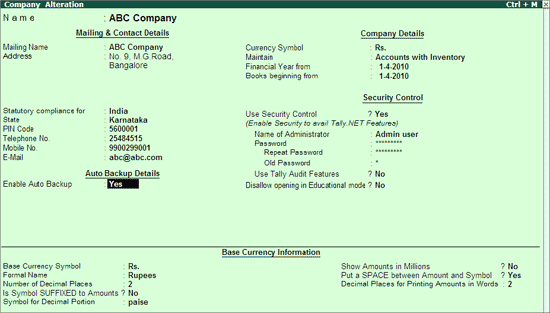
Go to Company Creation/Alteration screen of the required company.

Set Yes to Enable Auto Backup as shown:

  • Save the Company Creation/Alteration screen.

The data backup is stored in the data folder of the respective company.

E.g.: A company titled ABC Company has a folder 10009 located in C:\Tally.ERP9\Data. On enabling Auto Backup feature the backup file ABK.900 is created in C:\Tally.EPR9\Data\10009

Restoring Auto Backup Data

To restore the auto backup taken execute the following steps:

From the Gateway of Tally

  • Press Ctrl + Alt + K.
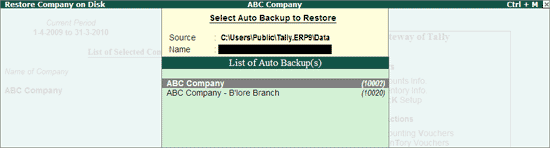
  • Restore Company on Disk screen appears.
  • The Source field displays the data path of the company under Select Auto Backup to Restore screen. Press Enter.
  • The List of Auto Backup(s) will list all the companies enabled for Auto Backup.
  • Select the required company and press Enter.

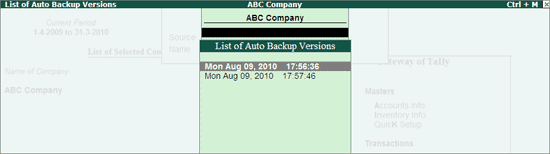
  • The List of Auto Backup Versions screen appears listing the backup versions.

  • Select the required version from the list and press Enter.
  • The selected version of data backup is restored to the respective company folder.
  • The auto backup utility prompts the user to overwrite the existing company.
  • Press Y or click Yes to proceed with restoring the data.
  • Press Alt + F1 to Shut the existing company.
  • Select the restored company.

Tally ERP 9 Auditors Edition Introduction, Features, Characteristics

Tally is an ERP accounting software package that is used to record day to day business data of a company. The latest version of Tally is Tally ERP 9.

It is one of the most financial accounting systems used in India. For small and medium enterprises, it is complete enterprise software. It is a GST software with an ideal combination of function, control, and inbuilt customisability. It is the best accounting software. This software can integrate with other business applications like Inventory, Finance, Sales, Payroll, Purchasing, etc.

Features of Tally

  • Tally is also called multi-lingual tally software because Tally ERP 9 supports multi-languages. In Tally, accounts can be maintained in one language, and reports can be viewed in other languages.
  • Tally is largely considered the best because it is easy to use, has no codes, robust and powerful, executes in real-time, operates at high speed, and has full-proof online help.
  • Using the Tally, you can create and maintain the accounts up to 99,999 companies.
  • Tally has the synchronization feature, so the transaction which is maintained in multiple locations offices can be updated automatically.
  • Tally is used to generate consolidated financial statements as per the requirements of the company.
  • Using the feature of payroll, you can automate the employee records management.
  • Tally can manage single or multiple groups.
  • The feature of Tally customization makes the software suitable for distinctive business functions.
  • Tally software is used to handle financial and inventory management, invoicing, sales and purchase management, reporting, and MIS.

Characteristics:

Separate Tracking:

This software helps to track the trading and non-trading accounts. It helps users to get the receipts, new bills and payments without any hassles.

Interest Calculation:

Tally software has a different transaction method that helps to customize the transaction process. The user can get a detailed report, after the transaction completion. The final report helps to get the balance amount that ought to receive.

Audit, Control and Budgeting:

Tally audit enables the user to have unlimited budgets and periods. With this support, a user can correct mistakes easily. A user can gain robust access control with high security.

Voucher Entry:

Using this software helps to identify the various business transaction details. Tally Classes in Chennai makes you more comfortable in accounting, use this opportunity and get a job in this field.

Billing details:

Tally accounting software enables users to handle billing information. It helps to allocate the payments regarding overdue and invoices. This helps to split the customers easily using billing data.

Interesting in Ledgers:

This software inculcates the multiple ledgers including Purchase Ledger, General Ledger and Sales Ledger. This ledger helps to create records and enter data simultaneously.

Advantages of Tally

Payroll management: Several calculations that need to be made while disbursing salary to employees. Tally is used to maintain the financial record of the company that includes net deduction, net payment, bonuses, and taxes.

Data reliability and security: In Tally, the entered data is reliable and secure. There is no scope of entering the data, after being entered into the software.

Management in the banking sector: Banks use Tally to manage various user accounts, and also calculate interests on deposits. Tally support ensures ease in the calculation and makes banking simpler. Tally Support can make the calculation easy and banking simpler.

Ease of maintaining a budget: Tally is used to maintain the budget. Tally is used to help the companies to work and manage expenses by keeping in mind the total budget which is being allotted.

Regulation of data across geographical locations: Tally software is used to manage the data of an organization globally. Tally can bring together all branches of the company and makes the common calculation for it at large. So no matter which location a company’s employee has access, it will be uniform throughout.

Simple tax returns filing: Tax GST is used to ensure that the company complies with all GST norms. Tax GST takes care of service tax returns, excise tax, VAT filing, TDS return, and profit and loss statement for all small businesses.

Remote Access of Data: In Tally, employees can access the financial data using the unique User ID and password. The logging and access of data can be done by sitting at the comforts of one’s office or house.

Audit tool for compliance: It acts as an audit tool. It is used to carry out regular audits of companies. It does a thorough compliance check towards the financial year beginning and ensures that all the monetary transactions are smoothly being carried out.

Quick Access to Documents: Tally can save all invoices, receipts, bills, vouchers in its archive folder. Using the Tally, we can quickly access any of the previously stored documents. We can immediately retrieve all the billing related files.

Tally.Net: Features, Requirements for remote connectivity Access information via SMS

Tally.NET is a technology within Tally. ERP 9 which powers revolutionary capabilities such as continuous upgrades & updates, central consolidation of branch data, central deployment of Customisation, instant support from within your Tally. ERP 9 and many more that enhances your business performance.

Tally.NET Services

On a broad level, Tally. ERP 9 comprises of:

  • The product itself
  • A set of capabilities (enabled via the Internet) by a service called Tally.NET

This ‘two component’ architecture was chosen as this delivers an unparalleled model of a host of services as below:

(Tally.NET Services Annual Subscription is included in your Tally. ERP 9 for the first one year. Subsequently you are advised to subscribe to avail the following services at a nominal charge of 20% of the then prevailing product price)

(a) Remote Access Services

Your business data stays with you locally, and is never stored on Tally.NET servers or on systems accessing that data via Remote Access.

(b) Integrated Support Services: Support Centre

Integrated within Tally. ERP 9 and Shoper 9, this new feature enables the users to report and track their queries from within the product. You can directly target the query to your regular Tally Service Provider (or any other Tally Service Provider, if you are making your first query) and get responses quickly. These can even be reported and viewed remotely. You can then use the reference number to escalate the issue to Tally’s Customer Centre in case you need to.

Over time, this capability will be extended to cover your Chartered Accountant or other business associates & friends using Tally. ERP 9 to broaden the horizon of your support ecosystem.

You can also access all the conversations centrally. This will simplify the process of having a summary view of the kinds of issues people in your company raise which will help you identify gaps of knowledge or other persistent system issues.

(c) Self-service using Control Centre

The Control Centre enables users to centrally configure and administer Site/ User belonging to an account. Thus, the Control Centre acts like an interface between the user and Tally. ERP 9 installed at different sites.

With the Control Centre you save time, travel and communication costs, manage Tally. ERP 9 installations efficiently and effectively because it enables you to:

  • Manage Licenses
  • Perform Central Configuration
  • Manage Users
  • Manage Company Profile
  • Manage Accounts
  • Change Passwords
  • Maintain Activity History

(d) Self-service using Knowledge Base

Tally has compiled a large selection of articles for users to understand the product and its applications. Users can access the Knowledge Base and search from available topics at their convenience.

(e) Software Assurance Services

Get instant product updates and upgrades as and when they happen

(f) Data Synchronisation Services

Now exchange data with ease between two or more Tally licenses (implemented at different locations)

Requirements for remote connectivity Access information via SMS

You can securely access your Tally. ERP 9 from anywhere to record transactions, or view reports when working from a client’s office, or other remote locations. All you need at the remote location is a Tally. ERP 9 installation, and an internet connection. In your office you need to have a valid Tally. ERP 9 license, an active TSS, an internet connection, and your company connected to Tally.NET services. Server and remote systems must have the same release of Tally ERP 9.

Security and Control: You have complete control on who can access your companies, and which features are available to the user. Further, your data will always be in your computer. Whenever a user connects to your company, based on the access permissions you have provided, the user can access the required features. If your employee is at a client’s place and want to print an invoice or purchase order placed by the client, it can be done. However, the employee will not view your financial reports unless you have given the permission. If you want to check your financial reports when you are away from your office, you can use any computer with a Tally. ERP 9 installation and view the reports.

Anywhere, Any Tally. ERP 9 Installation: You can access your Tally. ERP 9 companies from anywhere using even a Tally. ERP 9 in Educational Mode, and an internet connection. When your employees are at clients’ locations, they can view the stock availability and commit delivery dates to the clients, or check the pending receivables from the clients. This will ensure availability of the latest details at that moment.

Audit Accounts: You can allow your auditor to do verification of your books using remote access. For this, you just need to allow remote access to your company for the auditor’s Tally.NET ID. Like you or your employees logging in to the company, auditor also can log in and do the work.

Print Reports and Vouchers: Users can open a voucher or report, and print it at the remote location. When your employee is at a client’s place to collect receivables, after collection a receipt can be recorded and a voucher can printed for the client.

Record or Alter Vouchers: The user with the required permissions can create or alter vouchers. If you or your employee meets a supplier, and strike a favourable deal, a purchase order can be raised immediately from your Tally. ERP 9 company.

Easy Setups: Connect your company, and allow users to access your company from anywhere. Note that only users with valid Tally.NET IDs are allowed to access your company remotely. Your account ID (e-mail ID used to activate your license) is a valid Tally.NET ID. You can create Tally.NET IDs for users who need to log in to Tally. ERP 9 remotely, allow access to these IDs. Similarly, you can allow your accountants or auditor who have their Tally.NET IDs to log in remotely.

Deemed owners, Composite rent

Deemed owner is an owner by implication, he may not be the person under whose name property is registered. Some instances in which a person who is not the owner of the property is considered to be the owner for the purpose of tax levy are

1) An individual who transferred his property without adequate consideration to his or her spouse (otherwise than in connection with an agreement to live apart) his minor child (not being married daughter) is deemed to be owner of that property.

If an individual transfers another asset and his spouse or minor child purchase house property from that asset, then such individual is not treated as deemed owner.

2) If property is allotted by company/co-operative society to its shareholders/members, then technically the company/cooperative society may be the owner. But the shareholder/member to whom property is allotted is deemed to be owner of property.

3) If buyer has taken the possession of the property without getting the sale deed registered is deemed to be owner of the property.

A person who is allowed to take or retain possession of any building (or part thereof) in part performance of a contract of the nature referred to in section 53A of the Transfer of Property Act, 1882, is also deemed as the owner of that building (or part thereof).

4) A person who acquires any rights (excluding any rights by way of a lease from month to month or for a period not exceeding one year) in or with respect to any building (or part thereof) by virtue of any such transaction as is referred to in section 269UA(f) [i.e. if a person takes a house on lease for a period of 12 months or more, Persons who purchase properties on the basis of Power of Attorney]

Composite Rent

When the total amount i.e. rent of the building along with the hire charges for other assets such as furniture or service charges for certain services such as security, lift, etc. is received by the owner of the building; such amount so received is defined as Composite Rent.

Tax Treatment of Composite Rent:

The taxability of Composite Rent can be well understandable by considering Two cases mentioned below:

Case1: Where Total amount is inseparable

Where composite rent consists of rent for the building & hire charges for other assets & the two rents are inseparable, then the entire amount is chargeable under the Business Income or Other Sources, as case may be.

Case2: Where Total amount are separable

Where composite rent consists of rent for the building & hire charges for other assets & the two rents are separable, then rent of the building is taxable under the head Income from House Property whereas hire charges of other assets is charged to tax under Other Sources.

Also, if the composite rent is the mixture of rent of the building & also includes service charges for some services, then the total amount is spilt into rent & service charges. Rent gets taxable under House-Property & Service charges under Business Income.

Pareto Chart

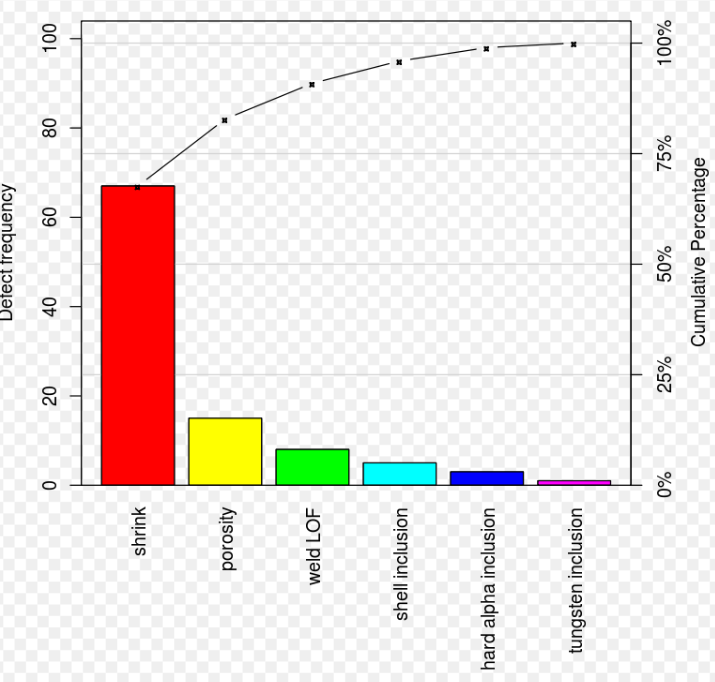
A Pareto chart is a type of chart that contains both bars and a line graph, where individual values are represented in descending order by bars, and the cumulative total is represented by the line. The chart is named for the Pareto principle, which, in turn, derives its name from Vilfredo Pareto, a noted Italian economist.

The left vertical axis is the frequency of occurrence, but it can alternatively represent cost or another important unit of measure. The right vertical axis is the cumulative percentage of the total number of occurrences, total cost, or total of the particular unit of measure. Because the values are in decreasing order, the cumulative function is a concave function. To take the example below, in order to lower the amount of late arrivals by 78%, it is sufficient to solve the first three issues.

The purpose of the Pareto chart is to highlight the most important among a (typically large) set of factors. In quality control, Pareto charts are useful to find the defects to prioritize in order to observe the greatest overall improvement. it often represents the most common sources of defects, the highest occurring type of defect, or the most frequent reasons for customer complaints, and so on. Wilkinson (2006) devised an algorithm for producing statistically based acceptance limits (similar to confidence intervals) for each bar in the Pareto chart.

These charts can be generated by simple spreadsheet programs, specialized statistical software tools, and online quality charts generators.

The Pareto chart is one of the seven basic tools of quality control.

Use a pareto chart

  • When analyzing data about the frequency of problems or causes in a process.
  • When there are many problems or causes and you want to focus on the most significant.
  • When analyzing broad causes by looking at their specific components.
  • When communicating with others about your data.

Pareto Chart Procedure

  • Decide what categories you will use to group items.
  • Decide what measurement is appropriate. Common measurements are frequency, quantity, cost and time.
  • Decide what period of time the Pareto chart will cover: One work cycle? One full day? A week?
  • Collect the data, recording the category each time, or assemble data that already exist.
  • Subtotal the measurements for each category.
  • Determine the appropriate scale for the measurements you have collected. The maximum value will be the largest subtotal from step 5. (If you will do optional steps 8 and 9 below, the maximum value will be the sum of all subtotals from step 5.) Mark the scale on the left side of the chart.
  • Construct and label bars for each category. Place the tallest at the far left, then the next tallest to its right, and so on. If there are many categories with small measurements, they can be grouped as “other.”

Note: Steps 8 and 9 are optional but are useful for analysis and communication.

  • Calculate the percentage for each category: the subtotal for that category divided by the total for all categories. Draw a right vertical axis and label it with percentages. Be sure the two scales match. For example, the left measurement that corresponds to one-half should be exactly opposite 50% on the right scale.
  • Calculate and draw cumulative sums: add the subtotals for the first and second categories, and place a dot above the second bar indicating that sum. To that sum add the subtotal for the third category, and place a dot above the third bar for that new sum. Continue the process for all the bars. Connect the dots, starting at the top of the first bar. The last dot should reach 100% on the right scale.


Alternatives to Collaboration: Horizontal and Vertical integration, Managing collaborator relations

Collaboration brings:

Providing Value: Working towards the same goal inspires in the team members with a strong sense of purpose. The team sees value in working together as the common goal gives them a meaningful reason to work together, along with receiving mutual benefits for the company as well as the team.

Brainstorming: Collaboration allows team members to come together on a common platform and work towards the achievement of a common goal by thinking, brainstorming, and offering various perspectives to provide solutions.

Equal Partaking: Collaboration provides every team member with equal opportunities to participate and communicate their ideas.

Horizontal Integration

The merger of two or more firms, which are engaged in the same line of business and their activity level is also same; then this is known as Horizontal Integration. The product may include complementary product, by-product or any other related product, competitive product or entering into the product’s repairs, services, and maintenance section.

Horizontal Integration reduces competition between firms in the market, as if the producers of the product get combined they can create a monopoly. However, it can also create an oligopoly if there are still some independent manufacturers in the market.

It is a tactic used by most of the companies to expand its size and achieve economies of scale due to increased production level. This will help the company to approach new customers and market. Moreover, the company can also diversify its products and services.

Vertical Integration

Vertical Integration is between two firms that are carrying on business for the same product but at different levels of the production process. The firm opts to continue the business, on the same product line as it was done before integration. It is an expansion strategy used to gain control over the entire industry.

Forward Integration:  If the company acquires control over distributors, then it is downstream or forward integration.

Backward Integration: When the company acquires control over its supplier, then it is upstream or backward integration.

Horizontal Integration Vertical Integration
Objective Increasing the size of the business Strengthening the supply chain
Capital Requirement Higher Lower
Strategy used to exercise control over Market Industry
Self-sufficiency No Yes
Consequence Elimination of competition and maximum market share. Reduction of cost and wastage.

Managing collaborator relations

Share the company’s mission over and over again. Everyone needs a reason to show up each day a cause to be part of, and a broader objective to work towards.

Defining your company’s mission is the first step towards bringing people together under one common goal and working together towards making it happen.

Communicate your expectation for collaboration.

Similarly, if your team doesn’t know that you want them to work together, you can’t expect them to do so. From the start, set your expectation for collaboration as a minimum standard. Even better, it should be part of your onboarding process so that potential recruits know you prioritize teamwork.

Promote a community working environment.

A sense of community is crucial for collaborative working environments. 54% of employees state that a strong sense of community led them to stay at a company longer than was in their own interests.

When people feel that their opinion matters, they are more likely to apply themselves more. Conversely, when people know their opinion doesn’t count for anything, they feel redundant and team-playing disintegrates.

Encourage Creativity.

A collaborative team is an innovative one. Likewise, creating the space for creativity will help foster collaboration. It’s a virtuous circle.

Brainstorming sessions can be a great way of opening up your team to creative thinking. An environment in which they can put forward and challenge ideas will help employees feel like they have a stake in the company’s mission.

Creating Collaboration Value: Meaning of Collaborators, Collaboration as Business process, Advantages and Drawbacks of Collaboration

Collaborators are any third parties that work directly with your company to support or assist in the development or execution of a strategy. Some common examples of collaborators include vendors, warehousers, and consultants.

Types:

Partners

Partners are any individuals with a formal interest in the success of a company. While all collaborators can be thought of as partners, this group specifically refers to business partners with a legal agreement in place.

Agencies

Agencies act as intermediaries and facilitators, connecting companies with other peoples and companies with skills they may need. An employment agency may provide a company with administrative staff, whereas a marketing agency could handle all of a company’s promotional needs.

Distributors

Distributors are responsible for a company’s supply chain. Not only do they maintain relationships with suppliers and vendors, they also house and facilitate the shipment of the company’s product.

Suppliers

Suppliers contribute not only the materials to make a company’s product, but as manufacturers are considered a supplier, they may create the product itself.

In defining your company’s collaborators, you also need to assess them for capability and commitment. A collaborator being unable to offer the support you need can have a serious impact on your operations, so it’s best to determine a collaborator’s capacity beforehand.

Collaboration as Business process

  • An integrated business process which consists of relevant business processes across participating organisations.
  • A set of mutually synchronized actions of peering and autonomous enterprises in order to conjointly provide an output for an external customer.
  • An integrated business process which consists of relevant business processes across participating organizations.

Utilize the power of consumers

Collaborative marketing is more than collaborating with other organizations. Modern technology gives us better outreach to capture the voice of your target audience. This continues to develop as the use of social media and wide-reaching digital reviews expand.

Fulfill campaign goals

Use collaborations to strategically mask your weaknesses or promotional shortcomings. Broaden your outreach with collaborative marketing that syncs with your organization. Relatable organizations will have similar goals, marketing campaigns and target audiences. Create mutually beneficial marketing promotions with these companies to fulfill the needs of your team.

When you bring this idea to modern collaborative marketing, you’ll need systems in place to enable this creative collaboration. The marketing technology stack your team is using should be configured to make this process as smooth as possible.

It’s essential to have the basic collaborative tools in place. The most important solution for marketing collaboration is digital asset management (DAM). This used by modern organizations for optimal brand management and asset storage. With DAM, you can easily collaborate on projects with externals through features like collection links and portals.

Align with like-minded businesses

Increase your brand awareness with collaboration. Work with other brands to promote similar products, which increases the outreach and strength of the advertisement. The marketing powers of numerous brands come together to bolster your business and minimize budget spending.

Here’s a real life example of this in action. Two different reputable Hollywood companies produce a movie. Though they are competitors, they solidify the quality of the film by collaborating. The brands build off each other this way, masking weaknesses and developing strengths in the eyes of consumers.

Plan the entire collaboration process

A strong collaboration is preceded by a systematic planning of the entire collaboration process. Begin by researching companies that have similar goals, marketing, brand and products. Especially online, marketing collaborations are more effective with higher amounts of collaborative companies. The next step is meeting with the collaborators and setting guidelines and agreements with each of them.

After the partnerships are formed, ensure all agreements are in place before launching the marketing advertisements. Finally, re-evaluate your campaign to ensure you’re constantly getting the most value from it. Ensure the companies you partnered with don’t change their goals or branding values without your knowledge.

Adapt to evolving organizational needs

Your collaborative marketing campaigns thrive when internal audits of collaborative relationships are routine. The needs of your organization are dynamic and the digital landscape changes constantly. In order to stay relevant and keep the collaborative marketing campaigns prosperous, regularly reassess both your organization’s needs and changes to the relationships with externals. Ensuring the relationship is still viable and beneficial to your organization will garner success.

Advantages of Collaboration

Better Division of Labor

One of the advantages of collaborative efforts in the workplace is the way that the work is divided. When more than one person is involved in accomplishing a certain task, particularly when it is a large project, it helps for everyone to have a small portion of the responsibility to ensure things get done versus loading one or two people with too much work to accomplish the task.

Greater Creative Input

When you have different people collaborating on a project, then you get a greater sense of creative input. You are able to tap into the creative combination of several employees in one group. The collection of different ideas, approaches to the project and brainstorms can spur innovative results that can in turn raise the visibility and quality of the products or services offered by your company.

Increased Employee Morale

Having employees collaborate also has a positive effect on their morale. As employees work together to accomplish goals, they can celebrate their successes both individually and as a group, and this can cause them to have a more positive view of their jobs and team members. In turn, this can also build trust among co-workers as each member contributes to the team’s accomplishments.

Drawbacks of Collaboration

Lack of Trust Among Team Members

To work effectively, employees on a team need to trust each other. Forbes notes that trust can quickly erode if a single team member doesn’t pull their weight. Because the work is collaborative, an employee who misses deadlines or doesn’t complete their assigned work can negatively impact the work of the entire team. This can lead to frustration and lack of trust within the other employees, reducing the effectiveness of their work and creating tension in the workplace.

Conflicts in Working Styles

When you group different people together to collaborate on one project or set of responsibilities, there may be a conflict in the working styles of the individuals within the group. This is one of the negative aspects of collaboration because it can hold up progress on accomplishing the job at hand, while team members instead muddle through conflicts caused by the different ways team members approach the work.

Too Many Faux Leaders

When you have a collaborative group, you may sometimes end up with too many people trying to lead the group, and not enough members that are willing to take a backseat and just do what it takes to get the job done. This ill will can then bleed over into other areas of the work environment, causing more tension among the rest of the staff, including those that may not even be involved in the collaborative effort.

Strategically managing profits: Increasing sales revenue-through volume, optimizing price, lowering costs

Profit Strategy is the strategy in which, the only target of the company is to maintain profitability by hook or a crook. It is a type of corporate-level stability strategy, where the profit generation takes place in a forced strategic way by the management of the company. And the management of the company, in order to achieve profits, tries to slash costs, cut additional investments, try to increase the efficiency or productivity level, raise the selling price or can adopt any intense steps in this direction.

Profit Strategy continues to use the old technology, at the time of technological change. And under this strategy, the management does not replace the old or obsolete technology with new technology in any case. Moreover, even if the replacement is inevitable, then the partial acquisition of technology takes place. Thus, this Strategy focuses on capitalizing as much as possible, out of the current situation.

Strategic financial management means not only managing a company’s finances but managing them with the intention to succeed that is, to attain the company’s long-term goals and objectives and maximize shareholder value over time.

Strategic financial management is about creating profit for the business and ensuring an acceptable return on investment (ROI). Financial management is accomplished through business financial plans, setting up financial controls, and financial decision-making.

Before a company can manage itself strategically, it first needs to define its objectives precisely, identify and quantify its available and potential resources, and devise a specific plan to use its finances and other capital resources toward achieving its goals.

Strategic management also involves understanding and properly controlling, allocating, and obtaining a company’s assets and liabilities, including monitoring operational financing items like expenditures, revenues, accounts receivable and payable, cash flow, and profitability.

Strategic financial management encompasses furthermore involves continuous evaluating, planning, and adjusting to keep the company focused and on track toward long-term goals. When a company is managing strategically, it deals with short-term issues on an ad hoc basis in ways that do not derail its long-term vision.

Increasing sales and revenues are related but different goals, and each needs its own strategy. Although the tactics for each may be different, they should complement each other. Understanding how sales and revenue are related and how to increase both helps you market efficiently and optimize your profits.

Sales vs. Revenues

The words “sales,” “revenue” and “income” have different meanings, and become confusing if used as synonyms. “Sales” refers to the number of units of your product you sell, “revenues” refers to the total amount money your sales generates, and “income” refers to your profit from those sales. Keep these in mind as you plan sales strategies to strike the right balance for your business’s needs. Don’t be surprised to hear “sales” and “revenues” used as synonyms, which is a common occurrence in business.

Increase Your Marketing

An obvious way to increase sales is to boost your marketing. Quantity doesn’t necessarily mean quality, so careful planning, test-marketing and monitoring your results maximizes your sales. Conduct marketplace research to learn which messages speak to your target audience.

Run ads and promotions in limited locations and check the results before spending your entire budget. Incorporate some way to monitor marketing communications, such as using coupons, electronic codes or website traffic statistics.

Review Your Pricing Strategies

If your product or service is price sensitive, pay special attention to your pricing strategies. Find out what your competition is charging and raise or lower your prices based on your goals. Lowering your prices can increase revenues to make up for lower margins.

Raising your prices can create a higher perceived value in the minds of consumers and increase your margins. Raising your prices can also increase your revenues without increasing sales.

Expand Your Distribution Channels

Changing where you sell your product can significantly boost your sales and revenues without requiring any changes to your marketing or pricing. Perform a careful study of the effects of using online selling, direct mail, wholesalers, retailers, distributors and outside sales reps to project how each method can affect your sales volumes, profit margins and total profits. In some cases, new distribution channels require marketing support.

Diversify Your Offerings

If you’re a mature company, it might be time to add new products and services to create exponential growth. If you feel you’ve saturated the marketplace, determine the products your target customers buy that you’re not selling and that you think you can make and market profitably. You might need to replace old products with new ones. This might result in a decrease in sales, but higher revenues if the replacement product has a higher price.

Develop Relationships and Cross Promotions

The more people you can get to promote your product or service, the more sales and revenues you’ll have. Look for businesses that don’t compete with you but which have the same target customer and develop cross promotions. For example, if you sell sports apparels, sponsor golf and tennis instructors and youth league coaches to wear and promote your line. Partner with charities to get them to promote you to their supporters. Use social media programs to build a following generated by satisfied customers.

Optimizing price

Price optimization is the practice of deciding upon the most effective pricing for a product or service. Reliant on crystal clear data, great pricing optimization enables companies to offer their products at the price points that are most likely to be picked up on by customers.

Optimal price points will deliver the best possible profits for the company, and may also be designed to achieve additional goals such as assisting in improving the company’s market share or enabling expansion into previously unexplored markets.

  • Starting prices: The starting price of a product or service is of course fundamental to its success, so pricing optimization is key here. Pricing optimization software will analyze data to reveal the best possible starting prices, taking a wide range of internal and external factors into account.
  • Discounts: Many companies opt to push their products out to larger audiences, or tempt back past customers, with the offer of discounts. Well-managed pricing optimization software can also be used in these instances, to ascertain the optimal price points.

The Benefits of Price Optimization

Pricing optimization brings a multitude of benefits, which are evident throughout the sales process. Take a look at some of the main advantages of pricing optimization strategies.

  • Maximize Sales and Profits: The best possible price points allow companies to achieve their true potential, particularly when it comes to maximizing sales and profits. Customers are more likely to pick up on products and services when they’re priced optimally, and companies soon reap the benefits.
  • React faster to market changes: Pricing software makes it possible for companies to react quickly to changes in the market, outsmarting their competitors by offering goods and services at the best possible prices for any given circumstances.
  • See fast ROI improvements: With pricing optimization software, it’s easy to see how things are improving. ROI can be closely monitored, with all changes available to view in real-time. This data-driven approach enables teams to respond to fluctuations in demand quickly, maintaining the best possible ROI for the company.
  • Gather insights into customer behavior: The more data a company has, the better it can understand its customers. And with this understanding comes immeasurable opportunities. Data allows companies to offer products they know their customers will love at prices they’re sure customers will respond favorably to.

Lowering costs

Cost cutting refers to measures implemented by a company to reduce its expenses and improve profitability. Cost cutting measures are typically implemented during times of financial distress for a company or during economic downturns. They can also be enacted if a company’s management expects profitability issues in the future, where cost cutting can then become part of the business strategy.

Cost reduction is the process used by companies to reduce their costs and increase their profits. Depending on a company’s services or products, the strategies can vary. Every decision in the product development process affects cost: design is typically considered to account for 70 – 80% of the final cost of a project such as an engineering project or the construction of a building.

Companies typically launch a new product without focusing too much on cost. Cost becomes more important when competition increases and price becomes a differentiator in the market.

The importance of cost reduction in relation to other strategic business goals is often debated.

Cost reduction strategies

  • Supplier consolidation: see examples in the aerospace manufacturing industry
  • Component consolidation
  • Low-cost country sourcing
  • Request for quotations (RFQ)
  • Supplier cost breakdown analysis
  • Function cost analysis / Value analysis / Value engineering
  • Design for manufacture / Design for assembly
  • Reverse costing
  • Cost driver analysis
  • Activity-based costing (ABC), which assigns a cost of each activity undertaken in the production and delivery of each product and service according to the actual consumption by each activity including a share of overheads. Peter Turney in a 1989 article examines the role of ABC in the achievement of manufacturing excellence and the product cost information needed by managers working towards this goal.
  • Product benchmarking
  • Competitor benchmarking
  • Design to cost
  • Design workshops with suppliers
  • Half cost strategies: ambitious strategies which aim to reduce the costs of specific production processes or value adding stages to 1/N of the previous cost.
error: Content is protected !!