Business Data Processing, Functions, Process, Components, Uses

Business Data Processing refers to the collection, organization, analysis, and use of data to support business activities and decision making. It involves converting raw data such as sales figures, customer details, and transaction records into meaningful information. In Indian businesses, data processing is used in accounting, payroll, inventory control, banking, and customer management systems. Computers and software help process large amounts of data quickly and accurately. Proper data processing improves efficiency, reduces errors, and helps managers plan better strategies. For example, companies use processed data to track profits, control costs, and understand customer trends. With the growth of digital payments and online business in India, business data processing has become an essential part of modern business operations and technology.

Functions of Business Data Processing:

1. Data Collection and Capture

This is the foundational function of gathering raw data from its various sources. It involves systematically recording business transactions and events at their point of origin. This can be done manually (via forms, surveys) or automatically through digital means like point-of-sale (POS) scanners, website cookies, IoT sensors, or customer relationship management (CRM) system entries. The goal is to ensure all relevant data is acquired completely and accurately for future processing. Efficient capture, often using technologies like Optical Character Recognition (OCR), minimizes entry errors and forms the reliable input for the entire data processing cycle.

2. Data Validation and Verification

Once data is captured, this function ensures its quality, accuracy, and integrity before further processing. Validation checks if data meets predefined rules (e.g., a date field contains a valid date, a price is a positive number). Verification confirms the data’s correctness, often by comparing it against a trusted source or using checksums. This step is critical to prevent “garbage in, garbage out” scenarios, where erroneous input leads to faulty outputs and business decisions. Automated validation rules in software forms and database constraints are key tools for maintaining high-quality, trustworthy data.

3. Data Classification and Organization

This function involves sorting and categorizing the validated raw data into logical, structured formats for efficient storage and retrieval. Data is classified based on shared characteristics, such as transaction type, customer segment, product category, or date. It is then organized into records and fields within a structured database or data warehouse. Proper classification, often using coding schemes or taxonomies, transforms chaotic data into an organized resource. This enables systematic analysis, supports reporting by various dimensions (e.g., sales by region), and is essential for implementing effective data management policies.

4. Data Calculation and Aggregation

This is the core computational function where raw data is transformed into meaningful information. It involves performing arithmetic and logical operations. This includes calculation (computing values like sales tax, total invoice amounts, or profit margins) and aggregation (summarizing detailed data into totals, averages, counts, or other statistical measures—e.g., total quarterly revenue, average customer spend). These processes convert individual transaction data into consolidated figures that reveal trends, performance metrics, and key business insights, forming the basis for managerial reporting and financial statements.

5. Data Storage and Retrieval

This function pertains to the secure and efficient archiving of processed and unprocessed data for future use. Processed information is stored in organized databases, data warehouses, or cloud storage systems. An effective system must allow for rapid retrieval of specific data or reports when needed by authorized users. This involves database management systems (DBMS) that use queries (e.g., SQL) to locate information. Proper storage ensures data durability, supports historical analysis, and provides a reliable audit trail, all while balancing cost, accessibility, and security requirements.

6. Data Analysis and Reporting

This function transforms stored, aggregated data into actionable intelligence for decision-makers. Analysis involves examining data using statistical tools, Business Intelligence (BI) software, or data mining techniques to identify patterns, correlations, and trends (e.g., seasonal sales spikes). Reporting is the process of presenting this analyzed information in a structured format—such as standard printed reports, interactive digital dashboards, or visual charts. The goal is to communicate key performance indicators (KPIs) and insights clearly and timely to various stakeholders, enabling informed operational control and strategic planning.

7. Data Communication and Distribution

This function ensures that processed information—reports, analyses, transactional confirmations—reaches the correct internal or external users in a usable format. Internally, it involves distributing sales reports to managers or inventory alerts to the warehouse. Externally, it includes sending invoices to customers, remittance advices to suppliers, or regulatory filings to government bodies. Modern systems automate this via email, enterprise portals, EDI (Electronic Data Interchange), or API integrations. Effective communication ensures all stakeholders have the information they need to act, closing the loop between data processing and business action.

8. Data Security and Integrity Maintenance

This is the protective function that safeguards data throughout its lifecycle. It ensures confidentiality (preventing unauthorized access via encryption, access controls), integrity (preventing unauthorized alteration via checksums, audit logs), and availability (ensuring data is accessible when needed via backups, redundancy). It involves implementing cybersecurity measures, establishing clear data governance policies, and complying with regulations like GDPR or India’s DPDP Act. This function is critical for maintaining trust, preventing financial loss from breaches or corruption, and ensuring business continuity, making it a non-negotiable aspect of modern data processing.

Process of Business Data Processing:

1. Origination: The Data Creation Point

This is the initial stage where a business transaction or event occurs, generating raw data. It is the source of all subsequent processing. Examples include a customer placing an order online, an employee logging hours, or a sensor reading inventory levels. The goal at this stage is to capture the data accurately at its point of origin. How data is originated (e.g., digital form, paper invoice, IoT stream) significantly impacts the efficiency and accuracy of the entire process. Effective origination often involves designing user-friendly interfaces and automated data capture to minimize initial errors.

2. Input: Data Entry and Collection

In this stage, the raw data from the source is converted into a machine-readable format and entered into the business’s information system. This can be manual (a clerk keying in invoice details) or automated (a barcode scanner reading a product SKU, an API pulling data from a website form). The focus is on efficient and error-free data entry. Techniques like source data automation (using scanners, sensors) and input validation rules are crucial here to ensure quality and completeness before the data moves to the next phase of the cycle.

3. Processing: The Transformation Core

This is the central stage where input data is manipulated, calculated, and transformed into meaningful information. Processing involves actions like:

  • Classifying: Sorting data into categories (e.g., sales region).

  • Sorting: Arranging data in a sequence (e.g., alphabetical, by date).

  • Calculating: Performing arithmetic (e.g., computing totals, taxes, discounts).

  • Summarizing: Aggregating data (e.g., creating daily sales totals).

This can be done via batch processing (processing accumulated transactions at once, often overnight) or real-time/online processing (handling each transaction immediately, as in ATM withdrawals).

4. Output: Information Delivery

In this stage, the processed data is converted into a useful, human-intelligible format and presented to the end-user. Output can take many forms: printed reports (payroll registers), visual dashboards on a screen, electronic files (e-mailed invoices), or even audio responses. The key is that the data is now organized information ready to support decision-making. Effective output design ensures the information is clear, relevant, timely, and accessible to the intended audience, whether it’s a manager, a customer, or another system.

5. Storage: Data Archiving and Retrieval

After processing, both the raw input data and the processed information are stored for future reference. This involves saving data to secure, organized storage media like databases, data warehouses, or cloud servers. Storage serves multiple purposes: it creates a permanent audit trail for transactions, provides historical data for trend analysis, and allows for the retrieval of information for subsequent reporting or processing cycles. A robust storage strategy balances accessibility, security, and cost, ensuring data integrity and compliance with data retention policies.

6. Distribution and Communication

This step involves transmitting the processed information (output) to the people or systems that need it to take action or make decisions. Distribution can be internal (sending a sales report to regional managers via a company portal) or external (e-mailing an invoice to a customer, submitting a regulatory filing via a government gateway). Modern systems automate this through workflows, EDI (Electronic Data Interchange), and integrated communication channels, ensuring the right information reaches the right destination promptly and securely to facilitate business operations and responses.

7. Feedback and Control Loop

This final, critical stage ensures the entire data processing cycle remains accurate and effective. Feedback involves monitoring the system’s output and comparing it against expected results or predefined standards (e.g., does the trial balance match?). If discrepancies or errors are found—such as a reporting anomaly or an input error—corrective control actions are taken. This could mean re-entering data, adjusting processing rules, or refining collection methods. This closed-loop process allows for continuous system verification, error correction, and improvement, maintaining the reliability and relevance of the business’s information system.

Components of Business Data Processing:

1. Input Devices and Data Capture Tools

These are the hardware and software components used to collect raw data from its source and convert it into a digital format for the system. This includes traditional tools like keyboards, barcodes, and scanners, as well as modern interfaces like web forms, mobile app inputs, IoT sensors, and APIs that automatically capture data from external systems. Their efficiency and accuracy directly impact data quality. Modern businesses prioritize source data automation (e.g., QR code scanners, OCR) to minimize manual entry errors and accelerate the initial stage of the processing cycle.

2. Central Processing Unit (CPU) and Servers

The CPU is the “brain” of the computer system where the actual processing occurs—performing calculations, executing logical operations, and controlling other components. In a business context, this function is scaled through servers and data centers (or cloud computing resources) that handle massive volumes of concurrent transactions. These systems run the software algorithms that sort, classify, calculate, and summarize raw data. Their processing power, speed, and reliability are critical for handling complex business logic, from real-time inventory updates to large-scale financial batch processing.

3. Storage Media and Databases

This component provides the permanent and temporary memory for holding data at every stage—input, in-process, and output. It includes primary storage (RAM for immediate processing) and secondary storage like hard disks, solid-state drives, and cloud storage for long-term retention. Database Management Systems (DBMS) like Oracle, MySQL, or SQL Server are specialized software that organize, store, and manage this data in structured, relational formats, enabling efficient querying, retrieval, and data integrity. This infrastructure is the foundation for a company’s “single source of truth” and historical record-keeping.

4. Output Devices and Presentation Layer

These are the components that communicate the processed information back to the end-user in a comprehensible format. They transform digital data into usable business intelligence. This includes physical devices like monitors, printers, and speakers, as well as the software interfaces that present the data: report generatorsBusiness Intelligence (BI) dashboardsdata visualization tools (like graphs and charts), and automated channels like email or portal notifications. An effective presentation layer is crucial for translating complex processed data into actionable insights for decision-makers at all levels.

5. System Software and Operating Environment

This is the foundational software that manages the hardware resources and provides a platform for running application software. The Operating System (OS) (like Windows Server, Linux) controls basic functions, while utility programs handle tasks like data backup, security, and disk management. This layer ensures all physical components (input, CPU, storage, output) work together harmoniously. It provides the essential services—file management, memory allocation, and user access control—that allow business application software to execute data processing tasks efficiently and securely.

6. Application Software and Business Logic

This is the specialized software programmed to perform the specific data processing tasks of the business. It contains the business rules and logic (e.g., formulas for tax calculation, rules for inventory reordering). Examples include Enterprise Resource Planning (ERP), Customer Relationship Management (CRM), and custom accounting software. This software uses the system software and hardware to execute the core functions of the data processing cycle: it accepts input, processes it according to defined procedures, directs storage, and generates the required reports and outputs that drive daily business operations.

7. Communication Networks and Connectivity

This component enables the flow of data between all other components, users, and sometimes external entities. It includes the physical networking hardware (routers, switches, modems) and protocols/software (TCP/IP) that connect input devices to servers, servers to storage, and the system to output channels. In modern distributed environments, this also encompasses internet connectivity, VPNs, and cloud integration. Robust network infrastructure is vital for real-time data processing, supporting e-commerce, cloud-based applications, and seamless data exchange across departments and geographic locations, ensuring the system operates as a cohesive unit.

8. Procedures and Human Resources

The most critical component is the set of documented procedures, rules, and instructions that govern how the system is used, and the people who execute them. This includes the IT staff who design and maintain the system, data entry operators, managers who interpret outputs, and end-users who initiate transactions. Clear procedures for data entry, error handling, backup, and security protocols are essential. Even the most advanced system fails without trained personnel following correct methods, making this human and procedural element the keystone for successful and reliable business data processing.

Uses of Business Data Processing:
1. Transaction Processing and Record Keeping

The foundational use of business data processing is the systematic recording of daily commercial transactions. This includes processing sales orders, purchase invoices, payroll, and inventory movements. By converting these events into digital records, the system creates a complete, accurate, and auditable financial history of the company. This automated record-keeping eliminates manual ledgers, reduces clerical errors, and ensures compliance with accounting standards and tax regulations. It provides the essential data trail for financial statements, internal audits, and regulatory reporting, forming the indisputable backbone of the company’s operational and financial integrity.

2. Customer Relationship Management (CRM)

Data processing powers CRM systems by consolidating and analyzing all customer interactions. It processes data from sales calls, support tickets, website visits, and purchase history to build comprehensive customer profiles. This enables personalized marketing campaigns, targeted sales follow-ups, and proactive customer service. By analyzing purchase patterns and feedback, businesses can anticipate needs, segment customers for tailored offers, and increase customer lifetime value. Effective CRM processing transforms raw customer data into actionable intelligence, driving loyalty, retention, and revenue growth through a deep, data-driven understanding of the customer base.

3. Inventory and Supply Chain Management

This use involves processing real-time data on stock levels, supplier lead times, order status, and sales forecasts. The system automatically updates inventory counts after each sale or receipt, triggers reorder points, and optimizes warehouse logistics. By processing data from the entire supply chain, businesses can achieve just-in-time inventory, reduce carrying costs, minimize stockouts and overstock, and improve order fulfillment accuracy. This end-to-end visibility and automation enhance operational efficiency, reduce waste, and create a more resilient and responsive supply network capable of adapting to demand fluctuations.

4. Financial Analysis and Management Reporting

Business data processing aggregates transactional data to generate critical financial reports and performance analyses. It automatically produces profit & loss statements, balance sheets, cash flow statements, and budget variance reports. Beyond standard accounting, it enables detailed management reporting—such as departmental P&L, sales performance by region, or product line profitability. By processing data into structured reports and visual dashboards, it provides executives and managers with timely insights into financial health, profitability drivers, and cost centers, supporting strategic planning, investment decisions, and operational control.

5. Human Resources and Payroll Administration

This use automates the core administrative functions of HR. Data processing systems manage employee databases, track attendance and leave, calculate complex payrolls (including taxes, deductions, and benefits), and ensure statutory compliance (like PF, ESIC). They process performance review data to aid in talent management and succession planning. By automating these labor-intensive tasks, HR data processing reduces errors, ensures timely and accurate salary disbursements, maintains confidential records securely, and frees the HR department to focus on strategic initiatives like employee engagement and development.

6. Marketing Analysis and Campaign Management

Data processing transforms marketing from a creative guesswork into a measurable science. It analyzes data from digital campaigns, social media engagement, website analytics, and sales conversions to measure ROI, customer acquisition costs, and channel effectiveness. By processing customer demographic and behavioral data, it enables precise audience segmentation for targeted campaigns (email, social ads). Marketers can test different strategies, process the response data, and continuously optimize campaigns for better performance, ensuring marketing budgets are spent efficiently to generate maximum leads and sales.

7. Business Intelligence and Strategic Decision Support

This advanced use involves processing large volumes of historical and current data to uncover trends, patterns, and predictive insights. Using Online Analytical Processing (OLAP), data mining, and predictive modeling, it answers strategic questions like “What will be the demand next quarter?” or “Which market should we enter?” By processing data into interactive dashboards and scenario models, it provides a fact-based foundation for long-term strategic decisions regarding market expansion, new product development, mergers & acquisitions, and competitive positioning, moving the business from reactive to proactive management.

8. Risk Management and Compliance Monitoring

Data processing is crucial for identifying, assessing, and mitigating business risks. It monitors transactional data in real-time to flag anomalies indicative of fraud or operational risk. It processes data to ensure adherence to internal controls and external regulations (e.g., SEBI, GDPR, RBI guidelines). By automating compliance checks and generating audit trails, it helps businesses avoid penalties, protect assets, and maintain their reputation. This use transforms risk management from a periodic audit exercise into a continuous, embedded process that safeguards the enterprise.

Management Information System (MIS), Concept, Features, Components, Types, Process, Advantages and Disadvantages

Management Information System (MIS) is a computer-based system that provides managers with the tools to organize, evaluate, and efficiently manage departments within an organization. Its primary purpose is to transform raw data from Transaction Processing Systems (TPS) into structured, summarized reports to support tactical decision-making. MIS focuses on monitoring, controlling, and planning current operations by presenting historical data in routine, scheduled formats like dashboards, summary reports, and trend analyses. By delivering relevant, timely information on key performance indicators (KPIs), it empowers middle management to compare actual performance against targets, identify issues, and ensure the smooth, efficient running of the business.

Features of Management Information Systems (MIS):

1. Management-Oriented and Driven

The design and development of an MIS are top-down, initiated by the needs of management. The system is built with the explicit purpose of serving the information requirements of managers at various levels—strategic, tactical, and operational. This ensures that the system outputs (reports, dashboards) are tailored to support specific managerial functions like planning, controlling, and decision-making. It is not a byproduct of operational data but a deliberate architecture to provide actionable intelligence, making it an essential tool for directing organizational performance and achieving business objectives.

2. Integrated System from Disparate Sources

A core feature of MIS is its ability to integrate data from various functional departments and Transaction Processing Systems (TPS) across the organization. It consolidates inputs from finance, marketing, production, and human resources into a unified database. This breaks down information silos and provides a holistic, cross-functional view of the organization. Integration ensures consistency, eliminates data redundancy, and allows managers to see the interconnected impact of decisions across different units, fostering coordinated and aligned actions throughout the enterprise.

3. Timely and Scheduled Reporting

MIS is designed to provide information when it is needed, following a structured reporting schedule. It generates reports daily, weekly, monthly, or quarterly, ensuring managers receive consistent updates on performance metrics. While not always real-time like a TPS, its timeliness is aligned with managerial review cycles. For example, a weekly sales summary allows a regional manager to take corrective action promptly. This predictable, scheduled flow of information supports routine planning and control activities, enabling proactive rather than reactive management.

4. Exception-Based Reporting

Beyond standard summaries, a sophisticated MIS includes exception reporting. It is programmed to highlight significant deviations from planned performance or predefined thresholds. For instance, it can automatically flag a product line where sales have fallen 15% below target or a department that has exceeded its budget. This feature directs managerial attention to areas requiring immediate intervention, improving efficiency by allowing managers to focus on critical issues and exceptions rather than sifting through volumes of routine data.

5. Support for Structured and Semi-Structured Decisions

MIS primarily aids in making structured and semi-structured decisions at the tactical and operational levels. These are recurring decisions with known information requirements, such as inventory reordering, budget allocation, or staff scheduling. By providing summarized historical data and comparative analyses, MIS reduces uncertainty and provides a factual basis for these decisions. It supports “what-if” analysis for semi-structured scenarios, helping managers evaluate the potential outcomes of different choices within a defined framework.

6. Use of Internal and Historical Data

MIS primarily relies on internal, historical data sourced from the organization’s own TPS and databases. It processes and summarizes past transactions to identify trends, patterns, and performance over time. While some systems may incorporate limited external data (e.g., market indices), the focus is on leveraging internal records to assess efficiency, productivity, and compliance with internal plans and budgets. This inward-looking analysis is crucial for internal control and operational optimization.

7. User-Friendly Output and Presentation

Effective communication of information is key. MIS provides outputs in easily understandable formats for non-technical managers. This includes structured reports, graphical dashboards, charts, and summaries. The presentation is designed to highlight key metrics and trends at a glance, facilitating quick comprehension and decision-making. The focus is on transforming complex data sets into clear, actionable intelligence, making the system accessible and valuable to its primary users—the management team.

8. Flexibility and Future-Oriented Design

While based on historical data, a well-designed MIS is built with flexibility to adapt to changing information needs. It should allow for the generation of ad-hoc reports and be scalable to include new data sources or reporting modules as the business evolves. This future-oriented design ensures the system remains relevant, supporting not just current operational control but also aiding in the formulation of future plans and strategies based on analyzed trends.

Components of Management Information Systems (MIS):

1. Data Resources

The data resource is the foundational component of any MIS. It comprises the structured collection of internal transactional data from TPS, as well as relevant external data (market reports, competitor information). This data is stored, organized, and managed in databases and data warehouses. Its quality—accuracy, timeliness, and relevance—directly determines the value of the system’s output. The data resource is the raw material that the MIS transforms into meaningful information, making its effective governance and management critical for reliable reporting and analysis.

2. Hardware

Hardware refers to the physical technology infrastructure required to operate the MIS. This includes servers for processing and storing data, computers and workstations for user access, networking equipment (routers, switches) for internal connectivity, and data centers to house the equipment. The choice of hardware influences the system’s processing speed, storage capacity, reliability, and scalability. In modern contexts, this increasingly includes cloud infrastructure, where hardware resources are provided as a service, offering flexibility and reducing the need for large capital investments in physical assets.

3. Software

Software is the set of programs and applications that process data and generate information. This includes the Database Management System (DBMS) that organizes data, the application software for generating specific reports and dashboards, and analytical tools for data mining and querying. The software component dictates the system’s functionality, user interface, and ability to transform raw data into usable formats for managers. It acts as the “brain” of the MIS, executing the logic for summarization, comparison, and presentation.

4. Procedures

Procedures are the formalized rules and guidelines that define how the MIS is used and managed. This includes operational procedures for data entry, validation, and storage; guidelines for generating standard and ad-hoc reports; and protocols for system access, security, and backup. Clear, documented procedures ensure consistency, data integrity, and effective utilization of the system by both technical staff and end-users, turning technology into a reliable business process.

5. People

People are the most vital component, encompassing all human elements involved. This includes end-users (managers, executives) who consume the information to make decisions, technical specialists (system analysts, database administrators) who design, implement, and maintain the system, and support staff. The system’s success depends entirely on the skills, training, and acceptance of these individuals. Their ability to define information needs, interpret outputs, and act on insights determines the MIS’s ultimate value to the organization.

6. Communication Networks

Communication networks are the digital pathways that enable the flow of data between all other components. This includes Local Area Networks (LANs), Wide Area Networks (WANs), and internet connectivity. Networks allow for the collection of data from remote sources, provide access to centralized databases for distributed users, and facilitate the delivery of reports and dashboards to managers’ devices. Robust, secure networking is essential for ensuring timely, reliable, and accessible information across the organization.

7. Information Products (Output)

This component is the tangible result of the MIS—the reports, dashboards, alerts, and analyses delivered to management. These information products, such as sales summaries, performance scorecards, or budget variance reports, are tailored to support specific managerial functions. Their design—clarity, relevance, and timeliness—is critical. They represent the culmination of the entire system’s work, transforming processed data into actionable intelligence that informs planning, control, and decision-making.

8. Control and Feedback Mechanisms

A mature MIS incorporates feedback loops to monitor its own effectiveness and accuracy. Control mechanisms track whether the system is meeting managerial information needs and identify errors or gaps in data. User feedback on report relevance and system usability is collected to drive continuous improvement. This component ensures the MIS remains aligned with evolving business goals and adapts to new requirements, maintaining its role as a vital management tool.

Types of Information Systems


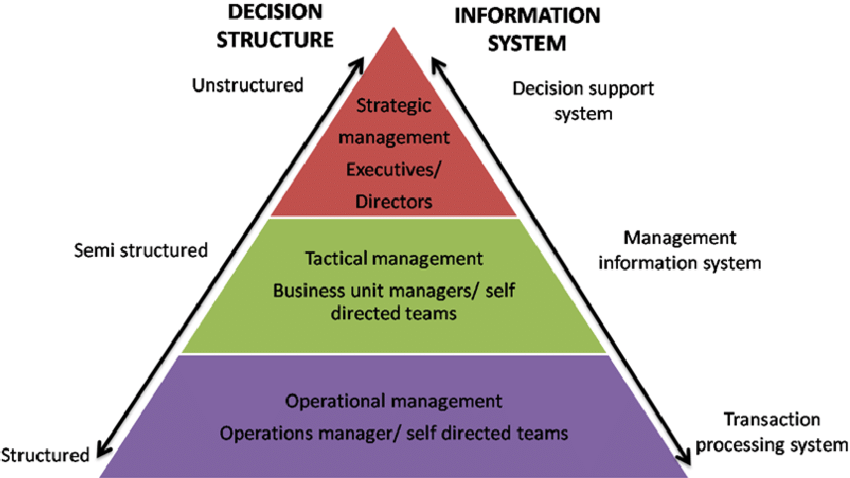
  1. Transaction Processing Systems (TPS): Used to record and manage day-to-day business transactions. An example is a Point of Sale (POS) system, which tracks daily sales.
  2. Management Information Systems (MIS): These systems guide middle-level managers in making semi-structured decisions. They use data from the Transaction Processing System as input.
  3. Decision Support Systems (DSS): Utilized by top-level managers for semi-structured decision-making. DSS systems receive data from the Management Information System and external sources like market forces and competitors.

Process of Management Information System (MIS):

1. Determination of Information Needs

The first step is a systematic analysis to define what information managers need to perform their roles effectively. This involves identifying key decision areas, strategic objectives, and performance indicators for different management levels. Questions like “What data is critical for inventory control?” or “Which KPIs does a sales head need weekly?” are answered. This stage aligns the MIS design directly with managerial requirements, ensuring the system delivers relevant, actionable intelligence rather than just raw data, and involves collaboration between end-users (managers) and system designers.

2. Data Collection and Input

This process involves gathering raw data from identified internal and external sources. Internally, data is sourced continuously from Transaction Processing Systems (TPS) across departments (sales, production, finance). Externally, data may be collected from market feeds, economic reports, or competitor analysis. This data is then validated and entered into the system’s databases. Accurate collection and error-free input are critical, as the quality of all subsequent information depends on the integrity of this foundational data.

3. Data Processing and Transformation

Here, the collected raw data is converted into meaningful information. This involves a series of operations: classification, sorting, calculating, summarizing, and aggregating. For instance, thousands of daily sales transactions are totaled into weekly revenue figures. Data is processed using predefined business rules and models. This transformation is the core function where disparate data points are synthesized into structured summaries, trends, and comparisons that managers can understand and use for decision-making.

4. Storage and Management of Processed Data

Processed information is organized and stored for immediate and future access. This involves managing databases or data warehouses where summarized data, historical trends, and performance metrics are retained. Effective storage ensures data integrity, security, and efficient retrieval. This stage creates an organizational memory—a repository of past performance and trends that managers can query to analyze historical patterns and support longitudinal analysis for planning.

5. Information Generation and Retrieval

In this stage, the system produces the required outputs for management. Based on scheduled needs or ad-hoc queries, the MIS retrieves stored data and formats it into standardized reports, dashboards, or graphical analyses. These outputs—such as a monthly profit & loss statement or a real-time inventory status dashboard—are tailored to the user’s role. The system must provide timely, accurate, and easily interpretable information that managers can retrieve on-demand to support their specific activities.

6. Dissemination and Distribution of Information

The generated information must be communicated effectively to the right managers at the right time. This process involves distributing reports via email, publishing them on intranet portals, or pushing alerts to mobile devices. Distribution protocols ensure that sensitive information reaches only authorized personnel. Efficient dissemination closes the loop, ensuring the intelligence produced by the MIS is delivered into the hands of decision-makers who can act upon it, thereby fulfilling the system’s primary purpose.

7. Utilization and Feedback for System Refinement

The final, cyclical stage involves managers actively using the information for planning, control, and decision-making. Their experience and the outcomes of their decisions generate critical feedback. This feedback on the information’s relevance, accuracy, timeliness, and format is communicated back to the MIS team. This input is used to continuously refine the system—adjusting data sources, processing rules, or report formats—ensuring the MIS evolves to meet changing managerial needs and remains a dynamic, valuable organizational tool.

Advantages of Management Information System (MIS):

1. Enhanced Decision-Making Efficiency

MIS transforms raw data into structured, summarized information, providing managers with a fact-based foundation for decisions. By delivering timely reports on key performance indicators (KPIs), budgets, and trends, it reduces reliance on intuition and guesswork. This leads to faster, more accurate, and confident decisions at tactical and operational levels. For example, a sales manager can quickly identify underperforming regions based on comparative reports and reallocate resources. The system minimizes uncertainty, allowing managers to focus on analysis and action rather than data collection and manual calculation.

2. Improved Operational Control and Planning

MIS serves as a vital tool for monitoring and controlling day-to-day operations. It provides regular performance reports that compare actual results against plans and budgets, highlighting variances. This enables managers to identify bottlenecks, inefficiencies, or deviations early and take corrective action promptly. Furthermore, by analyzing historical trends and current performance data, MIS supports effective short-term and medium-term planning, such as setting realistic sales targets or production schedules, ensuring resources are aligned with organizational goals.

3. Strategic Insight and Competitive Advantage

By integrating data from across the organization, MIS provides a holistic view of business performance and market position. Analysis of long-term trends, customer behavior, and operational efficiency can reveal strategic opportunities and threats. This insight helps senior management in formulating long-term strategies, such as entering new markets or discontinuing unprofitable products. A well-implemented MIS can thus become a source of sustainable competitive advantage by enabling proactive, data-driven strategy rather than reactive management.

4. Increased Organizational Efficiency and Coordination

MIS eliminates information silos by integrating data from all functional areas (finance, marketing, HR, production). This creates a single source of truth, improving coordination between departments. For instance, production can align output with sales forecasts, and procurement can plan based on inventory levels. Streamlined information flow reduces redundancy, minimizes errors, and accelerates processes. The resulting efficiency gains lower operational costs, improve resource utilization, and enhance the organization’s overall agility and responsiveness.

5. Better Communication and Collaboration

MIS acts as a centralized platform for information dissemination, standardizing communication across management levels. Reports and dashboards ensure all managers work from the same, up-to-date data set, fostering alignment and shared understanding. This transparency improves vertical and horizontal collaboration, as teams can easily access the information needed to coordinate projects and make interdependent decisions. Enhanced communication reduces conflicts stemming from misinformation and builds a more cohesive, informed organizational culture.

6. Cost Reduction and Resource Optimization

Automating the collection, processing, and reporting of management information significantly reduces administrative and clerical costs associated with manual report generation. MIS also enables data-driven resource optimization. By providing clear visibility into operations, it helps identify areas of waste, overstaffing, or underutilized assets. Managers can optimize inventory levels, streamline workflows, and improve workforce productivity, leading to direct bottom-line savings and a higher return on investment in both human and capital resources.

7. Support for Performance Management

MIS provides the objective data necessary for effective performance measurement and management. It tracks individual, departmental, and organizational KPIs, facilitating fair and transparent performance evaluations. This data supports management by objectives (MBO), helps in setting benchmarks, and identifies training or development needs. By linking performance data to outcomes, it motivates employees, aligns individual goals with corporate strategy, and creates a culture of accountability and continuous improvement.

Disadvantages of Management Information System (MIS):

1. Fast and Accurate Data Processing

Transaction Processing Systems handle a large number of business transactions quickly and without errors. They record sales, payments, payroll, and inventory updates in real time. In Indian banks and retail stores, TPS ensures every transaction is saved correctly. This reduces manual work and mistakes. Fast processing helps businesses serve customers better and keep records up to date. Accurate data also supports better reporting and decision making.

2. Improved Operational Efficiency

TPS automates routine business activities such as billing, order processing, and salary payments. This saves time and reduces paperwork. Indian companies use TPS in supermarkets, railway booking systems, and online payments. Automation allows employees to focus on more important tasks. As work becomes faster and smoother, overall business efficiency increases and operating costs reduce.

3. Better Record Keeping and Data Security

TPS stores transaction data in organized digital databases. Businesses can easily retrieve past records for audits, tax filing, and analysis. Indian firms benefit during GST reporting and financial reviews. Modern TPS also includes security features like passwords and access control to protect sensitive information. Proper record keeping improves transparency and trust.

4. Real Time Information Availability

TPS updates information instantly after every transaction. For example, when a product is sold, inventory levels change immediately. This helps managers track stock, cash flow, and customer activity in real time. Indian retail and logistics companies rely on real time data to avoid shortages and delays. Quick information supports better operational decisions.

Management Information System Role in Decision making Process:

1. Providing a Structured Factual Foundation

MIS transforms disparate, raw data from operational systems into organized, summarized information. It delivers structured reports on sales, inventory, finances, and productivity. This provides managers with a reliable, objective, and comprehensive factual base, replacing intuition or fragmented data with concrete evidence. By presenting clear metrics and historical trends, MIS eliminates ambiguity and establishes a shared truth, allowing managers to confidently frame problems and evaluate the current state of operations before proceeding with any analysis or choice.

2. Enabling Identification of Problems and Opportunities

Through routine and exception-based reporting, MIS acts as an early warning system. It highlights deviations from plans, such as a drop in regional sales, a cost overrun, or a spike in customer complaints. By systematically tracking KPIs, it helps managers identify negative trends (problems) and spot positive patterns (opportunities), such as an unexpectedly successful product line. This proactive identification ensures that decision-making is triggered by timely, data-driven insights rather than by crisis or chance, allowing for strategic intervention at the optimal moment.

3. Supporting the Generation and Evaluation of Alternatives

Once a problem or opportunity is identified, MIS aids in exploring solutions. It allows for “what-if” scenario analysis by modeling the potential outcomes of different courses of action. Managers can use historical data to simulate the impact of a price change, a new marketing spend, or a shift in production schedules. By providing predictive reports and comparative analyses, MIS helps generate viable alternatives and objectively evaluate their projected consequences on key metrics like revenue, cost, and market share, leading to more informed and rational choice selection.

4. Facilitating the Implementation of Decisions

After a decision is made, MIS plays a crucial role in translating the choice into actionable plans. It provides the detailed operational data needed to create implementation schedules, allocate budgets, and assign resources. For instance, launching a new product requires coordinated data from production capacity, inventory levels, and marketing budgets—all supplied by the MIS. By serving as the central information hub, it ensures all departments work from synchronized data, enabling clear communication of tasks and responsibilities for effective execution.

5. Enabling Monitoring, Control, and Feedback

Post-implementation, MIS is essential for tracking the results of the decision. It generates follow-up reports that measure actual performance against the expected outcomes defined during planning. This continuous monitoring allows managers to control the process, identify any implementation gaps or unforeseen issues, and make necessary mid-course corrections. The feedback loop created by this monitoring turns the decision-making process into a cycle of continuous improvement, where the results of past decisions inform and refine future ones.

error: Content is protected !!